
Odin: Valhalla Rising has long captured the attention of MMORPG fans across Asia. Now, after years of anticipation, the Norse mythology-inspired title is finally preparing to conquer global markets. Developed by Lionheart Studio and published by Kakao Games, this action-packed open-world MMORPG immerses players into the realms of Midgard, Jotunheim, and beyond, all steeped in Nordic lore.
Since its original launch in South Korea in 2021, the game has enjoyed major success across Asia. Now, with the global version launching on April 29, 2025, across both PC and mobile, with full cross-play support, fans everywhere are gearing up for epic adventures. But if you’re planning to dive into this sprawling universe, understanding how to set up your language preferences and optimize your gameplay is key.
This article will guide you through everything you need to know, from Odin: Valhalla Rising’s release details and supported languages to using a translation tool and optimizing performance using LagoFast. Let’s dive into the saga.

- ✅ Reduce Lag and High Ping.
- ✅ Boost FPS at the Same Time.
- ✅ Support 2000+ Popular Online Games.
- ✅ Support change server All around the World.
Part 1: Odin: Valhalla Rising Global Release Date
Part 2: Odin: Valhalla Rising Supported Languages
Part 3: How to Change Odin: Valhalla Rising Language - LagoFast
Part 4: How to Optimize Odin: Valhalla Rising Gaming Experience
Part 5: Odin: Valhalla Rising FAQs
Part 1: Odin: Valhalla Rising Global Release Date
Mark your calendars, April 29, 2025, is the official global release date for Odin: Valhalla Rising. On that day, players worldwide will be able to explore the Nine Realms of Norse mythology from their PCs, Android devices, or iPhones. The game’s global edition offers cross-platform functionality from day one, allowing you to seamlessly switch between devices and continue your journey wherever you go.
Pre-registration for the game started on April 3, 2025, and comes with enticing rewards, including a Viking-themed avatar and an exclusive mount. Even more exciting, character name and server reservations opened simultaneously, giving you the chance to lock in your identity and choose your desired realm before the masses flood in.
With a preload option available from April 28, 2025, eager adventurers can jump in as soon as the servers go live.
Part 2: Odin: Valhalla Rising Supported Languages
While Odin: Valhalla Rising has already launched in Korea, Japan, and Taiwan, the global version’s language support hasn’t been fully disclosed yet. However, based on the publisher’s previous international launches, it’s likely that English, Japanese, Chinese (Simplified and Traditional), and possibly Spanish, French, and German will be included.
That said, not all in-game content may be fully localized at launch. Dialogues, UI elements, or skill descriptions might appear in the default language depending on your region or server. This is where a reliable game translation tool becomes vital, especially if you’re not fluent in the original language or want to access Korean-exclusive content early.
Part 3: How to Change Odin: Valhalla Rising Language - LagoFast
Changing the language in Odin: Valhalla Rising can be tricky, especially if the game hasn’t been fully localized for your region. Fortunately, LagoFast provides an efficient workaround. This game accelerator and optimizer offers more than just lag reduction. It also includes a built-in translation tool, making it perfect for international players.
Step-by-Step: Change Your Language in Odin with LagoFast
Step 1. Download and install LagoFast.
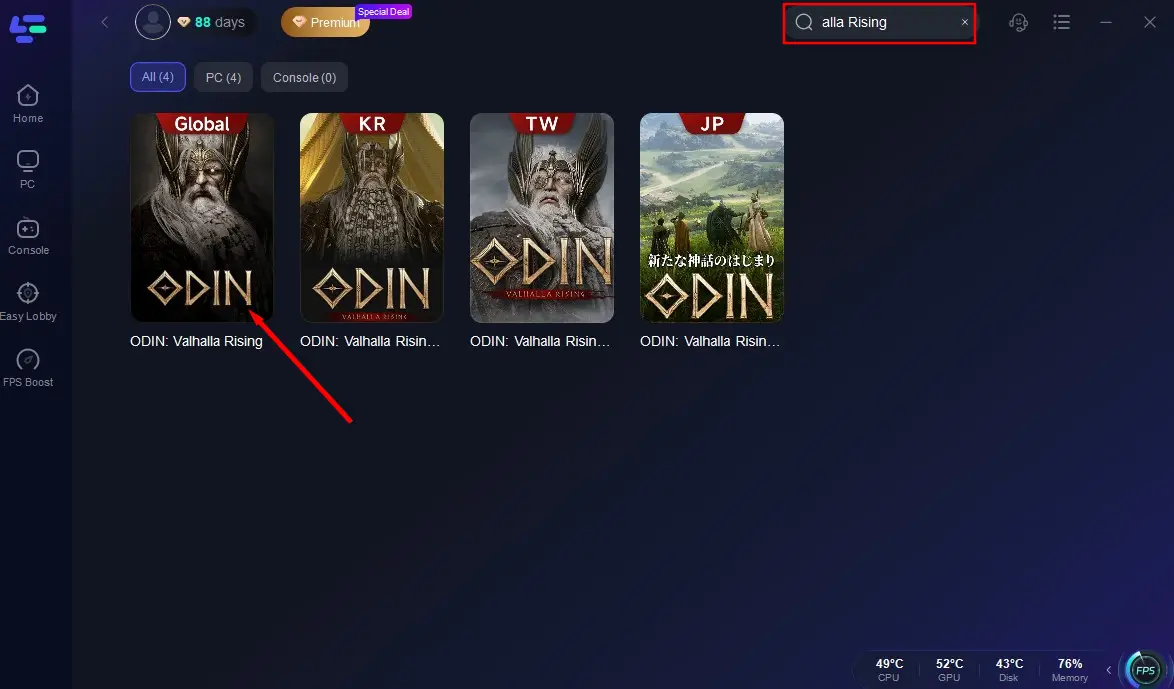
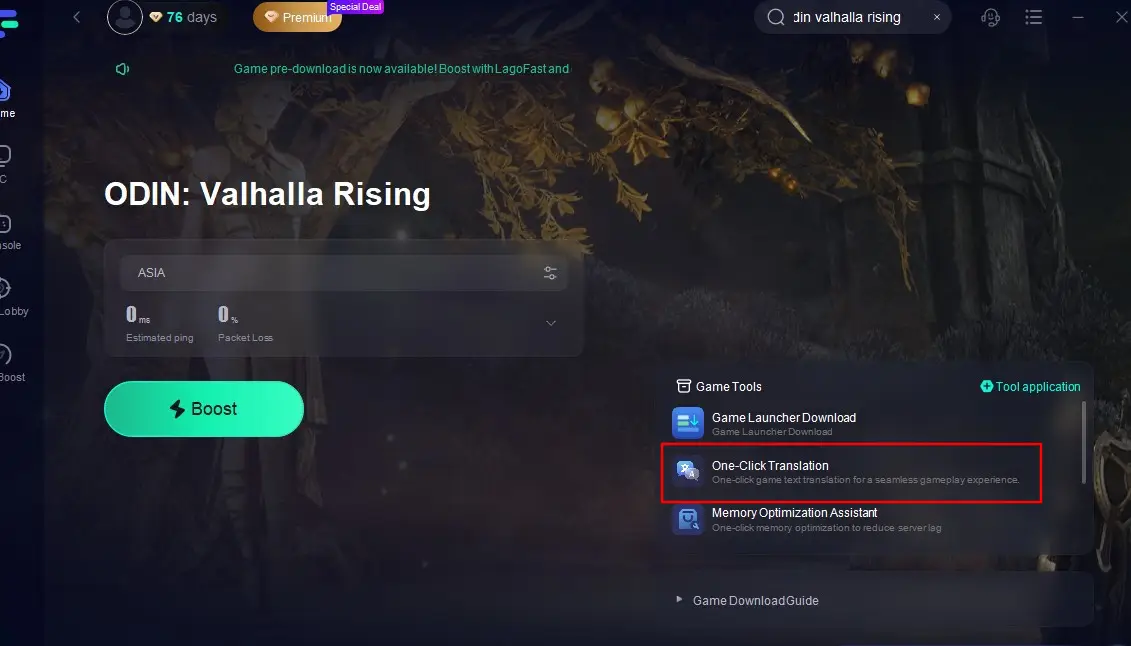
Step 2. Once installed, open LagoFast and find Odin: Valhalla Rising according to your IP. Then click the "One-Click Translation".
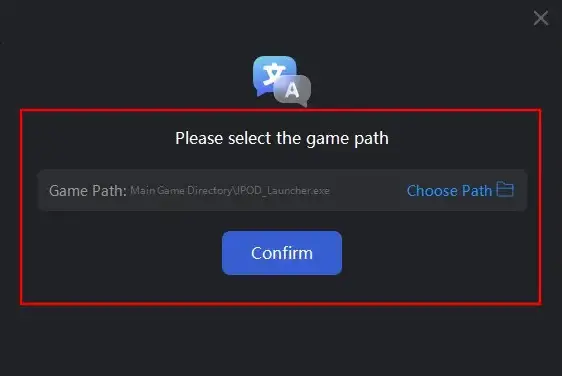
Step 3. Select the path to Odin: Valhalla Rising’s installation folder. This is typically located in your Steam, Xbox, or PlayStation directories.
Step 4. Choose your desired language (e.g., English or Spanish). LagoFast provides a list of supported languages, including Vietnamese, Arabic, and Portuguese. Select your preferred language from the drop-down menu.
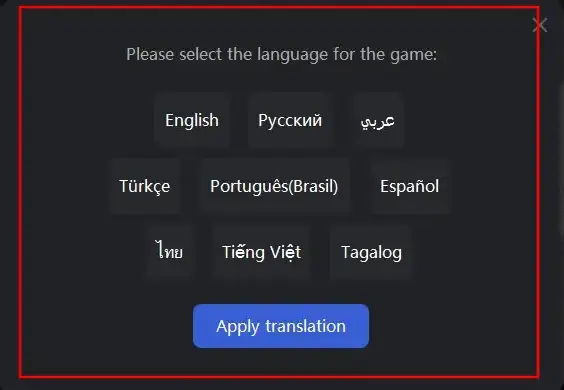
Step 5. Apply the Translation
After selecting the language, LagoFast will begin the translation process. The game’s interface, menus, and subtitles will be translated to your chosen language.
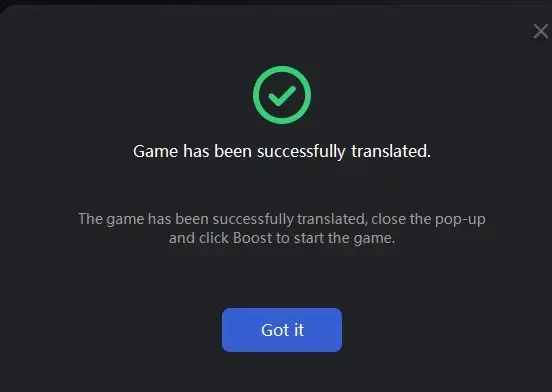
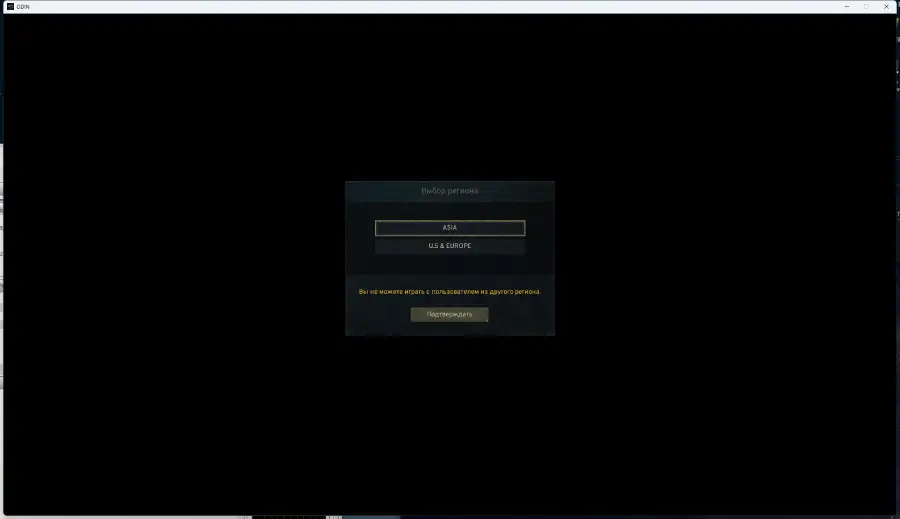
Step 6. Revert to Default Settings
If you want to switch back to the game’s original language at any time, simply launch LagoFast again and choose the option to restore the default settings. LagoFast offers a flexible and reversible translation process.
If you're playing on a server that defaults to Korean, this tool can make your experience much more accessible while still retaining the original voice acting and immersive audio.
Part 4: How to Optimize Odin: Valhalla Rising Gaming Experience
With its massive open world and real-time combat system, Odin: Valhalla Rising demands high performance. Whether you’re climbing cliffs in Midgard or fending off gods in Jotunheim, lag, FPS drops, and stuttering can really ruin the experience.
This is where LagoFast comes into play - not just as a translation tool but as a comprehensive performance booster for Odin: Valhalla Rising.
One of LagoFast’s standout features is its cross-device optimization. Since Odin supports cross-play, many players switch between mobile and PC. LagoFast ensures consistent gameplay across all platforms by:
- Reducing ping and network instability
- Boosting FPS on lower-end PCs and mobile phones
- Providing real-time performance monitoring
Whether you’re raiding with guildmates or grinding in a solo dungeon, LagoFast optimizes your routing to ensure the lowest latency and highest frame rates possible.
Follow this tutorial to use LagoFast to enjoy a seamless gaming Experience:
Step 1: Click the Free Trial button to download and install LagoFast.
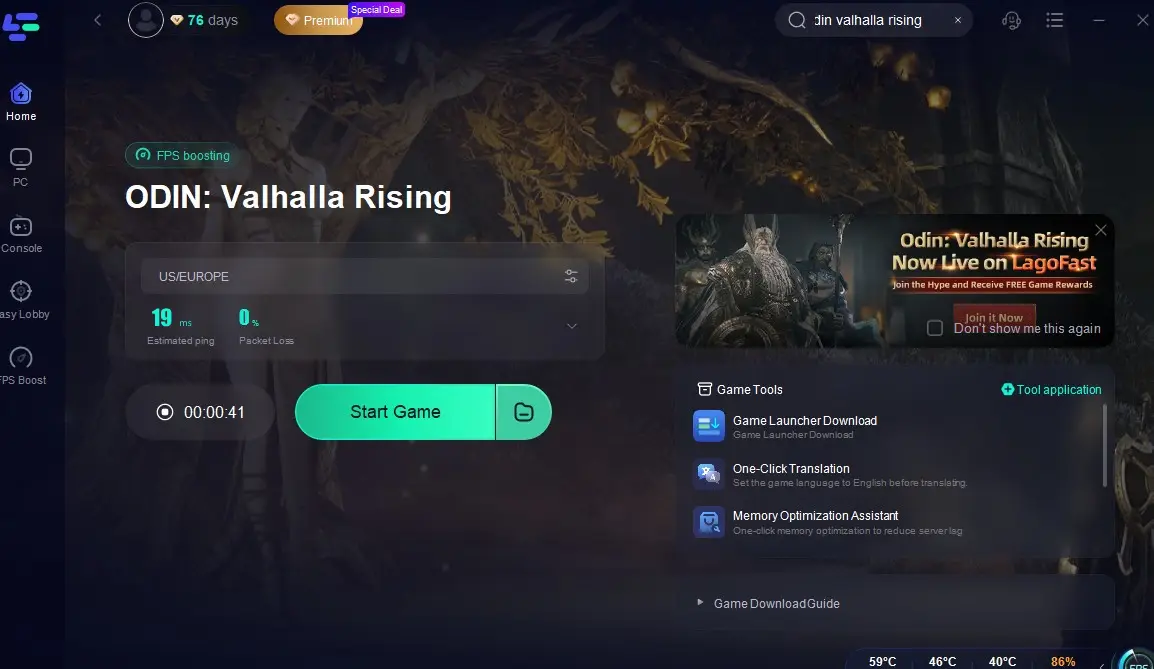
Step 2: Open LagoFast, then click the PC button on the left and search for Odin: Valhalla Rising in the search bar, click it after presenting.
Step 3: Click on “Server” to change to a better server to ensure a smooth gaming experience, then click on “Smart Boost”.
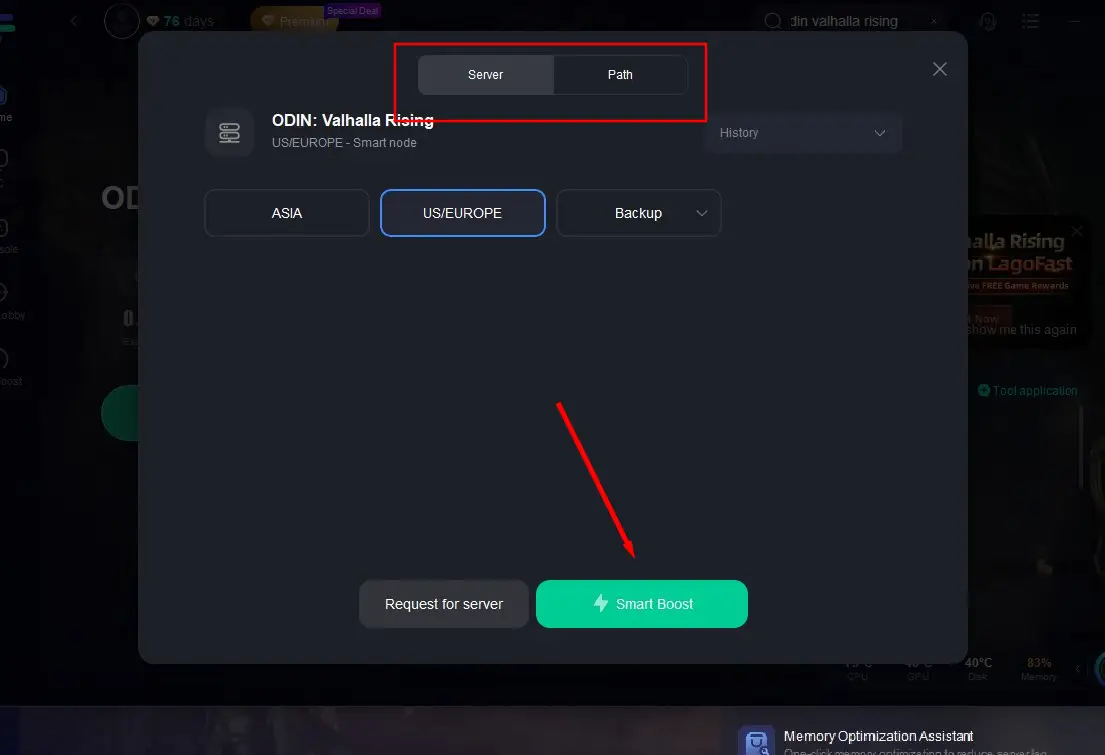
Step 4: Check the specific game ping, packet loss, and multiple path connection on the right side. Finally, click “Start Game” to play the game.
Follow the tutorial to use the LagoFast Mobile booster:
Step 1: Search “LagoFast Mobile Booster” in the Google App Store or Apple App Store. Alternatively, click here to download the APK File.
Step 2: Click the “Download” button, then install and launch “LagoFast Mobile Booster”.
Step 3: Start Odin: Valhalla Rising then switch to LagoFast Mobile and search it.
Step 4. Select and click Odin: Valhalla Rising in the interface.
Step 5: Enter the Severs selection interface where you can change to a stable server, then click the “Boost” button to enhance the gaming experience
Step 6: Finally, go back to Odin: Valhalla Rising and start playing it without any lag.
Part 5: Odin: Valhalla Rising FAQs
Is Odin: Valhalla Rising free to play?
Yes, the game follows a free-to-play model with optional microtransactions. While it doesn’t have a gacha system, you can purchase cosmetics, gear enhancements, and currency like Crystals and Gold.
What are the system requirements?
On PC, Odin requires mid-tier specs due to its Unreal Engine 4 base. A GTX 1060, 8GB RAM, and an i5 processor are the likely minimum. On mobile, a modern device with at least 4GB RAM is recommended.
Is there a gacha system?
No, Odin doesn’t rely on character pulling. Instead, progression comes through grinding, crafting, and questing. Microtransactions focus on cosmetic upgrades and gameplay boosts.
Can I switch servers after launch?
Server selection is permanent for the character you create. Choose carefully when pre-registering, especially if you're playing with friends.
Is voice acting included in the global version?
Korean voice acting will likely remain, but localized subtitles will be added depending on your selected language.
Can I play solo, or is this a group-heavy game?
You can play solo, but much of Odin's content, like guild raids and realm wars, is best experienced with others. Group content is where the game truly shines.
Conclusion
Odin: Valhalla Rising is shaping up to be one of the most ambitious MMORPGs to hit global markets this year. From its stunning open-world design to its fast-paced action combat and deeply rooted Norse mythology, it offers a fresh take for fans of the genre.
But with great scale comes complexity. Language barriers, lag, and inconsistent performance can turn your mythical journey into a frustrating slog. That’s where LagoFast becomes your ultimate companion. Its game translation tool, performance optimization, and cross-device compatibility make it the perfect sidekick for navigating Odin’s epic world—no matter where or how you play. So don’t just wait for Ragnarok. Prepare for it, with the right tools, the right team, and the best gaming experience possible.

Boost Your Game with LagoFast for Epic Speed
Play harder, faster. LagoFast game booster eliminates stutter and lags on PC, mobile, or Mac—win every match!
Quickly Reduce Game Lag and Ping!
Boost FPS for Smoother Gameplay!