
Odin: Valhalla Rising, the visually stunning MMORPG from Lionheart Studio, has amazed gamers all over the world with its immersive Norse mythology-inspired world. However, like many online multiplayer games, it’s not immune to connectivity problems. Players worldwide have reported recurring Odin: Valhalla Rising connection issues, ranging from sudden disconnections to login failures. This guide dives deep into the root causes, actionable fixes, and long-term solutions to ensure uninterrupted gameplay.

- ✅ Reduce Lag and High Ping.
- ✅ Boost FPS at the Same Time.
- ✅ Support 2000+ Popular Online Games.
- ✅ Enhance System Performance in Game.
Part 1: Common Odin: Valhalla Rising Connection Issues
Part 2: What Are The Causes of Odin: Valhalla Rising Connection Issues?
Part 3: How to Fix Odin: Valhalla Rising Connection Issues?
Part 4: How to Fix Odin: Valhalla Rising Error 0xE019101A?
Part 5: How to Enhance Gaming Experience in Odin: Valhalla Rising with LagoFast?
Part 1: Common Odin: Valhalla Rising Connection Issues
Generally, when Odin: Valhalla Rising encounters connection issues, players receive various prompts and experience specific symptoms. Below are the most common ones reported by players:
1. "Failed to Connect to Server" Errors
Players often face abrupt disconnections during raids or quests, accompanied by this error messages.
2. Authentication Failures
The game gets stuck on the loading screen or repeatedly prompts for credentials without progress.
3. High Latency (Ping Spikes)
Character movements and combat feel sluggish, even with strong Wi-Fi or 5G signals.
3. Region-Specific Blockouts
Geo-restrictions or server unavailability in certain countries (e.g., South America, parts of Asia).
4. Post-Update Instability
New patches occasionally introduce bugs that disrupt server communication.
Part 2: What Are The Causes of Odin: Valhalla Rising Connection Issues
The occurrence of the aforementioned connection issues is not due to a single cause, but rather stems from various reasons. Common causes include the following, which players can reference for self-checking:
1. Server-Side Problems
Overloaded Servers: Odin: Valhalla Rising’s popularity often strains regional servers during peak hours.
Scheduled Maintenance: Unannounced or extended downtime for updates. Connection issues may occur if players try to access Odin: Valhalla Rising during regular server maintenance when the official servers are temporarily suspended.
2. Network Issues
If players connect through public WiFi signals or experience network failures during gameplay, connection problems may arise.
3. Outdated Hardware
Devices that don't meet the game's minimum system requirements may result in high ping, severe latency/lag, or stuttering.
4. Software Conflicts
Firewalls or antivirus programs on the device could potentially block traffic flow when Odin: Valhalla Rising is running.
5. Background Processes
Excessive background applications during gameplay may consume system resources and bandwidth, leading to connectivity issues.
6. Corrupted/Overloaded Cache
Accumulated game cache data or accidental damage during device cleanup might cause connection failures in Odin: Valhalla Rising.
7. VPN interference
While VPNs help bypass geo-blocks, poorly configured servers can increase latency or trigger anti-cheat false positives.
Part 3: How to Fix Odin: Valhalla Rising Connection Issues
Here are several methods to help you fix Odin: Valhalla Rising connection issues:
1. Basic Troubleshooting
- Restart your router and device to refresh the network stack.
- Toggle between Wi-Fi and mobile data to identify ISP-related problems.
- Close background apps and enable “Do Not Disturb” mode.
2. Optimize Network Settings
Change DNS Servers: Switch to Google DNS (8.8.8.8 / 8.8.4.4) or Cloudflare (1.1.1.1).
Disable IPv6: Many gaming servers still prioritize IPv4.
3. Adjust In-Game Configurations
Lower graphics settings to reduce data load during multiplayer sessions.
Disable "Auto-Reconnect" if stuck in a login loop, then manually sign in.
4. Use a Gaming-Optimized VPN
If geo-blocks are the culprit, use a low-latency VPN like LagoFast with servers in supported regions (e.g., North America, Europe).
5. Reinstall the Game
A clean install resolves cache corruption and missing update files. Backup your account via Google Play Games or Apple Game Center first.
Part 4: How to Fix Odin: Valhalla Rising Error 0xE019101A?
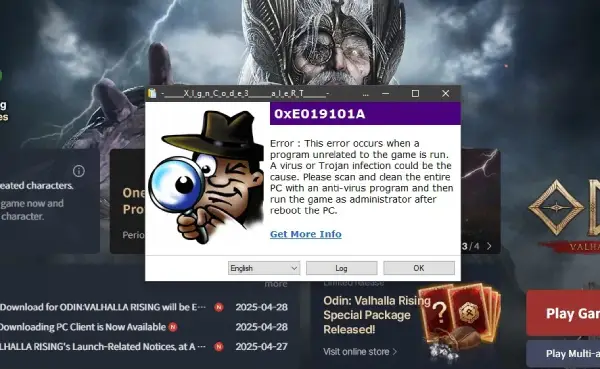
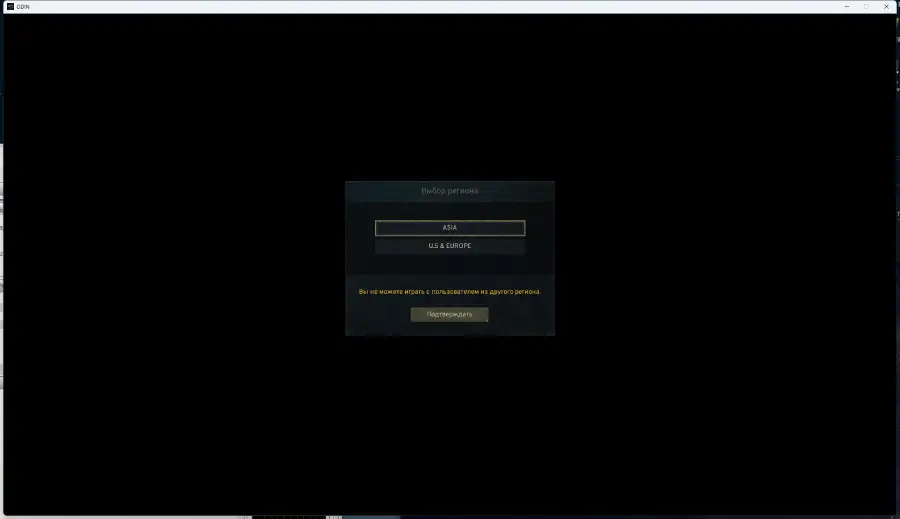
Some players have reported encountering "Error 0xE019101A" during login to Odin: Valhalla Rising Global, along with the prompt shown in the following image. This issue may be caused by a virus infection on the player’s device or running unrelated programs while the game is active. Players can attempt the following solutions to resolve the issue:
1. Scan for Malware/Viruses
Perform a full system virus scan using trusted antivirus software to rule out malicious activity.
2. Close Background Programs
Terminate unnecessary applications (e.g., third-party tools, VPNs, or overlays) that might interfere with the game.
3. Repair Game Files
Verify the integrity of game files via your platform (Steam/Epic/console) or reinstall the game if corruption is detected.
4. Uninstall Programs That Pose Security Risks
If programs like AnyDesk are flagged as a cheating program during runtime, triggering Error 0xE019101A, uninstalling these programs can help resolve the issue and allow you to log back into Odin: Valhalla smoothly to continue playing.
Part 5: How to Enhance Gaming Experience in Odin: Valhalla Rising with LagoFast?
Despite League of Legends' dominance in the gaming world for over a decade, connection errors remain a frequent headache for many players. Using LagoFast acts as an insurance policy for smooth gameplay in Odin: Valhalla Rising. As a professional game acceleration tool, LagoFast excels at reducing latency and boosting frame rates, all while prioritizing the ultimate gaming experience. Here are its key advantages:
- Reduced Lag: Minimizes latency issues, ensuring real-time responsiveness during combat.
- Stable Connection: Provides a consistent network connection, preventing disconnections during crucial moments.
- Optimized Game Performance: Enhances system performance, allowing for smoother graphics and faster load times.
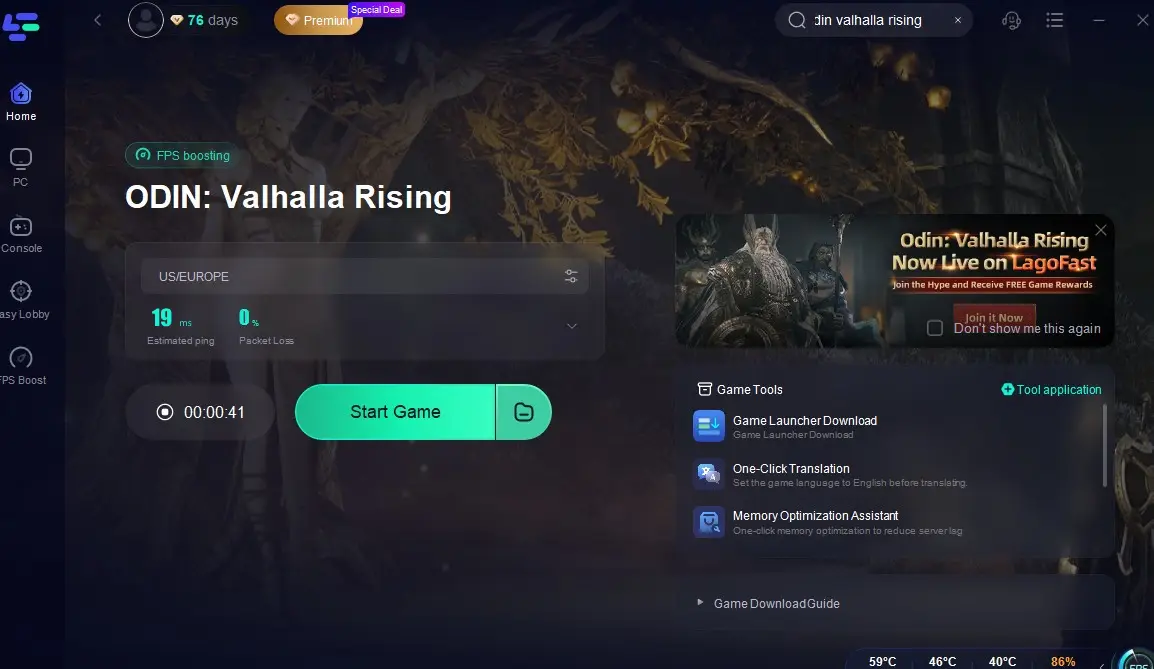
Follow these steps to optimize your performance in Odin: Valhalla Rising with LagoFast on PC:
Click the "Free Trial" button to download LagoFast.
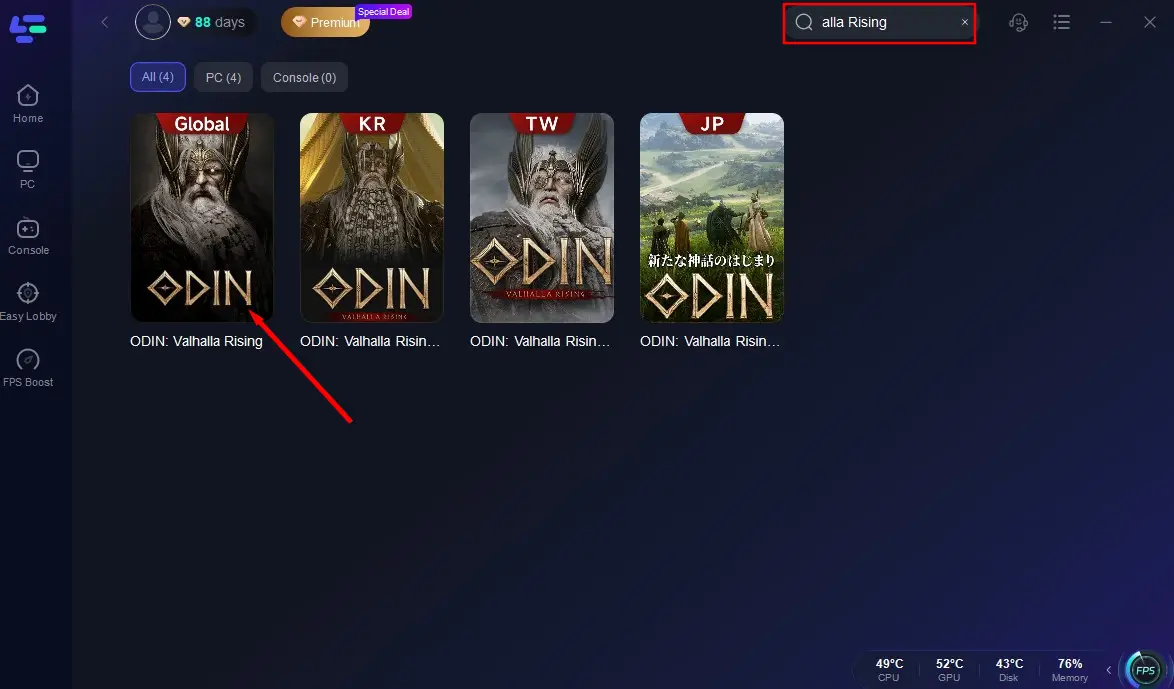
Search for Odin: Valhalla Rising in LagoFast's search bar.
Select the optimal server node based on your desired gameplay goals (low ping/high stability).
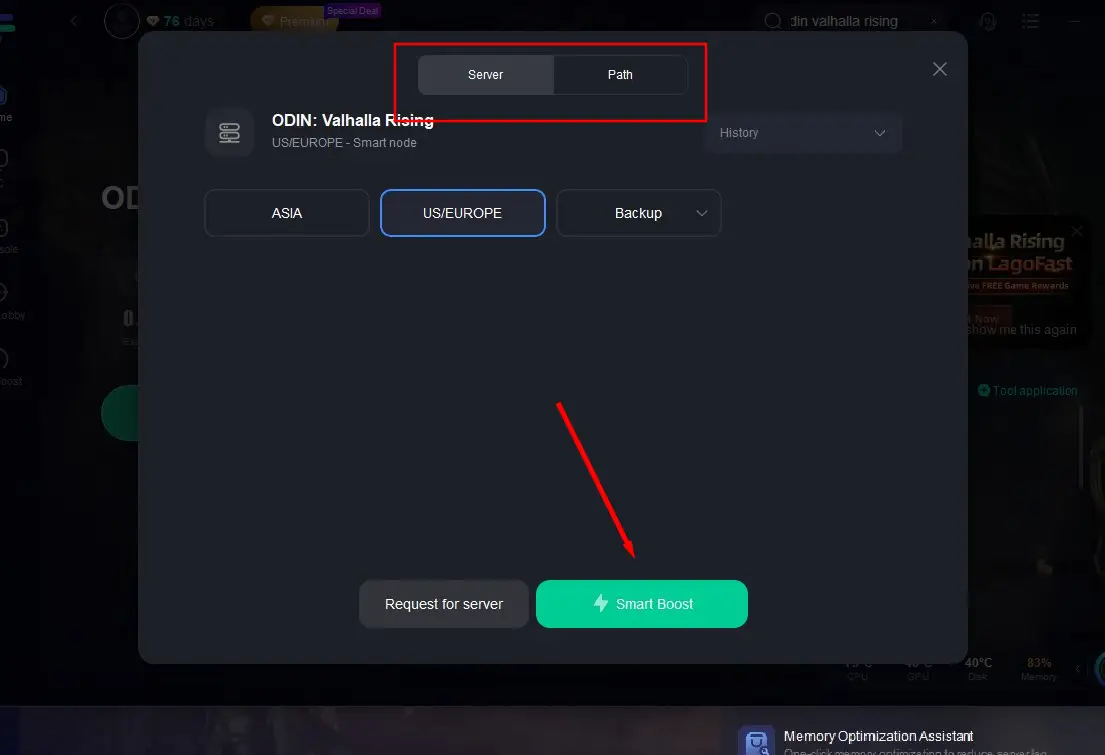
Click "Start Game" to dive into the world of Odin seamlessly.
Follow steps below to use LagoFast Game Booster on Mobile
Step 1: Search and download LagoFast Mobile Booster from the App Store or Google Play. Or scan the QR code below to get it.

Step 2: Search Odin: Valhalla Rising and click the result.
Step 3: Choose the Server you like, then click the Boost button.
Step 4: After completing the above network optimization settings, the FPS drops issue will be easily resolved.
Implementing LagoFast Game Booster can significantly improve your in-game experience, allowing you to fully immerse yourself in the epic battles of Valhalla.
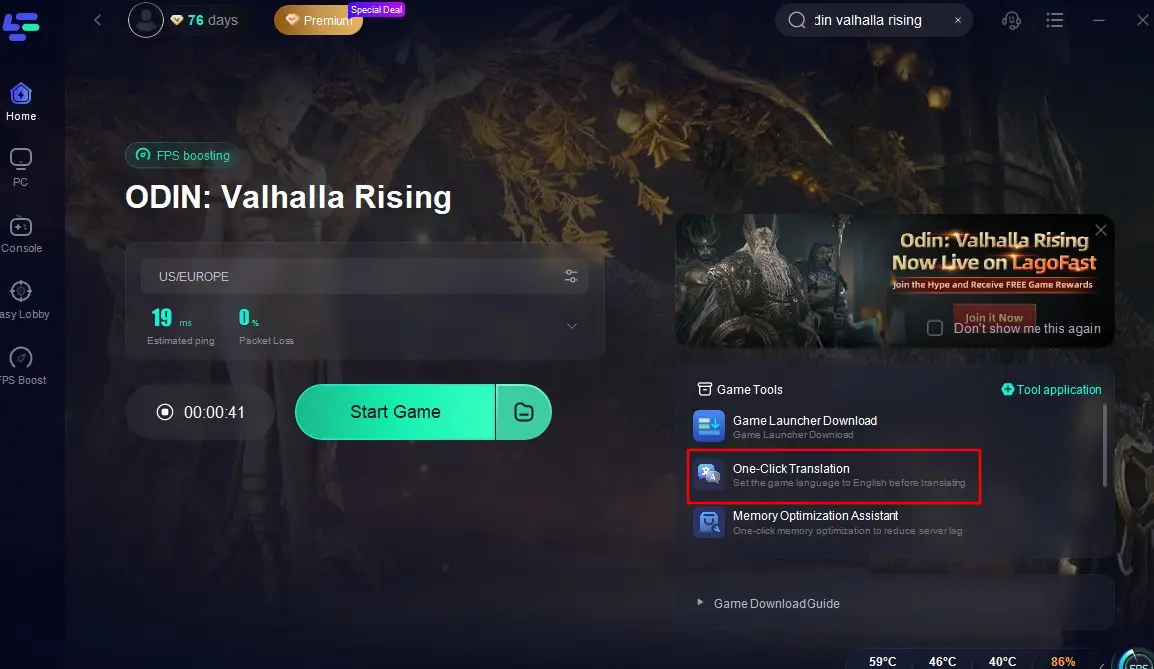
You can also use LagoFast's one-click translation tool to break through language barriers, and explore the game communities in different languages! Currently, LagoFast supports translating Odin: Valhalla Rising into Russian, French, Portuguese (Brazilian), German, Turkish, and Arabic.
Here's how to use LagoFast's one-click translation tool:
Open LagoFast and search for "Odin: Valhalla Rising Global".
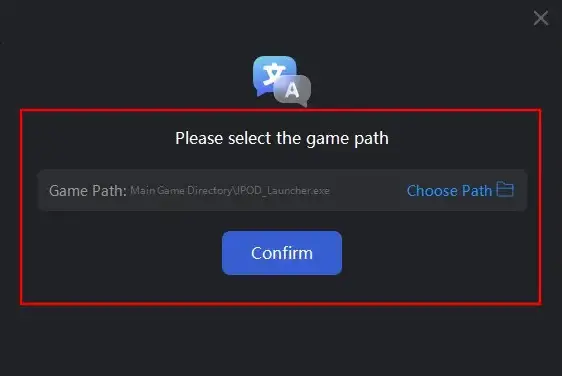
Start the acceleration at first. Then click the One-Click Translation tool located at the bottom right of the screen, and import the installation path of Odin: Valhalla Rising.
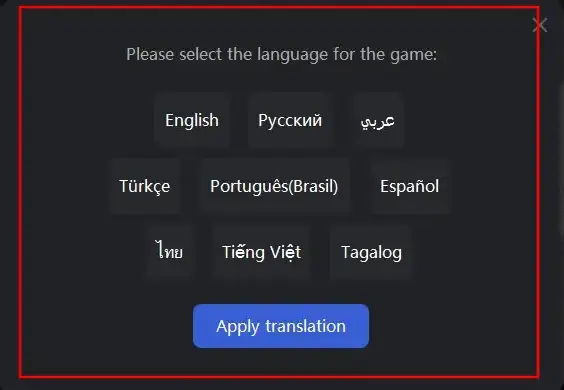
Select your target language for translation and click "Apply Translation".
Wait a moment for the translation to complete, and then you can return to the game!
Conclusion
While Odin: Valhalla Rising connection issues can be frustrating, most stem from fixable network or device hiccups. By combining immediate troubleshooting in the guide and long-term optimizations provides by LagoFast, players can enjoy seamless journeys through Yggdrasil’s realms. Stay updated, stay connected, and may Odin’s favor guide your path!

Boost Your Game with LagoFast for Epic Speed
Play harder, faster. LagoFast game booster eliminates stutter and lags on PC, mobile, or Mac—win every match!
Quickly Reduce Game Lag and Ping!
Boost FPS for Smoother Gameplay!