
Nothing ruins the thrill of an NBA 2K26 game more than sudden FPS drops. Whether you're launching into MyCAREER, navigating through The City, or competing in MyTEAM, choppy performance can compromise both your experience and gameplay effectiveness. In this guide, we'll explore the reasons behind FPS drops, how game-boosting tools like LagoFast can help, alternative fixes, preventative steps, and key FAQs to keep you playing at peak performance.

Part 1: Understanding the NBA 2K26 FPS Drops Issue
Part 2: Fix FPS Drops Issue with Game Booster — LagoFast
Part 3: Other Solutions to Fix NBA 2K26 FPS Drops Issue
Part 4: How to Prevent Future FPS Drops Issue
Part 1: Understanding the NBA 2K26 FPS Drops Issue
Frame rate drops in NBA 2K26 can stem from multiple factors:
- Hardware limitations or inefficiencies: Even capable systems sometimes underutilize GPU power or lose performance during intense scenes like in Rec Center or cutscenes.
- Graphics settings misconfiguration: Pushing maxed-out settings—high resolution, detailed shadows, crowd details, and anti-aliasing—may overburden your card. A user shared that turning down crowd and media quality boosted their FPS by about 50%.
- V-Sync, latency caps, and stutter issues: On Reddit, one player fixed low FPS by capping frames to 60 via RTSS and enabling ultra-low latency in the NVIDIA control panel, combined with in-game V-Sync, smoothing out stuttering.
- Network latency and stutters in online play: Although FPS is primarily hardware-related, inconsistent network performance can influence perceived smoothness. This is where a solution like LagoFast may help.
Understanding these causes will help you apply the most effective fixes.
Part 2: Fix NBA 2K26 FPS Drops Issue with Game Booster — LagoFast
Using a specialized game booster like LagoFast can offer both connection optimization and FPS enhancement for NBA 2K26—particularly helpful in network-heavy modes.
Its key benefits:
- Reduces ping and packet loss between host and players
- Maintains lower jitter so desyncs are minimized
- Smart Boost autos elects the best server path dynamically
LagoFast for PC Players
Step 1: Download LagoFast by clicking the Download button below and activate the free trial.
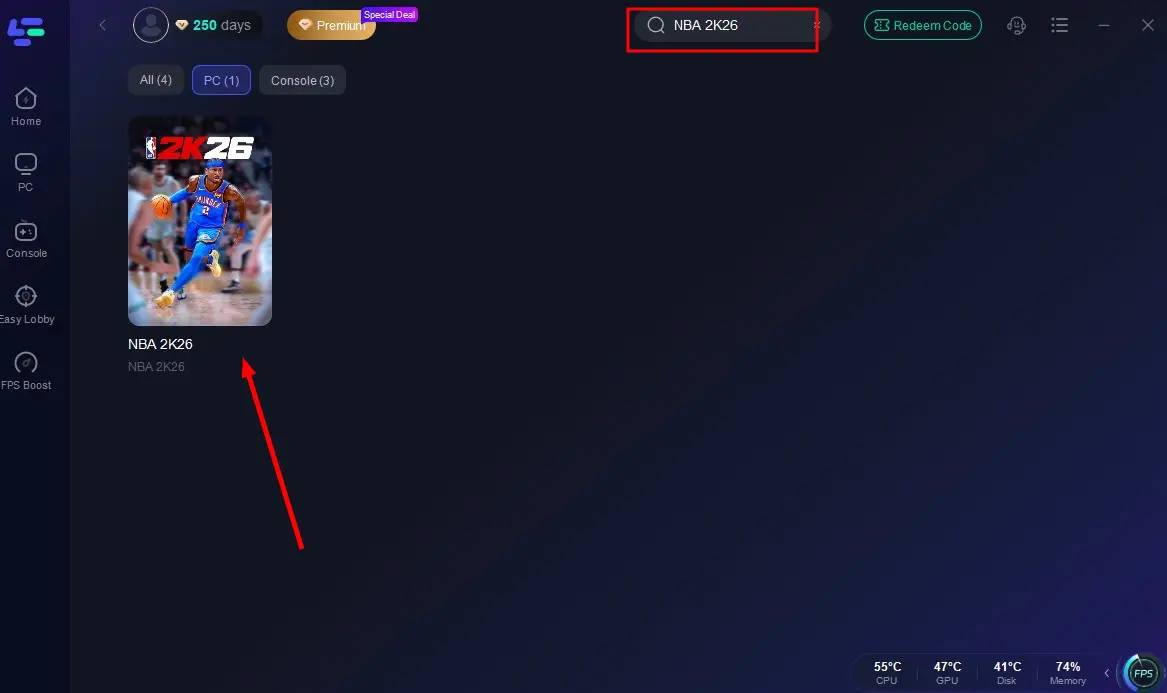
Step 2: Launch LagoFast and search for NBA 2K26 in the search bar.
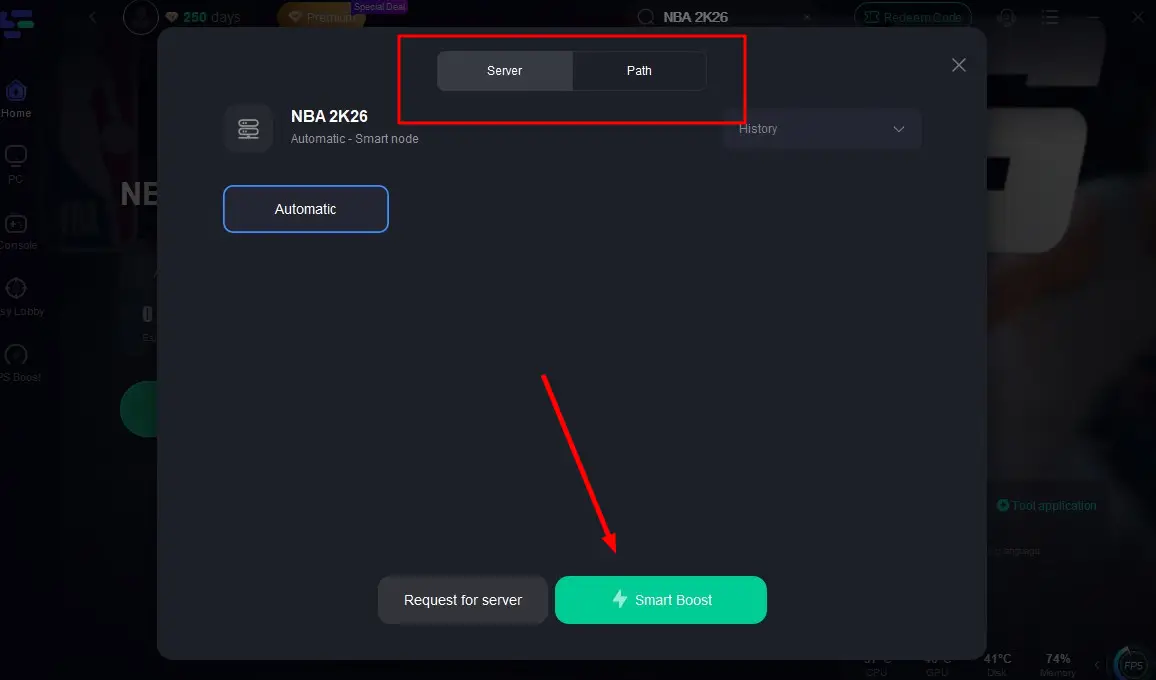
Step 3: Select the server with the best connection and choose the optimal Node. Click "Smart Boost" to start optimizing your connection.
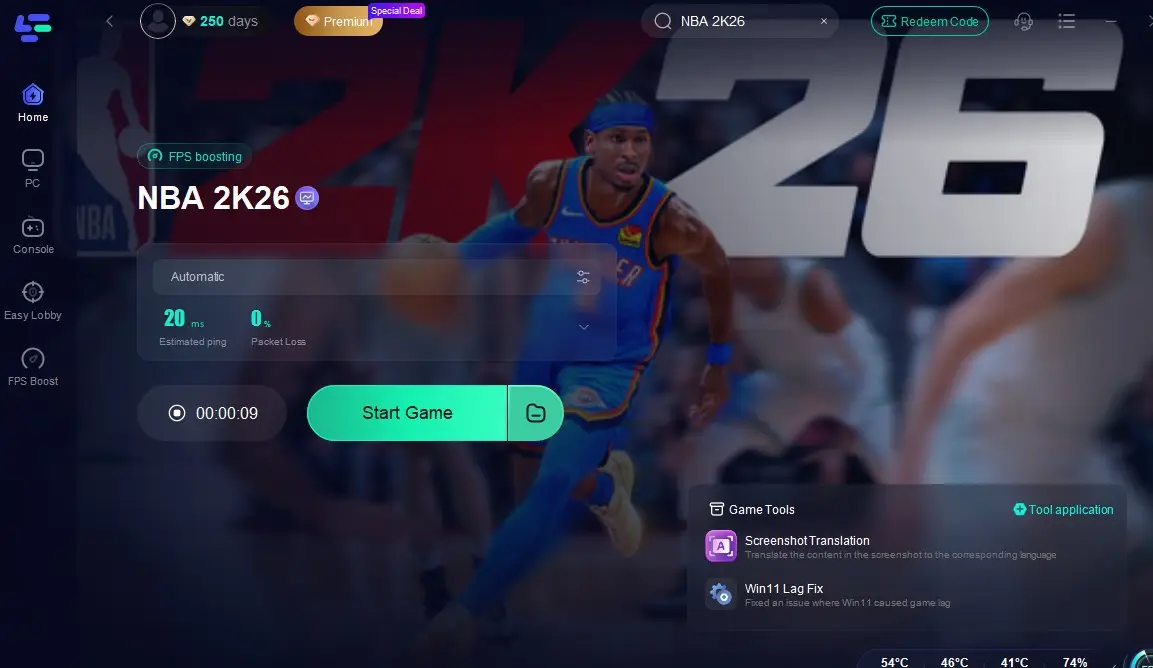
Step 4: Check real-time stats such as ping, packet loss, and network performance, then click the "Start Game" to play NBA 2K26 without any lag!
And for console players, here's your unique tool — LagoFast Box. LagoFast Box is a powerful tool designed to ensure a smooth, lag-free gaming experience on your console.
LagoFast Box for Console Players
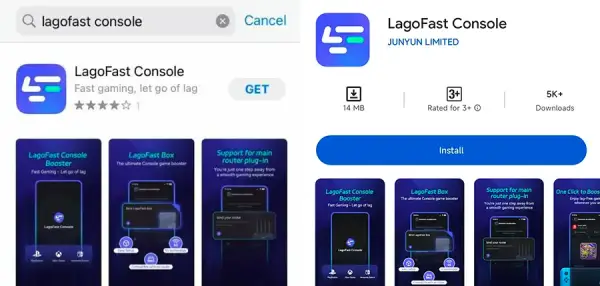
Step 1: Download the LagoFast Console App on your phone to control the LagoFast Box.
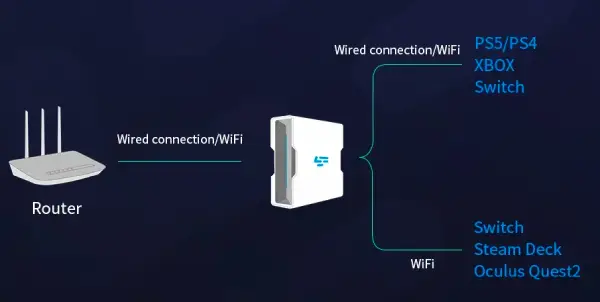
Step 2: Establish a connection between your LagoFast Box, router, and console, choosing between a wired or wireless connection.
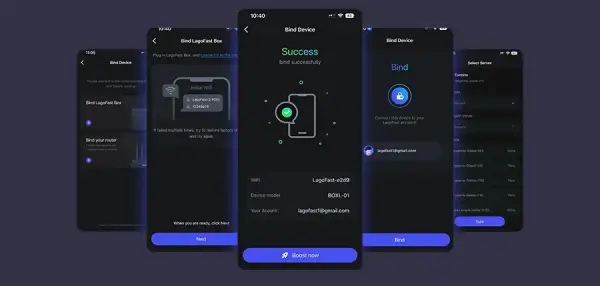
Step 3: Launch the LagoFast Console App and boost NBA 2K26. Once you have completed the binding process with the LagoFast Box, proceed to boost this game within the LagoFast Console App.
This approach targets underlying connection instability rather than just treating symptoms—meaning your game not only loads correctly but stays responsive during matches.
Part 3: Other Solutions to Fix NBA 2K26 FPS Drops Issue
Beyond LagoFast, try these adjustments:
- Optimize in-game graphics settings: Lower settings like crowd, shadow quality, and anti-aliasing.
- Enable driver-level fixes: Use Nvidia’s RTSS to cap FPS at 60 and enable ultra-low latency; combine that with in-game V-Sync for smoother gameplay.
- Update your graphics drivers: Keeping drivers up to date can improve optimization and FPS consistency.
- Close background applications: Free up CPU and GPU resources by disabling unnecessary overlays or programs during gameplay.
- Switch to performance mode or lower resolution: On consoles, choosing a lower resolution (e.g., 1080p) or enabling performance mode can stabilize FPS around 55–60.
- Ensure adequate cooling and stable power: Overheating can cause thermal throttling—keep your system cool for maximum performance.
Part 4: How to Prevent Future FPS Drops Issue
Here’s how to proactively avoid frame rate drops:
- Select balanced graphics settings: Aim for settings that prioritize smooth performance without unnecessary visual overhead.
- Monitor system temps and resource use: Use tools like MSI Afterburner to track usage and temperatures.
- Use LagoFast proactively: For online modes, starting LagoFast before gameplay helps keep latency low and FPS stable.
- Update regularly: Stay current with system, driver, and game patches that may offer optimizations or bug fixes.
- Adjust resolution and mode on consoles: Stick to performance mode or 1080p resolution for long sessions to maintain consistent FPS.
Part 5: FAQs
Q1: Will LagoFast increase my NBA 2K26 FPS even offline?
Primarily, LagoFast improves network routing. If lags induced by poor connection affect your perceived performance, it can help. However, direct FPS boosts usually depend on hardware settings or optimization.
Q2: What in-game settings should I lower first?
Start with crowd details, shadow quality, and anti-aliasing. These are often the most graphically demanding aspects and offer substantial FPS gains when reduced.
Q3: Is capping FPS to 60 a good idea?
Yes. Many report smoother gameplay with a 60 FPS cap using RTSS and V-Sync settings, especially in online modes.
Q4: Does LagoFast work on both PC and Xbox?
Yes—via its desktop app for PC and its Box for console, it optimizes network bandwidth and routing on both platforms.
Q5: Do I need to upgrade hardware to avoid FPS drops?
Not necessarily. Optimization often suffices. But if your system is below recommended specs, hardware upgrades can deliver significant improvements.
Conclusion
FPS drops in NBA 2K26 stem from a variety of causes—hardware strain, overloaded graphical settings, and unstable network conditions being the primary culprits. By adjusting visual settings, leveraging driver-level features like V-Sync, and implementing optimized tools like LagoFast, you can significantly smooth gameplay both offline and online.
Boost Your Game with LagoFast for Epic Speed
Play harder, faster. LagoFast game booster eliminates stutter and lags on PC, mobile, or Mac—win every match!
Quickly Reduce Game Lag and Ping!
Boost FPS for Smoother Gameplay!