
The release of NBA 2K26 has generated excitement among basketball fans worldwide, but unfortunately, some players have reported being stuck on a black screen when launching the game or trying to load into modes like MyCareer or The City. This frustrating issue prevents users from enjoying the latest installment in the franchise and often leaves them wondering: Why is NBA 2K26 showing a black screen? Why can’t I load into 2K26?
If you’re facing the NBA 2K26 black screen on PC or console, don't be worried. In this comprehensive guide, we’ll explain the most common causes and provide tested methods to fix NBA 2K26 stuck on black screen error across different platforms, including PC, Xbox Series X|S, and PlayStation 5.

- ✅ Reduce Lag and High Ping.
- ✅ Boost FPS at the Same Time.
- ✅ Support 2000+ Popular Online Games.
- ✅ End Stuck & Crashing Issues.
Part 1: Why Is NBA 2K26 Showing a Black Screen
Part 2: How to Fix NBA 2K26 Black Screen on PC
Part 3: How to Fix NBA 2K26 Black Screen on Console
Part 1: Why Is NBA 2K26 Showing a Black Screen
The 2K26 black screen problem usually appears right after launching the game or when loading into certain game modes, shows the issue like freezing with a dark screen while the background music may still play. The causes differ slightly depending on whether you’re playing on PC or console, but here are the most common causes:
- Corrupted or missing game files
- Outdated graphics drivers or system requirements
- Conflicts with overlays or third-party apps
- Excessive cached data on consoles or PCs
- Display settings mismatch such as refresh rate or V-Sync issues
- Network conflicts like alternate MAC addresses or DNS problems
- Corrupted save data or licenses on consoles
Most of these issues can be solved without needing professional support.
Part 2: How to Fix NBA 2K26 Black Screen on PC
PC players encounter the black screen when launching NBA 2K26 through Steam or Epic Games. Below are the most effective ways to resolve it.
1.Best Fix - LagoFast Game Booster
LagoFast is a professional game booster that provides global servers and real-time optimization of game data transmission paths. It can effectively help players improve game loading speed and fundamentally prevent black screen issues from occurring.
Key Features of LagoFast:
How to Play NBA 2K26 with LagoFast on PC:
Step 1: Download LagoFast by clicking the Download button below and activate the free trial.
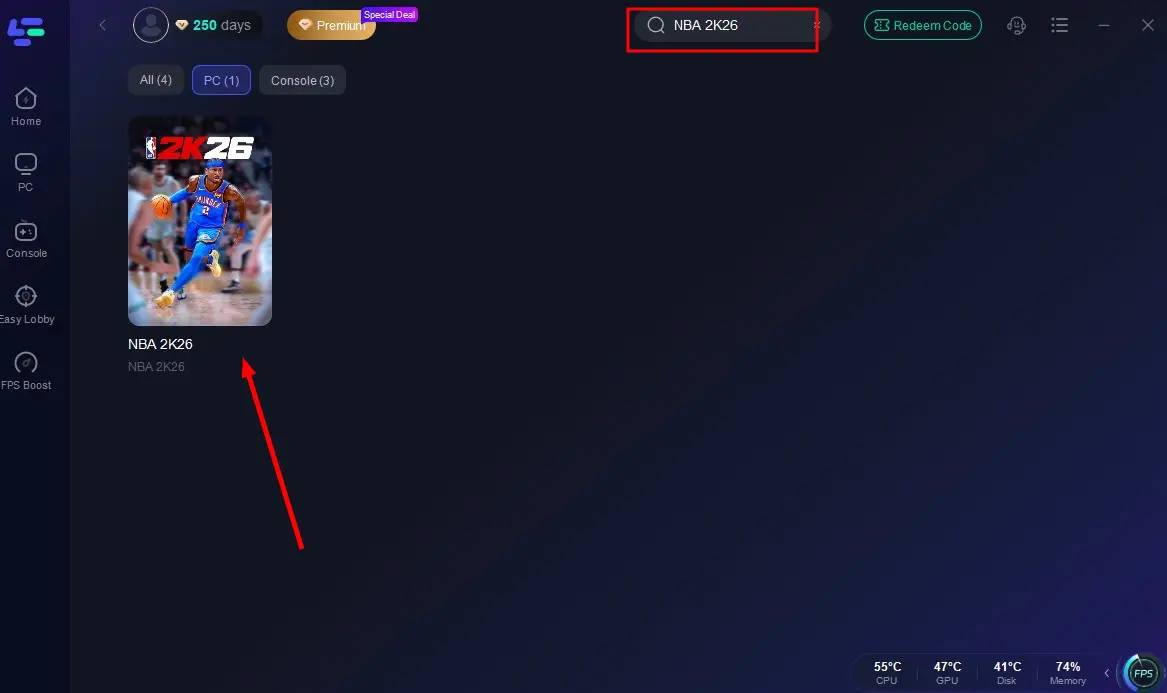
Step 2: Launch LagoFast and search for NBA 2K26 in the search bar.
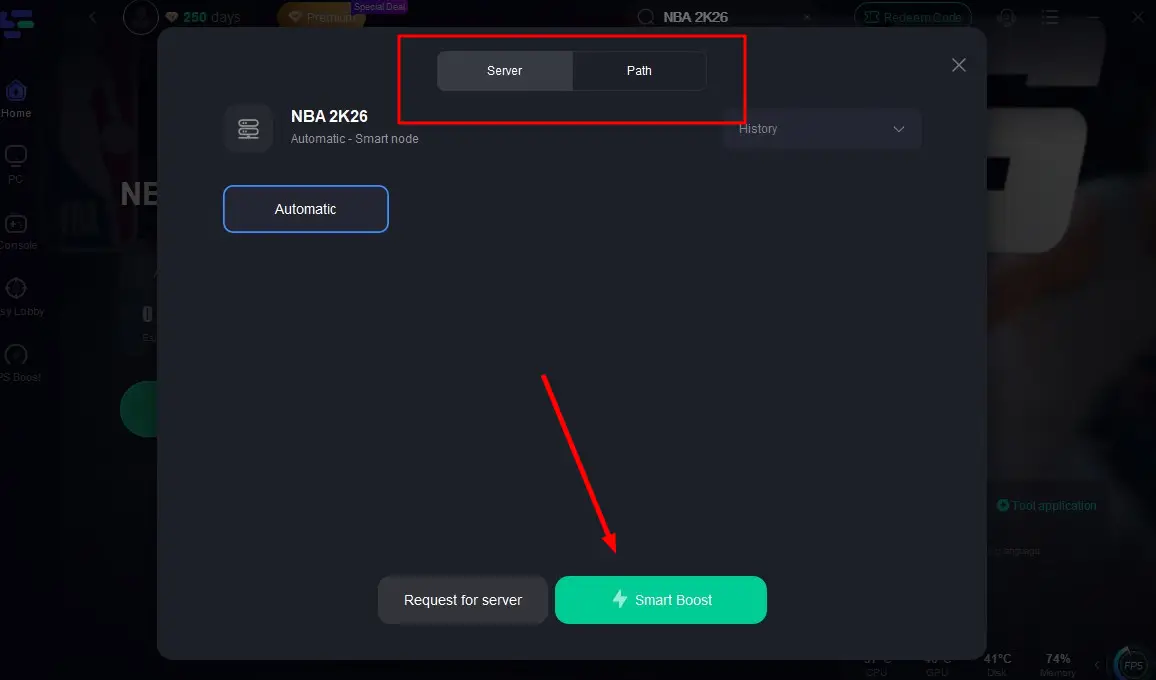
Step 3: Select the server with the best connection and choose the optimal Node. Click "Smart Boost" to start optimizing your connection.
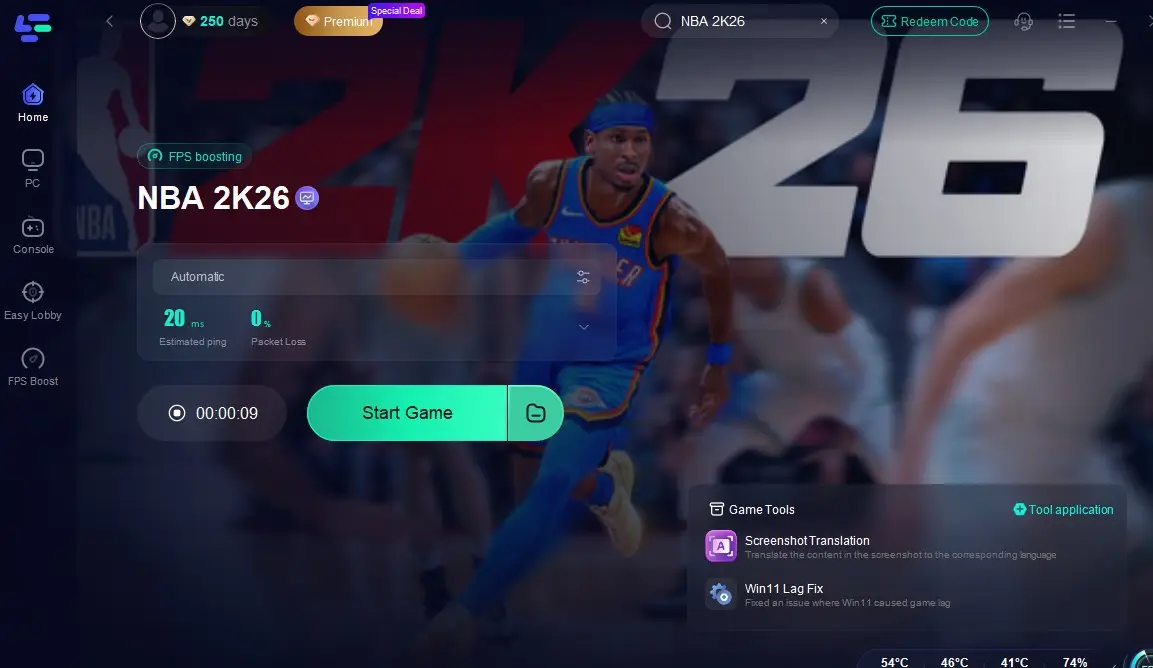
Step 4: Check real-time stats such as ping, packet loss, and network performance, then click the "Start Game" to play NBA 2K26 without any lag!
2. Update Graphics Drivers: Visit NVIDIA’s or AMD’s official website to install the latest drivers. A clean install is often recommended.
3. Run the Game as Administrator: Right-click the game executable, select Run as Administrator, and see if the issue persists. This can bypass permission conflicts.
4. Disable Overlays and Background Apps: Apps like Discord overlay, Xbox Game Bar, or GeForce Experience can interfere with the game. Disable overlays, close unnecessary apps, and relaunch NBA 2K26.
5. Verify Game Files: If you launch NBA 2K26 on Steam or Epic Games, use the "Verify Integrity of Game Files" option to repair corrupted or missing data. This alone fixes the black screen for many players.
6. Adjust Display Settings
- Lower refresh rate to 60 Hz.
- Turn off V-Sync.
- Cap FPS to 60.
These changes often stabilize the game on mid-range PCs.
7. Delete Config Files: Sometimes NBA 2K26's graphics settings file becomes corrupted. Navigate to the configuration folder (usually under Documents > 2K26), delete or rename the settings file, and restart the game to generate a fresh one.
8. Free Up Storage and Clear Cache: Ensure you have at least 40 GB of free space on your drive. Low storage or excessive cache buildup can cause crashes during loading screens.
If all else fails, a clean reinstall of Windows and NBA 2K26 may be required, though most players solve it with the above steps.
Part 3: How to Fix NBA 2K26 Black Screen on Console
For Xbox Players:
Console users especially on Xbox Series X|S, have also reported the black screen error when launching NBA 2K26 or trying to enter MyCareer. Here’s how to resolve it.
1. Power Cycle Console
- Hold the power button for 10 seconds until the Xbox fully shuts down.
- Unplug the power cable for at least 30 seconds.
- Restart and relaunch NBA 2K26.
This clears temporary system cache and resolves many startup issues.
2. Clear Alternate MAC Address: Navigate to Settings > Network > Advanced Settings > Alternate MAC Address and select Clear. Restart your console afterward.
3. Reset DNS Settings: Change your DNS to Google’s (8.8.8.8 and 8.8.4.4). Network conflicts often cause loading crashes.
4. Check for Updates and Restore Licenses: Make sure both the console system software and NBA 2K26 are up to date. If your digital license is corrupted, restore licenses in account settings.
5. Reinstall NBA 2K26: If nothing works, uninstall the game completely and reinstall it. Many Xbox players report this as the ultimate fix.
For PS5 Players:
PlayStation 5 users face similar issues, often caused by corrupted cache or licenses.
1. Clear System Cache
- Turn off the PS5 completely.
- Unplug it for at least one minute.
- Plug it back in and restart.
2. Restore Licenses: Go to Settings > Users and Accounts > Other > Restore Licenses. This often fixes loading crashes for digital versions.
3. Rebuild Database: Boot into Safe Mode and select Rebuild Database. This cleans corrupted data without deleting your games.
4. Reinstall the Game: As on Xbox, a full reinstall of NBA 2K26 is sometimes necessary if other methods fail.
Best Fix for NBA 2K26 Black Screen on Console - LagoFast:
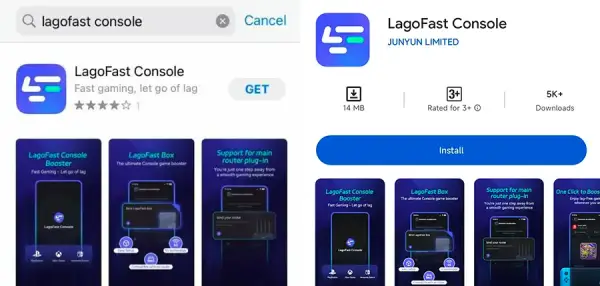
Step 1: Download the LagoFast Console App on your phone to control the LagoFast Box.
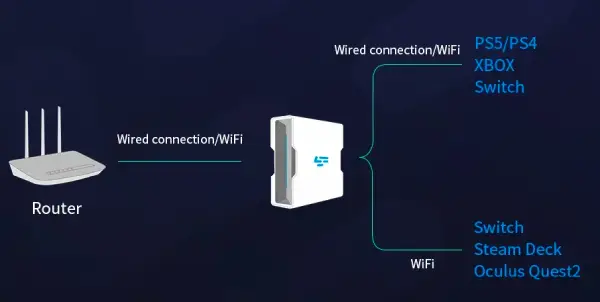
Step 2: Establish a connection between your LagoFast Box, router, and console, choosing between a wired or wireless connection.
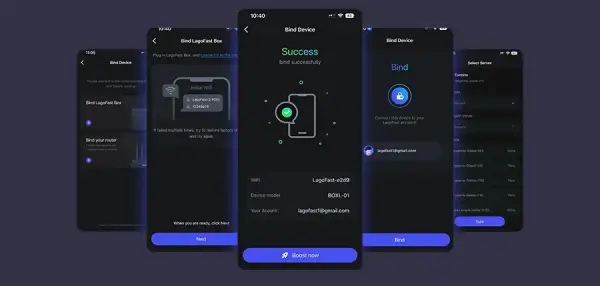
Step 3: Launch the LagoFast Console App and boost NBA 2K26. Once you have completed the binding process with the LagoFast Box, proceed to boost this game within the LagoFast Console App.
Conclusion
The NBA 2K25 black screen problem can be incredibly frustrating, especially when you just want to enjoy the game. Whether you’re dealing with the issue on PC, Xbox Series X|S, or PlayStation 5, LagoFast is always the best option to fix it! Download LagoFast and start your basketball legend in NBA 2K26 without any error!

Boost Your Game with LagoFast for Epic Speed
Play harder, faster. LagoFast game booster eliminates stutter and lags on PC, mobile, or Mac—win every match!
Quickly Reduce Game Lag and Ping!
Boost FPS for Smoother Gameplay!