
Since Mecha Break's global open beta launch, its popularity has soared worldwide, attracting players speaking diverse languages to embark on their mecha combat journeys. This article will introduce Mecha Break's multilingual support features and guide you through the best game translation tool to enhance your experience.

- ✅ Reduce Lag and High Ping.
- ✅ Boost FPS at the Same Time.
- ✅ Support 2000+ Popular Online Games.
- ✅ Change Server without Latency.
- ✅ Explore Mecha Break Tier List
Part 1: How Many Languages Does Mecha Break Support
Part 2: Benefits of Mecha Break Game Translation Tool
Part 3: Best Mecha Break Game Translation Tool - LagoFast
Part 4: How to Enhance Gaming Experience in Mecha Break
Part 1: How Many Languages Does Mecha Break Support
Mecha Break, as a mecha shooter game aimed at global players, already has relatively mature multilingual localization support. Currently, its officially supported languages include: English, Japanese, Simplified Chinese, Korean, Traditional Chinese, French, German, Russian, Portuguese (Brazil), Spanish (Spain), and Thai. Among these, only English, Japanese, and Simplified Chinese have full localization for the interface, full audio, and subtitles. The support of up to 11 languages also provides relatively complete localization support for players worldwide.
Part 2: Benefits of Mecha Break Game Translation Tool
Players using officially supported languages can directly understand Mecha Break's game settings and missions in their familiar language, enjoying seamless gameplay without barriers. However, players using unsupported languages—such as Vietnamese or Filipino—need a game translation tool to break language barriers and ensure smooth operation in Mecha Break. Using a Mecha Break translation tool offers several benefits:
- Deeper Game Comprehension: Translate interfaces, dialogues, and quests into your language for clearer story immersion and mission objectives.
- Global Connectivity: Bridge language gaps in this worldwide game, unlocking access to diverse strategies and cultural perspectives.
- Faster In-Game Decisions: Instantly grasp skill mechanics, item stats, and alerts to react swiftly in combat and progress efficiently.
- Seamless Multiplayer Teamwork: Communicate effortlessly with allies across regions, ensuring precise coordination during raids and PvP battles.
A translation tool enhances both your gameplay mastery and community ties in Mecha Break.
Part 3: Best Mecha Break Game Translation Tool - LagoFast
If you're searching for an accurate and easy-to-use Mecha Break translation tool, don't miss LagoFast's screenshot translation feature. It translates game interfaces into over 20 languages and boasts simple operation and high accuracy. Here's how to use LagoFast's screenshot translation tool:
Step 1: Click the "Free Trial" button to download and install LagoFast at no cost.
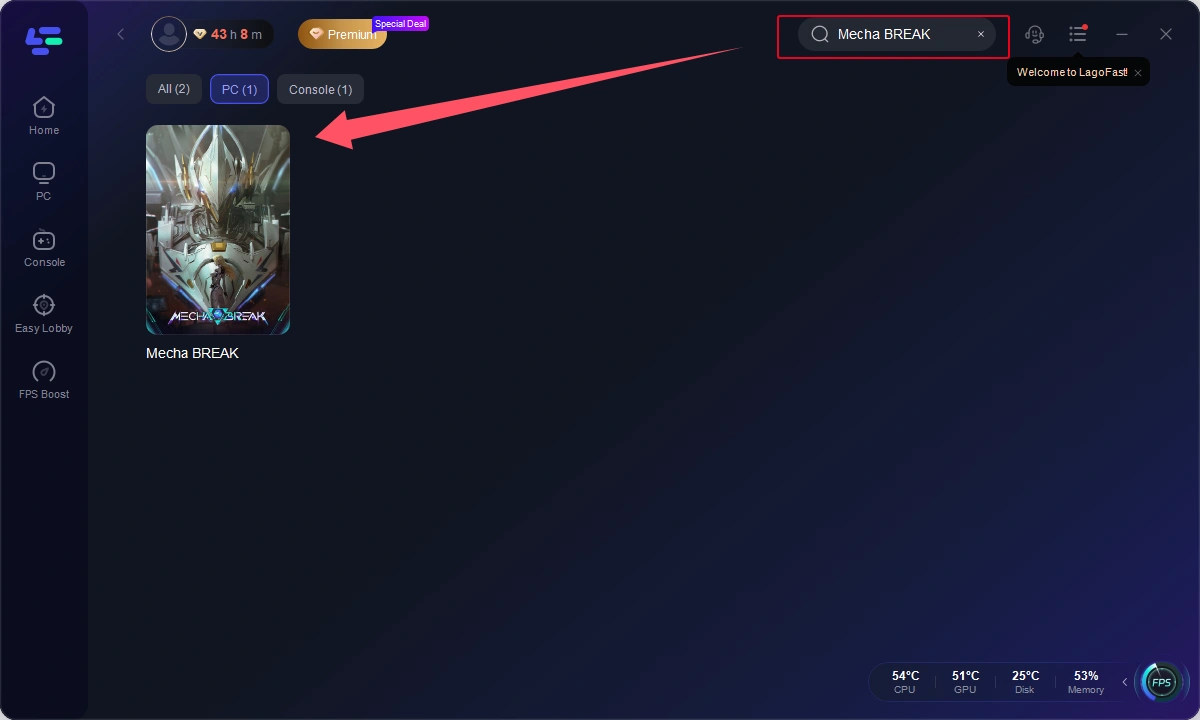
Step 2: After installation, search for "Mecha Break" in LagoFast's search bar.
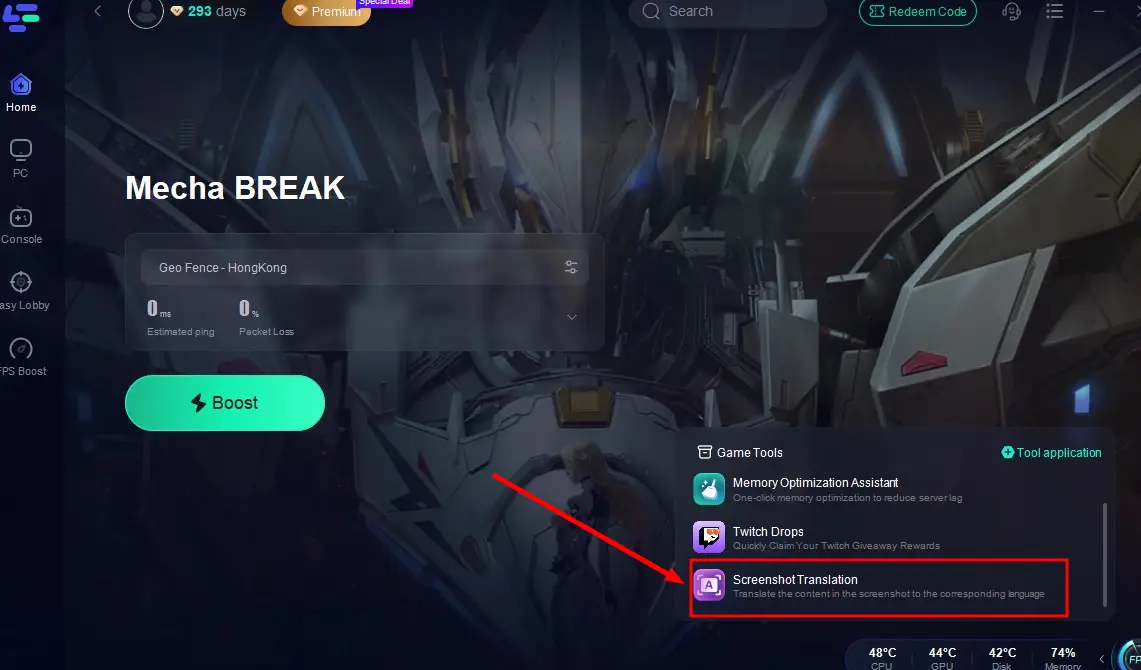
Step 3: Click the "Screenshot Translation" tool in the lower-right corner.
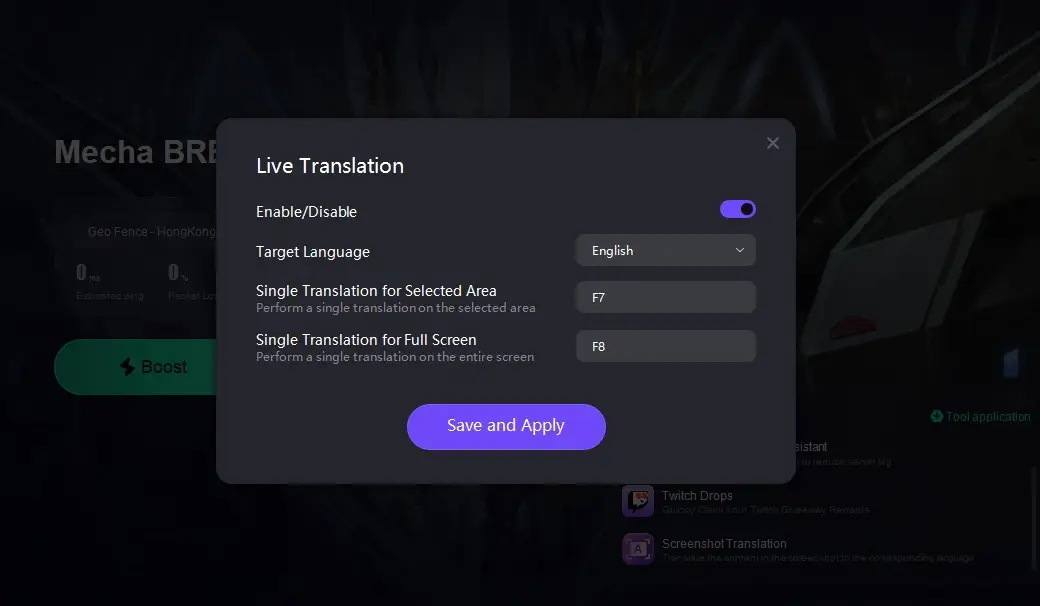
Step 4: Select your target language, customize your hotkey settings, and return to the game. Press your assigned hotkey to instantly translate the game interface into your desired language!
Part 4: How to Enhance Gaming Experience in Mecha Break
When using LagoFast's Mecha Break translation tool, enabling its acceleration feature can effectively reduce lag, disconnections, and other issues, enhancing your gameplay. Here's how to use LagoFast's acceleration function:
Step 1: Click the "Free Trial" button to download and install LagoFast.
Step 2: Open LagoFast, search for "Mecha Break" in the search bar, and click on it.
Step 3: Choose the nearest server based on your location, then click "Smart Boost" to start acceleration.
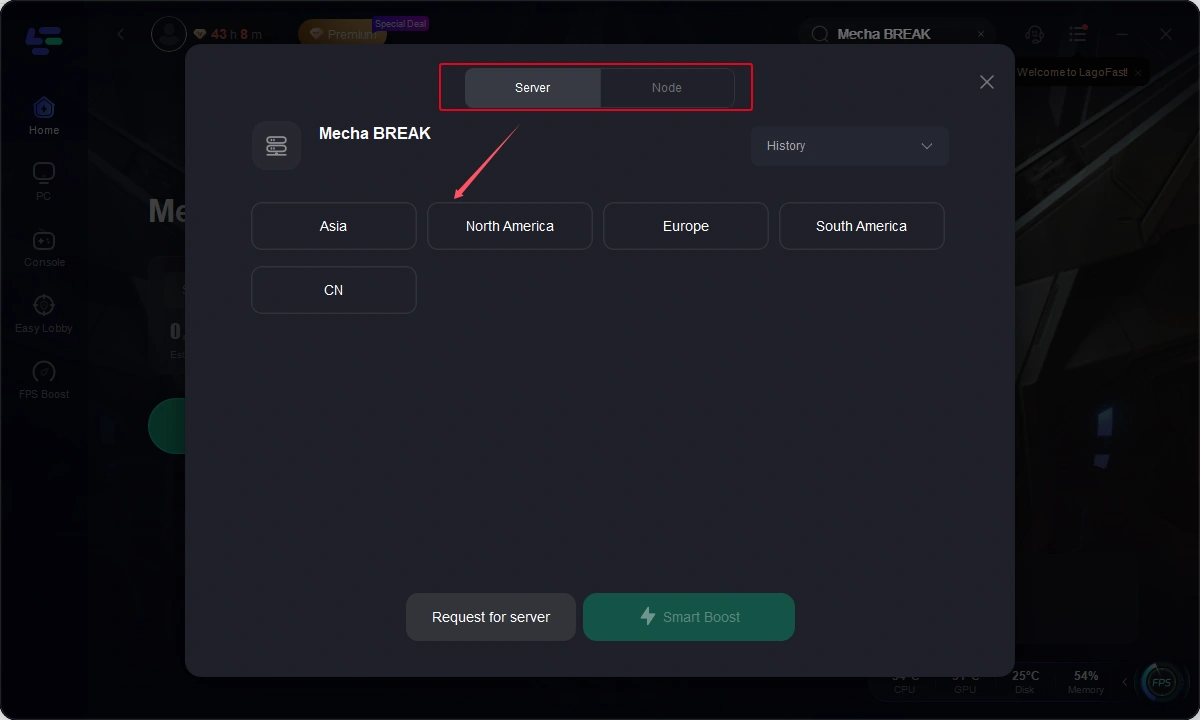
Step 4: Verify that your game's performance is optimized, and click "Start Game" to start playing Mecha Break.
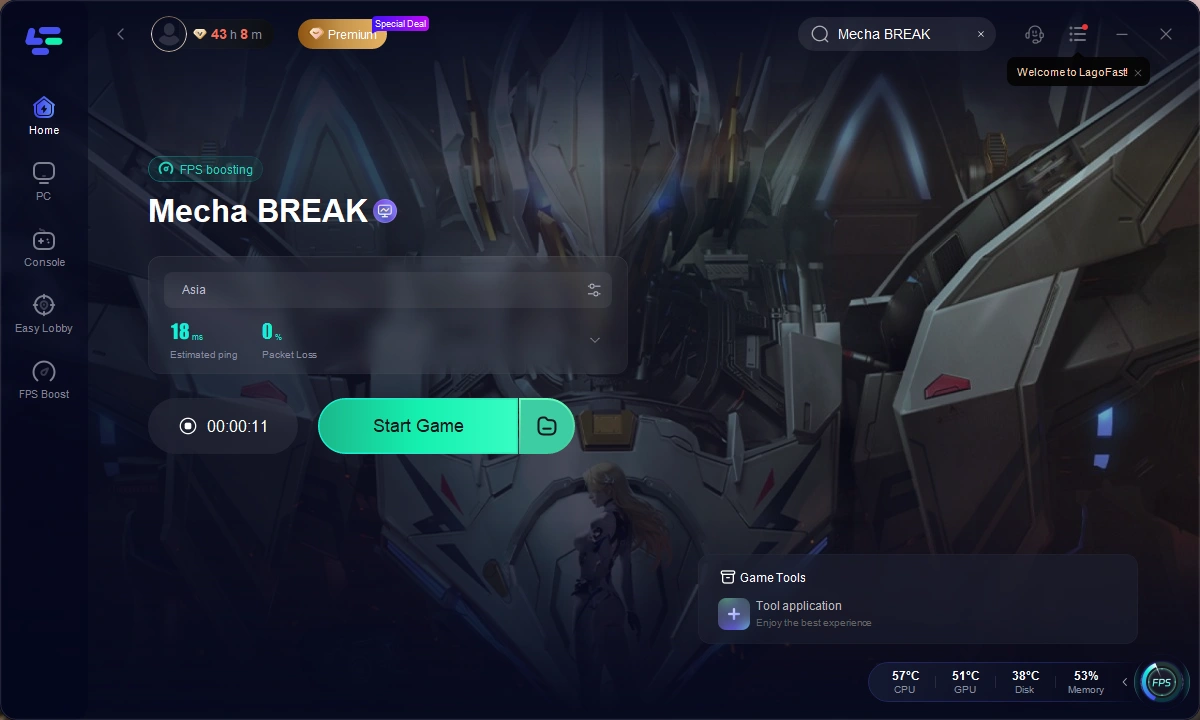
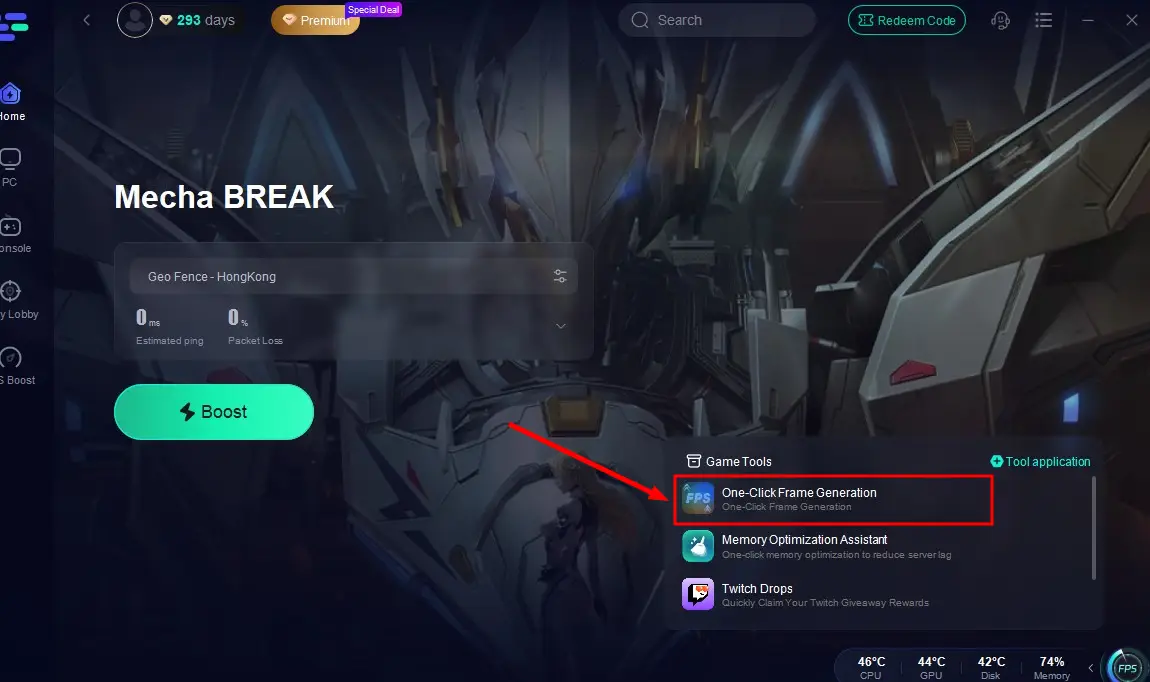
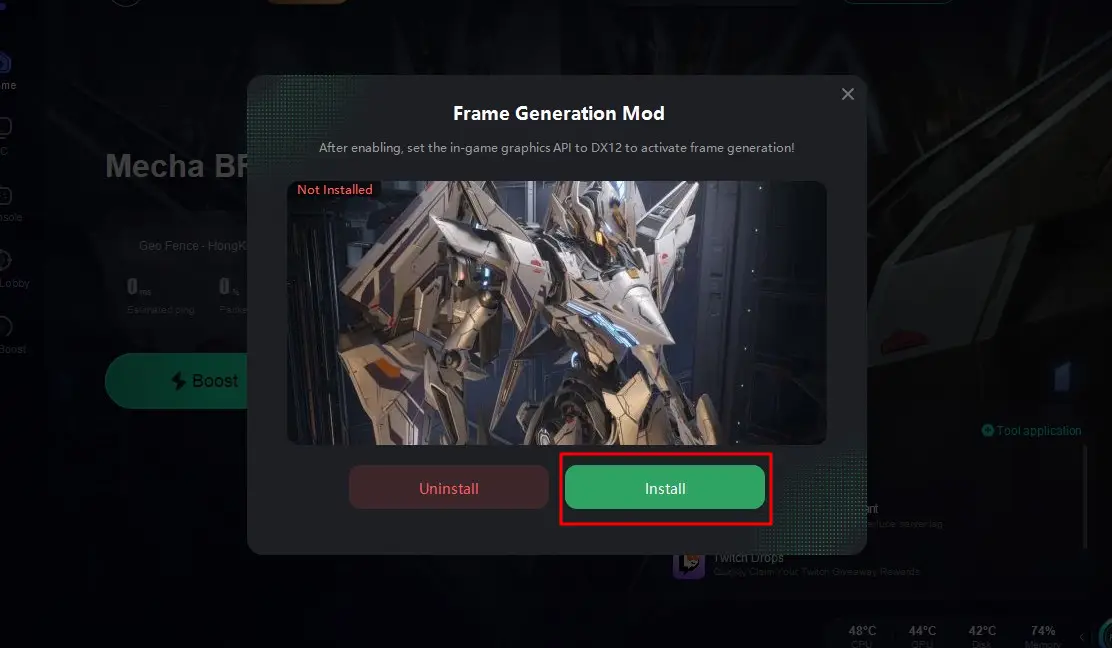
For the sharpest visuals and most immersive experience, activate LagoFast's One-Click Frame Generation. Simply set your in-game graphics API to DX12 to optimize mecha dynamic resolution, boost performance, and enjoy stunning visuals.
Click the One-Click Frame Generation tool in the lower-right corner.
Click "Install" to complete setup, then return to Mecha Break for crystal-clear graphics instantly!
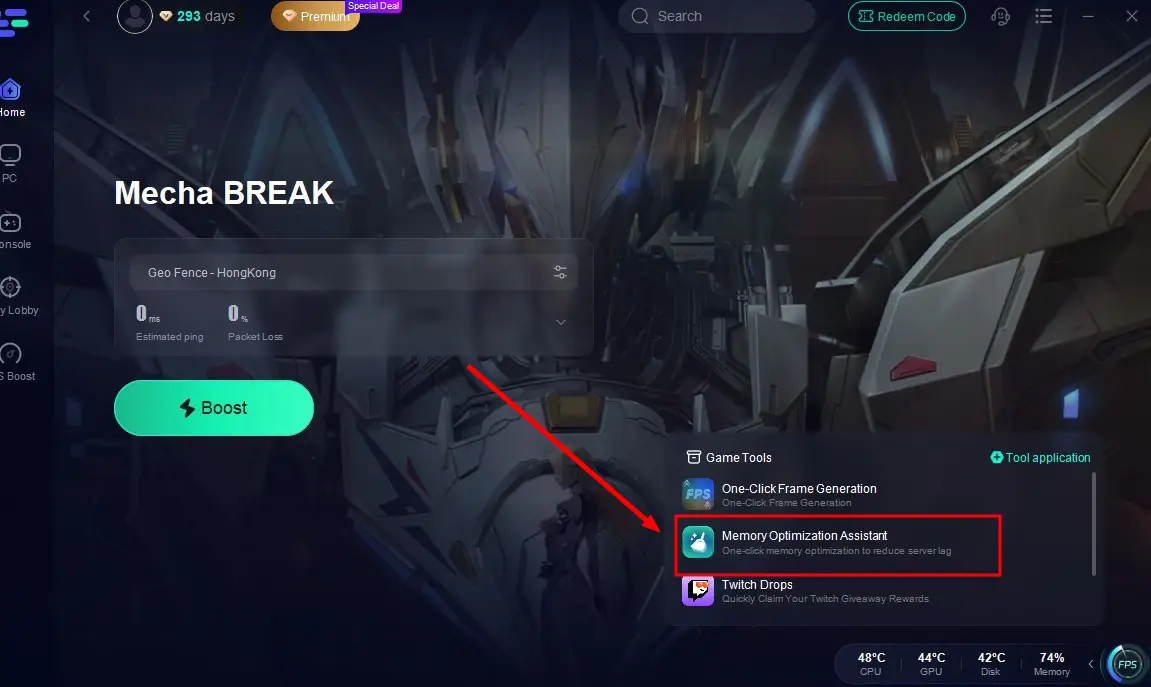
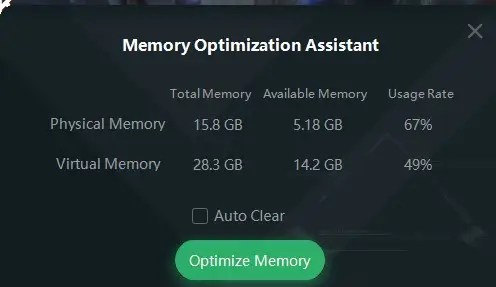
Additionally, LagoFast offers a Memory Optimization Assistant to free up device memory, ensuring smoother gameplay and reducing stuttering or crashes.
After enabling optimization, click the Memory Optimization Assistant tool in the corner.
Click "Optimize Memory" to clear space, giving Mecha Break more room to run flawlessly!
Conclusion
Mecha Break's massive mecha battlefields thrive on multiplayer cooperative brawls, but teaming up with players from different language backgrounds often brings frustrating language barriers. LagoFast's Mecha Break translation tool bridges this gap with precise, easy-to-use features, turning global communication from a weakness into a strategic advantage and ensuring flawless gameplay. Plus, its suite of tools boosts FPS for smoother visuals and enhances overall performance, giving your mecha battles an edge.

Boost Your Game with LagoFast for Epic Speed
Play harder, faster. LagoFast game booster eliminates stutter and lags on PC, mobile, or Mac—win every match!
Quickly Reduce Game Lag and Ping!
Boost FPS for Smoother Gameplay!