
Quick Answer
Currently, Meccha Chameleon does not feature a built-in system to save custom paint looks or outfits between matches. To save your current outfit, you must use the LagoFast Game Booster’s "One-Click Outfit Change" tool. This utility allows you to extract your current paint brushstrokes as a local file, which can then be reapplied instantly via a hotkey in future games or shared with friends.

- ✅Less ping and crashes.
- ✅ Higher FPS and better performance.
- ✅ Support for 2000+ games.
- ✅ Stable connection and region switching.
Part 1: Can You Save Outfits in Meccha Chameleon?
Part 2: What Counts as an Outfit in Meccha Chameleon?
Part 3: How One-Click Extract Works
Part 4: The LagoFast One-Click Outfit Change Tool
Part 5: How to Enhance Your Game Experience with LagoFast Game Booster
Part 6: Best Times to Save a Paint Preset
Part 1: Can You Save Outfits in Meccha Chameleon?
In the high-stakes world of Meccha Chameleon, the ability to blend into your surroundings is the difference between a successful hide and an early exit. Players often spend significant time during the preparation phase meticulously painting their "Hider" to match specific environmental textures—vending machines, brick walls, or metallic crates. The frustration arises when the round ends, and that perfect camouflage is lost forever.
As of the current build, the developers have not implemented a native "Save Preset" button within the game’s UI. Every match starts with a blank slate, forcing players to recreate their complex designs from scratch every time they want to use a specific hiding spot. This lack of a permanent storage solution for paint looks has led the community to seek external tools that can bridge the gap between creativity and efficiency.
Part 2: What Counts as an Outfit in Meccha Chameleon?
When we discuss "outfits" in this game, we aren't talking about traditional character skins purchased from a shop. Instead, an outfit is a combination of three distinct elements that define your visual presence in a match.
Paint Look
The most critical component is the "Paint Look." This refers to the actual colors and textures applied using the in-game brush system. Since the game relies on dynamic lighting and varied environmental palettes, a paint look that works in the neon-lit streets might fail in a dimly lit warehouse.
Camouflage Preset
A camouflage preset is the specific pattern or design you’ve developed to break up the silhouette of your prop. Pro players often use "dazzle" patterns or high-contrast textures that mimic the noise of the game's background assets, making it harder for Seekers to spot a static object.
Hider Body Design
While the paint is the primary focus, your "outfit" is also tied to your chosen prop's body design. The way paint wraps around a rounded object versus a flat one changes the visual impact. A truly saved outfit needs to account for the geometry of the Hider itself to ensure the camouflage remains effective when reapplied.
Part 3: How One-Click Extract Works
The technical hurdle in saving an outfit lies in the way the game handles brushstrokes. Every time you paint, the game records a series of coordinates and color values. The LagoFast "One-Click Extract" tool works by capturing this data stream in real-time.
Capture your current painted look
When you activate the extraction tool, it reads the current state of all brushstrokes applied to your Hider during the match. It essentially "snapshots" the visual data you've created.
Save it as a local preset file
Instead of relying on a cloud server that the game doesn't support, the tool converts these brushstrokes into a small local file on your PC. This file acts as a script that can "replay" your painting process at high speed.
Reuse the same camouflage later
In a subsequent match, the tool can read this local file and re-apply the exact same strokes to your character. This eliminates the need for manual repainting, allowing you to focus on positioning and strategy rather than artistic recreation.
Part 4: The LagoFast One-Click Outfit Change Tool
LagoFast(LagoFast Game Booster - Get No Lag and Lower Ping) has introduced a specialized utility specifically for Meccha Chameleon players who are tired of losing their hard work. This tool is integrated into the Game Booster and offers three primary features designed to streamline the "Hider" experience.
Feature 1: Extract and Save Your Current Paint Look
The extraction feature is the foundation of the tool. It allows you to grab the entirety of your current match’s paintwork and save it as a local preset. It is important to note that this records every single stroke you’ve made during the current session. If you’ve spent ten minutes detailing a complex texture, the tool will capture it all.
Feature 2: Use Hotkeys to Switch Outfits In-Game
Efficiency is king in hide-and-seek. Once you have saved multiple presets for different maps, you can bind them to specific hotkeys. If you find yourself near a red container, you can hit a shortcut to apply your "Red Metal" preset. The tool will rapidly apply the saved strokes. However, keep in mind that the more complex the original painting was (the more strokes it had), the longer the re-application process will take.
Feature 3: Share Paint Files with Friends
The social aspect of Meccha Chameleon is one of its biggest draws. Since the outfits are saved as local files, you can simply open the local directory, copy the file, and send it to a friend. Once they drop that file into their own directory, they can use your "god-tier" camouflage instantly. This has led to the rise of community-driven "camo-sharing" groups where players exchange the best textures for specific map locations.
Important Note
This is a non-final demo version and may be updated in future releases, including changes to paint file formats that may not be compatible with this build.
When saving a paint preset, the tool records all brush strokes applied during the current match. During one-click application, these strokes are replayed to recreate the outfit effect, and longer painting sessions may result in longer switching time.
For accurate replication, the character’s pose during application should match the pose used when the paint was originally created.
Part 5: How to Enhance Your Game Experience with LagoFast Game Booster
To get the most out of the outfit saving system and ensure your game runs without the stuttering that can ruin a precise paint job, follow these steps to set up the tool correctly.
Click the Free Trial button to download and install LagoFast Free Trial.
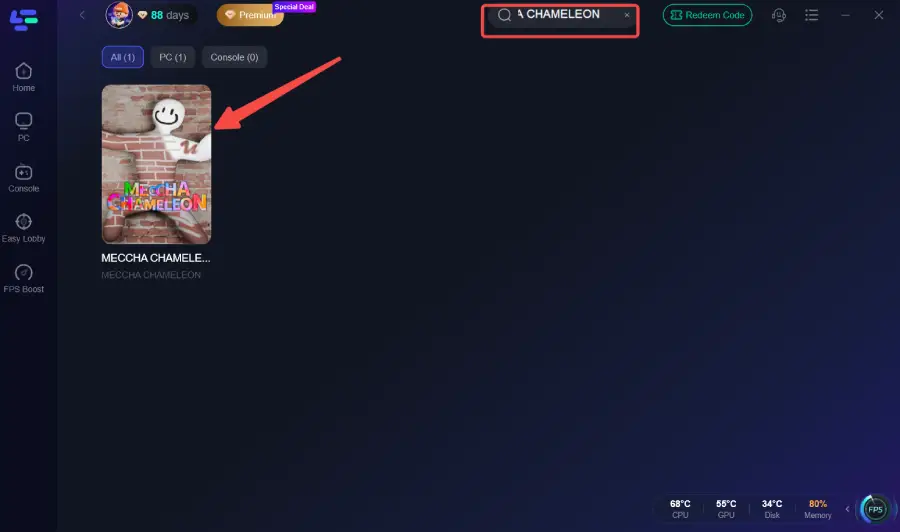
Locate Meccha Chameleon: Use the search bar within the LagoFast client to find the game.
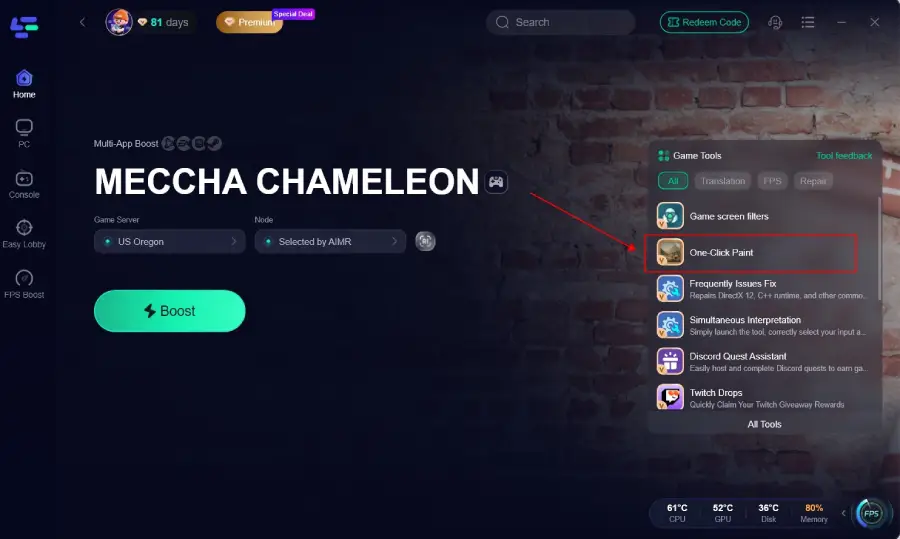
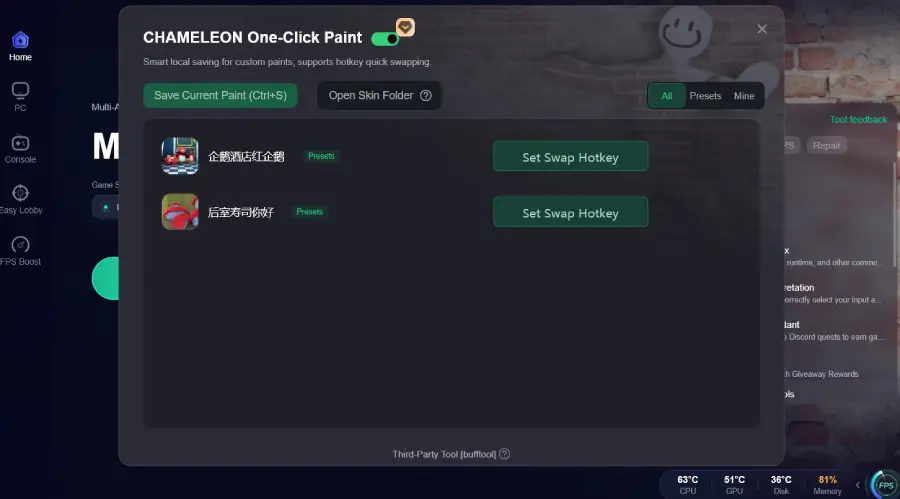
Activate the Outfit Tool: Before launching the game, look for the "One-Click Paint" utility in the game’s dashboard within LagoFast.
Boost and Launch: Click the "Boost" button to optimize your network path and then launch the game.
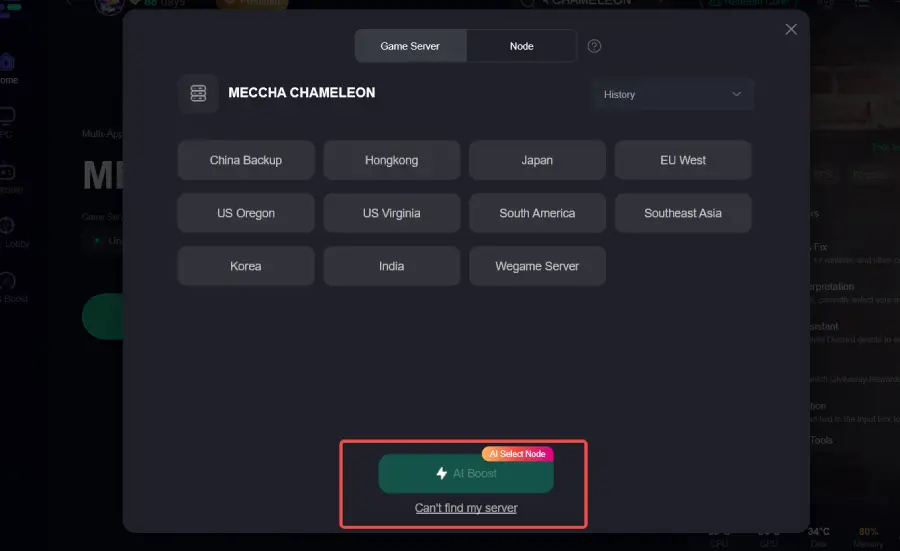
Save Your First Outfit: Once you are in a match and have finished painting a look you like, use the designated extraction hotkey to save it to your local drive.
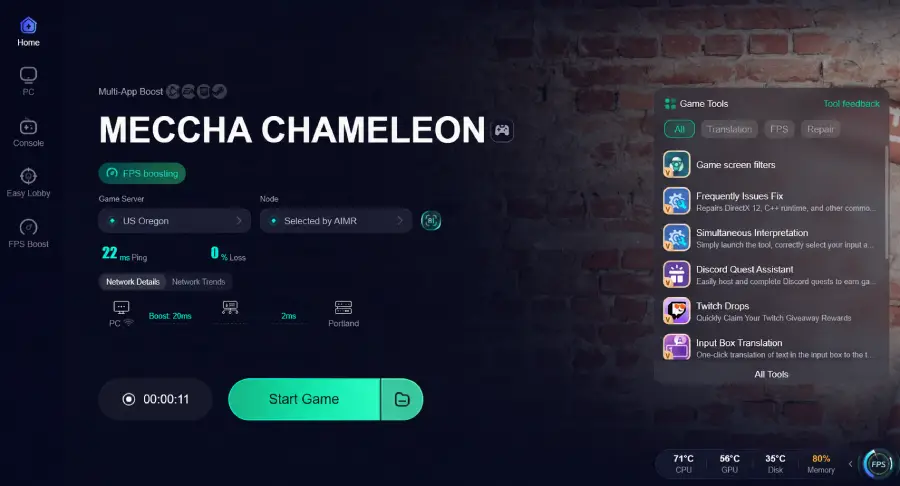
Set Up Hotkeys: In the LagoFast settings, assign your saved files to keys (e.g., NumPad 1, 2, 3) for quick access during future rounds.
Pro Tip: For the most accurate replication, ensure you are in the same pose when applying a preset as you were when you first saved it. If you saved a look while crouching, applying it while standing might cause the textures to misalign.
Part 6: Best Times to Save a Paint Preset
Not every paint job is worth saving. To build a truly effective library of presets, you should focus on specific scenarios that offer a tactical advantage.
After finding a good hiding spot
If you discover a corner of the map that Seekers rarely check, spend the time to paint a perfect match for that specific spot. Save it immediately. This allows you to rush to that spot in future games and blend in within seconds.
After matching a map background
Some maps have unique lighting or specific color palettes that are hard to get right on the fly. When you finally nail the "dirty concrete" look of the industrial map, save it. That preset will be a staple of your gameplay whenever that map appears in rotation.
Before playing with friends
If you are planning a coordinated "prop stack" where everyone hides as the same object in the same area, having a shared preset ensures everyone looks identical. This level of coordination can be incredibly confusing for Seekers and is much easier to achieve using shared files.
Part 7: FAQ
Q1: Does the tool work if I change my prop type?
A1: The paint is applied based on the coordinates of the hider's body. If you switch to a prop with a significantly different shape, the paint may look distorted or appear in the wrong places. It is best to save presets for specific prop types.
Q2: Is there a limit to how many outfits I can save?
A2: Since the files are saved locally on your hard drive, the only limit is your disk space. Each file is quite small, so you can effectively save hundreds of different camouflage patterns.
Q3: Can Seekers see the paint being applied when I use a hotkey?
A3: Yes, the application of paint happens in real-time. It is much faster than manual painting, but it is not instantaneous. You should always find a safe spot to apply your preset before the Seekers are in your immediate vicinity.
Q4: Why is the outfit applying so slowly?
A4: The speed of the "One-Click Change" depends on the number of brushstrokes in the original save. If you used thousands of small strokes for fine detail, the tool has to "replay" all of them. For faster switching, try to use broader strokes where possible.
Q5: Can I edit a saved outfit file?
A5: The files are saved in a specific format for the tool to read. While you can't easily edit them in a text editor, you can apply a preset in-game, make manual adjustments with the brush, and then "Extract" it again to save the updated version.
Key Takeaway
Saving outfits in Meccha Chameleon is the ultimate "quality of life" improvement for dedicated Hiders. While the game lacks a native system, the LagoFast Game Booster provides a robust solution through its one-click extraction and hotkey switching features. By building a library of local presets, maintaining consistent poses during application, and sharing your best designs with your squad, you can significantly increase your survival rate. Remember to save your best textures as soon as you create them, and always ensure your network is optimized to prevent any lag during the critical painting phase. Download LagoFast today to start building your collection of perfect camouflages.
Boost Your Game with LagoFast for Epic Speed
Play harder, faster. LagoFast game booster eliminates stutter and lags on PC, mobile, or Mac—win every match!
Quickly Reduce Game Lag and Ping!
Boost FPS for Smoother Gameplay!