
Quick Answer:
To change paint presets in Meccha Chameleon quickly, you can use the LagoFast One-Click Outfit Tool. This tool allows you to extract your current paint strokes, save them as a local file, and bind them to a hotkey. Once set up, simply press the hotkey in-game while maintaining the same pose to instantly apply your saved outfit and quickly blend into surroundings without manual painting.
Meccha Chameleon has taken the hide-and-seek genre by storm, challenging players to manually paint their white bodies to match the environment. However, as any veteran hider knows, manual painting is slow and leaves you vulnerable. The community has been clamoring for a way to use saved outfits to adapt to different rooms on the fly. Whether you need to save an outfit for a specific kitchen counter or a grassy backyard, mastering the quick outfit switch is the key to becoming an invisible master of disguise.

- ✅Less ping and crashes.
- ✅ Higher FPS and better performance.
- ✅ Support for 2000+ games.
- ✅ Stable connection and region switching.
Part 1: Why Hotkey Outfit Switching Matters
Part 2: How Hotkey Paint Presets Work
Part 3: Best Hotkey Setup Ideas for Hiders
Part 4: LagoFast One-Click Outfit Switch Tool: The Ultimate Solution
Part 5: How to Enhance Your Game Experience with LagoFast Game Booster
Part 6: Common Hotkey Problems and Fixes
Part 1: Why Hotkey Outfit Switching Matters
In Meccha Chameleon, time is your most valuable resource. When a round starts, you have a limited window to find a spot and paint yourself. If the seeker moves to a new area, you might need to relocate, but your old paint job will give you away instantly. This is where hider saved presets become a game-changer.
Instead of spending thirty seconds meticulously matching the wood grain of a table, a hotkey outfit switch allows you to transition between different environments in a heartbeat. It transforms the game from a slow painting simulator into a high-stakes tactical stealth experience. Being able to quickly blend into surroundings means you can move more freely, knowing that your perfect camouflage is just one button press away.
Part 2: How Hotkey Paint Presets Work
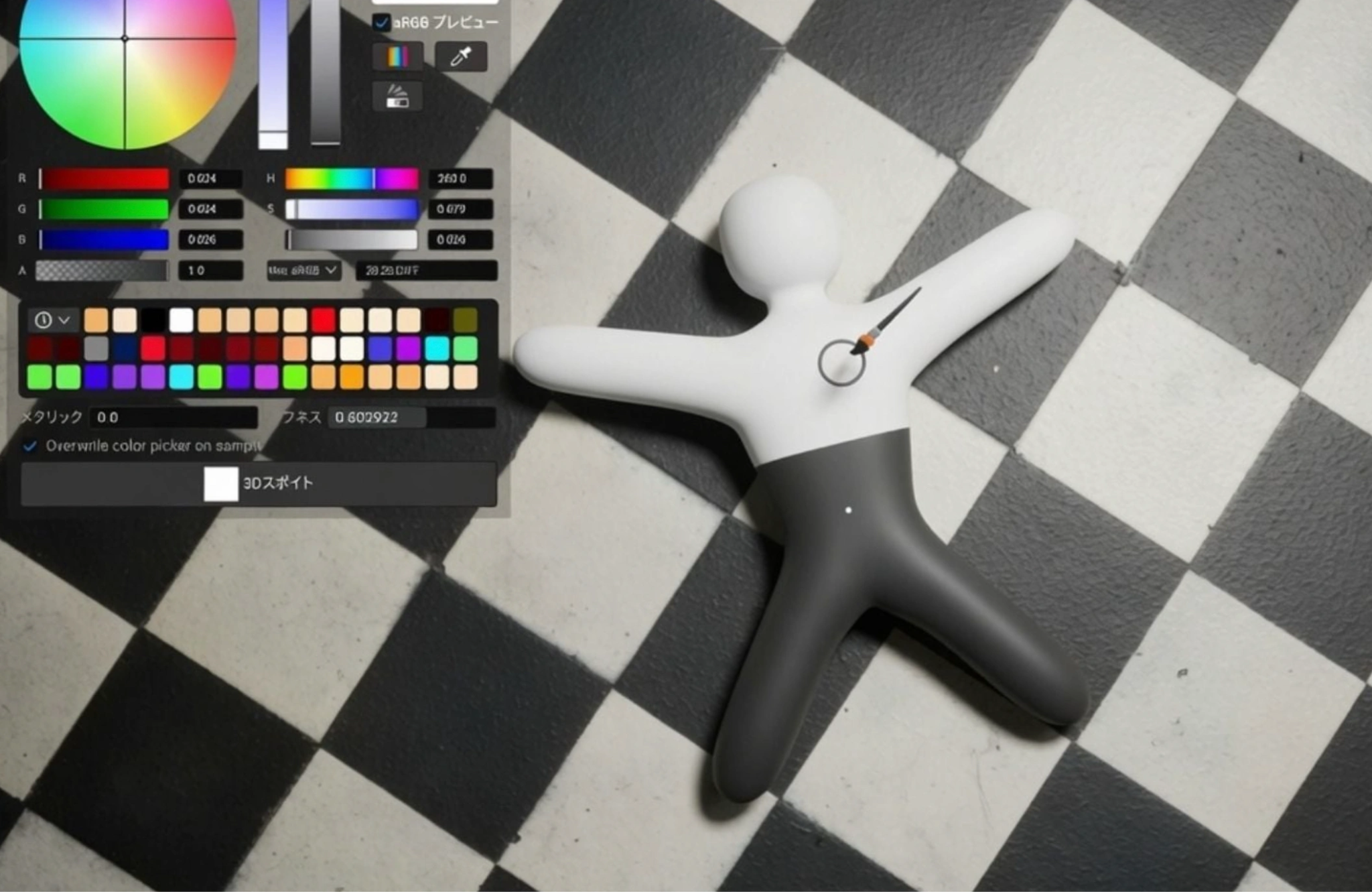
The concept of hotkey presets is simple: you record a specific set of paint strokes and "play them back" instantly during a match. This involves three main steps:
Bind a saved outfit to a key
First, you need to have a library of saved outfits. These are files that contain the exact color, texture, and placement of every brushstroke you've applied. You then assign these files to specific keys on your keyboard (e.g., F1 for "Grass," F2 for "Brick Wall").
Press the hotkey in-game
Once you are in a match and have reached your target location, you simply press the assigned key. The game (or the supporting tool) recognizes the command and begins the application process.
Apply the selected paint look instantly
The system rapidly "repaints" your character model based on the saved data. It’s important to note that the more complex the original painting was, the longer the "instant" application might take, as the game engine still needs to process all those individual strokes.
Part 3: Best Hotkey Setup Ideas for Hiders
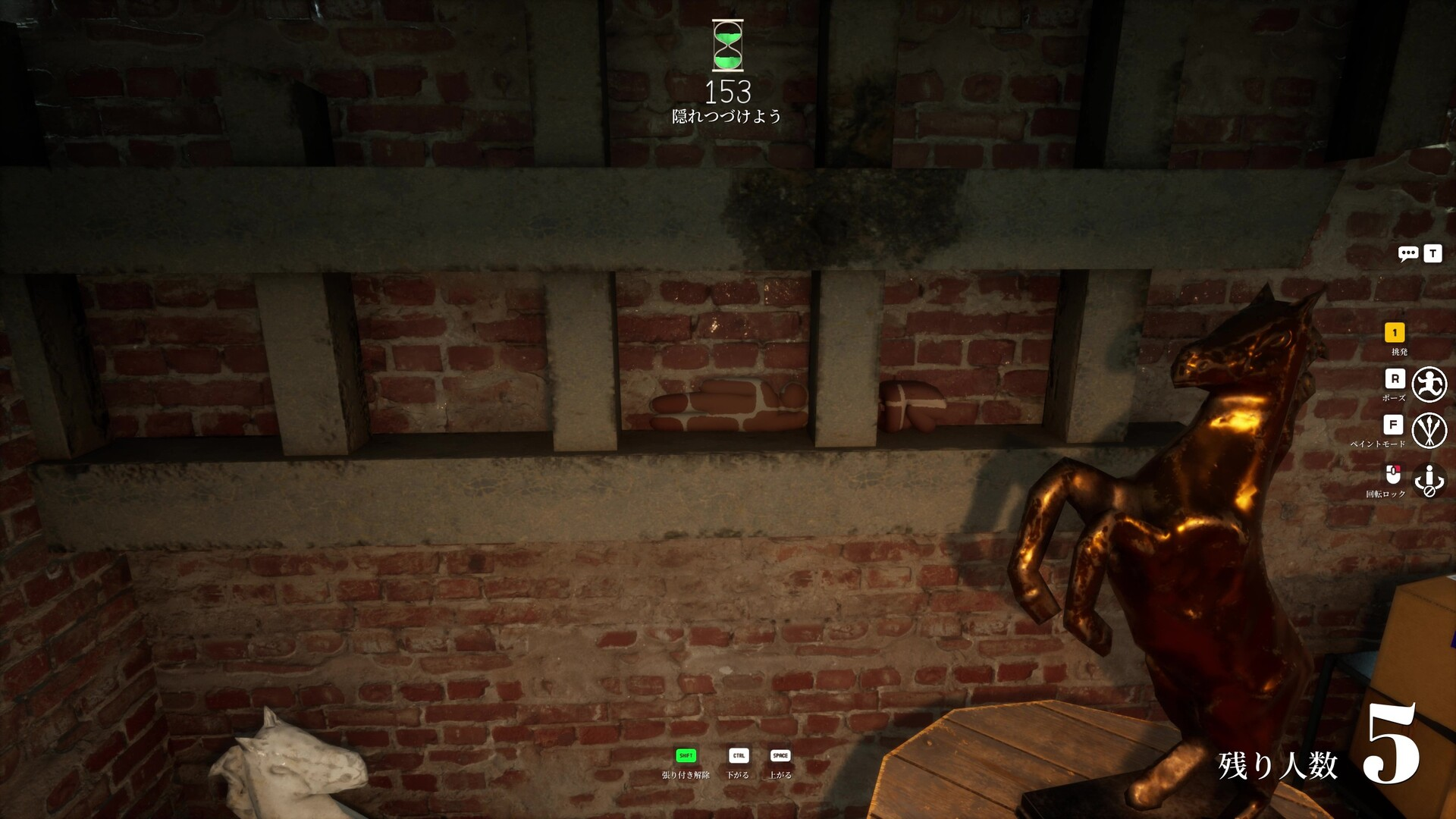
To be truly effective, you should have a diverse set of hider saved presets ready for any situation. Here are some essential ideas for your hotkey layout:
- One preset for dark areas: Focus on deep shadows and dark grays. This is perfect for hiding under furniture or in the corners of dimly lit rooms.
- One preset for grass or green backgrounds: Essential for outdoor maps. Use a mix of vibrant and dark greens with some "blade of grass" textures to break up your silhouette.
- One preset for walls and indoor hiding spots: A neutral beige or off-white preset can help you blend into the most common wall colors found in the game's indoor stages.
- One preset for quick emergency camouflage: A "generic" multi-color noise preset that can help you look like a pile of clutter in a pinch.
Part 4: LagoFast One-Click Outfit Switch Tool: The Ultimate Solution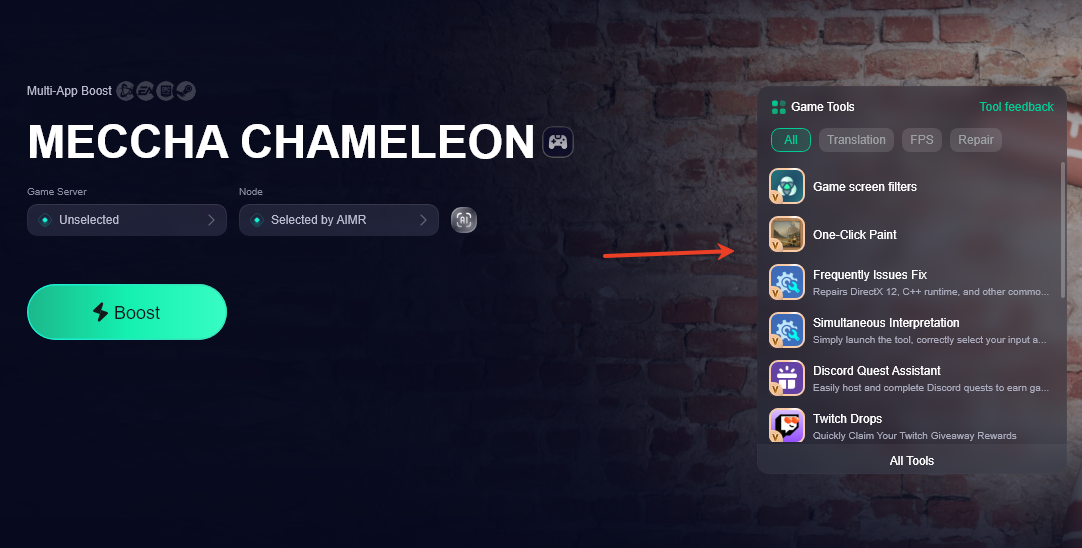
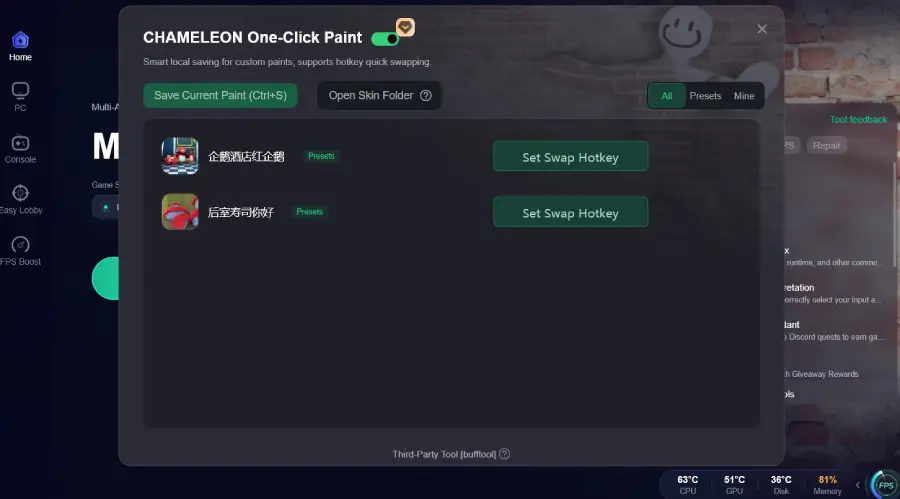
While the base game focuses on manual skill, the LagoFast One-Click Paint Tool provides the technical edge that serious players need. This tool is specifically designed to handle the heavy lifting of saved outfits and quick outfit switches.
Key Features of the LagoFast Tool:
- One-Click Extraction: You can "grab" your current, perfectly hand-painted look and save it as a local file instantly. No more losing your best work after the round ends.
- Hotkey Binding: Easily bind your saved files to any key. When you're in the heat of a match, one press is all it takes to quickly blend into surroundings.
- File Sharing: Want to help a friend? You can open your local directory and send your outfit files directly to them. They just need to drop the file into their own folder to start using your pro-level camouflage.
Pro Tip: When using the LagoFast tool, remember that it records all strokes from your current session. Also, you must maintain the same pose you used when saving the outfit for the "re-painting" to align correctly with your body.
Part 5: How to Enhance Your Game Experience with LagoFast Game Booster
Meccha Chameleon is a physics-based game where timing and precision are everything. If you experience lag or high ping, your paint strokes might desync, or your hotkey outfit switch might fail to trigger at the critical moment. This is why using LagoFast(LagoFast Game Booster - Get No Lag and Lower Ping) Game Booster is highly recommended for the best PC experience.
Detailed Steps to Use LagoFast:
Click the Free Trial button to download and install LagoFast Free Trial.
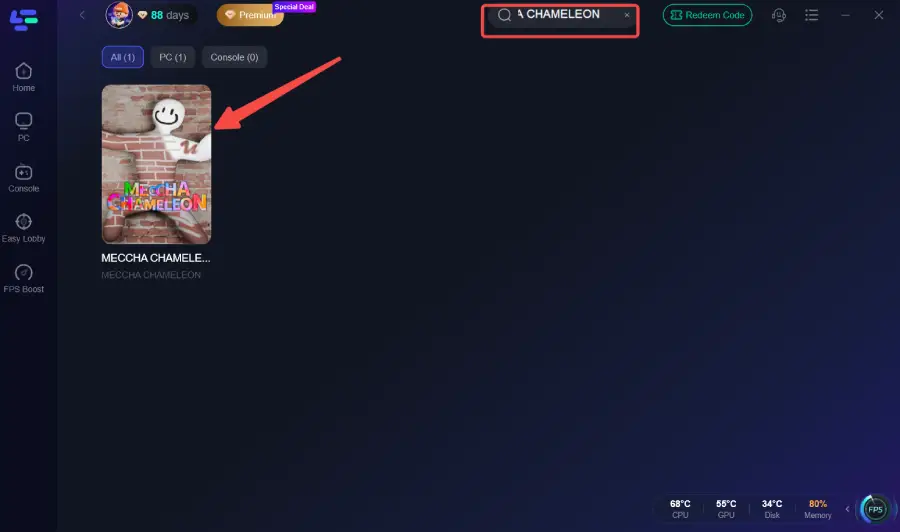
Search for Meccha Chameleon: Open the app and find the game in the library.
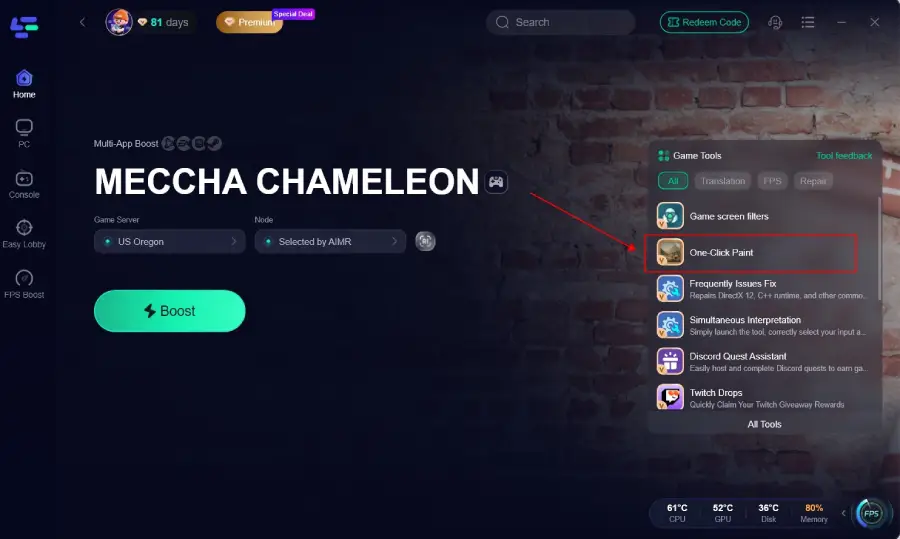
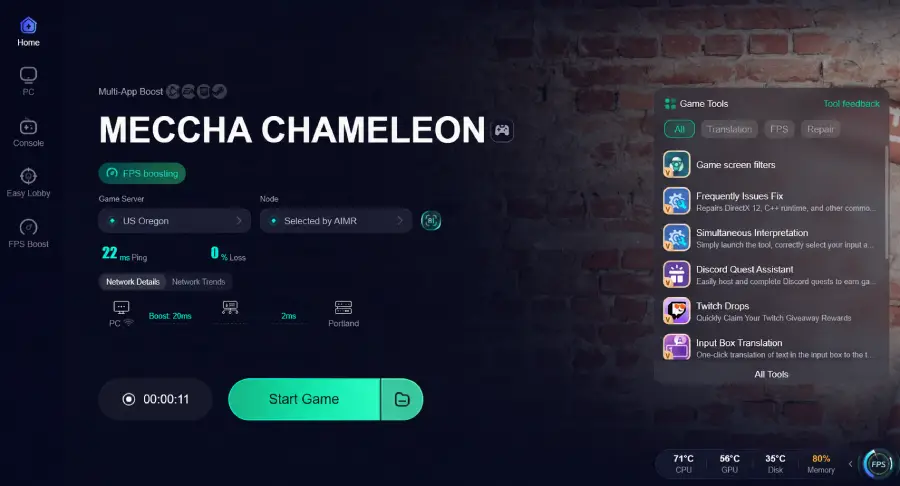
Enable the Outfit Tool: Navigate to the "Game Tools" section on the right side of the boost page to find the Meccha Chameleon One-Click Paint Tool.
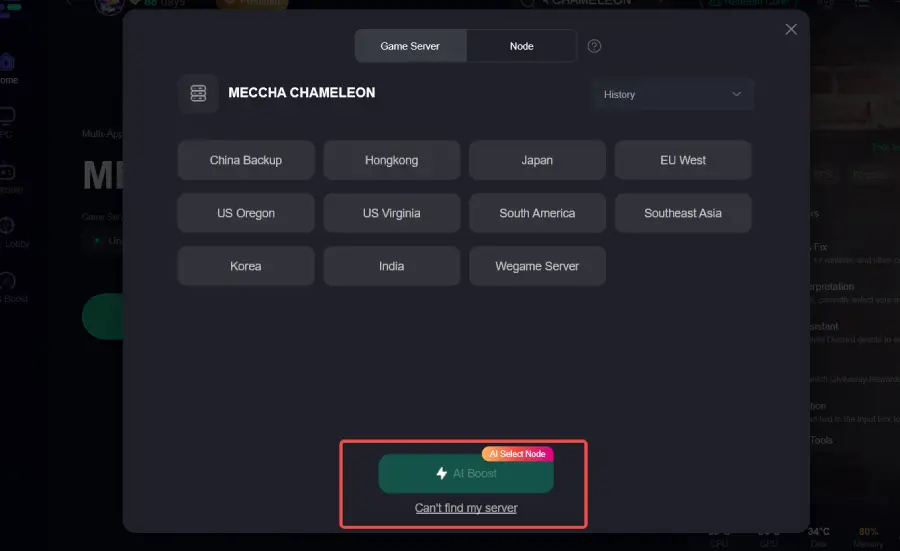
Select Your Node: Choose the most stable network node. LagoFast will show you real-time ping and packet loss stats.
Boost and Play: Click the "Boost" button to optimize your connection and launch the game with the outfit tool active.
Part 6: Common Hotkey Problems and Fixes
Even with the best tools, you might encounter some technical hiccups. Here’s how to fix them:
- Hotkey not working: Ensure that the LagoFast tool is running with administrator privileges and that the game is in "Borderless Windowed" or "Windowed" mode.
- Wrong preset applied: Double-check your keybindings in the tool's settings. It’s easy to mix up F1 and F2 in the middle of a chase!
- Preset does not paint correctly: This is almost always a pose issue. If you saved the outfit while crouching, you must be crouching when you press the hotkey for it to apply correctly.
- Key conflict with game controls: Avoid using keys like 'W', 'A', 'S', 'D', or 'Space' for your presets. Stick to the Function keys (F1-F12) or the Numpad.
Part 7: Meccha Chameleon FAQ
1. Can I save an outfit I made in a previous round?
Yes, if you used the extraction tool to save it as a local file, you can load it and use it in any future round.
2. Does the quick outfit switch happen instantly?
It is very fast, but not instantaneous. The game has to "draw" the strokes. The more complex your painting, the longer it takes to fully apply.
3. Can seekers use saved outfits too?
While the focus is on hiders, seekers can technically use the tool to save "scary" or "distracting" looks, though it doesn't provide a tactical advantage for them.
4. Is using an outfit tool considered cheating?
Most players view it as a quality-of-life improvement. Since you still have to manually paint the original design to save it, the "artistic skill" requirement of the game remains intact.
5. How do I share my saved presets with friends?
Simply go to the LagoFast directory where your .outfit files are stored, copy them, and send them via Discord or any file-sharing service.
Key Takeaway
- Efficiency is Stealth: Using a Meccha Chameleon hotkey outfit setup allows you to adapt to new environments faster than any manual painter.
- Pose Consistency: Always remember that your quick outfit switch depends on you being in the same pose as when you saved the preset.
- Tool Support: The LagoFast One-Click Outfit Tool is the most reliable way to manage saved outfits and share them with the community.
- Network Stability: Use LagoFast Game Booster to ensure your hotkeys trigger without delay and your paint strokes stay in sync.
- Preparation Pays Off: Spend time in a private lobby creating a library of hider saved presets for every major room in the game.

Boost Your Game with LagoFast for Epic Speed
Play harder, faster. LagoFast game booster eliminates stutter and lags on PC, mobile, or Mac—win every match!
Quickly Reduce Game Lag and Ping!
Boost FPS for Smoother Gameplay!