
Marvel Rivals is a high-octane, superhero-focused PvP shooter where every precision shot and ability activation can turn the tide of battle. But with its diverse roster—from sniping heroes to melee bruisers and aerial sluggers—there’s no one-size-fits-all crosshair. Customizing your reticle isn’t just cosmetic; it’s a performance upgrade.
In this guide, we'll walk you through the best crosshair settings for every hero archetype, show you how to import and tweak reticle codes, and introduce a powerful tool—LagoFast—that not only optimizes your network but also supports advanced crosshair customization on mobile devices. Ready to elevate your gameplay? Let’s dive in.

Part 1: Marvel Rivals Introduction
Part 2: How to Change Marvel Rivals Crosshair
Part 3: Best Marvel Rivals crosshairs
Part 4: Enhance Gameplay and Get Marvel Rivals Aiming Assist Tool with LagoFast
Part 1: Marvel Rivals Introduction
Marvel Rivals is a fast-paced, team-based FPV shooter featuring iconic Marvel heroes. With melee bruisers, snipers, aerial attackers, and more, every hero demands tailored crosshairs for peak performance. The in-game reticle editor is incredibly flexible—adjusting size, shape, opacity, color, and animation. PC players can save multiple crosshairs and import community-made codes; console players must recreate settings manually .
Part 2: How to Change Marvel Rivals Crosshair
- Open Settings → Combat (Keyboard/Controller) → HUD → Reticle Save.
- Select “All Heroes” or individual heroes to customize.
- Pick a default reticle, or click + to edit—adjust width, opacity, animation, color, and more.
- On PC, use Import Save, paste a code, and hit Confirm.
Part 3: Best Marvel Rivals crosshairs
Small Crosshair – The Classic Choice for Precision
Recommended for: Cloak & Dagger, Invisible Woman, Jeff, Loki, Mantis, Namor, Psylocke, Rocket Raccoon, Spider-Man
This minimalistic small crosshair is inspired by classic tactical shooters like Valorant. Its clean design makes it perfect for players who value precision over flashiness. Ideal for heroes who require fast target tracking and accuracy in chaotic team fights.
Crosshair Code:
2;0.0;0.0,20.0,0.0,0.0;100.0,100.0,100.0,0.0;55.0,70.0,55.0,55.0;100.0,100.0,100.0,100.0;0.0,0.0,0.0,0.0;9.0,9.0,9.0,9.0;12.0;100.0,100.0,100.0,0.0;0.0;4,4,4,4;1.0,1.0,1.0;
Small Dot – For Headshot Aficionados
Recommended for: Black Widow, Hawkeye, Hela
If you're looking for a minimalist crosshair with zero distractions, this small dot reticle is perfect. It’s especially great for heroes with pinpoint abilities or who need to land headshots. The cyan tint helps it stand out against most backgrounds, while remaining subtle.
Crosshair Code:
3;1;10.0,10.0,10.0,10.0;100.0,100.0,100.0,100.0;50.0,50.0,50.0,50.0;100.0,100.0,100.0,100.0;0.0,0.0,0.0,0.0;33.0,33.0,33.0,33.0;30.0;100.0,100.0,100.0,100.0;0.0;5,5,5,5;0.0,1.0,1.0;
Small Circle – Clean and Versatile
Recommended for: Adam Warlock, Luna Snow, Mister Fantastic, Moon Knight, Scarlet Witch, Star-Lord, The Punisher
For players who find the dot too small, the small circle reticle provides a good compromise. The outer circle gives spatial reference while still keeping your view clean. Great for hybrid heroes with both ranged and melee capabilities.
Crosshair Code:
1;0.0;10.0,10.0,10.0,0.0;100.0,100.0,100.0,100.0;50.0,50.0,25.0,0.0;100.0,100.0,100.0,100.0;0.0,0.0,0.0,0.0;10.0,10.0,10.0,10.0;30.0;100.0,100.0,100.0,100.0;0.0;5,5,5,5;0.0,1.0,0.0;
Circle + Cross – High Visibility with Balanced Focus
Recommended for: Magik, Magneto, Peni Parker, Squirrel Girl, Storm, Winter Soldier
This yellow reticle combines a circle and crosshair, offering excellent visibility during intense team fights. The mid-sized crosshair and contrasting color ensure your aim stays locked on target, even when the action gets messy.
Crosshair Code:
4;0.0;10.0,30.0,20.0,0.0;100.0,100.0,100.0,0.0;50.0,68.0,55.0,50.0;100.0,100.0,100.0,100.0;0.0,0.0,0.0,0.0;0.0,12.0,0.0,0.0;15.0;100.0,100.0,100.0,0.0;0.0;5,5,5,5;0.914,1.0,0.149;
Large Circle – Great for Area-Based and Heavy Attack Heroes
Recommended for: Black Panther, Captain America, Doctor Strange, Emma Frost, Groot, Hulk, Human Torch, Iron Fist, Iron Man, The Thing, Thor, Ultron, Venom, Wolverine
This larger reticle helps with spatial awareness for heroes who deal heavy AoE or projectile-based damage. It also works well for newer players who need more visual context when lining up shots with larger hitboxes.
Crosshair Code:
1;0.0;10.0,10.0,10.0,0.0;100.0,100.0,100.0,0.0;50.0,50.0,25.0,50.0;100.0,100.0,100.0,100.0;0.0,0.0,0.0,0.0;25.0,25.0,25.0,25.0;30.0;100.0,100.0,100.0,0.0;0.0;5,5,5,5;1.0,0.149,1.0;
How to Import Crosshair Codes in Marvel Rivals
- Launch Marvel Rivals and go to the Settings menu.
- Navigate to the Crosshair or Reticle tab.
- Click on Import or Crosshair Code Input.
- Paste your chosen crosshair code from this list.
- Hit Apply, test in a match, and adjust to your preference.
Choosing the right crosshair can make a significant difference in how effectively you play your hero in Marvel Rivals. Whether you prefer sleek, minimal designs or highly visible, multi-layered reticles, there’s a perfect match for every playstyle and every hero.
Stick with one for consistency or swap depending on your hero of choice—it’s all about what makes you feel confident when it’s time to land that crucial shot.
Part 4: Enhance Gameplay and Get Marvel Rivals Aiming Assist Tool with LagoFast
LagoFast enhances gameplay in two pivotal ways:
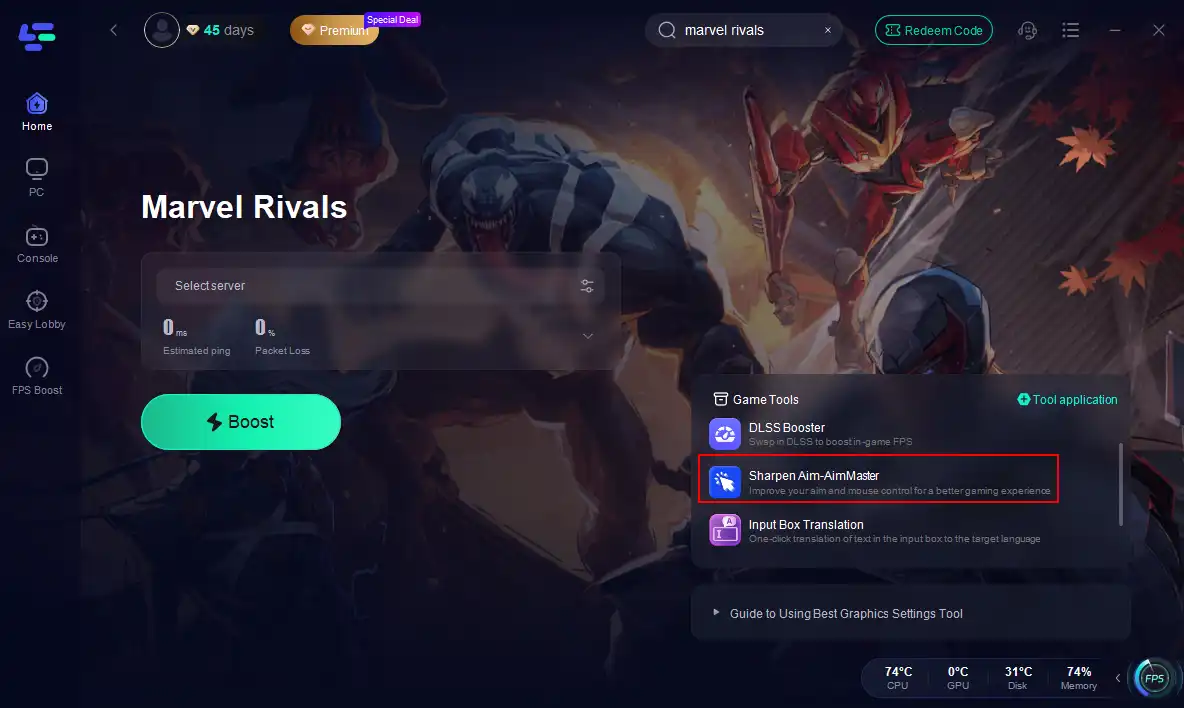
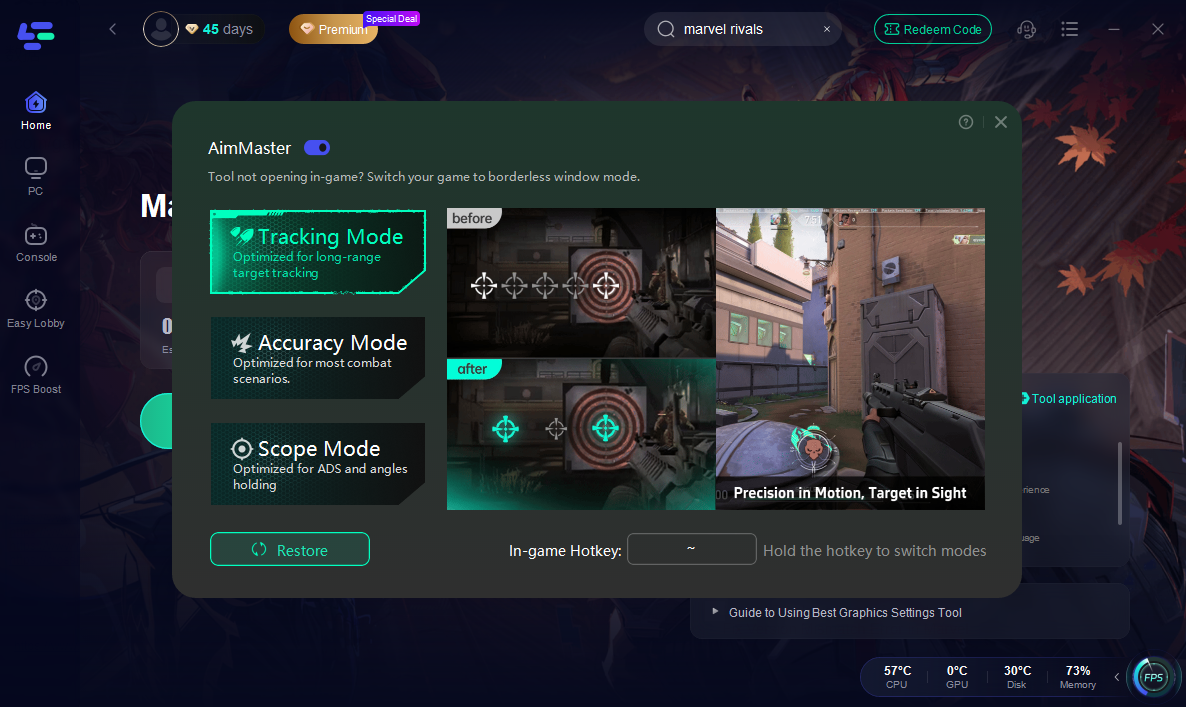
Sharpen Aim - AimMatser Tool
This mod provides three distinct modes to help you shoot more precisely.
- Tracking Mode: This mode is optimized for long - distance target tracking. When you're dealing with enemies at a far - off distance, Tracking Mode can help you zero in on them more accurately.
- Accuracy Mode: Accuracy Mode is suitable for most combat scenarios. It provides a balanced aim assist that helps you land your shots more consistently.
- Scope Mode: Scope Mode is designed with ADS and angle - holding in mind. When you're using weapons with scopes and need to hold your aim at specific angles for a more accurate shot, this mode comes in handy.
Gaming Experience Enhanced
- Cross-Regional Ping Optimization: Reduces lag caused by long-distance servers, ensuring responsive aiming in global matches.
- Lag & Ping Reduction: Intelligent routing for lowest latency to Marvel servers.
- Frame Rate Boost: Tweaks graphics settings to maintain smooth FPS.
- Server Control: Choose the fastest nodes to prevent spikes.
Step 1: Begin by clicking the Free Trial button to download and install the LagoFast Free Trial.
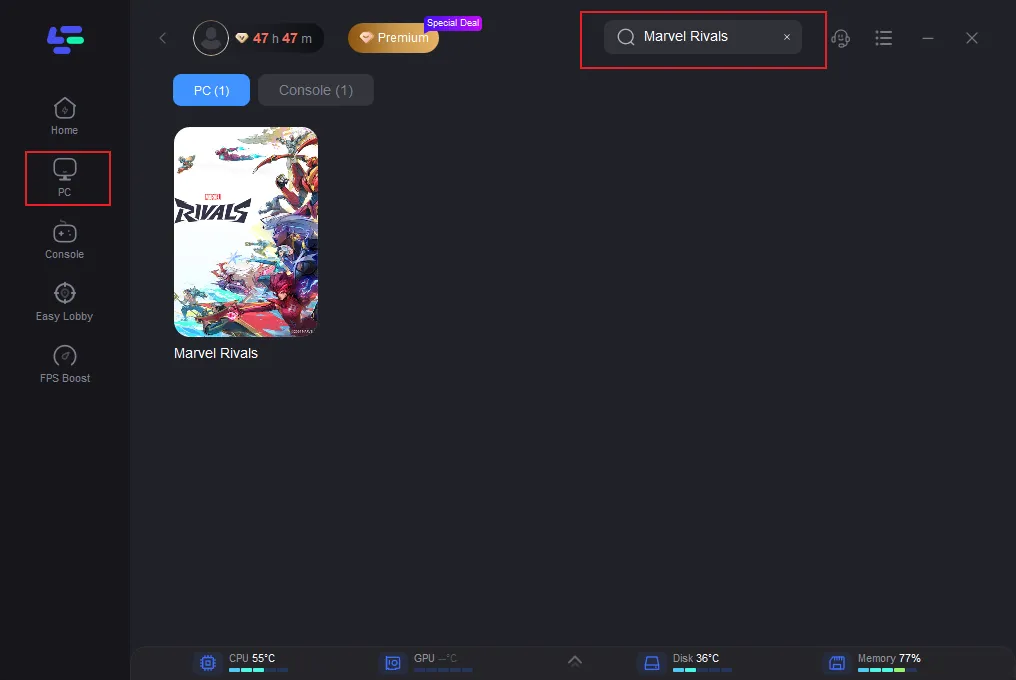
Step 2: Search for Marvel Rivals Open LagoFast and use the search bar to find Marvel Rivals.
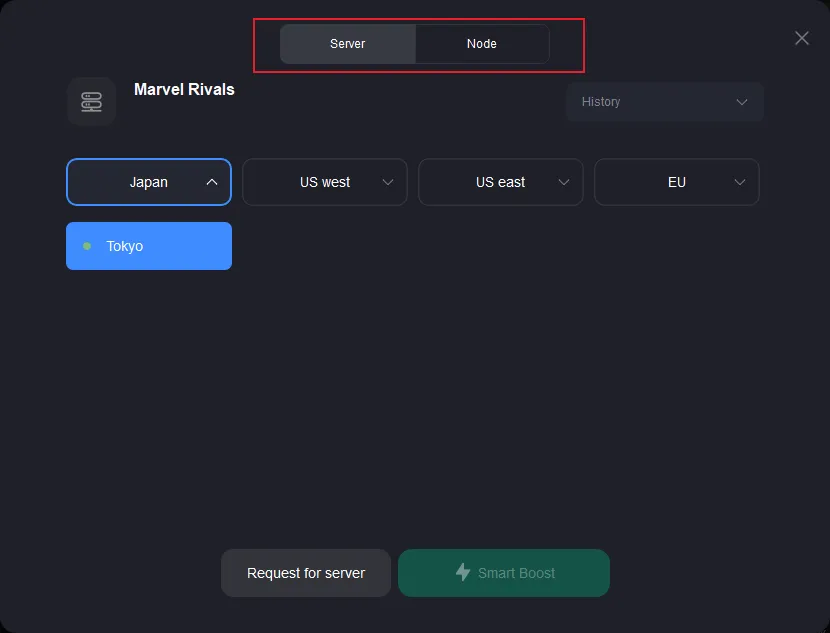
Step 3: Optimize Network Settings: LagoFast will automatically select the optimal server and settings to reduce latency and packet loss.
Step 4: Launch the Game: Start Marvel Rivals through LagoFast to enjoy improved performance and stability.
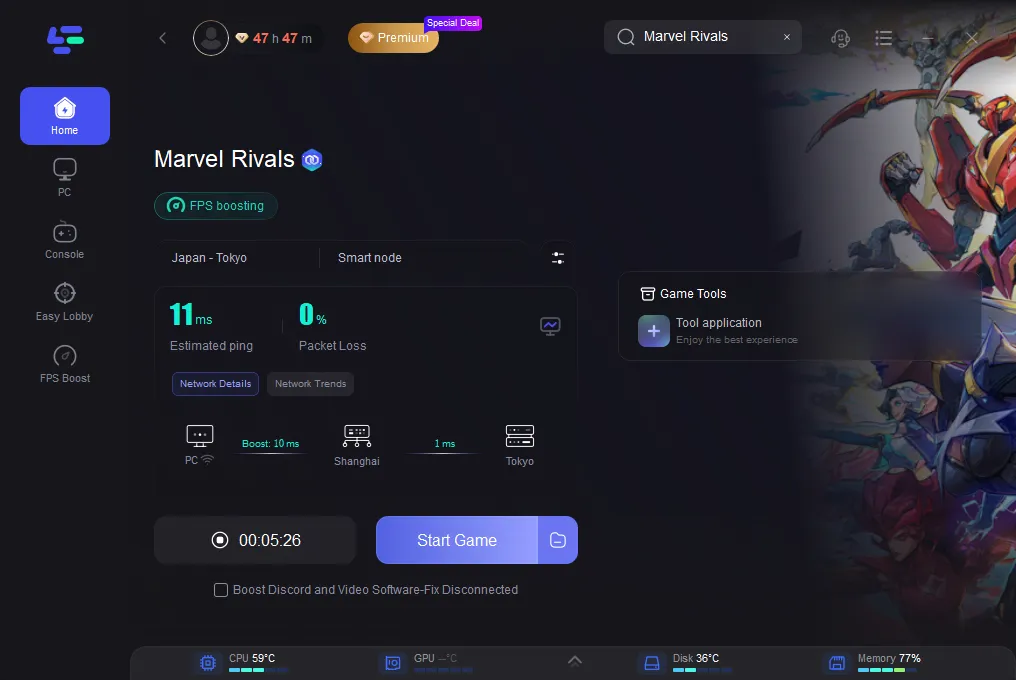
Step 5: Enable Sharpen Aim - AimMatser: Click on the tool application on the right to enter for settings.
Whether you're using Wi-Fi or wired connections, LagoFast can help eliminate jitter, stabilize latency, and reduce packet loss, making it easier to fully enjoy Death Stranding 2’s unique online mechanics.
Part 5: FAQs
Q1: Can crosshairs differ per hero?
Yes. You can set unique crosshairs per hero or globally in HUD settings using “Save Reticle”.
Q2: Why can’t console users import codes?
Console clients can’t paste numeric strings. They must manually recreate settings.
Q3: Which color crosshair is best?
Bright contrasting ones—blue, green, pink, yellow—help the reticle stand out against chaotic visuals.
Q4: Can a large ring hide enemies?
For melee heroes, a large ring is helpful. But avoid using it on precision characters—it may obscure targets.
Q5: Does crosshair animation help?
Animated reticles expand when inaccurate. Professionals often disable it to avoid distraction .
Q6: How many crosshairs can I save?
Max 5 slots—plan based on your go-to heroes.
Conclusion
In Marvel Rivals, your aim is everything—and a tailored reticle can transform gameplay. Use precise dots for headshot specialists, expandable circles for projectile users, and large rings for melee brawlers. PC users can instantly import codes; console users can fine-tune manually or use LagoFast’s powerful tools to boost both reticle and performance. Embrace the customization, test setups in practice range, and emerge dominant with precision gear tailored to your hero.

Boost Your Game with LagoFast for Epic Speed
Play harder, faster. LagoFast game booster eliminates stutter and lags on PC, mobile, or Mac—win every match!
Quickly Reduce Game Lag and Ping!
Boost FPS for Smoother Gameplay!