
More and more players have been reporting the same issue in Marathon by Bungie:
Error Code: TAPIR
If you're in Russia or other CIS countries and the game won’t let you past the title screen, this guide explains what’s actually happening—and what you can realistically do about it.

- ✅ Reduce Lag and High Ping.
- ✅ Boost FPS at the Same Time.
✅ Support 2000+ Popular Online Games.
✅ Change Server without Latency.
✅ Boost Game Loading Speed.
Part 1: What Is the Tapir Error in Marathon?
Part 2: Is This a Bug or a Regional Block?
Part 3: Why Is Marathon Fully Localized in Russian But Inaccessible?
Part 4: Marathon—How to Play in Russia
Part 5: Can You Manually Add Bungie/Steam IP Ranges?
Part 6: What You Should Do Now
Part 1: What Is the Tapir Error in Marathon?
Tapir is a login/authentication error.
Typical symptoms:
- Stuck at login screen
- Instant return to main menu
- “Error Code: TAPIR” message
- VPN sometimes works—sometimes doesn’t
Important:
Based on multiple reports, this is not a local PC issue. It appears to be related to routing or regional validation during account authentication, which affected players both in the Open Beta and the official launch.
Part 2: Is This a Bug or a Regional Block?
From community discussions, there are two likely scenarios.
1. Full or Partial Geo-Restriction
Players from Russia, Belarus, Ukraine, Kazakhstan, and Serbia report being unable to log in.
There is currently no clear official statement confirming a CIS block for Marathon—but the pattern looks familiar.
2. Steam Authentication Routing Conflict
Another theory suggests that Tapir may be tied to:
- Steam login validation servers
- Third-party authentication services
- Blocked IP ranges in certain regions
That points more toward a routing-level block rather than a store restriction.
Part 3: Why Is Marathon Fully Localized in Russian But Inaccessible?
This is what confuses many players.
Marathon:
- Has full Russian localization (UI, text, voice)
- Is sold in some CIS regions
- Has no official public ban announcement
If this were a deliberate permanent regional removal, localization would not make much sense.
That’s why many believe this is either
- A silent compliance-based routing block
- Or a misconfigured validation service
Part 4: Marathon—How to Play in Russia
There is no official fix at the moment.
However, players report two practical approaches.
Method 1: Use a Stable Steam Account Setup
If you own the game on Steam:
- Make sure your Steam region isn’t mismatched.
- Launch directly through Steam.
- Avoid random free VPNs (they often trigger anti-cheat issues).
- Use a stable, consistent route instead of constantly switching IPs.
Many players found during the open beta that Tapir was often triggered by unstable routing, and using a consistent IP and proper Steam setup helped them log in successfully in Russia.
Method 2: Use a Game Network Optimizer—LagoFast
If you’re seeing the Tapir error in Marathon, it’s usually related to authentication or connection routing issues—especially for players in certain regions.
Instead of manually changing DNS settings, restarting your router multiple times, or trying unstable VPNs, you can use LagoFast’s built-in Tapir fix feature.
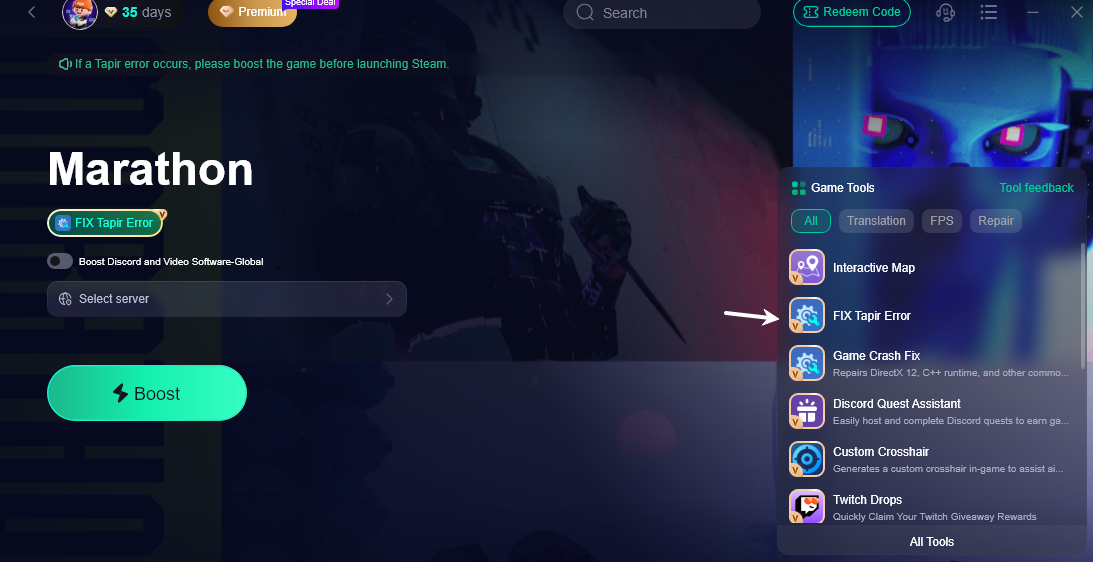
In the Game Tools panel, there’s a dedicated “Fix Tapir Error” option that automatically optimizes your connection route before launching Steam. This helps stabilize authentication and prevents the Tapir error when logging into the game.
For PC players, this is often the fastest way to determine whether the issue is routing-related rather than account-related.
Step 1: Click the Free Trial button to download and install LagoFast.
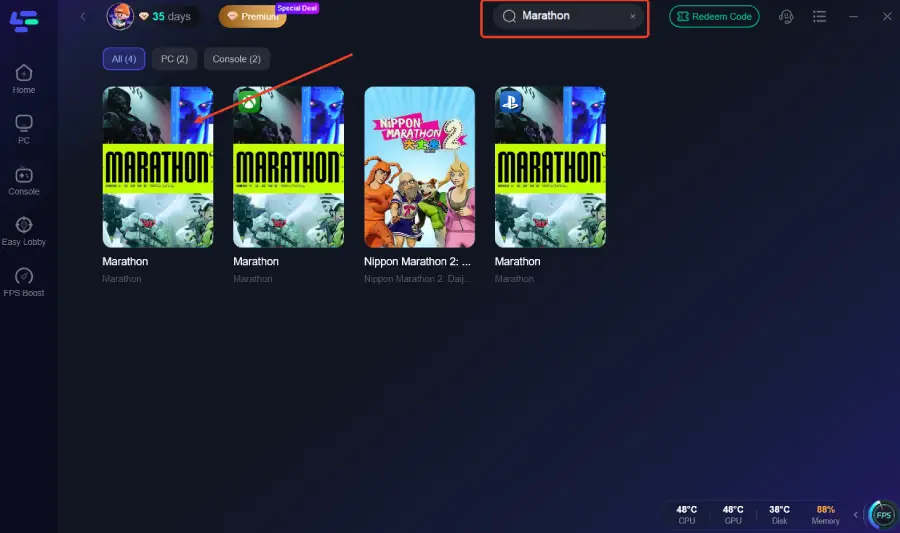
Step 2: Open LagoFast and add Marathon to the optimization list.
Step 3: In the Game Tools section, select “Fix Tapir Error.”
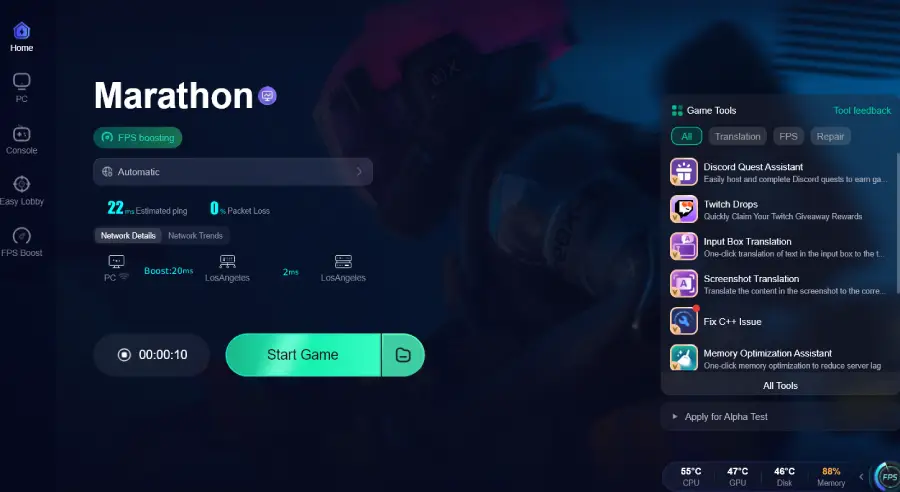
Step 4: Enable optimization and launch the game through LagoFast.
Part 5: Can You Manually Add Bungie/Steam IP Ranges?
Some community members shared Bungie and Steam authentication subnets and manually added them to VPN configs.
But:
- IP lists change
- Requires technical setup
- Not beginner-friendly
- No guarantee of stability
This is not a universal fix.
Is This Permanent?
Right now:
- Bungie has acknowledged increased Tapir reports.
- No official confirmation of a permanent CIS ban for Marathon.
- Similar past cases (Destiny 2) were resolved after investigation.
So this could be:
- A legal compliance filter
- A third-party authentication blacklist
- A routing misconfiguration
Without an official statement, everything remains partially speculative.
Part 6: What You Should Do Now
If you're getting Tapir in Russia:
- Restart router and PC.
- Flush DNS.
- Check Steam region.
- Avoid unstable free VPNs.
- Use a stable game routing optimizer.
- If access remains impossible, request a Steam refund under “multiplayer not working.”
Final Take
Marathon Tapir error in Russia is not just “bad internet.”
It’s almost certainly:
- A routing-level block
- Or authentication filtering affecting CIS IP ranges
Until Bungie provides full transparency, the only reliable workaround is stabilizing your connection route.

Boost Your Game with LagoFast for Epic Speed
Play harder, faster. LagoFast game booster eliminates stutter and lags on PC, mobile, or Mac—win every match!
Quickly Reduce Game Lag and Ping!
Boost FPS for Smoother Gameplay!