
Love and Deepspace is the latest sci-fi romance title from the acclaimed Mr. Love series. While originally built for mobile, the game’s stunning 3D visuals, immersive first-person dates, and interactive storytelling make it perfect for a PC or Mac experience. Emulators bring that experience to life—enabling high-fidelity graphics, smoother performance, and precise controls.
If you’re looking to elevate your Love and Deepspace experience on PC, this guide provides everything you need—from installation to optimization.

Part 1: Introduction to Love and Deepspace
Part 2: Can I Download Love and Deepspace on PC?
Part 3: How to Download Love and Deepspace on PC
Part 4: Recommended Emulators for Love and Deepspace
Part 5: How to Enhance Game Experience in Love and Deepspace on PC
Part 1: Introduction to Love and Deepspace
Love and Deepspace is the first 3D otome title that merges sci‑fi action and emotional storytelling. Set in the cosmically influenced universe of Deepspace, players take on the role of a Deepspace Hunter, wielding "Evol" powers to fight alien Wanderers and weave heartfelt bonds with love interests like Xavier, Rafayel, Zayne, Sylus, and Caleb. The game also supports real-time 3D interactive cutscenes, custom avatar appearance and voice, and a rich mix of gacha and story missions—all hallmarks that set it apart from standard mobile romance titles.
Part 2: Can I Download Love and Deepspace on PC?
Yes—you can! While not officially released as a native executable, Love and Deepspace runs excellently on PC and Mac using Android emulator software. The most recommended option is MuMuPlayer (particularly MuMu Player 12), which offers native-level performance, keyboard and mouse mapping, multi-instance support, and high‑FPS rendering modes like 120 Hz or higher. BlueStacks is another solid choice, officially supporting Love and Deepspace with enhancements for multitasking, real‑time translation, scripting, and high FPS gameplay.
Part 3: How to Download Love and Deepspace on PC
Via MuMuPlayer (Windows / macOS)
- Visit the MuMuPlayer official website and download the latest version for Windows or macOS.
- Install and, if possible, enable virtualization technology (VT) on your PC to improve emulator performance and stability.
- Launch MuMuPlayer, sign in to Google to access the Play Store, and search “Love and Deepspace” in the App Center. If not visible, install the APK manually.
- Download and install the game, then launch it from your emulator’s interface.
Via BlueStacks
- Download and install BlueStacks 5 (Windows or macOS).
- Sign in to your Google account, search for Love and Deepspace, and install it. BlueStacks delivers useful features like Eco Mode, multi-instance sync, and script automation for repetitive tasks.
Part 4: Recommended Emulators for Love and Deepspace
MuMuPlayer / MuMu Player 12
- Developed by NetEase, optimized for Love and Deepspace and other mobile games.
- Supports DirectX or Vulkan rendering, VT acceleration, high-frame-rate settings, smart controls, and multi-instance support for running multiple accounts or games simultaneously.
- Compatible with the Apple Silicon Mac and tailored for Apple‑M processors.
BlueStacks 5
- A widely trusted emulator with robust support for otome games and high-efficiency features.
- Known for its macro scripting, real-time translation, multi‑instance sync, and high FPS environments. It’s an excellent alternative if you're already familiar with the BlueStacks ecosystem.
Why These Emulators?
- They produce little-to-no lag, offer controls tailored for romance gaming, and create a visually richer experience than a mobile screen can provide. Reddit users also affirm using the latest MuMu 12 build with DirectX mode ensures smoother compatibility and performance.
Part 5: How to Enhance Game Experience in Love and Deepspace on PC
Play mobile games like Love and Deepspace on PC relies on consistent online connectivity. LagoFast Game Booster is a network optimization service designed to:
- Reduce ping, packet loss, and connection instability—especially important within emulators
- Automatically route traffic through optimal, low-latency servers
- Provide background optimization without impacting system performance
Players report significantly smoother loading, better matchmaking, and reduced stutter when running through emulators with LagoFast enabled.
How to use LagoFast to Boost Emulator and Optimize Love and Deepspace Gaming Experience on PC:
Step 1: Begin by clicking the Free Trial button to download and install the LagoFast Free Trial.
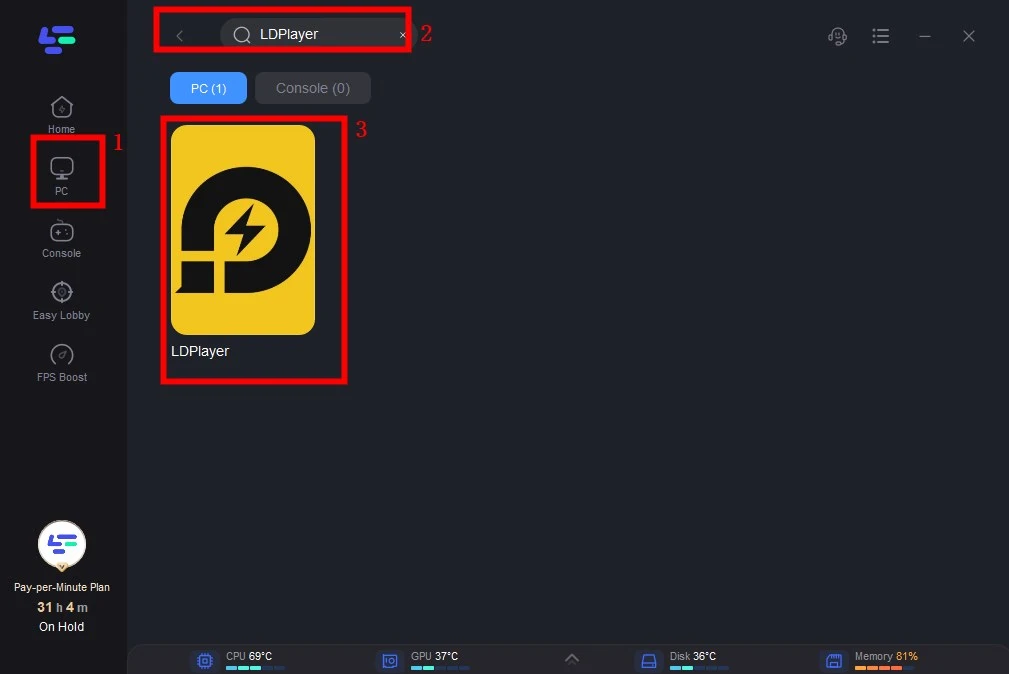
Step 2: Open LagoFast then click the PC button on the left and search the emulator you utilized like LDPlayer in the search bar, click it after appearing.
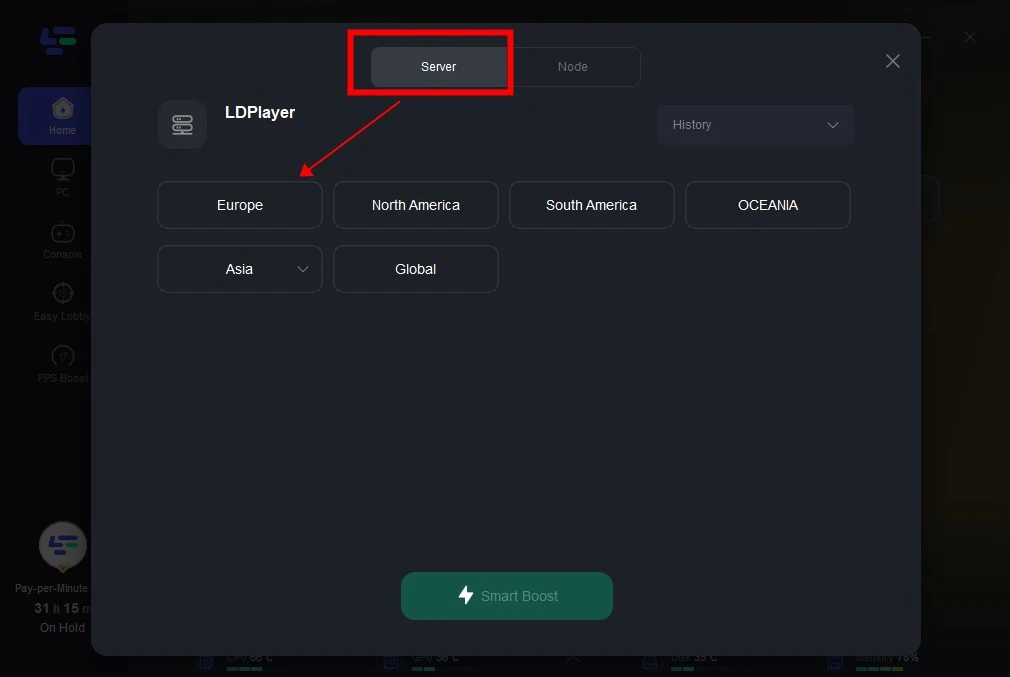
Step 3: Click on “Server” to change to a better server that ensures smooth gameplay, then click on “Smart Boost”.
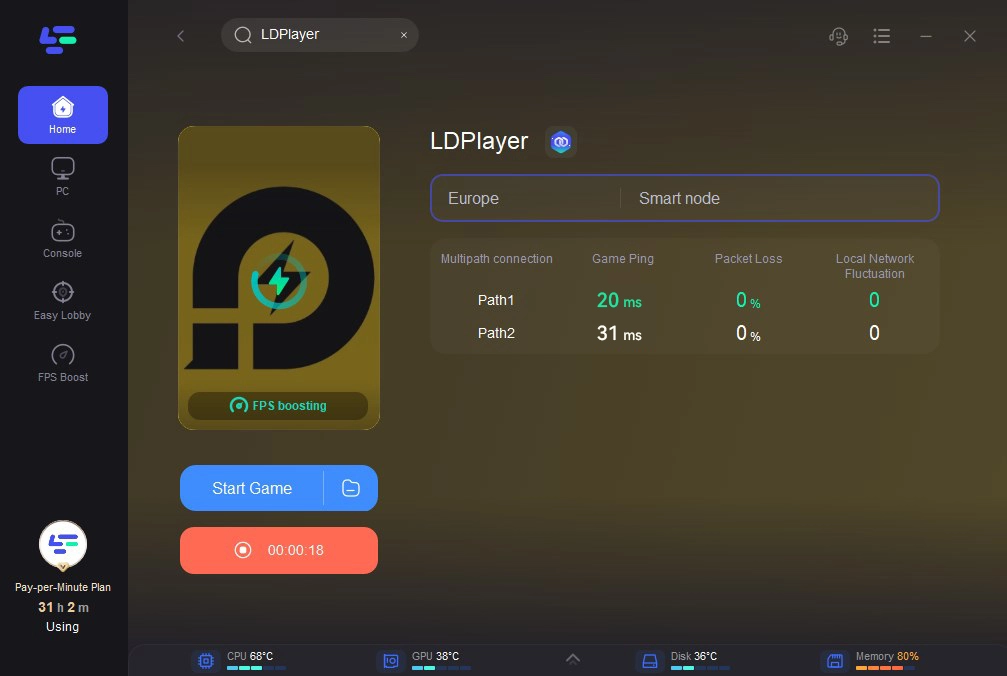
Step 4: Check the specific game ping, packet loss, and multiple path connection on the right side. Finally, click the “Start Game” to play the game.
How to use LagoFast Game Booster on Mobile
Step 1: Visit the official website of LagoFast, download the LagoFast Mobile APK file, and follow the prompts to complete the installation.

Step 2: Search Love and Deepspace and click the result.
Step 3: Choose the Server you like, then click the Boost button.
Step 4: After completing the above network optimization settings, the FPS drops issue will be easily resolved.
Part 6: FAQs
Q1: Will Love and Deepspace run on any mobile game emulator?
Most modern emulators work, but MuMuPlayer and BlueStacks are recommended due to stability, performance optimization, and broad compatibility.
Q2: Why does the game crash in chapter 8 with heavy cutscenes?
Some mobile devices (especially lower-end ones) may struggle with memory or rendering. Running cutscenes via MuMuPlayer or BlueStacks on PC avoids that crash entirely.
Q3: Is playing via emulator allowed?
While not officially supported, using emulators like MuMu or BlueStacks is common and generally accepted in community practice. Just avoid modifying game files or using cheats.
Q4: How do I sync progress between my mobile device and emulator?
Ensure you log into the same account (Google, Apple ID, or game-specific login) across both platforms—progress should transfer seamlessly.
Q5: What’s the best emulator for low-spec PCs?
MuMuPlayer is optimized for low RAM usage and high FPS even on modest hardware. BlueStacks Eco Mode is a close alternative for balancing multiple instances and low performance footprint.
Conclusion
Playing Love and Deepspace via emulator unlocks the full visual and interactive potential of the game—on a large screen with smoother controls and faster performance. MuMuPlayer and BlueStacks deliver the best experience, especially when paired with optimizations like high FPS, VT support, and the optional LagoFast Game Booster for improved network stability. Whether you’re reliving intense story chapters or enjoying romantic interactions, this setup transforms your journey into Linkon City. Ready to elevate your PC gameplay? Install an emulator, optimize your settings, and dive into cosmic romance like never before.
Boost Your Game with LagoFast for Epic Speed
Play harder, faster. LagoFast game booster eliminates stutter and lags on PC, mobile, or Mac—win every match!
Quickly Reduce Game Lag and Ping!
Boost FPS for Smoother Gameplay!