

Lineage Classic is a classic PvP-focused MMORPG where progression depends on understanding the details—skill effects, item stats, quest objectives, and system messages all directly affect how efficiently you build your character. The game officially supports only Korean and Traditional Chinese, which can make it challenging for players who aren’t familiar with those languages to fully understand what’s happening on screen. When key information isn’t clear, even simple decisions can slow your progress. This guide explains how to overcome that language barrier and enjoy the game with a smoother, more complete experience.

- ✅ Reduce Lag and High Ping.
✅ Boost FPS at the Same Time.
✅ Support 2000+ Popular Online Games.
✅ Change Server without Latency.
✅ Boost Game Loading Speed.
Part 1: Lineage Classic Release Date, Platforms, and Game Features
Part 2: What Languages Does Lineage Classic Support?
Part 3: The Best Translation Tool to Play Lineage Classic Smoothly
Part 1: Lineage Classic Release Date, Platforms, and Game Features
Release Date and Platforms
Lineage Classic officially began its free pre-open phase on February 7, 2026, in Korea and Taiwan. It then transitioned to a monthly subscription model with full official launch on February 11, 2026.
The game is available exclusively on PC through official regional servers operated by NCSOFT.
Game Features
Lineage Classic keeps the core systems that defined early MMORPG design. Progression is slower, competition is real, and player interaction drives much of the experience.
- Open-World PvP: PvP is part of the core design. Outside of safe zones, encounters with other players are always possible. Your awareness, gear preparation, and positioning matter at all times.
- Castle Sieges & Clan Warfare: Castle sieges are a central feature of the game. Clans compete for control, and winning requires coordination, planning, and consistent participation from members.
- High-Risk Leveling: Leveling is grind-focused, and death carries penalties. Losing experience or progress makes every fight and farming session feel meaningful.
- Player-Driven Economy: Items, materials, and equipment circulate through player trading. Managing resources wisely is part of long-term progression.
- Detailed Skill and Item Systems: Skills, buffs, debuffs, and equipment stats are explained through in-game text. Understanding these descriptions is essential for building your character effectively.
Part 2: What Languages Does Lineage Classic Support?
Lineage Classic officially supports Korean and Traditional Chinese in-game. These are currently the only available language options on official servers.
There is no built-in support for English, Spanish, Russian, or other major languages. This means the full interface—quests, skill descriptions, item stats, NPC dialogue, and event notices—appears only in Korean or Traditional Chinese.
Because Lineage Classic relies heavily on text-based systems, not understanding the language can slow progression and make character decisions less efficient. For many non-Korean and non-traditional Chinese players, this quickly becomes a real gameplay limitation.
Part 3: The Best Translation Tool to Play Lineage Classic Smoothly
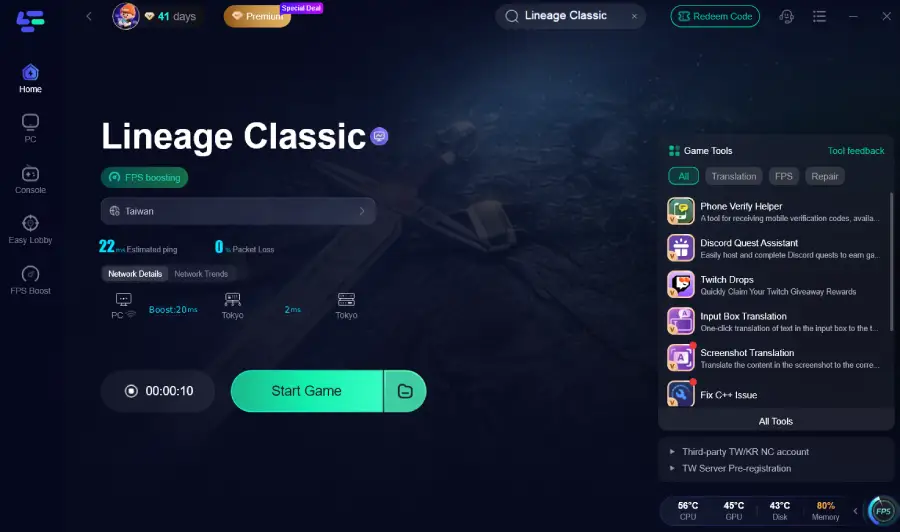
For players whose native languages aren’t supported in Lineage Classic, such as English, Spanish, Russian, or others, but still want to fully enjoy the game, LagoFast is an excellent choice. LagoFast's One-Click Translation feature allows you to translate game text with one click for a seamless gameplay experience. This tool supports English, Spanish, Ukrainian, Filipino, French, Russian, Brazilian Portuguese, and Vietnamese; you can clearly read quests, skill effects, and system messages in real time without breaking immersion.
Beyond translation, LagoFast also improves overall performance. It helps reduce ping, minimize packet loss, stabilize network connections, optimize routing, and boost FPS. Additional utilities, such as its Phone Verify Helper Tool, further streamline the experience. For a competitive, text-heavy MMORPG like Lineage Classic, combining accurate translation with stable performance simply makes the game easier and smoother to play.
How to Use LagoFast for Lineage Classic Translation
Step 1: Click the Free Trial button to download and install LagoFast.
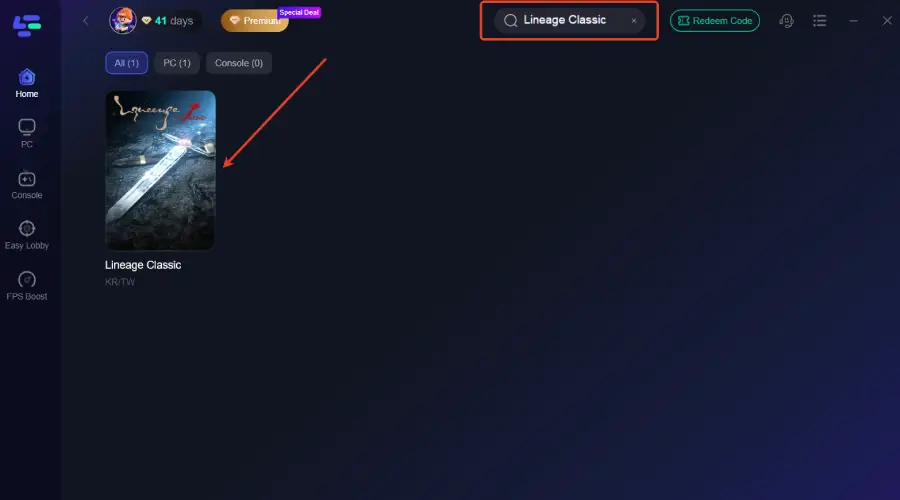
Step 2: After installation, search "Lineage Classic" in the search bar and select the game.
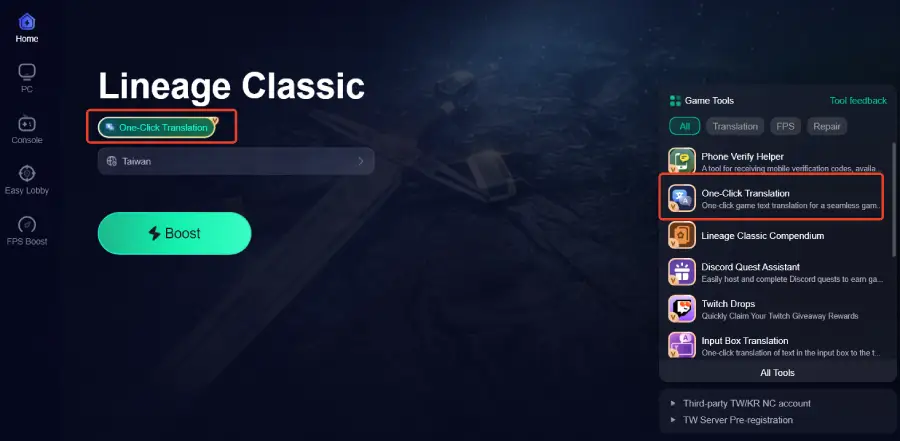
Step 3: Activate the Translation Tool—Click the One-Click Translation icon in LagoFast.
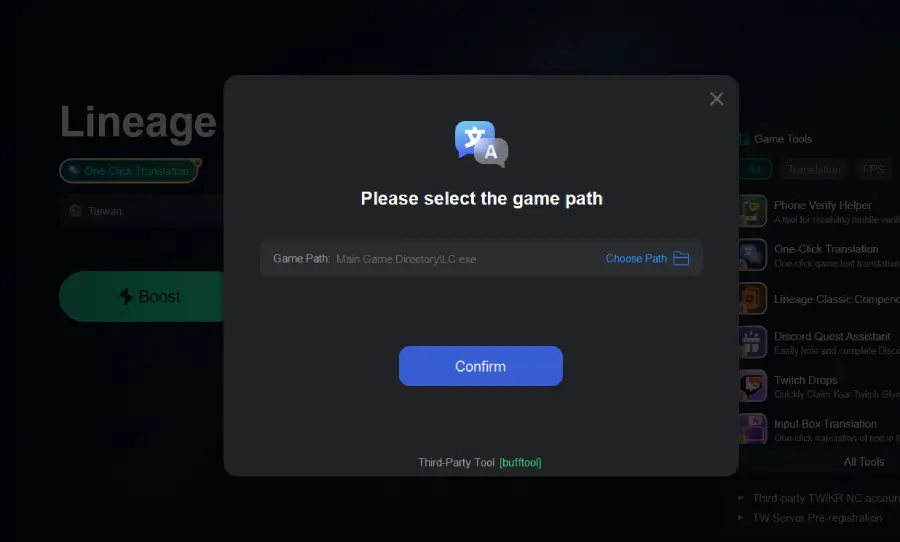
Step 4: Select the game file path and install the translated text file.
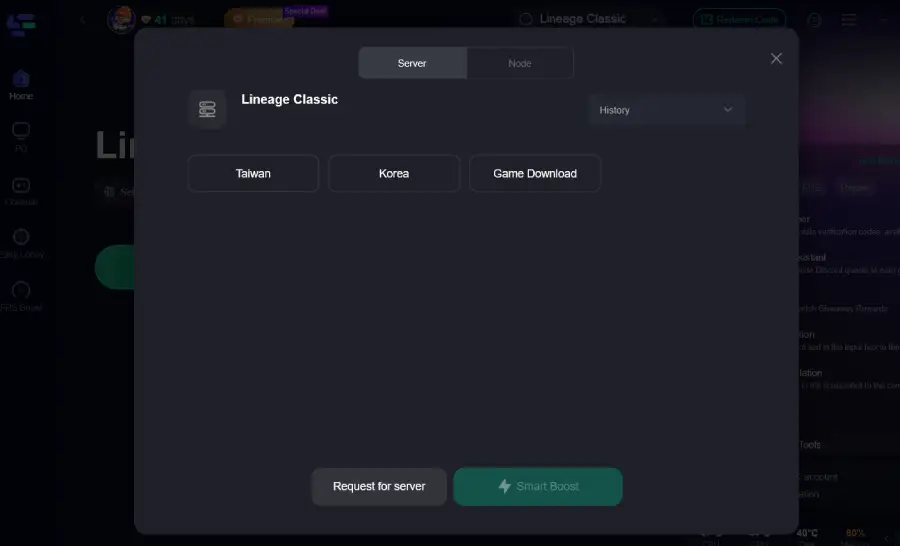
Step 5: Choose your preferred server node and click "Smart Boost" to start optimizing.
Step 6: Launch your game and enjoy smooth, optimized gameplay with lower ping and no stutter.
Conclusion
Lineage Classic is built around detail, strategy, and player competition, which makes understanding the game text essential. With official support limited to Korean and Traditional Chinese, many international players face a real language barrier. A tool like LagoFast’s One-Click Translation helps remove that obstacle while also improving connection stability and overall performance. If you want to enjoy the full depth of Lineage Classic without confusion or interruptions, having the right tools in place makes all the difference.

Boost Your Game with LagoFast for Epic Speed
Play harder, faster. LagoFast game booster eliminates stutter and lags on PC, mobile, or Mac—win every match!
Quickly Reduce Game Lag and Ping!
Boost FPS for Smoother Gameplay!