

Lineage Classic is one of the most beloved MMORPGs, known for its rich world, intense PvP battles, and challenging quests. But nothing ruins the fun faster than lag or high ping, especially during boss fights or crowded events. If your game feels slow, stutters, or responds late, don’t worry—this guide will explain why it happens and show practical ways to fix it so you can enjoy a smooth, seamless experience.

- ✅ Reduce Lag and High Ping.
✅ Boost FPS at the Same Time.
✅ Support 2000+ Popular Online Games.
✅ Change Server without Latency.
✅ Boost Game Loading Speed.
Part 1: Why Is Lineage Classic Lagging and Having High Ping?
Part 2: How to Fix Lineage Classic Lagging and High Ping?
Part 1: Why Is Lineage Classic Lagging and Having High Ping?
If your Lineage Classic gameplay feels choppy or your actions respond late, several factors could be causing lag and high ping. Knowing the causes will help you fix them faster.
Slow or Unstable Internet Connection
High ping often comes from fluctuating internet speed. Unstable connections make the game struggle to sync in real time, causing delayed actions, stutters, or rubber-banding.
Unstable Wi-Fi or Packet Loss
Even with good speed, wireless connections can be unreliable due to interference, distance, or channel congestion. Packet loss can make the game jittery or unresponsive.
ISP or Router Issues
Latency spikes can come from your ISP or router. Poor routing, outdated firmware, or overloaded equipment can cause lag. Restarting your router or contacting your ISP often helps.
Device Performance Limitations
Lag can occur if your PC or mobile device is underpowered. Running multiple apps can overload your CPU, GPU, or RAM, causing stutters or freezes, especially in crowded areas or boss fights.
Server-Side Congestion or Maintenance
Not all lag is on your side. Server overloads or maintenance can cause freezes, disconnects, or delays. Check server status before troubleshooting your setup.
Background Applications Using Bandwidth
Programs like downloads, streams, or cloud backups can consume bandwidth, making the game unresponsive even if your connection seems fine.
Part 2: How to Fix Lineage Classic Lagging and High Ping?
Use LagoFast—The Best Lineage Classic Lag and Ping Reducer
If you’re looking for the most effective way to fix high ping and lag in Lineage Classic, LagoFast is a top choice. Unlike basic network tweaks or temporary fixes, LagoFast is a professional game accelerator designed to optimize the connection between your device and the game servers. It can reduce ping, minimize packet loss, stabilize your network, and optimize routing. In addition, LagoFast offers tools to improve FPS, fix game issues, and other handy features, giving you a smoother, more responsive gaming experience.
Tutorial To Use LagoFast To Fix Lineage Classic Lag and High Ping:
Step 1: Click the Free Trial button to download and install Lagofast.
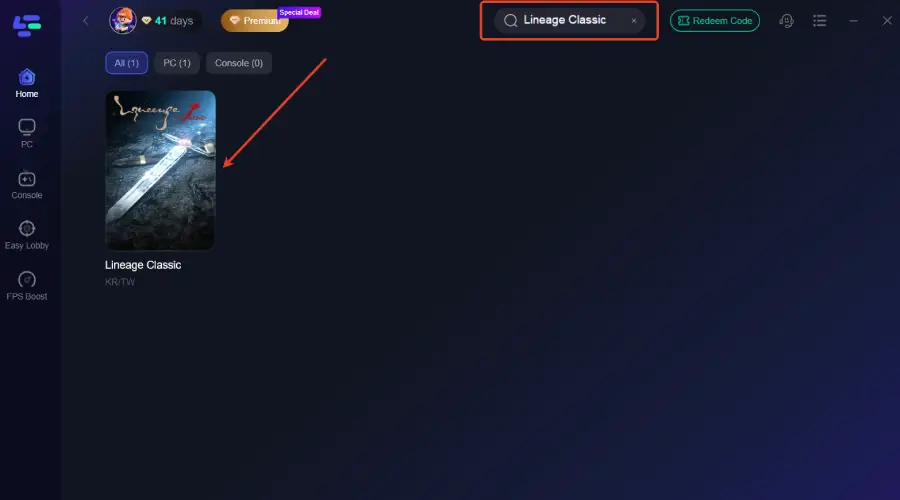
Step 2: After installation, search "Lineage Classic" in the search bar and select the game.
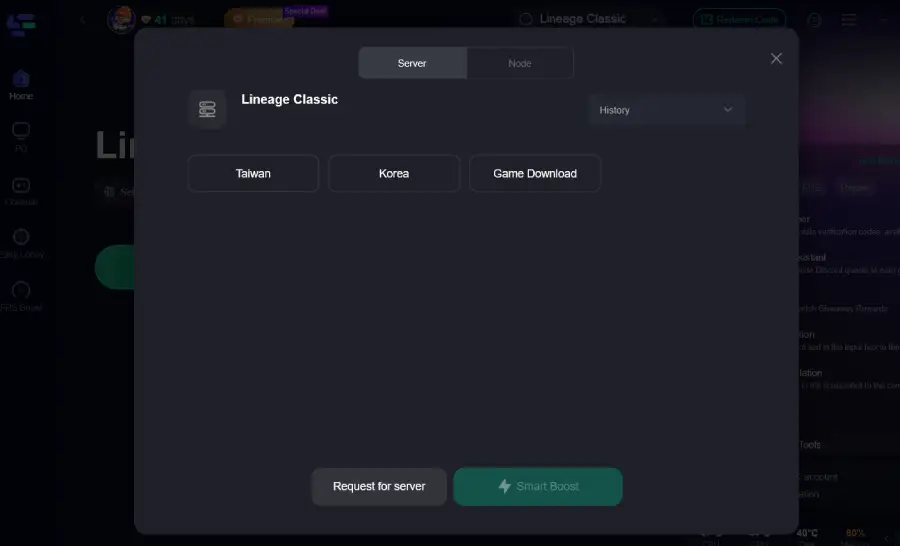
Step 3: Choose your preferred server node and click "Smart Boost" to start optimizing.
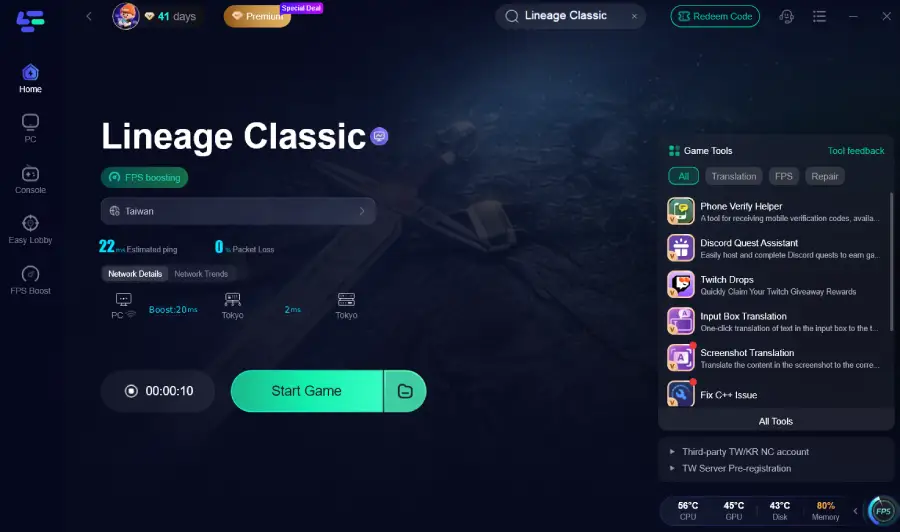
Step 4: Launch your game and enjoy smooth, optimized gameplay with lower ping and no stutter.
Improve Your Network Connection (Slow or Unstable Internet)
If your high ping is caused by a slow or unstable internet connection, here’s how you can fix it step by step:
Steps to Fix:
- Connect your device via Ethernet cable instead of Wi-Fi.
- Restart your modem/router to refresh the connection.
- Close other internet-heavy apps such as downloads or streaming services while gaming.
- Choose the game server closest to your location to reduce latency.
Optimize Wi-Fi or Reduce Packet Loss
If your Wi-Fi is unstable or you’re experiencing packet loss, follow these steps to stabilize your connection:
Steps to Fix:
- Move closer to your Wi-Fi router to strengthen signal.
- Switch to the 5GHz band if your router supports it.
- Reduce interference from other devices (microwaves, cordless phones, other networks).
- If problems persist, consider a wired connection or upgrade your network adapter.
Fix Device Performance Issues
If your device is underpowered or overloaded, these steps can help improve performance:
Steps to Fix:
- Close background apps consuming CPU, GPU, or RAM.
- Lower in-game graphics settings: reduce shadows, effects, and resolution.
- Restart your device to free up memory.
- If still lagging, consider upgrading hardware (add RAM, better GPU/CPU).
Handle Server Congestion or Maintenance
If the lag is caused by server-side issues, here’s what you can do:
Steps to Fix:
- Check official server status pages or social media updates.
- Avoid peak hours when servers are crowded.
- Wait patiently during maintenance or server issues.
Reduce Background Bandwidth Usage
If other programs are consuming network bandwidth, follow these steps to ensure smooth gameplay:
Steps to Fix:
- Pause or stop downloads, video streams, or cloud backups while playing.
- Enable QoS (Quality of Service) on your router to prioritize gaming traffic.
Conclusion
Lag and high ping can seriously affect your Lineage Classic experience, but most issues have practical solutions. By using LagoFast, optimizing your network, managing device performance, and controlling background bandwidth, you can enjoy smoother, more responsive gameplay. Understanding the cause of your lag is the first step—then these simple fixes can help you get back to the action without interruptions.

Boost Your Game with LagoFast for Epic Speed
Play harder, faster. LagoFast game booster eliminates stutter and lags on PC, mobile, or Mac—win every match!
Quickly Reduce Game Lag and Ping!
Boost FPS for Smoother Gameplay!