
The world of online gaming is dynamic, and one key aspect of enjoying your experience is ensuring that the server is running smoothly. For players of Limbus Company, staying updated on the server status is essential to avoid interruptions during gameplay. This article provides a comprehensive guide on checking the Limbus Company server status and what you can do if you face any issues.

- Why Is Server Status Important?
- How to Check the Limbus Company Server Status
- What to Do if the Server Is Down
- Common Server Issues in Limbus Company
- Optimize Your Limbus Company Experience with LagoFast
1. Why Is Server Status Important?
Before diving into the steps to check the Limbus Company server status, let’s briefly discuss why it’s essential:
- Uninterrupted Gameplay: A stable server ensures that your gameplay experience is smooth, without lag or crashes.
- Event Participation: Limbus Company regularly hosts special events, which might be inaccessible during server downtimes.
- Bug Fixes and Updates: Server maintenance is often necessary for bug fixes, updates, and performance improvements.
2. How to Check the Limbus Company Server Status
Here are the most reliable methods to check the Limbus Company server status and ensure you’re not facing any issues:
1. Official Website
The official Limbus Company website is the best source for up-to-date server information. The website typically posts server maintenance schedules, known outages, and any other relevant status updates. Keep an eye on the website for any news about ongoing server issues.
2. Limbus Company Social Media Channels
Limbus Company is active on several social media platforms, including Twitter, Facebook, and Discord. The game’s social media pages often provide real-time updates about server status, maintenance schedules, and unexpected outages. This is an excellent resource to stay in the loop if the official website isn’t enough.
3. Gaming Forums and Communities
Gaming communities like Reddit and specialized Limbus Company forums often feature discussions about server issues. Other players may report problems, and moderators or official representatives from the game might confirm whether the servers are down. You can also find troubleshooting tips and other helpful information in these communities.
4. Server Status Websites
Websites like DownDetector and IsItDownRightNow track the server status of various online games, including Limbus Company. These websites monitor user reports and display a live server status graph, showing any fluctuations in server availability.
3. What to Do if the Server Is Down
If you check the Limbus Company server status and find that the server is down, here are a few steps you can take:
1. Wait for the Official Resolution
Often, server outages are temporary and related to maintenance. If the servers are down for maintenance, the official channels will inform you of the expected resolution time.
2. Check Your Internet Connection
Sometimes, the issue might be on your end. Make sure your internet connection is stable and test by visiting other websites or playing other online games. If your internet is working fine but the Limbus Company servers are still down, it’s likely an issue on their side.
3. Contact Customer Support
If the server is down for an extended period or if you’re experiencing frequent connectivity issues, it might be time to contact Limbus Company’s customer support. They can provide personalized assistance and updates on when to expect the servers to be back online.
4. Common Server Issues in Limbus Company
While occasional downtime is inevitable, here are some of the common server issues that players of _Limbus Company_may experience:
1. Server Maintenance
Scheduled maintenance is common in many online games, and Limbus Company is no exception. This usually happens to implement new features, updates, or bug fixes. Always check for maintenance announcements before attempting to log in.
2. Server Overload
If a large number of players are trying to log in simultaneously, such as after a new update or event, the servers can become overloaded, leading to login errors or slower gameplay.
3. Connection Issues
Some players may experience connection issues due to their ISP (Internet Service Provider) or local network configuration. These issues are not related to the Limbus Company servers, but it can still disrupt gameplay.
4. Regional Server Outages
Limbus Company may have different servers for various regions. Sometimes, one region’s server might experience issues while others remain unaffected. Always check the regional server status if you’re having trouble connecting.
5. Optimize Your Limbus Company Experience with LagoFast
If you’re experiencing lag, high ping, or sudden disconnections while playing Limbus Company, using a game booster like LagoFast can significantly enhance your connection. Designed specifically for gamers, LagoFast helps you achieve smoother gameplay by optimizing your network route and reducing latency.
Key benefits of using LagoFast:
- Lower ping and reduced lag during matches
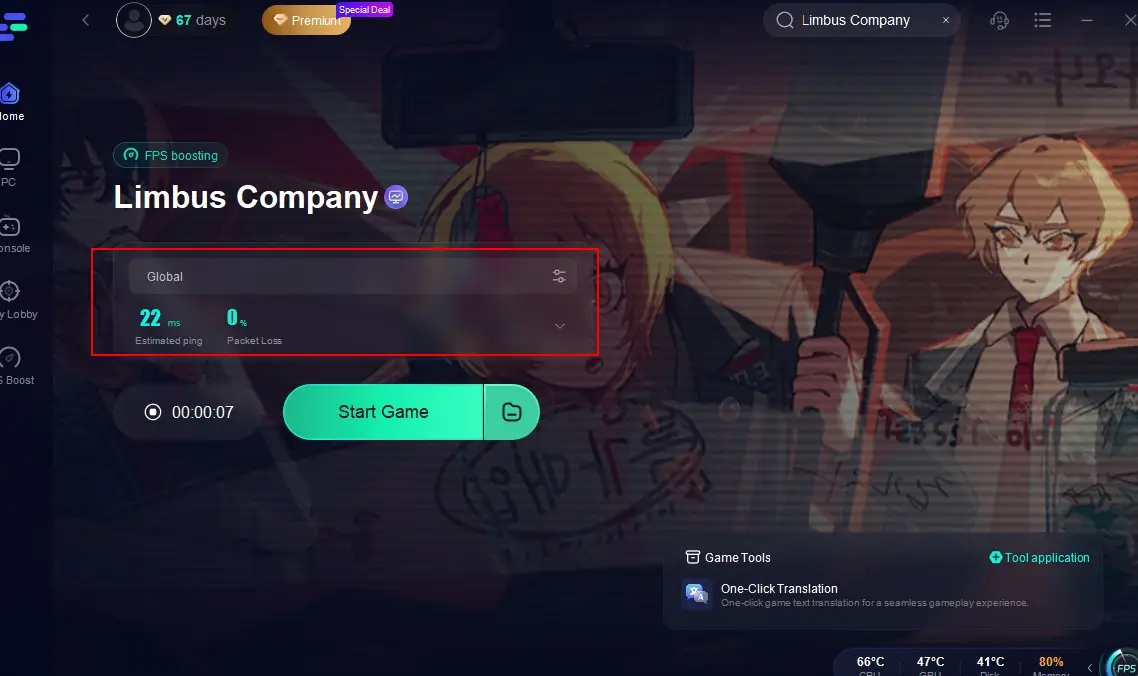
- Real-time monitoring of ping, packet loss, and network type
- Smart routing to the most stable game servers
- Easy setup with user-friendly interface
How to Use LagoFast for Limbus Company:
Step 1: Install LagoFast on your PC by clicking the "Free Trial" button.
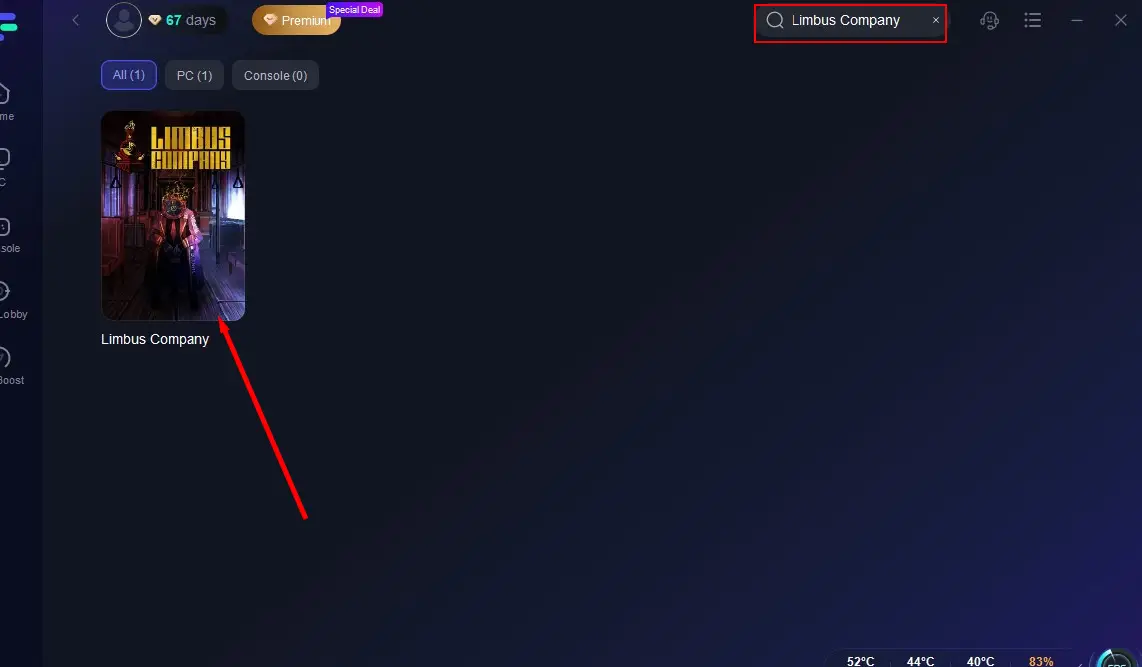
Step 2: Open LagoFast, search for "Limbus Company" and click on it.
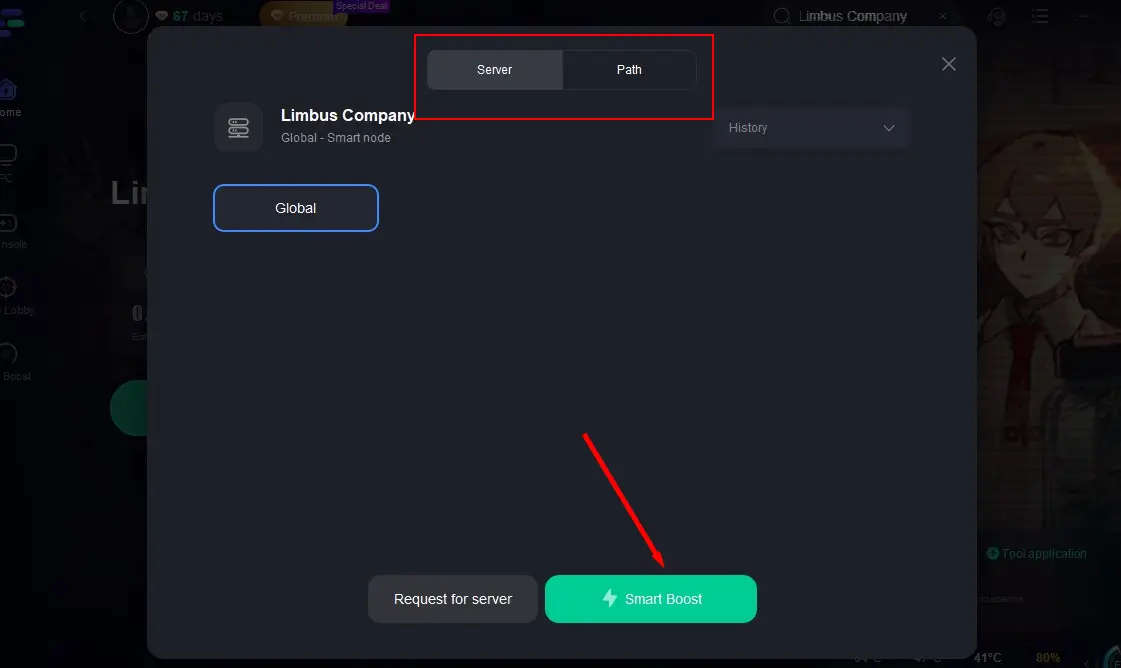
Step 3: Click on "Select Server," choose the global server, and then switch to a node with good performance. Click on "Smart Boost".
Step 4: Check the real-time game data, return to Limbus Company, and enjoy a smooth, lag-free, and stutter-free gaming experience!
Tutorial on how to use LagoFast's game translation tool:
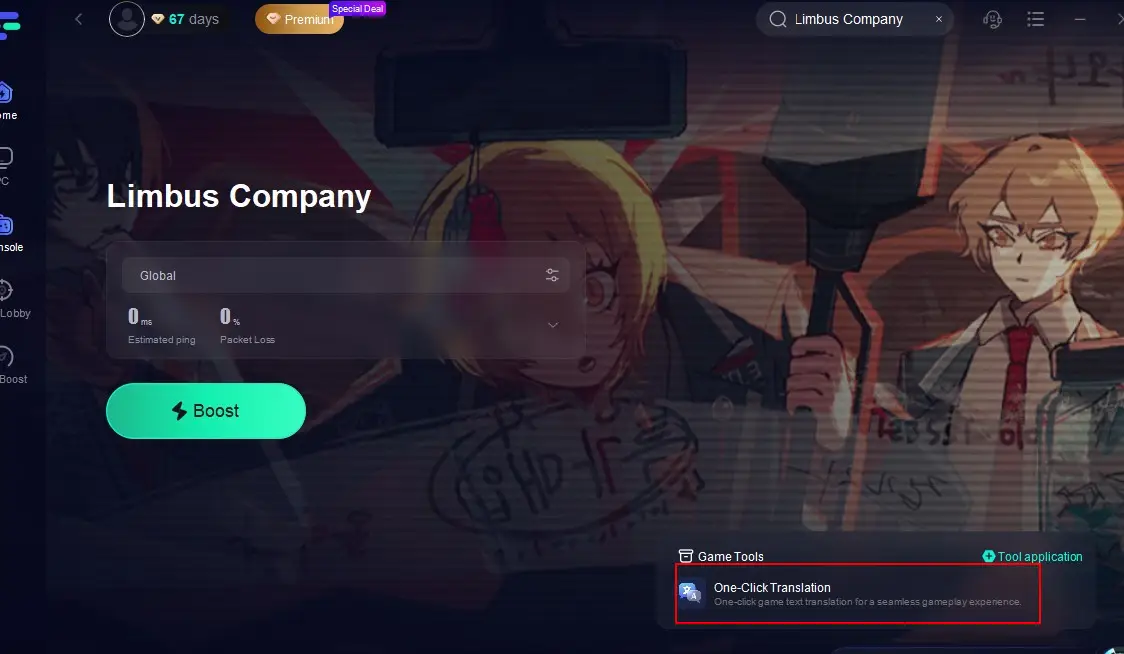
Step 1: After selecting a suitable server to initiate the acceleration process, click the "One-Click Translation Tool" located in the bottom right corner.
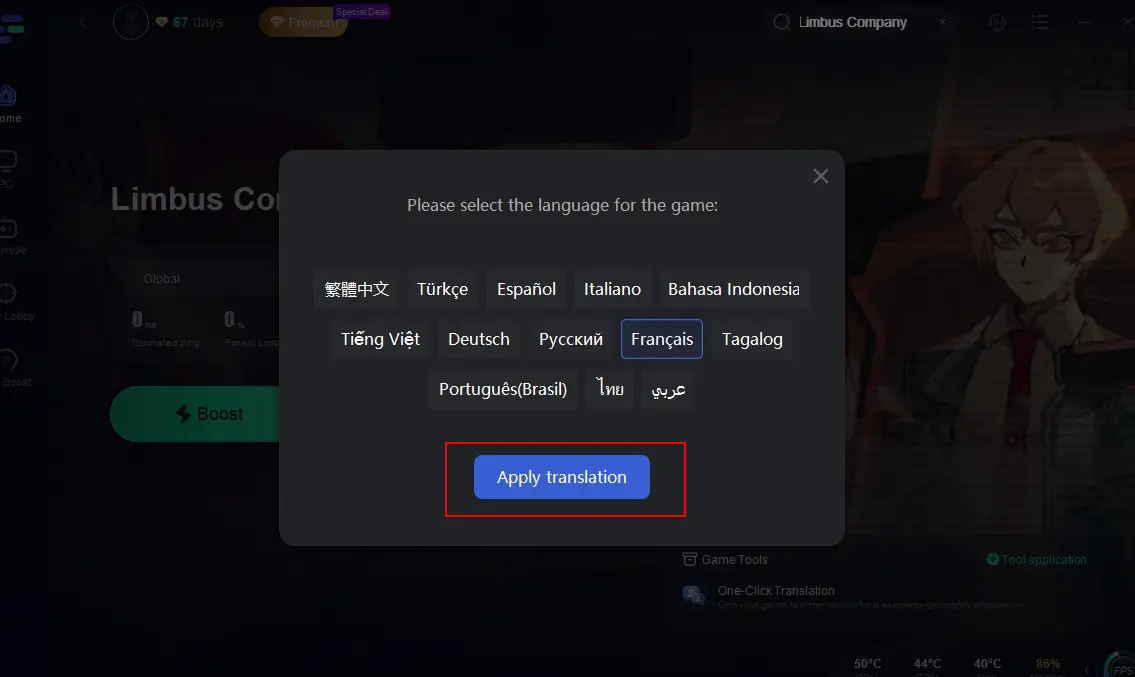
Step 2: Choose the target language you want to translate into and click the "Apply Translation" button.
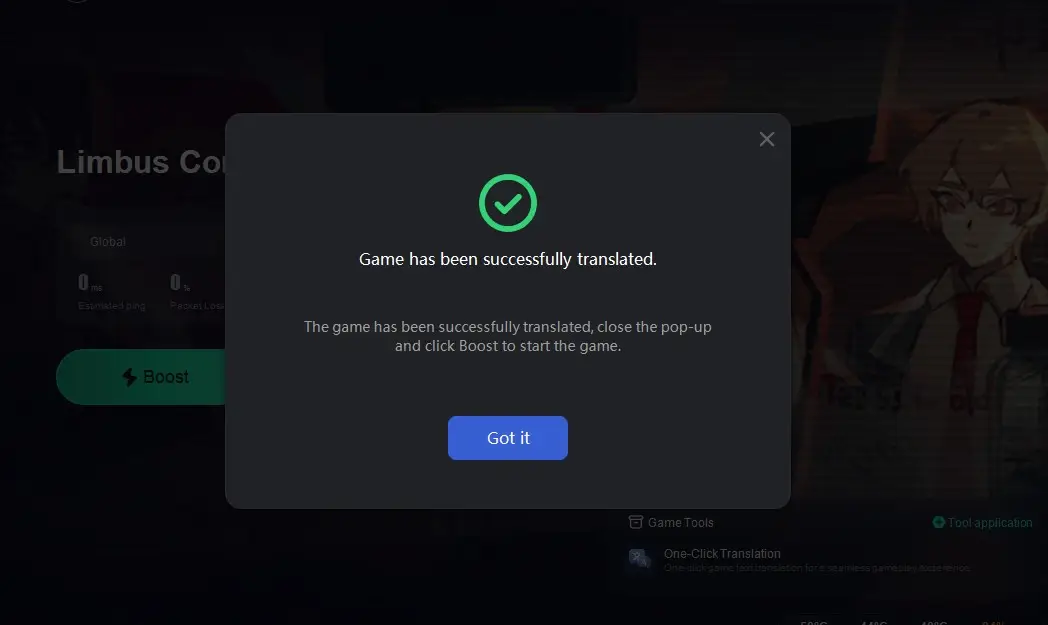
Step 3: Once the translation is complete, simply return to the game, and you'll be able to break through language barriers and play in your native language! If you wish to switch languages, just go back to LagoFast and reselect your preferred language.

With just a few quick steps, you can enjoy a smoother, more responsive Limbus Company session. Whether you’re diving into a story event or climbing the ranks, LagoFast ensures your gameplay stays uninterrupted.
Conclusion
Staying informed about the Limbus Company server status is crucial for a seamless and enjoyable gaming experience. Whether through the official website, social media, or third-party status tracking sites, you have several reliable ways to check if the servers are up and running. If you face issues, always follow the troubleshooting steps or reach out to customer support for assistance. By keeping an eye on the server status and staying proactive during outages, you can ensure that your _Limbus Company_experience remains uninterrupted and enjoyable.
Boost Your Game with LagoFast for Epic Speed
Play harder, faster. LagoFast game booster eliminates stutter and lags on PC, mobile, or Mac—win every match!
Quickly Reduce Game Lag and Ping!
Boost FPS for Smoother Gameplay!