
For a League of Legends (LoL) player, nothings is more disheartening than double-clicking the game icon, only to be met with… nothing. The client refuses to launch, the screen stays blank, or an error flashes briefly before vanishing. The infamous "LoL Not Starting" issue can leave even seasoned players feeling helpless. But fear not—this guide is your lifeline. We'll dive into the root causes of this problem and walk you through proven fixes to revive your game and reclaim your spot on the Rift.
Vietnamese version: Cách sửa lỗi LoL không khởi động được? - Thành công 100%

- ✅ Reduce Lag and High Ping.
- ✅ Boost FPS at the Same Time.
- ✅ Support 2000+ Popular Online Games.
- ✅ Support servers in 60+ countries and 150+ cities.
Part 1: Why won't LoL start? Common causes explained
Part 2: Step-by-step fixes for LoL won't start
Part 3: How to enhance gaming experience in LoLwith LagoFast?
Part 1: Why won't LoL start? Common causes explained
The "LoL Won't Start" issue can stem from a variety of technical hiccups. Here are the most frequent causes:
- Corrupted Game Files: Missing or damaged client files.
- Outdated Drivers/Software: Graphics drivers, .NET Framework, or DirectX issues.
- Antivirus/Firewall Conflicts: Overprotective security tools blocking the game.
- Administrator Privileges: LoL requires elevated permissions to run.
- Background App Interference: Discord, overlays, or other software clashing with the client.
- Insufficient System Resources: Low RAM, CPU overload, or outdated hardware.
Part 2: Step-by-step fixes for LoL won't start
Follow these solutions in order, starting with the quickest fixes.
1. Run LoL as Administrator
LoL often requires admin rights to access critical system files.
- Right-click the LoL shortcut or LeagueClient.exe (located in Riot Games\League of Legends).
- Select "Run as Administrator".
If the game launches, make this permanent:
- Right-click the shortcut > Properties > Compatibility tab > Check "Run as Administrator" > Apply.
2. Close Background Apps and Overlays
Third-party apps like Discord, MSI Afterburner, or Steam overlays can conflict with LoL.
- Press Ctrl + Shift + Esc to open Task Manager.
- End tasks for: Discord; Razer Synapse; Nvidia GeForce Experience/ShadowPlay; Any screen-recording tools (OBS, XSplit).
- Relaunch LoL.
3. Repair Game Files via Hextech Repair Tool
Riot's official repair tool scans and fixes corrupted files.
- Download the Hextech Repair Tool.
- Run the tool and select "League of Legends".
- Click "Start Scan" and follow prompts to repair issues.
4. Update Graphics Drivers
Outdated GPU drivers are a common cause of game startup failures.
- Nvidia Users:
Open GeForce Experience > Drivers tab > Check for Updates.
Install the latest driver and restart your PC.
- AMD Users:
Open Radeon Software > Updates section.
Download and install the recommended driver.
5. Disable Antivirus and Firewall Temporarily
Security software might mistakenly flag LoL as a threat.
- Windows Security: Go to Virus & Threat Protection > Manage Settings > Turn off Real-Time Protection.
- Third-Party Antivirus: Disable the antivirus temporarily via its system tray icon.
- Attempt to launch LoL. If successful, whitelist LoL in your antivirus: Add LeagueClient.exe, League of Legends.exe, and the Riot Games folder to exclusions.
6. Perform a Clean Reinstall of LoL
If all else fails, a fresh install eliminates deep-seated issues.
Uninstall LoL via Control Panel > Programs.
Manually delete leftover files:
- Navigate to C:\Riot Games and delete the League of Legends folder.
- Clear the ProgramData folder: C:\ProgramData\Riot Games.
Download the latest installer from the official LoL site.
Reinstall the game on a different drive if possible (e.g., D:\Riot Games).
Part 3: How to enhance gaming experience in LoLwith LagoFast?
Even though League of Legends has reigned as a titan in the gaming industry for over a decade, its client remains infamous for persistent bugs—a struggle familiar to every dedicated player. Integrating LagoFast into your setup can dramatically curb these recurring frustrations, thanks to its game-changing capabilities:
- Lower Ping: LagoFast employs smart routing algorithms to analyze real-time data traffic, automatically switching to the fastest server pathways. This cuts down transmission delays, eradicates lag spikes, and delivers buttery-smooth matches.
- Connextion Stability: Backed by a sprawling network of servers in 60+ countries and 150+ cities, LagoFast ensures players always have access to high-performance, low-latency connections.
- FPS Optimization: By minimizing ping fluctuations and stabilizing latency, LagoFast dynamically enhances frame rate consistency, elevating both visual clarity and responsiveness.
Here's how to supercharge your League of Legends gameplay with LagoFast:
Tutorial to use LagoFast:
Step 1: Click the Free Trial button to download and install LagoFast.
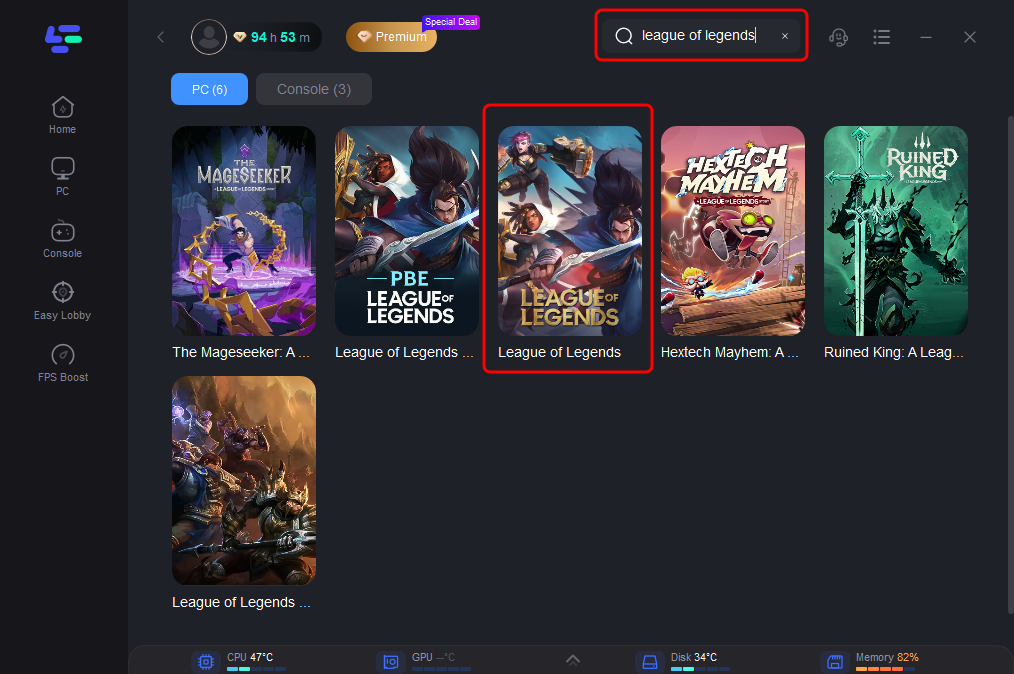
Step 2: Open LagoFast then click the PC button on the left and search League of Legends in the search bar, click it after appearing.
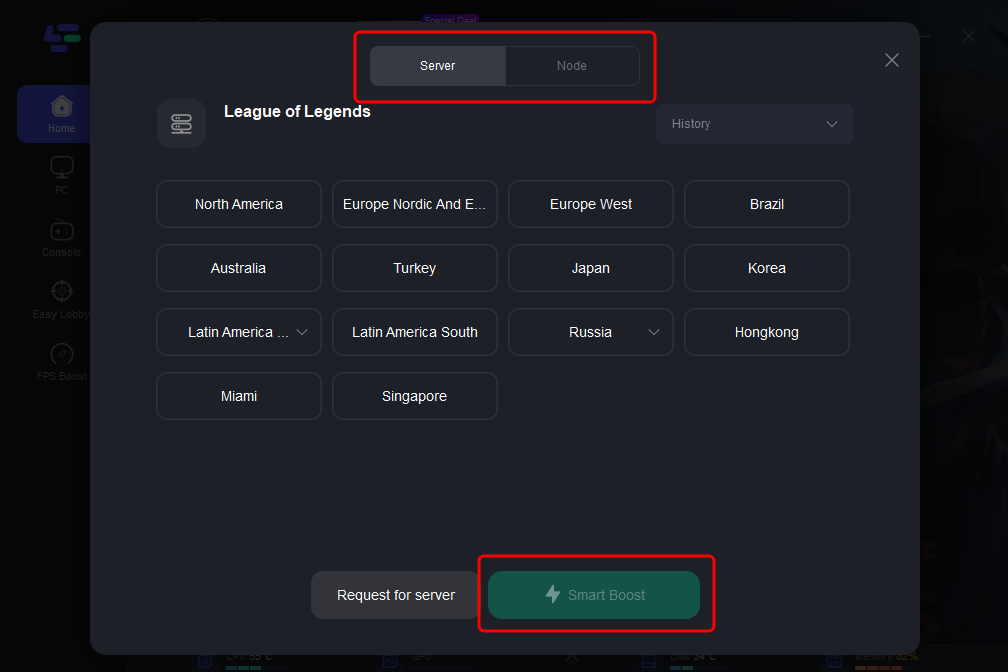
Step 3: Click on “Server” to change to a better server that can enhance the gaming experience, then click on “Smart Boost”.
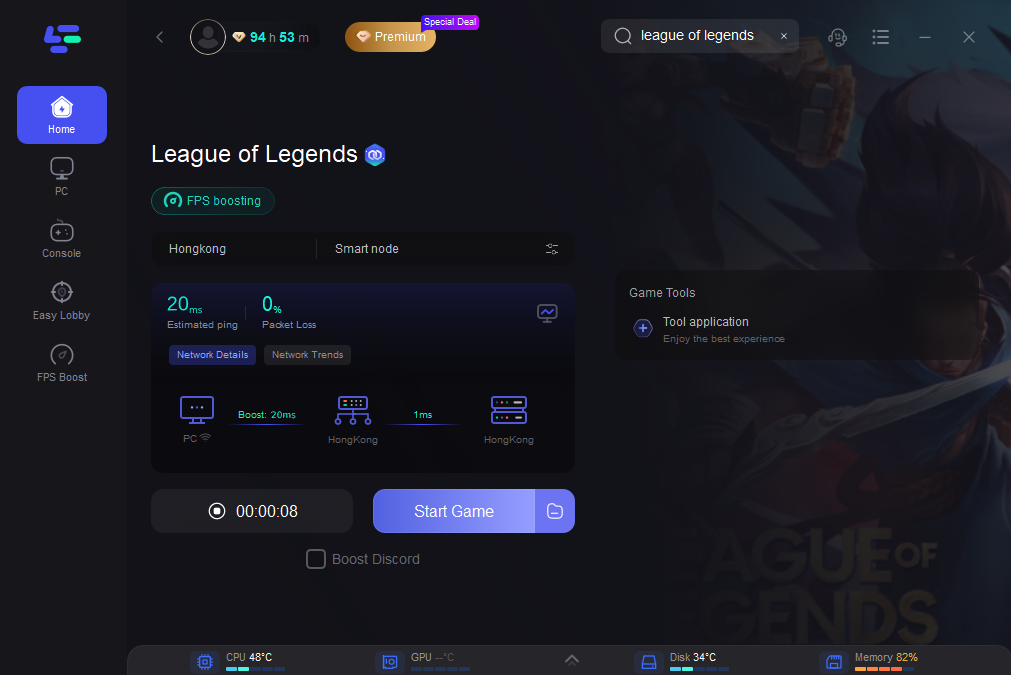
Step 4: Check the specific game ping, packet loss, and multiple path connection on the right side. Finally, click the “Start Game” to play the game.
Part 4: FAQs
Q: Why does LoL crash immediately after the splash screen?
A: This often points to corrupted game files, outdated drivers, or conflicting software. Start with a repair or driver update.
Q: Can low disk space cause LoL to not start?
A: Yes! Ensure at least 20GB of free space on your installation drive.
Q: Does a VPN help if LoL won't launch?
A: Yes. Tools like LagoFast can bypass regional restrictions or ISP throttling. Test with and without a VPN.
Q: Is there a Riot Client repair tool?
A: Yes. Open the client, click the gear icon, and select "Initiate Full Repair"
Conclusion
The "LoL won't start" issue is frustrating but rarely insurmountable. By methodically addressing software conflicts, outdated components, and system settings, you'll likely resolve the problem within minutes. But with LagoFast, you can enjoy the gameplay in LoL with troubles minimized. Try and enjoy the amazing game journey created by LagoFast!

Boost Your Game with LagoFast for Epic Speed
Play harder, faster. LagoFast game booster eliminates stutter and lags on PC, mobile, or Mac—win every match!
Quickly Reduce Game Lag and Ping!
Boost FPS for Smoother Gameplay!