

League of Legends is one of the most popular multiplayer online battle arena (MOBA) games in the world, attracting millions of players with its competitive gameplay, diverse champion roster, and strategic depth. However, to fully enjoy the excitement and immersive experience that League of Legends offers, it is essential to ensure that your system meets the necessary requirements.
In this article, we will explore the minimum and recommended system requirements for both PCs and Macs, provide tips for optimizing performance on lower-end systems, and highlight how to enhance your gaming experience using tools like LagoFast.
Vietnamese Version: Yêu cầu hệ thống League of Legends

- ✅ Reduce Lag and High Ping.
- ✅ Boost FPS at the Same Time.
- ✅ Support 2000+ Popular Online Games.
- ✅ Reduce crashes in gameplay.
Part 2: League of Legends Minimum System Requirements
Part 3: League of Legends Recommended System Requirements
Part 4: League of Legends System Requirements for Mac
Part 5: Tips for Optimizing Performance on Low-End Systems
Part 6: How to Use LagoFast Enhance your Game Experience
Part 1: Introduction
League of Legends (LoL) remains one of the most popular and accessible multiplayer online battle arena (MOBA) games worldwide. Its enduring appeal is partly due to its modest system requirements, allowing a broad range of players to engage in its competitive gameplay. However, as the game evolves with new updates and features, understanding the current system requirements is essential to ensure optimal performance.
Part 2: League of Legends Minimum System Requirements
To run League of Legends on a PC, your system should meet the following minimum specifications:
- Operating System: Windows 10 (Build 19041+) or Windows 11 (TPM 2.0 enabled)
- CPU: Intel Core i3-530 or AMD A6-3650
- RAM: 2 GB
- GPU: NVIDIA GeForce 9600GT, AMD Radeon HD 6570, or Intel HD 4600 Integrated Graphics (DirectX 10 compatible)
- VRAM: 1 GB
- Storage: 16 GB HDD
- Resolution: 1024x768
Meeting these requirements will allow you to run the game, but performance may vary, and you might experience lower frame rates or longer loading times.
Part 3: League of Legends Recommended System Requirements
For a smoother and more responsive gaming experience, it's advisable to meet or exceed the recommended system specifications:
- Operating System: Windows 10 (Build 19041+) or Windows 11 (TPM 2.0 enabled)
- CPU: Intel Core i5-3300 or AMD Ryzen 3 1200
- RAM: 4 GB
- GPU: NVIDIA GeForce GTX 560, AMD Radeon HD 6950, or Intel UHD 630 Integrated Graphics (DirectX 11 compatible)
- VRAM: 2 GB
- Storage: 16 GB SSD
- Resolution: 1920x1080
These specifications will provide better frame rates, faster loading times, and an overall enhanced gaming experience.
Part 4: League of Legends System Requirements for Mac
League of Legends is compatible with macOS, but it's important to note that the game runs on Rosetta 2 translation for Apple Silicon Macs, as there is no native support yet.
Minimum Requirements:
- Operating System: macOS 10.13 (High Sierra) or later
- CPU: Intel Core i5-750
- RAM: 2 GB
- GPU: AMD HD 6570 or Intel HD 4600 Integrated Graphics
- VRAM: 1 GB
- Storage: 12 GB HDD
- Resolution: 1024x768
Recommended Requirements:
- Operating System: macOS 10.14 or later
- CPU: Intel Core i5-3300
- RAM: 4 GB
- GPU: AMD Radeon HD 6950 or Intel UHD 630 Integrated Graphics
- VRAM: 2 GB
- Storage: 16 GB SSD
- Resolution: 1920x1080
While the game is playable on Mac, performance may not be as optimized as on Windows systems.

Part 5: Tips for Optimizing Performance on Low-End Systems
If you're experiencing performance issues on a system that meets only the minimum requirements, consider the following tips:
- Lower In-Game Graphics Settings: Set graphics to 'Low' or 'Very Low' to reduce the strain on your GPU.
- Close Background Applications: Free up system resources by closing unnecessary programs running in the background.
- Update Drivers: Ensure your graphics and system drivers are up to date for optimal compatibility and performance.
- Adjust Resolution: Lowering your screen resolution can improve frame rates.
- Use Performance Mode: Enable performance mode in your system settings to prioritize gaming performance.
Implementing these adjustments can help enhance your gaming experience on lower-end hardware.
Part 6: How to Use LagoFast Enhance your Game Experience
LagoFast is a game booster designed to optimize network performance and reduce latency, which can be particularly beneficial for online games like League of Legends. By routing your connection through their optimized servers, LagoFast aims to provide a more stable and responsive gaming experience.
Benefits of Using LagoFast:
- Reduced Ping: Minimizes latency for smoother gameplay.
- Stable Connection: Reduces packet loss and connection drops.
- Optimized Routing: Selects the best server routes for optimal performance.
How to Use LagoFast with League of Legends
Step 1: Begin by clicking the Free Trial button to download and install the LagoFast Free Trial.
Step 2: Launch LagoFast: Select League of Legends from the supported games list.
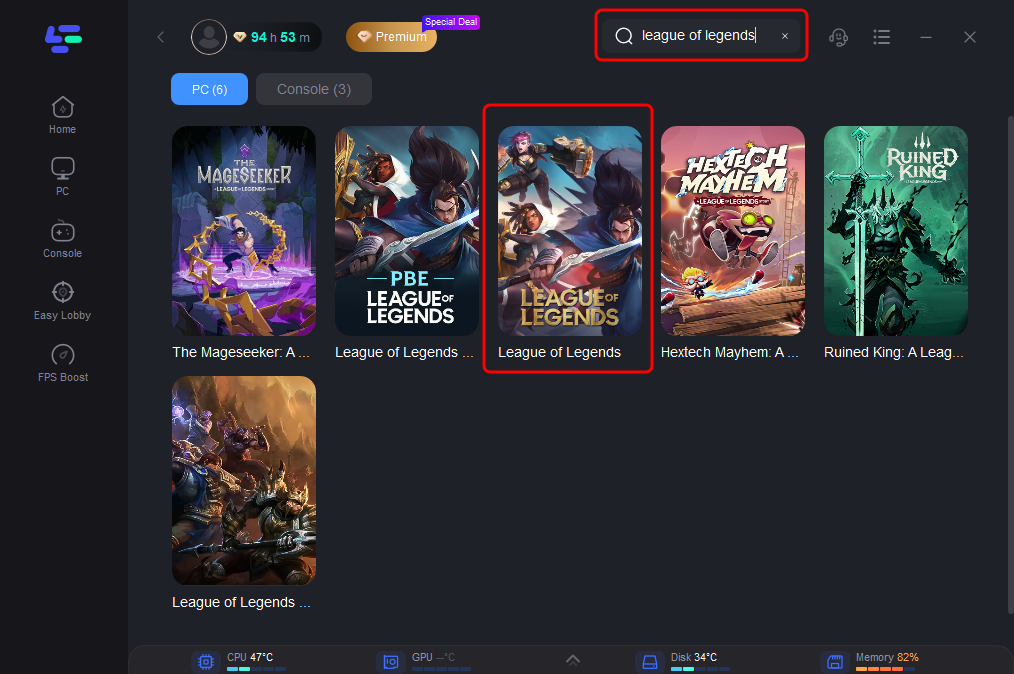
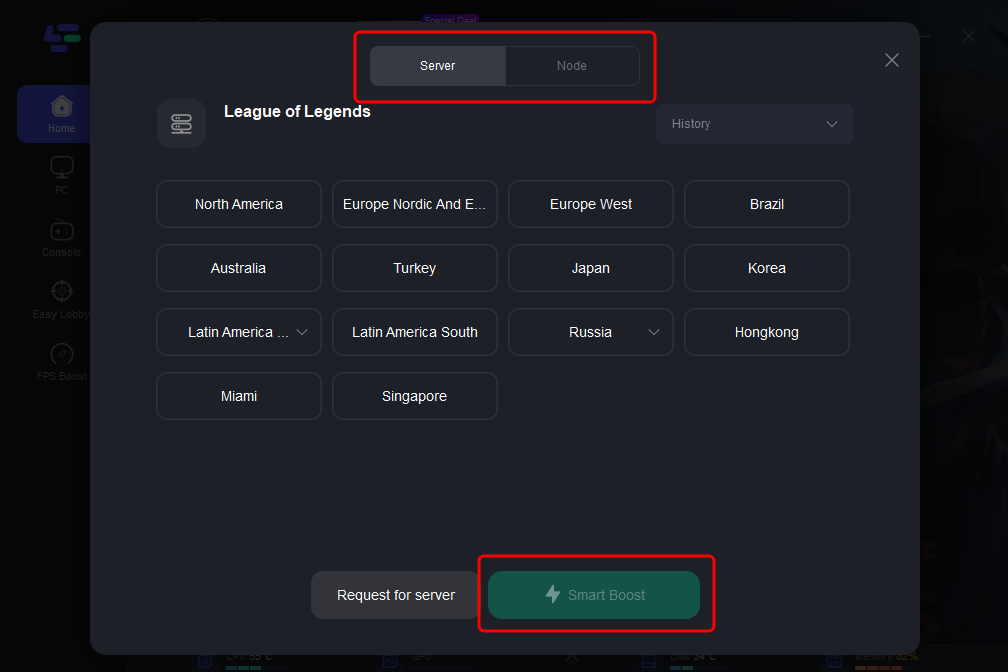
Step 3: Choose the Optimal Server: Select the best server location to minimize lag and improve connectivity.
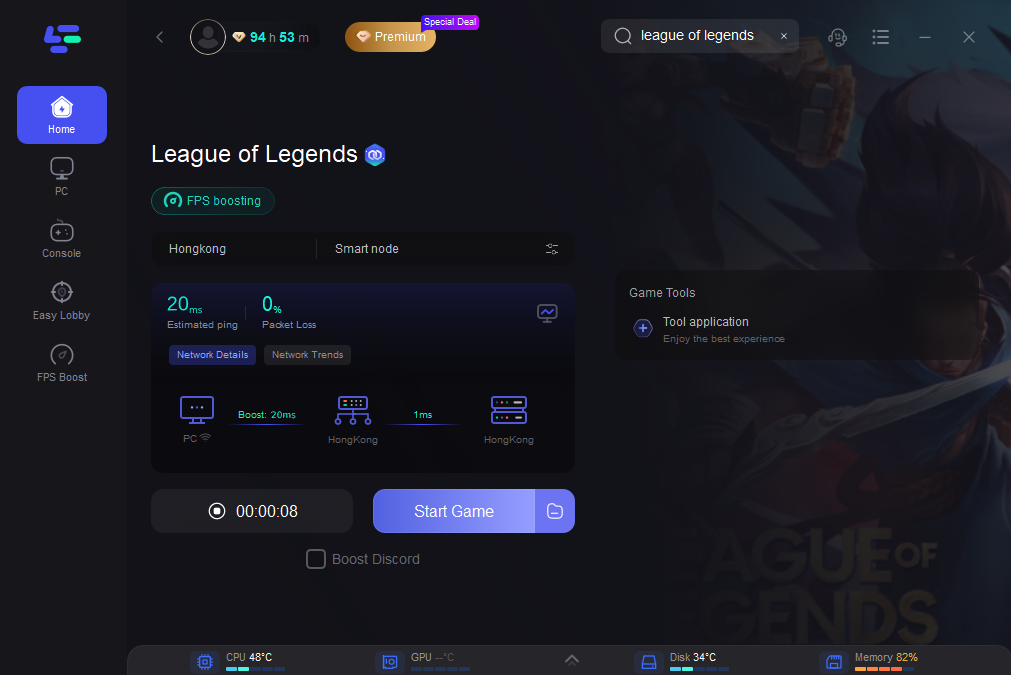
Step 4: Boost Your Game: Activate LagoFast and launch League of Legends. You should notice faster loading times and fewer connection issues.
Part 7: FAQs
1. Can I play League of Legends on a Mac?
Yes, but League of Legends only supports x86 Macs. Ensure your Mac meets the specified system requirements.
2. What should I do if I experience performance issues?
Try lowering graphics settings, closing background applications, and ensuring your system meets the recommended requirements.
3. How can LagoFast improve my gameplay?
LagoFast reduces lag, improves stability, and optimizes performance, enhancing your overall gaming experience.
4. Are there plans for future system requirements changes?
Riot Games typically announces any changes to system requirements a few months in advance. Keep an eye on the official website for updates.
Conclusion
Understanding the system requirements for League of Legends is crucial for ensuring a smooth gaming experience. Whether you’re playing on a PC or Mac, meeting the minimum and recommended requirements can significantly impact your performance. By following optimization tips and utilizing tools like LagoFast, players can enhance their gameplay, focusing on strategy and teamwork. As you prepare to engage in the thrilling battles of Summoner’s Rift, make sure your setup is ready to deliver the best experience possible.
Boost Your Game with LagoFast for Epic Speed
Play harder, faster. LagoFast game booster eliminates stutter and lags on PC, mobile, or Mac—win every match!
Quickly Reduce Game Lag and Ping!
Boost FPS for Smoother Gameplay!