
Last Epoch is an action-packed role-playing game that combines deep character customization with fast-paced combat. To enjoy the game without performance issues, it’s crucial to ensure that your PC meets the necessary system requirements. In this article, we’ll cover both the minimum and recommended system specs for playing Last Epoch, as well as some important updates you need to know for a smoother gaming experience.

- Last Epoch: System Requirements
- How to Check if Your PC Meets Last Epoch’s System Requirements
- Tips for Improving Performance in Last Epoch
- Optimizing Game Performance with LagoFast
1. Last Epoch: System Requirements
Minimum System Requirements
To run Last Epoch on your PC with the minimum settings, your system must meet the following specifications:
- Operating System (OS): Windows 7 (64-bit)
- Processor (CPU): Intel Core i5 2500 or AMD FX-4350
- Memory (RAM): 8 GB
- Graphics (GPU): nVidia GTX 1060 / AMD RX 580 with 6GB of VRAM
- DirectX Version: 11
- Network: Broadband Internet connection
- Storage: 22 GB available space
- Additional Notes: SSD is strongly recommended for better performance
These specs will allow you to play the game, but keep in mind that graphics and frame rates may not be at their highest potential. You may need to adjust in-game settings for optimal performance.
Recommended System Requirements
For the best experience with high-quality graphics and smooth gameplay, your system should meet or exceed the following recommended specifications:
- Operating System (OS): Windows 10 (64-bit)
- Processor (CPU): Intel Core i5 6500 or AMD Ryzen 3 1200
- Memory (RAM): 16 GB
- Graphics (GPU): nVidia RTX 3060 or AMD RX 6600-XT with 6GB+ VRAM
- DirectX Version: 11
- Network: Broadband Internet connection
- Storage: 22 GB available space
- Additional Notes: SSD is strongly recommended for faster load times and better performance
With these specifications, you will experience a smooth and immersive gaming experience with Last Epoch at high settings, allowing you to fully enjoy its graphics, combat mechanics, and detailed world.
Important Update: Windows 10 and Later Versions
Starting January 1st, 2024, Steam will only support Windows 10 and later versions for Last Epoch. This means that if you’re using Windows 7 or older, you’ll need to upgrade to Windows 10 to continue enjoying the game. Make sure to update your operating system to stay compatible with future patches and updates.
2. How to Check if Your PC Meets Last Epoch’s System Requirements
Before launching Last Epoch, it’s a good idea to verify whether your system meets the game’s minimum or recommended requirements. Here are some easy steps to check:
Check System Information (Windows):
- Press Windows + R, then type “dxdiag” to open the DirectX Diagnostic Tool.
- Review the details under System to check your OS, processor, and memory.
- Under the Display tab, you can check your graphics card and VRAM.
Compare with Last Epoch’s Requirements:
- Once you have your system specs, compare them to the minimum and recommended requirements listed above to see if you’re ready for the game.
Use a System Compatibility Tool:
- Several free tools, like Can You Run It, allow you to automatically check if your PC meets the game’s system requirements by scanning your hardware and comparing it with Last Epoch’s official specs.
By following these steps, you can easily determine if your PC can handle Last Epoch. If your system falls short, consider upgrading your hardware to meet the recommended specs for optimal performance.
3. Tips for Improving Performance in Last Epoch
If your system meets the minimum system requirements but you’re still experiencing lag or poor performance, here are a few tips to help boost your gaming experience:
Lower In-Game Settings:
- Reduce the graphics settings like texture quality, shadow quality, and anti-aliasing. Lowering these settings can significantly improve your frame rates and reduce lag.
Update Your Drivers:
- Ensure your graphics card drivers are up to date. New drivers can enhance performance and fix bugs, allowing for smoother gameplay.
Close Background Applications:
- Close unnecessary programs running in the background while playing Last Epoch. This frees up resources, especially RAM and CPU power, for a better gaming experience.
Optimize Your Internet Connection:
- Since Last Epoch requires a stable internet connection, using a wired connection instead of Wi-Fi can help reduce lag and improve network stability. Additionally, ensure no one else is using the network heavily during your gaming sessions.
Use an SSD:
- If you haven’t already, switching to a Solid State Drive (SSD) can dramatically improve load times and overall game performance. Last Epoch strongly recommends using an SSD to avoid long waiting times during gameplay.
By applying these optimization tips, you can enhance the gaming experience, even if your system falls just shy of the recommended specs.
4. Optimizing Game Performance with LagoFast
If you’re experiencing lag or connectivity issues in your game, LagoFast can help optimize your connection for a smoother experience. Follow these simple steps to boost your gameplay and reduce latency:
Step 1: Free Trial Download.
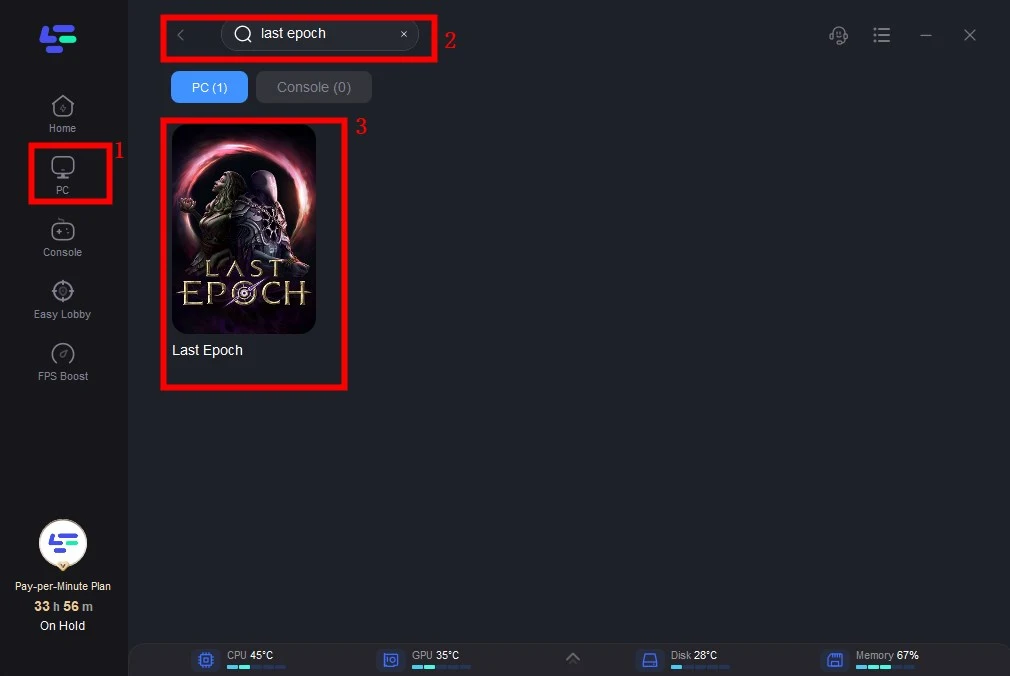
Step 2: Click the Game Boost Button on the left and search Last Epoch in the top search bar.
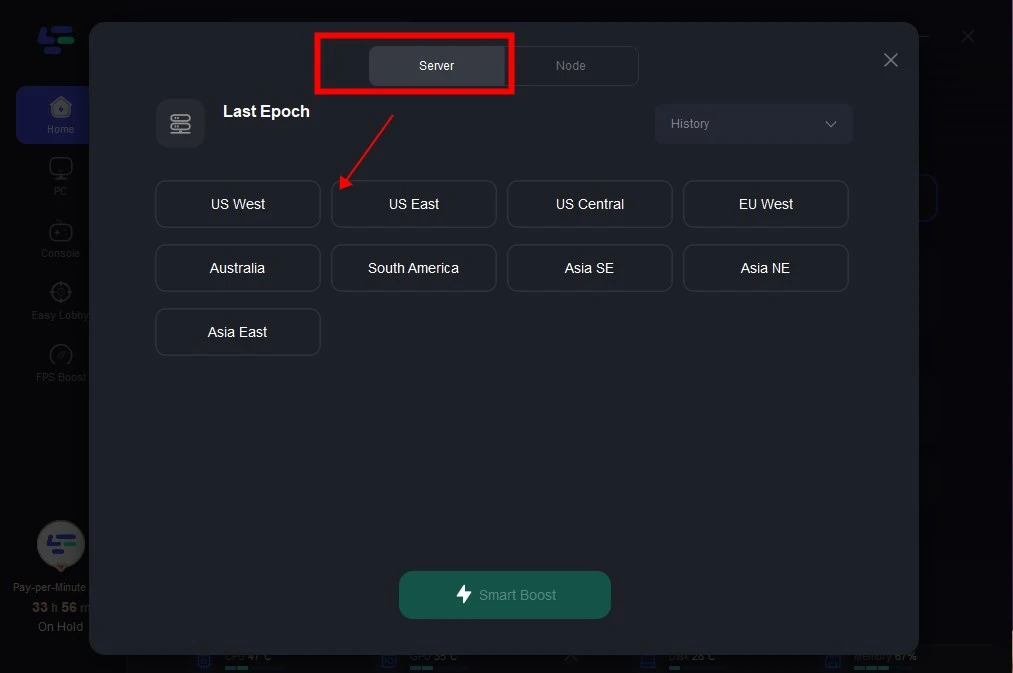
Step 3: Click on Select Server to choose a stable server, then click on the Node on the right, select a good Node, and then click the Smart Boost button.
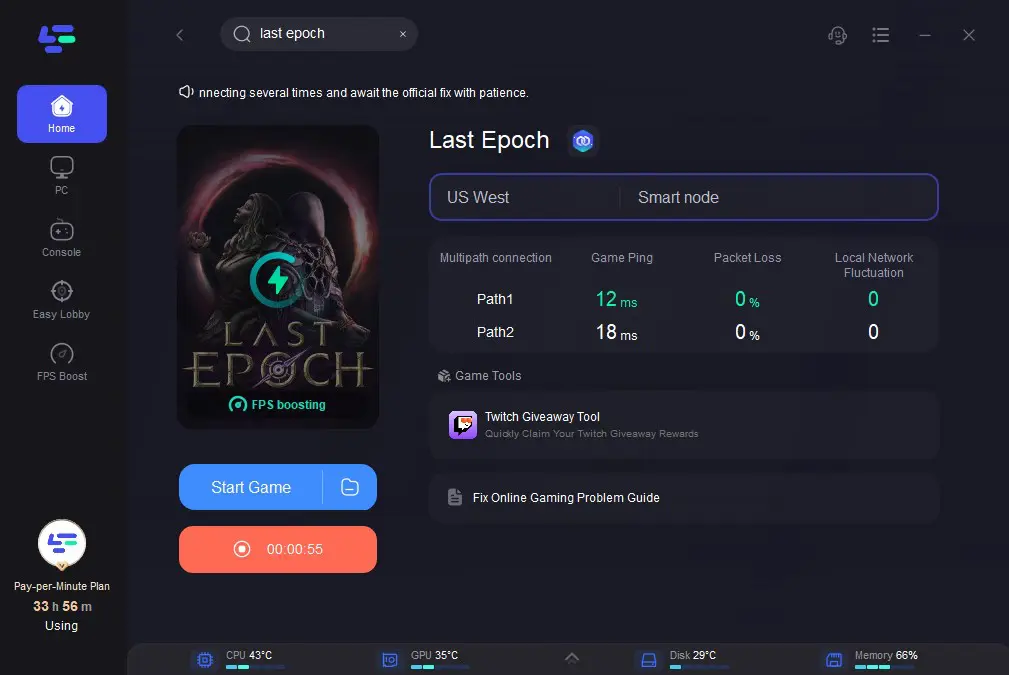
Step 4: By clicking the Smart Boost button, specific game ping, packet Loss, and network type are shown on the right side.
Finally, you can enjoy a lag-free experience with FPS Boosting.
By following these steps, LagoFast will help you connect to the best possible servers, ensuring that you enjoy lag-free, stable gameplay. LagoFast is a powerful tool to improve your gaming connection and reduce performance issues. With just a few clicks, you can enhance your experience and focus more on the game itself rather than on network problems. Try LagoFast today and get back to enjoying your games with a smoother, faster connection!
Conclusion
To play Last Epoch without performance issues, it’s essential to ensure your PC meets or exceeds the minimum system requirements. For the best experience, we recommend using the recommended specs to run the game smoothly with high settings. Additionally, don’t forget the upcoming change for Steam users — make sure you’re using Windows 10 or later starting January 1st, 2024.

Boost Your Game with LagoFast for Epic Speed
Play harder, faster. LagoFast game booster eliminates stutter and lags on PC, mobile, or Mac—win every match!
Quickly Reduce Game Lag and Ping!
Boost FPS for Smoother Gameplay!