
Last Epoch is an action-packed RPG that has captured the attention of gamers worldwide. However, like most online games, its server status plays a crucial role in the gameplay experience. Server issues can lead to lag, disconnects, or even prolonged downtime. This article will keep you updated on the Last Epoch server status, helping you stay informed and troubleshoot any potential problems you might encounter while playing.
Part 1: How to Check the Last Epoch Server Status
Part 2: Common Server Issues in Last Epoch
Part 3: Troubleshooting Server Issues in Last Epoch
Part 4: How Long Does Last Epoch Server Downtime Last?
Part 5: How to Use LagoFast to Optimize Your Game Connection
Part 1: How to Check the Last Epoch Server Status
Before diving into gameplay, it’s essential to verify if the Last Epoch servers are up and running smoothly. Here’s how to check the server status:
- Official Last Epoch Website: The developers often post server status updates on their official site, providing real-time information about downtime or server maintenance.
- Social Media Accounts: Follow Last Epoch’s official Twitter and Facebook pages for live updates. The community team usually tweets about any unexpected outages or planned server maintenance.
- Third-Party Websites: Some websites track the health of game servers. These third-party sites can be a good backup if you’re experiencing issues.
- Community Reports: If you’re encountering difficulties connecting to the game, check the Last Epoch community forums or Discord server. Other players often report downtime or connection issues, giving you a good idea if the problem is on your end or a wider server issue.
Part 2: Common Server Issues in Last Epoch
There are various reasons why you might experience server-related issues while playing Last Epoch. Here are some of the most common problems:
1. Server Downtime for Maintenance
Regular maintenance is essential for keeping the servers in top shape. During scheduled maintenance, the servers may go offline for a few hours. Always check the official sources for announcements regarding scheduled downtime.
2. High Traffic
When Last Epoch sees a surge in player activity, the servers can become overloaded, resulting in slow performance or temporary disconnects. This is typically noticeable during patch releases or events.
3. Server Outages
Sometimes, the servers can go down unexpectedly due to technical issues, such as hardware failures or unexpected bugs. In these cases, Last Epoch developers usually provide updates as soon as possible, outlining the issue and estimated resolution times.
Part 3: Troubleshooting Server Issues in Last Epoch
If you’re experiencing server-related issues, here are some steps you can take to troubleshoot:
- Check Your Internet Connection: Make sure your connection is stable and that other online services aren’t causing disruptions.
- Restart the Game: Sometimes, a simple restart can help resolve connectivity issues and reconnect you to the servers.
- Switch Server Regions: If you’re facing lag or connection issues, try switching to a different server region (if available) to see if performance improves.
- Disable Firewalls or VPNs: Firewalls or VPNs can sometimes block your connection to the servers. Try disabling these temporarily to see if the issue persists.
Part 4: How Long Does Last Epoch Server Downtime Last?
The duration of Last Epoch server downtime can vary depending on the nature of the issue. Scheduled maintenance typically lasts between 1-3 hours, but it may be extended if unexpected issues arise. Developers will provide updates on their social media platforms or official forums if downtime is longer than expected.
Part 5: How to Use LagoFast to Optimize Your Game Connection
If you’re facing issues with lag or connection problems while gaming, LagoFast is the perfect tool to help. It boosts your connection, reduces ping, and minimizes packet loss, ensuring a smoother gaming experience. Here’s how you can quickly use LagoFast to optimize your connection:
Tutorial to use LagoFast to enhance gaming experience:
Step 1: Click the "Free Trial" button to download LagoFast on your device.
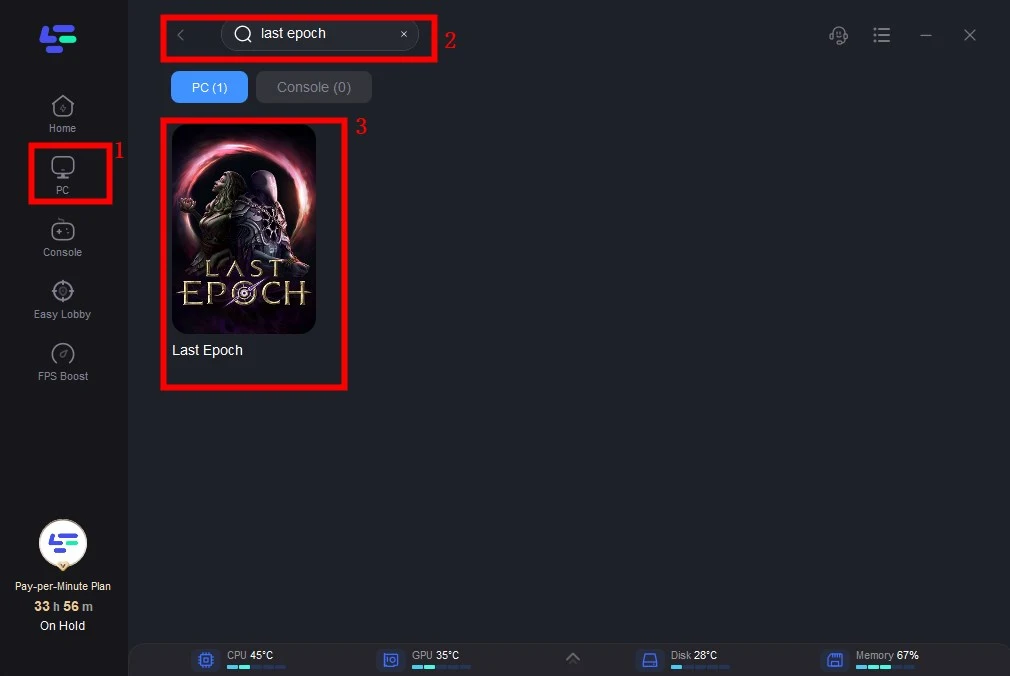
Step 2: Open LagoFast then click the PC button on the left and search Last Epoch in the search bar, click it after appearing.
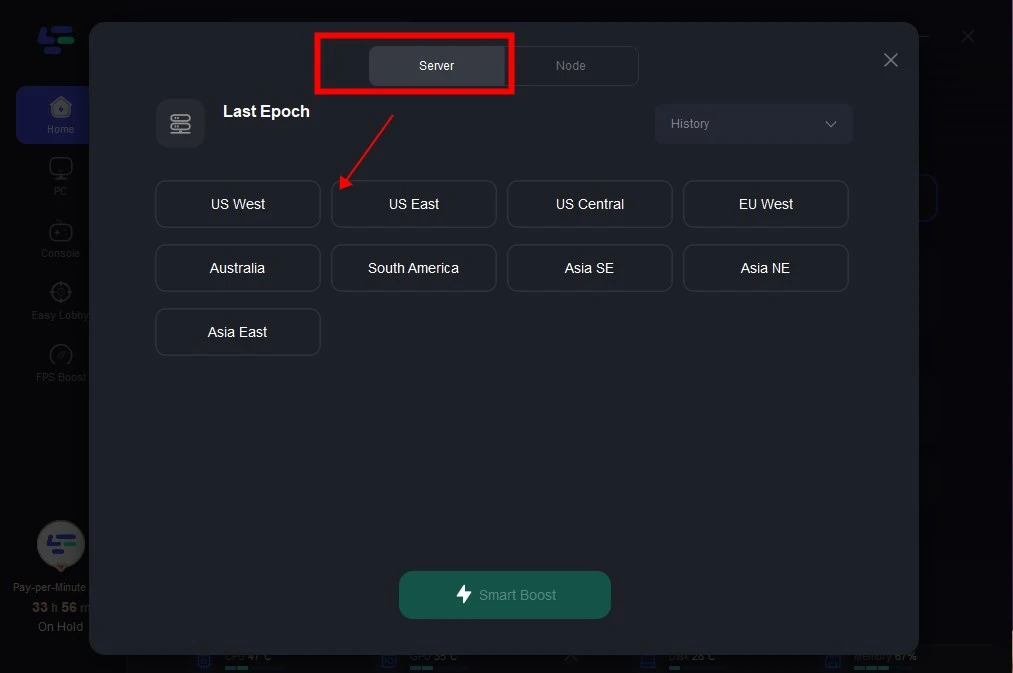
Step 3: Click on “Server” to change to a better server that ensures the gaming experience, then click on “Smart Boost”.
Step 4: Check the specific game ping, packet loss, and multiple path connection on the right side. Finally, click the “Start Game” to play the game.
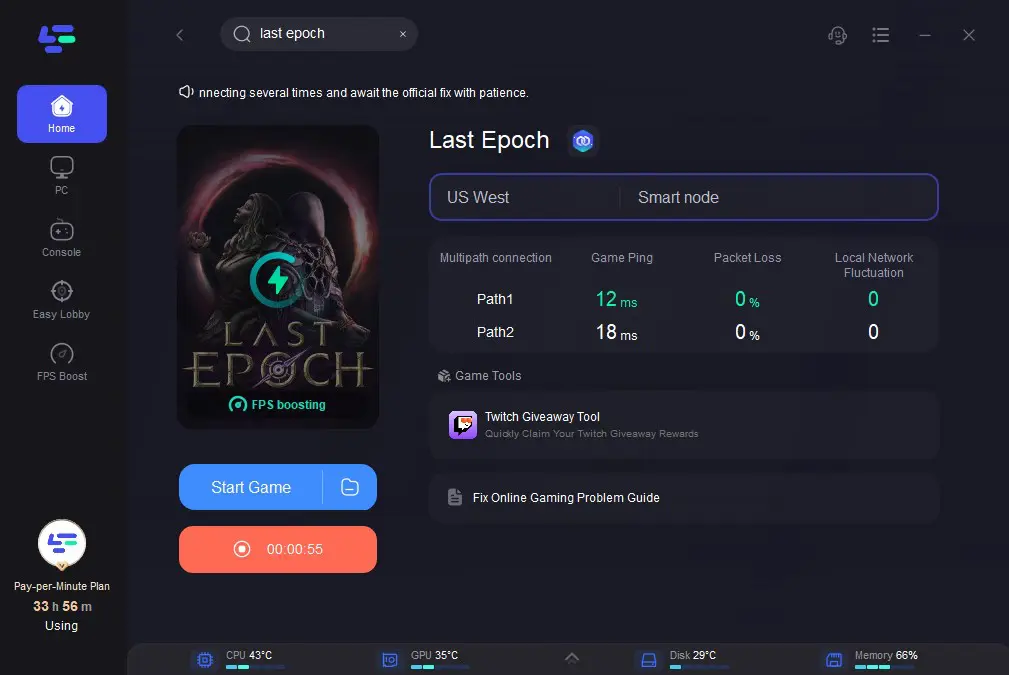
By following these simple steps, LagoFast helps you get a more stable and optimized gaming connection, letting you focus on the game rather than lag issues. LagoFast is an easy-to-use solution for improving your online gaming performance. With just a few clicks, you can reduce latency and enhance your gameplay experience. Try it today for a smoother, faster connection!
Conclusion
Maintaining a stable Last Epoch server status is essential for uninterrupted gameplay. Always keep an eye on official channels for updates, and be sure to follow troubleshooting steps when facing server issues. With these tips in mind, you can ensure a smoother experience while diving into the world of Last Epoch By staying informed about server maintenance schedules, high-traffic periods, and potential outages, you can be better prepared for any disruptions that may occur during your adventures in Last Epoch.

Boost Your Game with LagoFast for Epic Speed
Play harder, faster. LagoFast game booster eliminates stutter and lags on PC, mobile, or Mac—win every match!
Quickly Reduce Game Lag and Ping!
Boost FPS for Smoother Gameplay!