

Little Nightmares 3 is shaping up to be one of the most anticipated horror adventure titles of 2025. Developed by Supermassive Games and published by Bandai Namco Entertainment, this installment introduces a haunting new world, two playable characters—Low and Alone, and, most importantly, online multiplayer co-op gameplay. But is Little Nightmares 3 truly multiplayer, or does it also support couch co-op? In this guide, we’ll break down everything about its co-op system, how to join a friend online, and how to make the most of your eerie journey through the Spiral.

- ✅Reduce Lag and High Ping.
✅ Boost FPS at the Same Time.
✅ Ensure a Stable Server Connection.
✅ Change Server without Latency.
✅ Fix Crashing and Stuck Errors.
✅ 0% Packet Loss Rate
Part 1: Is Little Nightmares 3 Multiplayer?
Part 2: How to Join Little Nightmares 3 Multiplayer Mode?
Part 3: How to Maximize Your Multiplayer Gaming Experience in Little Nightmares 3?
Part 4: Little Nightmares 3 Multiplayer FAQs
Part 1: Is Little Nightmares 3 Multiplayer?
Little Nightmares 3 officially introduces multiplayer for the first time in the series, allowing two players to explore the eerie world of the Nowhere together as Low and Alone. Developed by Supermassive Games and published by Bandai Namco Entertainment, the sequel enhances the series’ dark storytelling with teamwork, cooperation, and shared fear.
Unlike earlier entries, where players were alone or accompanied by AI, Little Nightmares 3 offers true co-op gameplay. Each protagonist has unique tools and mechanics:
- Low uses a bow to hit distant targets or cut ropes.
- Alone wields a wrench to smash obstacles or activate machinery.
- Success depends on communication, coordination, and courage between players to solve puzzles and survive the nightmare together.
It’s important to note that Little Nightmares 3 supports online multiplayer only, with no local couch co-op option. This was a deliberate design choice to maintain the game’s eerie sense of isolation. In short:
- Online multiplayer is confirmed.
- Local couch co-op is not available.
- Two playable characters—Low and Alone—can be controlled by two online players.
Part 2: How to Join Little Nightmares 3 Multiplayer Mode?

Joining a friend in Little Nightmares 3 is designed to be seamless, thanks to the Friend’s Pass system available across supported platforms. This feature allows two friends to experience the entire co-op campaign together—even if only one of them owns the game. Here’s how it works:
- The host player who owns Little Nightmares 3 can invite a friend through the Friend’s Pass feature.
- The invited friend does not need to purchase the game; they can join for free via the pass.
- Both players must have an active internet connection and a compatible platform (such as PC, PlayStation, Xbox, or Nintendo Switch).
This feature mirrors systems seen in other co-op adventures like It Takes Two, making Little Nightmares 3 accessible and player-friendly. However, there are some limitations. Once you start a co-op game, you must finish it with the same partner—you can’t switch from solo to co-op or swap players mid-save. You can, however, create multiple save files (up to eight), allowing you to play solo on one and co-op on another.
Step-by-Step Guide to Join Multiplayer:
Step 1. Launch the Game: Start Little Nightmares 3 from your preferred platform.
Step 2. Select Co-op Mode: From the main menu, choose “Online Co-op.”
Step 3. Invite a Friend: Use your platform’s friend list or invite system to send a Friend’s Pass link.
Step 4. Accept the Invite: Your friend joins your session, loading in as either Low or Alone.
Step 5. Start the Journey: Work together to solve puzzles, avoid monsters, and uncover the mysteries of the Spiral.
As of now, cross-platform multiplayer is not supported. This means a PC player cannot join a friend on PlayStation or Xbox. Supermassive Games has stated that while cross-gen play (e.g., PS4 with PS5 or Xbox One with Xbox Series X|S) might be added later, cross-platform play between different console families won’t be available at launch.
Part 3: How to Maximize Your Multiplayer Gaming Experience in Little Nightmares 3?

Multiplayer horror games thrive on atmosphere, teamwork, and timing—but nothing ruins immersion like lag, connection drops, or low FPS. If you want the smoothest possible online experience in Little Nightmares 3, a reliable performance booster like LagoFast can make a major difference. LagoFast is an advanced game optimizer and ping reducer designed to improve your gaming experience across both PC and console platforms. Since Little Nightmares 3 relies on precise cooperation and timing, reducing latency is crucial for smooth puzzle-solving and responsive controls.
Here’s how LagoFast enhances your co-op experience:
- Ping Optimization: Reduces high ping and stabilizes your connection for lag-free online play.
- Global Route Boosting: Automatically selects the best routing server to reduce packet loss between you and your co-op partner.
- FPS Booster: Optimizes CPU and GPU performance for consistent frame rates, especially during intense or detailed sequences.
- Smart Matchmaking: Ensures low-latency routes between players in different regions, helping both of you experience minimal delay.
- Easy-to-Use Interface: One-click optimization makes setup simple—no advanced configuration needed.
Using LagoFast ensures that your exploration of the Nowhere remains hauntingly beautiful—without stutters, lag spikes, or frustrating disconnects. Whether you’re sneaking past the monstrous Residents or racing through the collapsing Spiral, LagoFast helps you stay immersed and connected every step of the way.
Tutorial to use LagoFast to ensure your multiplayer gaming experience in Little Nightmares 3 on PC:
Step 1: Click the Free Trial button to download and install LagoFast.
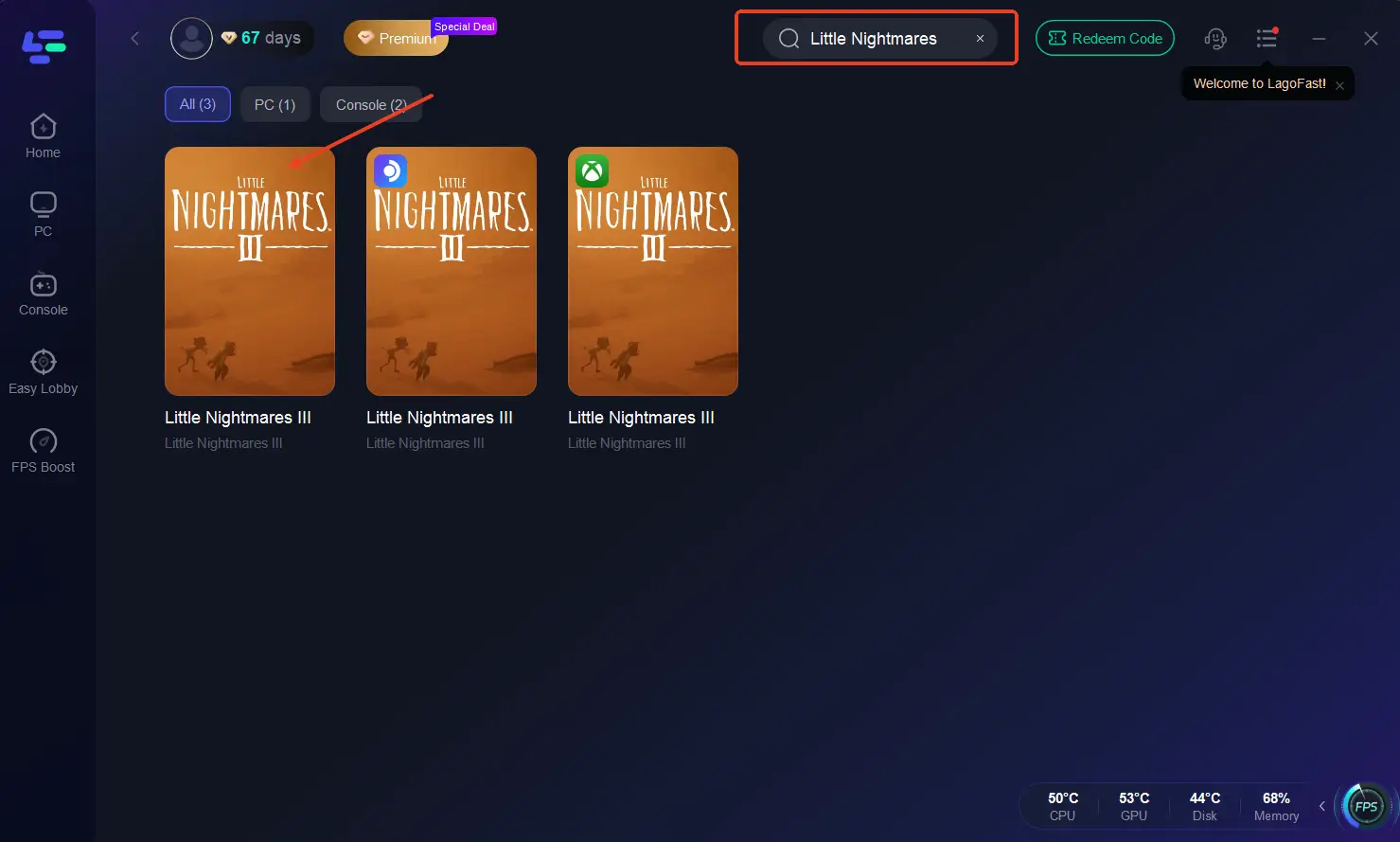
Step 2: Open LagoFast, then click the PC button on the left and search for Little Nightmares 3 in the search bar, and click it after it appears.
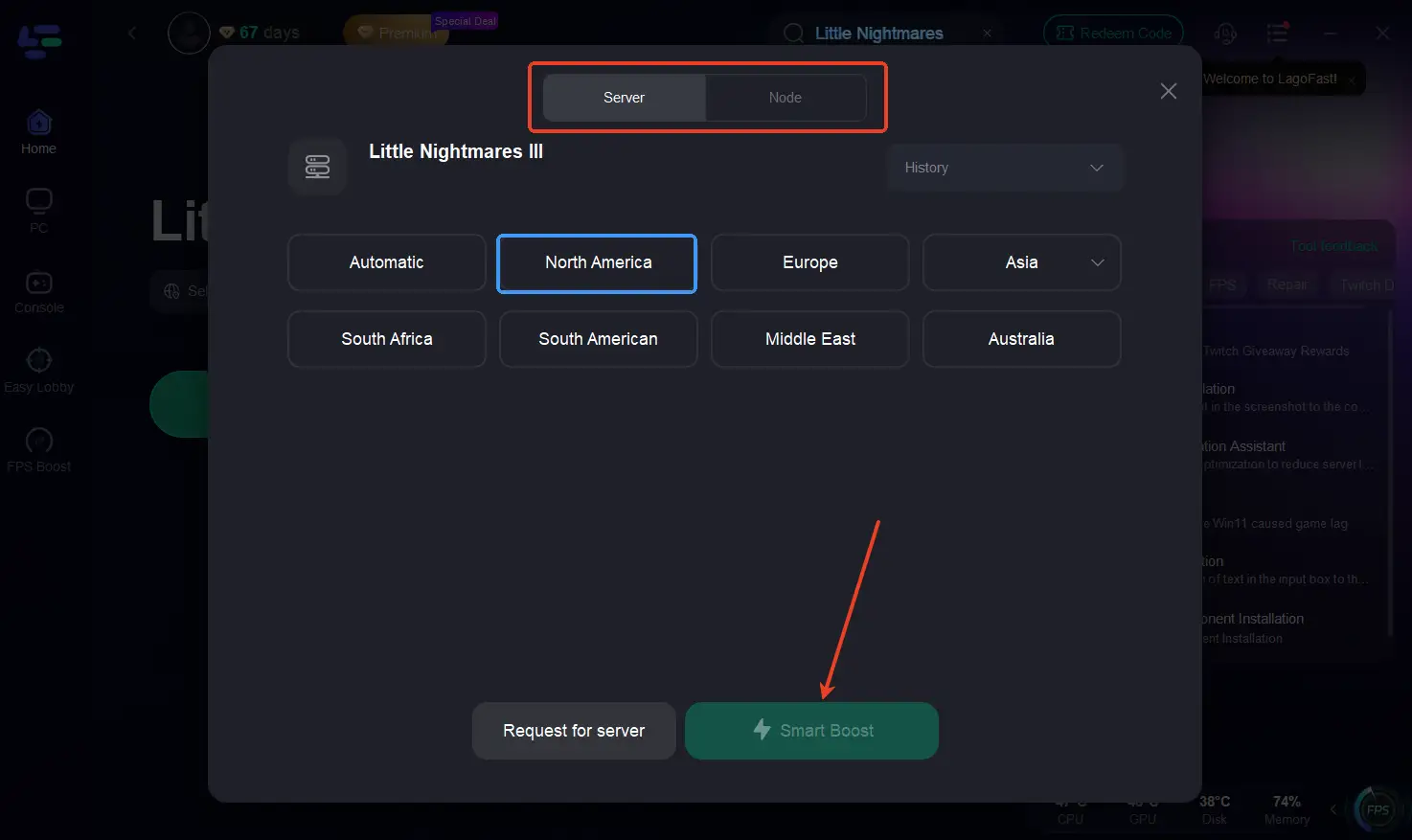
Step 3: Click on “Server” to change to a better server that fixes lag and ensures the Little Nightmares 3 gaming experience, then click on “Smart Boost.”
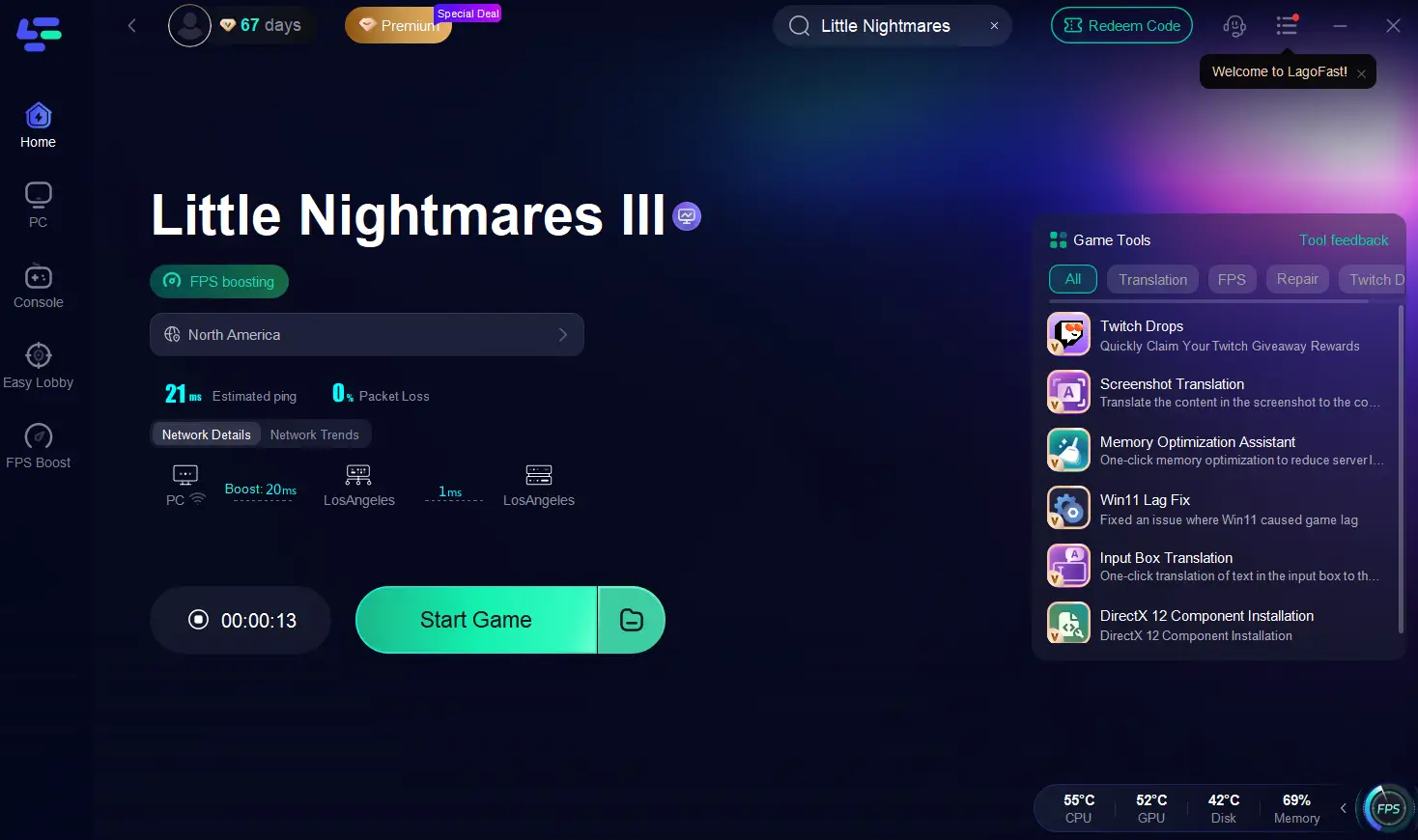
Step 4: Check the specific game ping, packet loss, and multiple path connections on the right side. Finally, click “Start Game” to play the game.
Part 4: Little Nightmares 3 Multiplayer FAQs
Is Little Nightmares 3 multiplayer?
Yes, Little Nightmares 3 features online co-op multiplayer for two players. You can explore and solve puzzles as Low and Alone together.
Does Little Nightmares 3 support couch co-op?
No, the game does not include local couch co-op. Supermassive Games designed it as an online-only cooperative experience to preserve the game’s eerie atmosphere.
Can I play Little Nightmares 3 solo?
Yes. If you prefer to play alone, the second character will be controlled by an AI companion, allowing you to experience the full story solo.
Is crossplay supported?
Cross-platform play between different console brands (like PlayStation and Xbox) is not supported. However, cross-gen (e.g., PS4 with PS5) may be added in the future.
What is the release date of Little Nightmares 3?
Little Nightmares 3 will launch on October 10, 2025, for PlayStation 5, Xbox Series X|S, PC, Nintendo Switch 2, PlayStation 4, Xbox One, and Nintendo Switch.
Conclusion
Little Nightmares 3 takes a bold new step for the series by introducing true online co-op multiplayer, letting players experience its eerie world together. While the absence of local couch co-op may disappoint some fans, the inclusion of a Friend’s Pass and a focus on atmospheric immersion show Supermassive Games’ dedication to quality storytelling. To make the most of this experience, tools like LagoFast can ensure your online adventure remains smooth and immersive—so you and your friend can focus on escaping The Nowhere together, not fighting against lag.

Boost Your Game with LagoFast for Epic Speed
Play harder, faster. LagoFast game booster eliminates stutter and lags on PC, mobile, or Mac—win every match!
Quickly Reduce Game Lag and Ping!
Boost FPS for Smoother Gameplay!