

Dune: Awakening is one of the most anticipated survival MMOs, immersing players in the harsh deserts of Arrakis. However, like many online games, it can experience server downtimes that disrupt gameplay.
This guide will help you understand, identify, and resolve server-related issues, ensuring a smoother gaming experience.

Part 2: Is Dune Awakening Down?
Part 3: Understanding Dune Awakening Server Down Issues
Part 4: Checking Dune Awakening Server Status
Part 5: How to Fix Dune Awakening Server Down Issues With LagoFast Game Booster
Part 1: Introduction
In Dune: Awakening, players navigate a vast, persistent world filled with challenges and opportunities. Given its scale and complexity, occasional server downtimes are inevitable, especially during peak times or major updates. Understanding how to handle these downtimes is crucial for uninterrupted gameplay.
Part 2: Is Dune Awakening Down?
Before troubleshooting, determine if the issue is on your end or if the servers are genuinely down. Common signs of server downtime include:
- Inability to log in or connect to the game.
- Extended loading screens or timeouts.
- Error messages indicating server unavailability.
Checking official channels or community forums can confirm if others are experiencing similar issues.
Since the Early Access for Dune: Awakening was opened on June 5th for players who purchased the Deluxe and Ultimate Editions, the game's official servers have been inundated with connection attempts. However, as the game is still in its initial release phase, players may encounter the "no servers found" issue. Here are two viable solutions:
- Restart or Update Steam: To address the current problems, the Dune: Awakening team has released the D1 patch. Players need to restart or update their Steam client to see and download the patch, which will resolve the issue.
- Change Beta Version Region: Since Dune: Awakening had a Beta testing phase previously, if players are still on the Beta version, they should click the "Change Region" button and select the appropriate region.
Part 3: Understanding Dune Awakening Server Down Issues
Several factors can lead to server downtimes:
- Scheduled Maintenance: Regular updates or patches may require temporary server shutdowns.
- Unexpected Outages: Technical glitches or unforeseen issues can cause sudden downtimes.
- High Traffic: Surges in player activity, especially during events or launches, can overwhelm servers.
- DDoS Attacks: Malicious attacks aimed at disrupting server operations.
Understanding the root cause can help in determining the appropriate response or workaround.
Hot Related: Dune: Awakening Multiplayer Guide
Part 4: Checking Dune Awakening Server Status
To verify server status:
- Official Website: Visit duneawakening.com for announcements or maintenance schedules.
- Social Media: Check @DuneAwakening on X for real-time updates.
- Community Forums: Browse discussions on platforms like Steam Community or Reddit for player reports.
Regularly monitoring these sources can keep you informed about server statuses and potential resolutions.
Part 5: How to Fix Dune Awakening Server Down Issues With LagoFast Game Booster
While server downtimes are often beyond individual control, optimizing your connection can mitigate related issues. LagoFast is a game optimization tool designed to improve gaming performance by reducing lag, lowering ping, and increasing FPS. It achieves this through advanced features such as:
How LagoFast Helps Improve Your Gaming Experience:
- Stabilized Connection: Reduces lag and prevents disconnections by optimizing network routes.
- Lower Ping: Ensures faster response times, crucial for real-time gameplay.
- Automatic Server Selection: Connects you to the most stable and fastest server available.
- User-Friendly Interface: Easy setup and operation, even for non-tech-savvy users.
How to Use LagoFast with League of Legends
Step 1: Begin by clicking the Free Trial button to download and install the LagoFast Free Trial.
Step 2: Open the LagoFast application and log in or create an account if necessary.
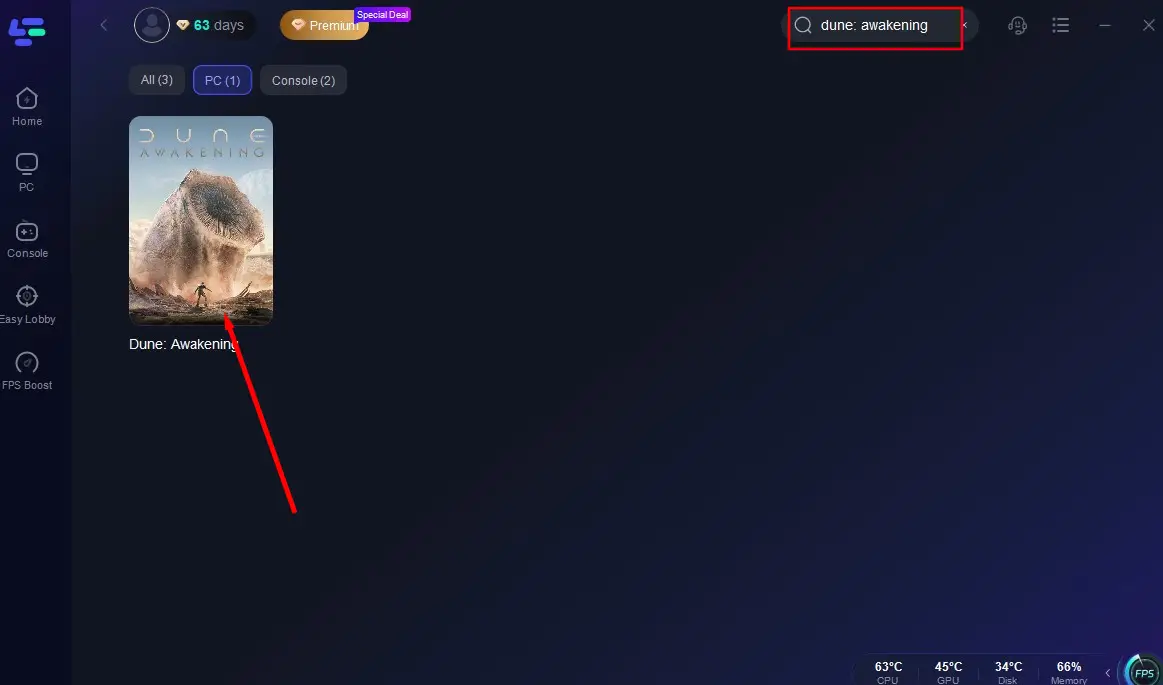
Step 3: In the LagoFast interface, find and select dune awakening from the list of supported games.
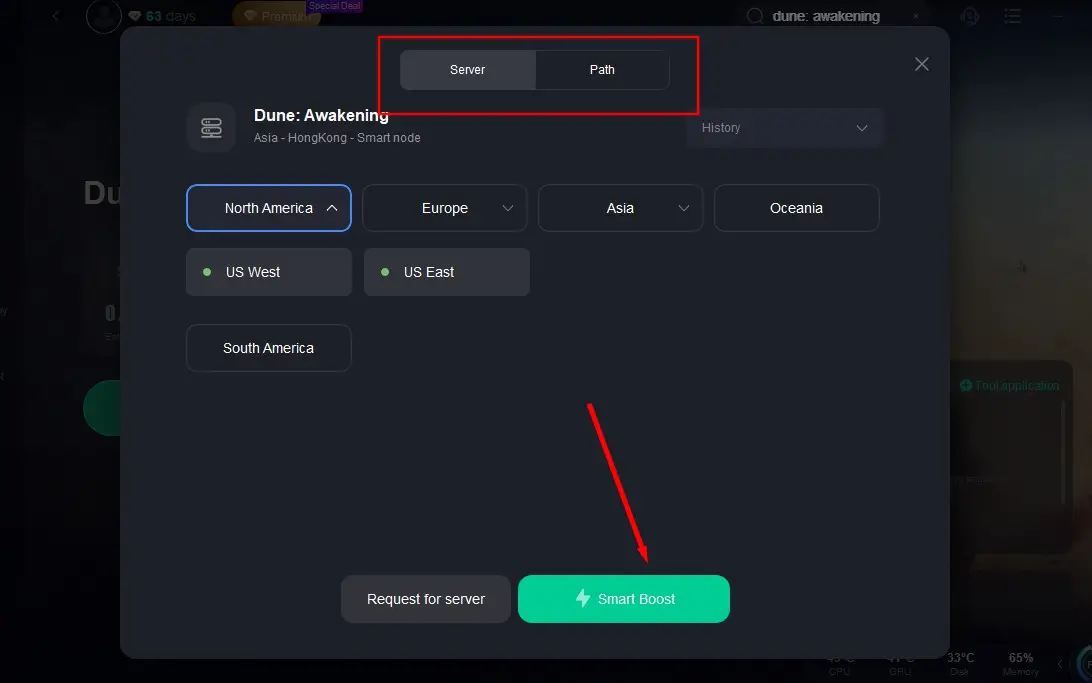
Step 4: Choose the server region closest to your location and let LagoFast optimize the best route for your connection.
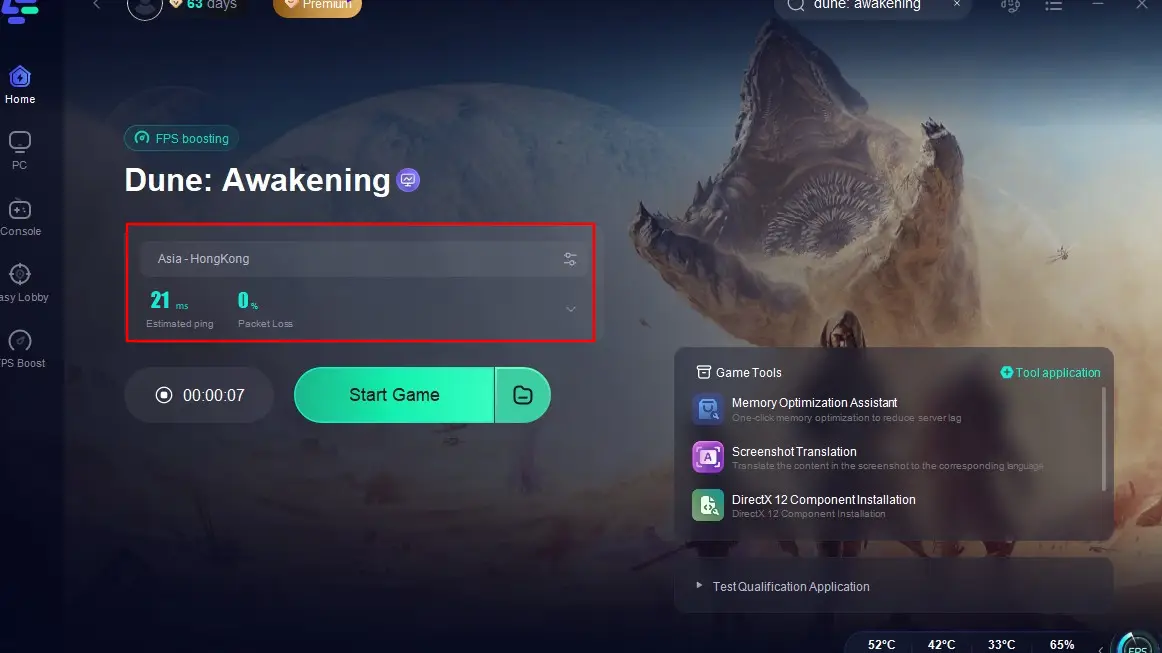
By integrating LagoFast into your gaming setup, you can experience smoother gameplay, even during server instabilities.
Part 6: FAQs
Q1: How often does Dune: Awakening experience server downtimes?
A: While the game aims for high uptime, occasional downtimes occur due to maintenance, updates, or unforeseen issues.
Q2: Can I play offline during server downtimes?
A: No, Dune: Awakening is an online multiplayer game and requires a stable internet connection.
Q3: Does LagoFast guarantee uninterrupted gameplay?
A: While LagoFast optimizes your connection, it cannot prevent server-side downtimes but can enhance overall stability and performance.
Q4: How can I stay updated on server statuses?
A: Regularly check official channels, social media, and community forums for real-time updates and announcements.
Conclusion
By staying informed and utilizing tools like LagoFast, you can navigate and mitigate server-related challenges in Dune: Awakening, ensuring a more seamless and enjoyable gaming experience.
Boost Your Game with LagoFast for Epic Speed
Play harder, faster. LagoFast game booster eliminates stutter and lags on PC, mobile, or Mac—win every match!
Quickly Reduce Game Lag and Ping!
Boost FPS for Smoother Gameplay!