
Black Myth: Wukong has taken the gaming community by storm, delivering a cinematic action RPG inspired by the classic Journey to the West mythos. From its awe-inspiring visuals to the intricate boss battles that rival the best soulslike titles, the game offers a challenging and immersive single-player experience. But for many players, the question arises: Can I explore this world with friends?
The short answer is that the official version is still a single-player game, but thanks to the creativity of the modding community, multiplayer is already possible. If you’ve ever wanted to take down colossal enemies side by side with your friends or wander through the game’s lush environments as a group, the Black Myth: Wukong Multiplayer Mod is the answer.
In this in-depth guide, we’ll cover the game’s multiplayer status, how you can play online right now, why LagoFast’s multiplayer mod is the go-to choice, and what extra features can improve your gameplay even further.

Part 1: Is Black Myth: Wukong Multiplayer?
Part 2: How to Play Black Myth: Wukong Online Multiplayer?
Part 3: Black Myth: Wukong Multiplayer FAQs
Part 1: Is Black Myth: Wukong Multiplayer?
As of now, Black Myth: Wukong’s official build is single-player only. Game Science, the studio behind the title, has focused on delivering a polished, story-driven, solo journey. There’s no built-in co-op or PvP mode at launch.
However, there are two reasons multiplayer fans can be hopeful:
- Third-party mod support: The community has already created mods like WukongMP that add online multiplayer functionality.
- Future DLC possibilities: Rumors and datamined information suggest that an official multiplayer or co-op DLC could arrive in the near future, possibly as early as August.
Until then, modding is the only way to bring friends into your adventure — and the best method currently available is through LagoFast’s multiplayer mod.
Part 2: How to Play Black Myth: Wukong Online Multiplayer
If you’re eager to try multiplayer now instead of waiting for an official update, your best bet is the LagoFast Multiplayer Mod. This solution not only adds online play but also optimizes your network and FPS for a smooth experience.
Play Black Myth: Wukong Online Multiplayer By LagoFast
Unlike some mods that require complex setups or unstable peer-to-peer connections, LagoFast integrates directly with its game booster platform. This means you get both the multiplayer functionality and lag reduction in one package.
Step-by-Step Guide: LagoFast Multiplayer Mod Setup:
Step 1. Download LagoFast: click the Free Trial button to download and install LagoFast.
Step 2. Add Black Myth: Wukong: Launch LagoFast and use the search bar to find “Black Myth: Wukong.”

Step 3. Enable Multiplayer Mode: On the right-hand panel, select the “Multiplayer Mod” option. Click to download and install it.

Step 4. Choose Server Region: Select between US East (North America) or Hong Kong (East Asia) servers. This ensures low latency for you and your friends.

Step 5. Host or Join a Room: You can create your own multiplayer room or join an existing one. Each room supports up to 8 players, and all participants need to be on the same server region.
Step 6. Start Playing
Once everyone’s connected, load into the game and start exploring bosses, quests, and hidden areas together — all synced in real-time.
Enhancing Multiplayer Gameplay with LagoFast’s Tools
LagoFast isn’t just about multiplayer. It offers an entire toolkit to make your Black Myth: Wukong sessions smoother, faster, and more enjoyable.
FPS Boost & Network Optimization
Combat in Black Myth: Wukong can be intense, and dropped frames are the last thing you want during a boss fight. LagoFast prioritizes your game traffic, reroutes your connection through the most efficient servers, and eliminates lag spikes.
Benefits:
- Higher frame rates in busy areas
- Reduced input delay
- Lower ping even during peak server hours
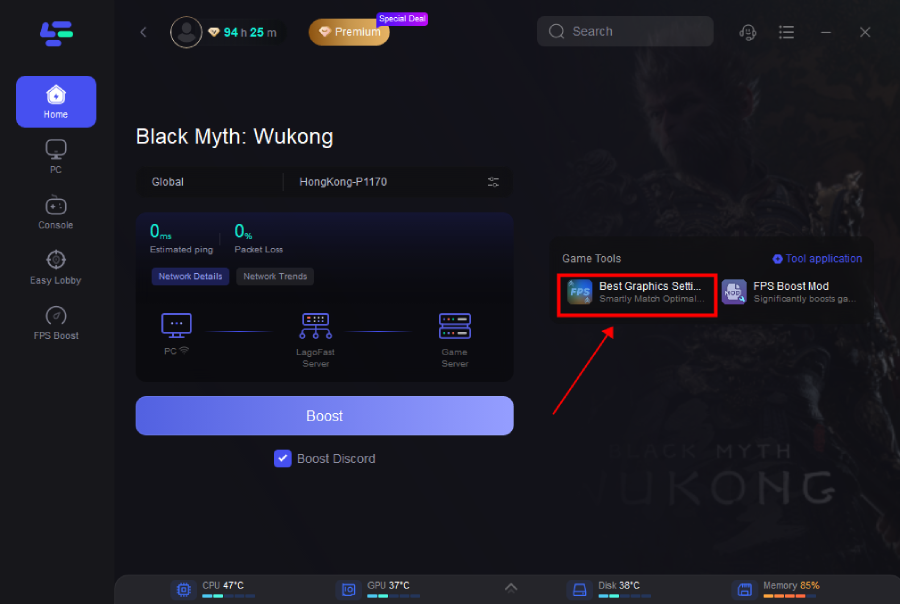
Step 1: Click the Best Graphics Settings Tool on the right side of the page.
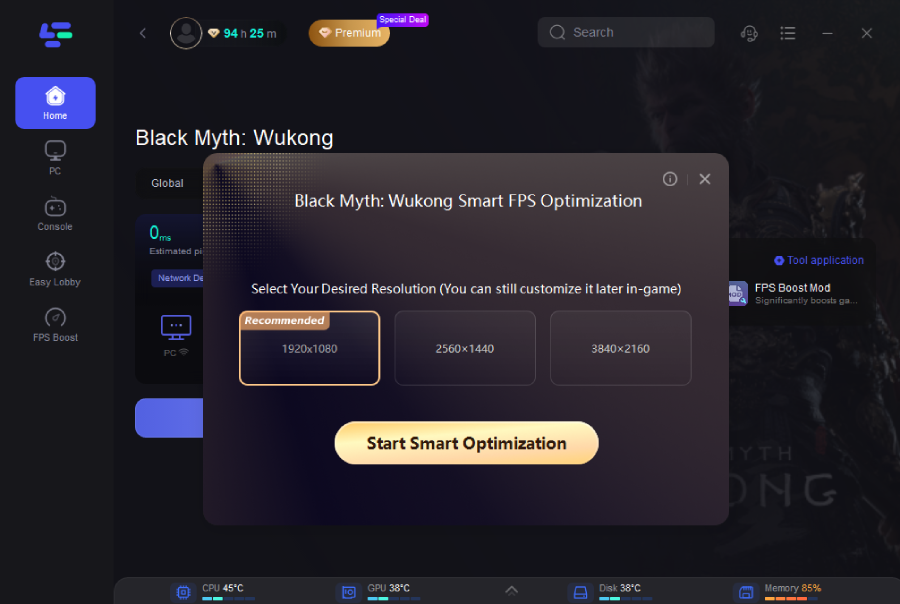
Step 2: Select your desired resolution, and click Start Smart Optimization button.
Interactive Map & Navigating Map Tool
Black Myth’s world is massive, filled with secrets, enemy camps, and hidden treasures. LagoFast’s real-time map tool overlays detailed locations right into your game, letting you mark objectives, track bosses, and share waypoints with your co-op team.
How It Helps in Multiplayer:
- Everyone can see where to go next
- Fewer “where are you?” moments in chat
- Perfect for speedruns and treasure hunting
Tutorial to use LagoFast to ensure a smooth gaming experience in Black Myth: Wukong
Step 1: Click the Real-time Map Tool on the right.
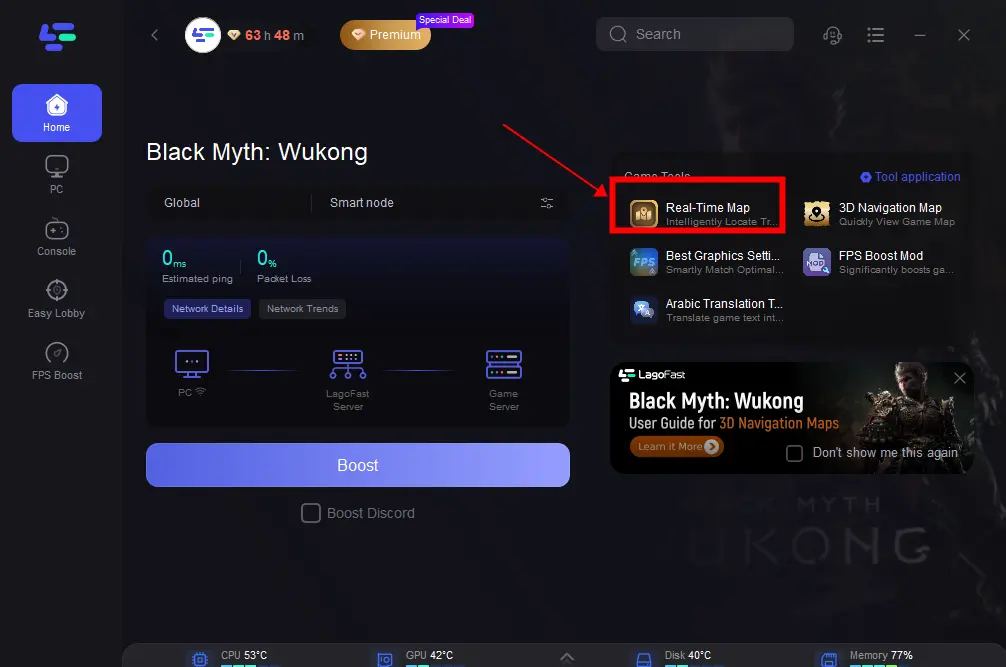
Step 2: Click the button on the right to open the real-time map. Or press control+M in-game to turn the minimap on.
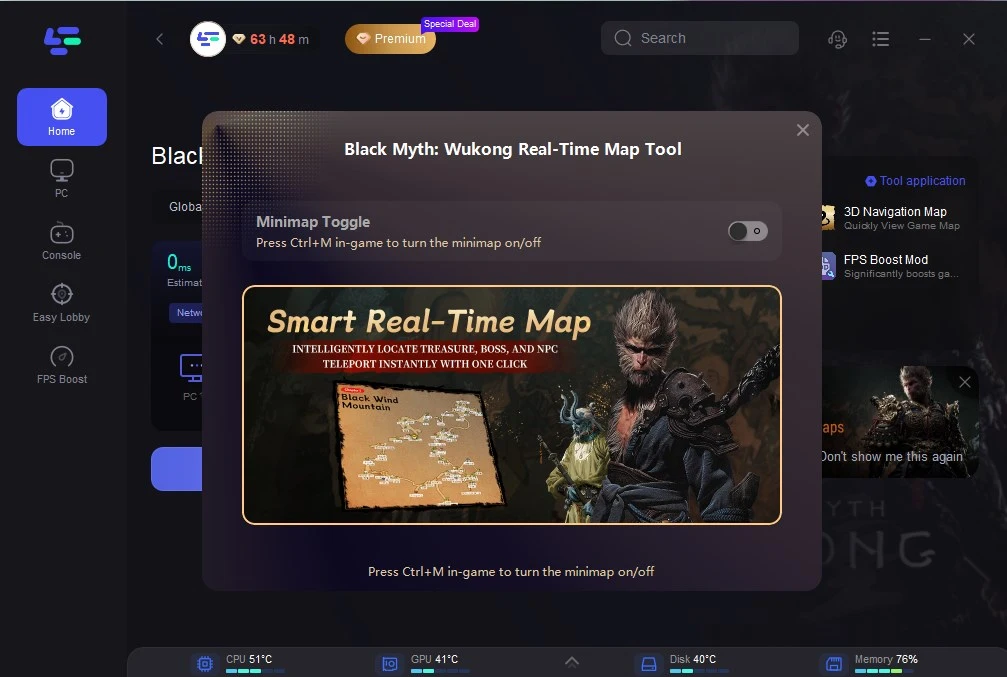
How to Get Black Myth: Wukong Navigating Map in LagoFast
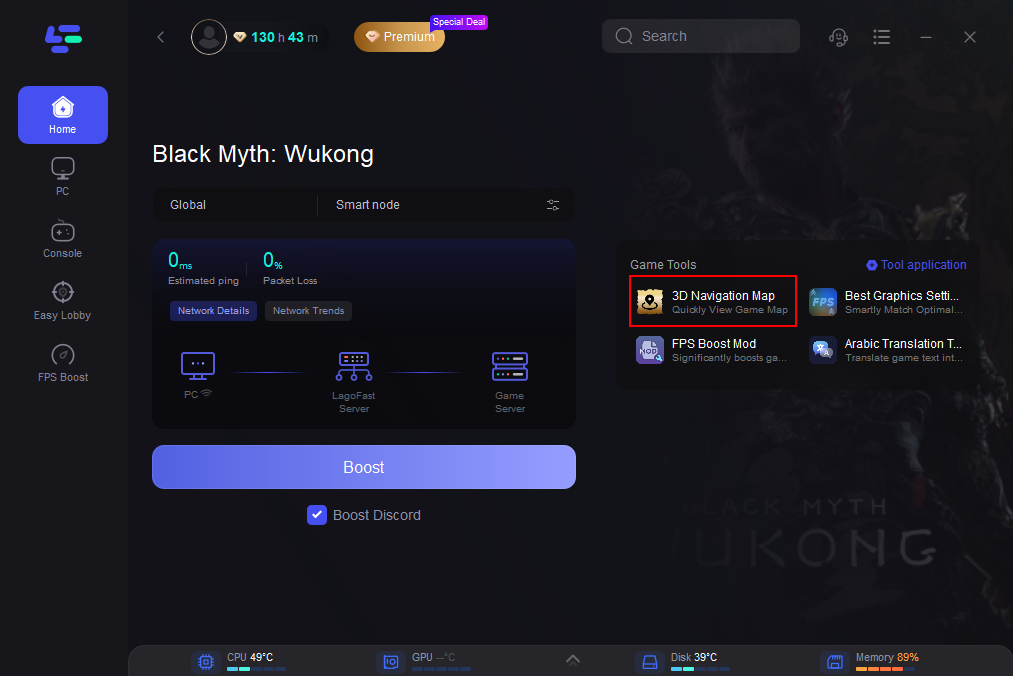
[Note]: Before using this tool, please exit the game and close Steam in the background.
Step 1: Click the 3D Navigation Map Tool on the right.
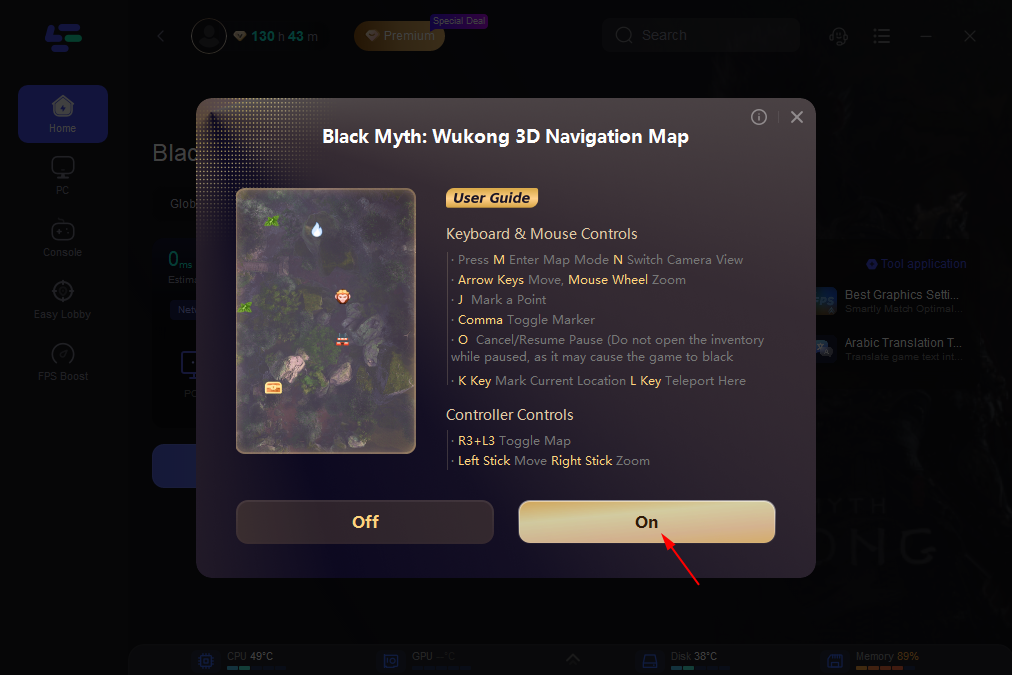
Step 2: Click on “On” and wait for loading. This may take a while, please be patient.
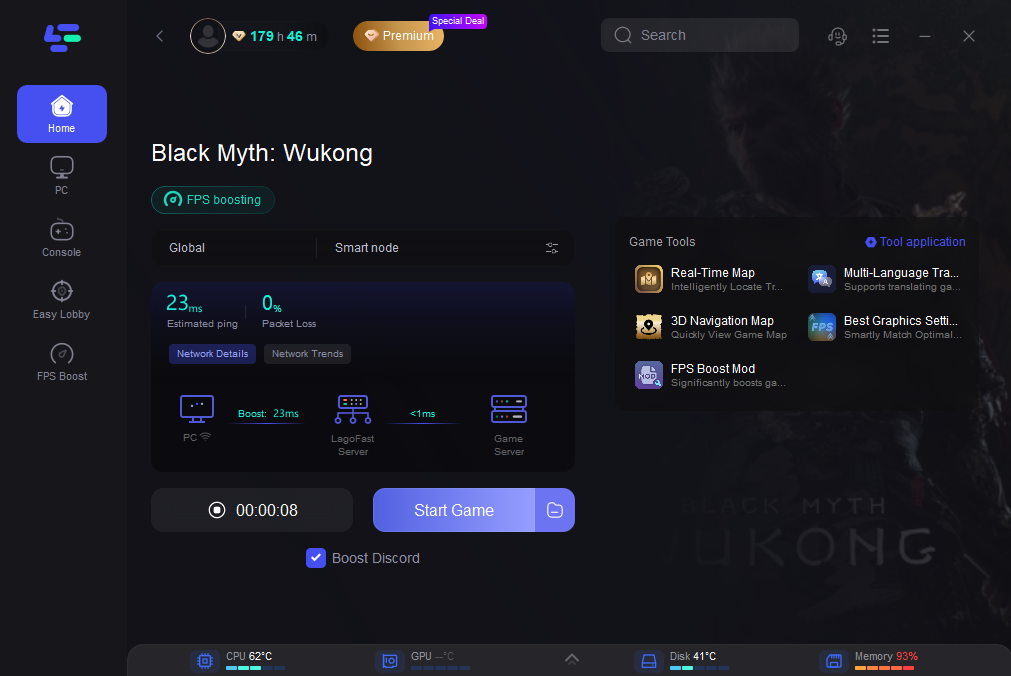
Step 3: After the loading is finished, click the Boost button and Start Game. Then you can use the Black Myth: Wukong Navigating 3D map in the game.
Here is a display of the in-game map effect. Players can use this map to get a simpler gaming experience.
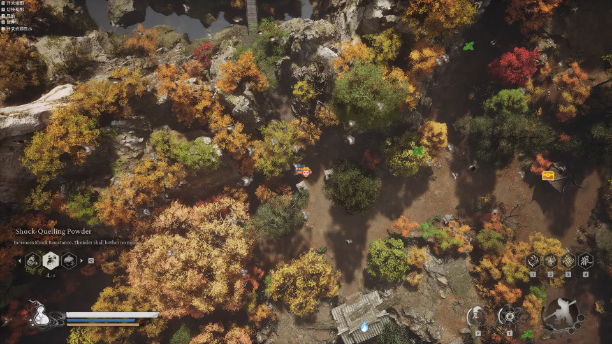
For more complete information, you can click here.
Part 3: Black Myth: Wukong Multiplayer FAQs
Is there multiplayer in the official game?
Not at launch. The official campaign is single-player only, but future DLC could bring online features.
Can I play with more than 8 friends?
Currently, the LagoFast multiplayer mod supports up to 8 players per room.
Will using mods affect my save file?
LagoFast’s multiplayer mod is designed to sync progress across all players, so your save data should remain consistent. Always back up your save before modding.
Do I need a strong internet connection for multiplayer?
Yes, but LagoFast helps optimize your route to the game server, reducing lag even on average connections.
Does the map tool work in single-player?
Yes. You can use the interactive map even if you’re not playing multiplayer.
Conclusion
While Black Myth: Wukong may still be an official single-player title, the modding community and tools like LagoFast have opened the door to multiplayer adventures. With the LagoFast Multiplayer Mod, players can team up in real-time, tackle bosses together, and explore one of the most visually stunning game worlds of recent years without the frustration of lag or crashes. Add in LagoFast’s FPS Boost, interactive maps, and stability fixes, and you have everything you need for an enhanced experience. Whether you’re waiting for the rumored August DLC or just eager to start your co-op journey now, LagoFast delivers the smoothest, most reliable way to play Black Myth: Wukong online with friends.

Boost Your Game with LagoFast for Epic Speed
Play harder, faster. LagoFast game booster eliminates stutter and lags on PC, mobile, or Mac—win every match!
Quickly Reduce Game Lag and Ping!
Boost FPS for Smoother Gameplay!