
As Hytale approaches its official Early Access launch in January 2026, PC gamers everywhere are eager to know whether their hardware can run this highly anticipated sandbox adventure. Hytale is designed to balance accessibility with performance, offering a wide creative canvas without overly intimidating system requirements. However, because the game blends deep world simulation, procedural generation, and optional mods, understanding the correct specs — from minimum thresholds to recommended configurations — is essential for a smooth, enjoyable experience.
This comprehensive guide breaks down Hytale’s hardware demands, network needs, how it uses your system, and even how performance tools like LagoFast game boosters can help. Let’s dive in.

- ✅ Reduce Lag and High Ping.
✅ Boost FPS at the Same Time.
✅ Support 2000+ Popular Online Games.
✅ Change Server without Latency.
✅ Boost Game Loading Speed.
Part 2: Minimum System Requirements to Run Hytale
Part 3: Hytale Recommended System Requirements
Part 4: Hytale Network Requirements
Part 5: How Hytale Uses Your Hardware
Part 6: How to Use LagoFast Game Booster to Enhance Your Game Experience
Part 1: Introduction
Hytale is a sandbox RPG that combines exploration, crafting, combat, and community creativity in a procedurally generated voxel world. It aims to expand the genres popularized by games like Minecraft, but with richer simulation, modding support, and flexible multiplayer gameplay.
Unlike simple block games, Hytale uses a custom engine optimized to leverage modern hardware, especially multi-core CPUs and GPUs with up-to-date drivers. The developers are still tuning performance, but the current system requirements give a solid picture of what players can expect at launch — structured into minimum, recommended, and creator/streamer tiers.
Related Article: How to Download Hytale on PC & Fix Launcher Issues?
Part 2: Minimum System Requirements to Run Hytale
The minimum requirements represent the baseline hardware needed to run Hytale at 1080p with around 30 FPS on Low graphics settings. These specs are best suited for players on older or modest gaming PCs, integrated graphics environments, or those who prioritize functionality over visual fidelity.
Operating System
- 64-bit Windows 10 (version 1809) or Windows 11
CPU (Processor)
- Intel Core i5-7500 (or equivalent)
- AMD Ryzen 3 1200 (or equivalent)
Memory (RAM)
- Dedicated graphics: 8 GB
- Integrated graphics: 12 GB
- Multiplayer-only: 8 GB
Integrated graphics systems require more RAM because the CPU handles additional tasks.
Graphics (GPU)
- Integrated: Intel UHD Graphics 620, AMD Radeon Vega 6
- Dedicated: NVIDIA GTX 900 Series, AMD Radeon 400 Series, Intel Arc A-Series
Modern drivers supporting at least OpenGL 4.1 are required, with newer standards like DirectX 12 and Vulkan potentially needed in future updates.
Storage
- SATA SSD with 20 GB free
Network
- 2 Mbit/s download speed for multiplayer (UDP/QUIC compatible)
Cloud-based downloads and online authentication require an internet connection, but offline play is supported once installed. At minimum settings, Hytale is playable but will limit some performance factors like view distance, visuals, and simulation complexity — especially in singleplayer, where your PC runs both client and server logic simultaneously.
Part 3: Hytale Recommended System Requirements
For most players, recommended specifications provide the best balance between visual quality and smooth gameplay. Hytale’s goal here is 60+ FPS at 1080p on High settings, offering a significantly more immersive experience.
Operating System
- Windows 10 (64-bit, version 1809) or Windows 11
CPU
- Intel Core i5-10400 (or equivalent)
- AMD Ryzen 5 3600 (or equivalent)
Memory (RAM)
- 16 GB
Graphics (GPU)
- Integrated: Intel Iris Xe, AMD Radeon 660M
- Dedicated: NVIDIA GTX 900 Series, AMD Radeon 400 Series, Intel Arc A-Series
Drivers with up-to-date OpenGL support remain essential. Future updates may require Vulkan or DirectX 12 support.
Storage
- NVMe SSD with 20 GB free
Network
- 8 Mbit/s download speed for smooth multiplayer
The recommended tier also targets higher view distances (e.g., 384 blocks), richer simulation, and better overall performance — especially in multiplayer servers and larger worlds.
Part 4: Hytale Network Requirements
Networking is vital in Hytale, especially for multiplayer games, exploration, and server-hosted sessions. Although singleplay can be done offline after download, your experience online depends on download speed and view distance settings.
|
View Distance |
Minimum Download |
Recommended Download |
|---|---|---|
|
192 Blocks |
2 Mbit/s |
4 Mbit/s |
|
384 Blocks |
4.5 Mbit/s |
7 Mbit/s |
|
480 Blocks |
6 Mbit/s |
10 Mbit/s |
These figures represent worst-case scenarios where players rapidly load world data. Normal gameplay, especially in small maps or minigames like Skywars or Bedwars, uses much less bandwidth and remains playable on lean connections with lower view distances. Upload speed isn’t as critical (typically <250 Kbit/s) because Hytale relies more on server data flowing to the client rather than vice versa.
Part 5: How Hytale Uses Your Hardware
Understanding how Hytale interacts with your PC helps explain why specs matter. The game operates both as a rendering client and a server simulation — especially in singleplayer.
Singleplayer Demands
In singleplayer, your computer handles both:
- Rendering graphics and UI
- Simulation logic, world generation, NPC events
This dual load increases CPU and RAM usage compared to multiplayer, making stronger CPUs and more system memory beneficial.
Multiplayer Efficiency
Joining a remote server offloads the simulation to the host, letting your PC focus almost entirely on graphics and gameplay. Many players with mid-range machines will see better performance in multiplayer than solo.
View Distance
View distance is one of the most impactful graphical settings. Doubling view distance quadruples the amount of world data your PC must process. Lowering view distance is often the quickest way to improve FPS on modest hardware.
CPU vs GPU
Unlike many games, Hytale places a heavy load on the CPU due to world simulation. Once your GPU meets the minimum bar, upgrading the CPU and RAM often yields the most performance gains.
Part 6: How to Use LagoFast Game Booster to Enhance Your Game Experience
While Hytale’s official specs help players match the right hardware, software tools like LagoFast Game Booster can further optimize performance — especially for players with systems near the minimum or recommended specs.
Benefits of Using LagoFast
- Reduced Ping: Minimizes latency for smoother gameplay
- Stable Connection: Reduces packet loss and connection drops
- Optimized Routing: Selects the best server routes for optimal performance
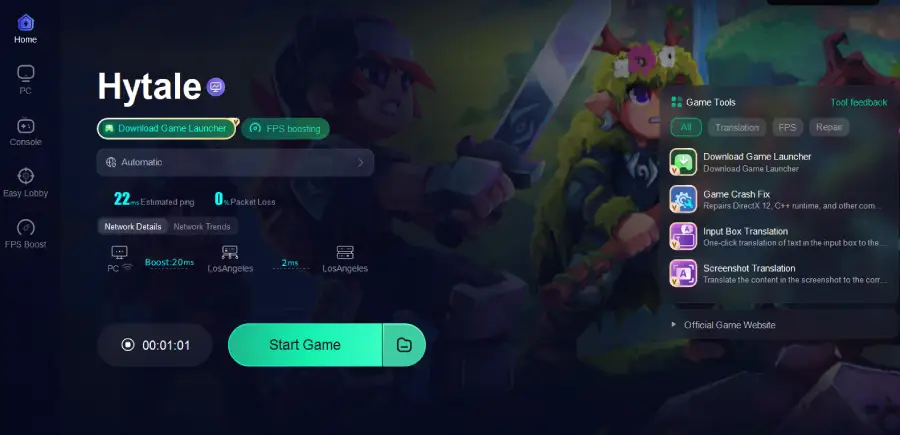
- Easy Hytale Launcher Download: Quickly download and install the official launcher
How to Use LagoFast
Step 1: Click the Free Trial button to download and install LagoFast.
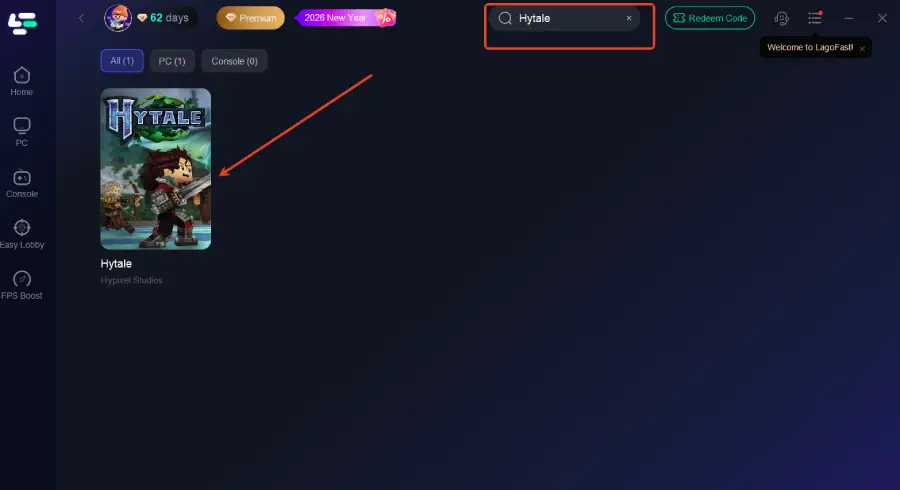
Step 2: After installation, search "Hytale" in the search bar and select the game.
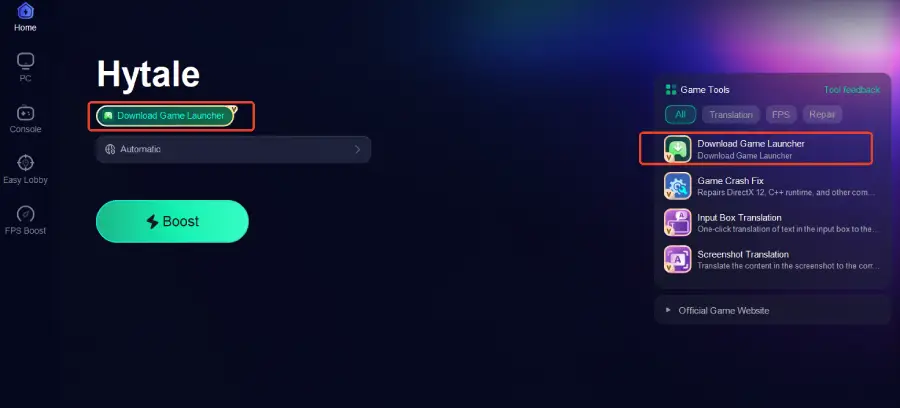
Step 3: Click the Download Game Launcher tool on the right to start downloading
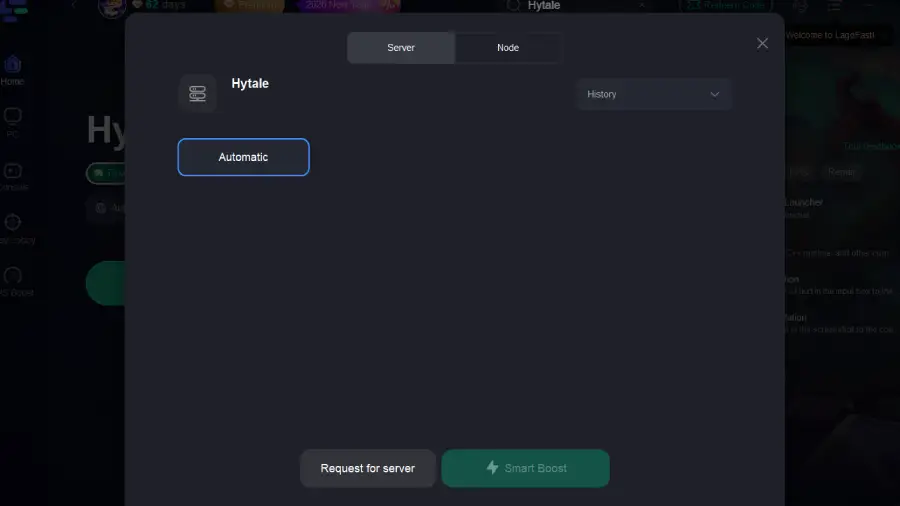
Step 4: Choose your preferred server node and click "Smart Boost" to start optimizing.
Step 5: Launch your game and enjoy smooth, optimized gameplay with lower ping and no stutter.
Part 7: FAQs
Q1: Can my laptop run Hytale?
Yes — if it meets at least the minimum specs (8–12 GB RAM, supported GPU, SSD, modern CPU). Expect better performance on dedicated GPUs.
Q2: Is SSD required?
An SSD is strongly recommended to reduce load times and stuttering, especially in large worlds.
Q3: Does multiplayer require faster internet?
Yes, higher view distances significantly increase bandwidth needs; mid-range internet (~7–10 Mbit/s) is ideal for larger distances.
Q4: Will Hytale run on Linux or Macs?
Support is planned, and minimum requirements include Mac/Apple Silicon equivalents in some listings, but Windows remains the primary launch platform.
Q5: Do mods affect performance?
Absolutely — mods can increase CPU, RAM, and GPU load beyond baseline requirements.
Conclusion
Hytale’s system requirements strike a thoughtful balance between accessibility and performance. Whether you’re running the game on an older GPU or planning to stream at high quality, there’s a tier tailored to your hardware and ambitions. By understanding what each requirement means and how Hytale uses your system, you can prepare — and even optimize with tools like LagoFast — to enjoy this highly anticipated sandbox experience fully.

Boost Your Game with LagoFast for Epic Speed
Play harder, faster. LagoFast game booster eliminates stutter and lags on PC, mobile, or Mac—win every match!
Quickly Reduce Game Lag and Ping!
Boost FPS for Smoother Gameplay!