
Counter-Strike 2 (CS2), released in September 2023, is the latest installment in Valve's iconic tactical first-person shooter series. Built on the Source 2 engine, CS2 introduces enhanced graphics, improved physics, and a new "sub-tick" server architecture, offering a more responsive and immersive gaming experience. While CS2 is globally accessible, players in China face unique challenges due to regional restrictions and censorship policies.
This guide provides a comprehensive overview of how to play CS2 in China, including accessing the game, connecting to Chinese servers, and optimizing your gaming experience.
Part 2: How to Play the Chinese Version of CS2
Part 3: Is CS2 Available in China
Part 4:How Do I Get Into Chinese Servers
Part 5: Enhance your Gaming Experience By Using LagoFast Game Booster
Part 1: Introduction
Counter-Strike 2 (CS2) has made waves in the gaming community since its release on September 27, 2023. As the latest installment in the renowned Counter-Strike series, it offers both old fans and new players a fresh experience with improved graphics, gameplay mechanics, and updated maps. However, for gamers in China, accessing CS2 involves specific steps due to regional regulations and platform requirements.
Part 2: How to Play the Chinese Version of CS2
In China, CS2 is distributed through Perfect World, a local publisher that collaborates with Valve to comply with Chinese regulations. The Chinese version features modifications such as censored blood effects, altered skins, and removal of certain symbols to adhere to local content guidelines. To play CS2 in China:
- Register a Perfect World Account: Visit the cs2 site and create an account using your Chinese personal identifiable information.
- Bind Your Steam Account: Log in to your Steam account and bind it to your Perfect World account through the provided interface.
- Complete Identity Verification: Submit the required identification documents for verification. This step is mandatory to comply with China's real-name registration policy.
- Activate CS2: After verification, you'll receive an activation code. Use this code to activate CS2 on your Steam account.
- Launch CS2 via Steam: Ensure that you launch the game through the Steam client to avoid any errors.
By following these steps, you can access the Chinese version of CS2, which is tailored to meet local regulations and provides a seamless gaming experience within China.
Part 3: Is CS2 Available in China
Yes, CS2 is available in China through Perfect World. The game has been localized to comply with Chinese laws, resulting in certain content modifications:
- Censorship of Visual Elements: Skulls, skeletons, and certain symbols have been removed or altered.
- Language Localization: Maps and in-game texts have been translated into Chinese, and some foreign language texts have been removed or replaced.
- Content Restrictions: Certain skins, stickers, and music kits have been modified or are unavailable to comply with cultural sensitivities.
Despite these changes, the core gameplay mechanics remain intact, ensuring that players in China can enjoy the full CS2 experience within the framework of local regulations.
Part 4: How Do I Get Into Chinese Servers
To connect to Chinese servers in CS2, follow these steps:
- Use the Perfect World Version: Ensure you're playing the Perfect World version of CS2, as it automatically connects you to Chinese servers.
- Set Launch Options: In your Steam library, right-click on CS2, select "Properties," and under "Launch Options," add -perfectworld to ensure the game connects to the appropriate servers.
- Adjust Max Acceptable Matchmaking Ping: Within CS2, navigate to "Settings" > "Game" and increase the "Max Acceptable Matchmaking Ping" to expand your matchmaking range, potentially connecting you to a broader selection of servers.
- Use Console Commands: Open the developer console and enter Steamdatagram_client_force_relay_cluster "hkg" to prioritize connecting to Hong Kong servers, which may offer lower latency for players in southern China.
By configuring these settings, you can optimize your connection to Chinese servers, ensuring a smoother and more responsive gaming experience.
Part 5: Enhance your Gaming Experience By Using LagoFast Game Booster
Network stability and low latency are crucial for competitive gameplay in CS2. LagoFast Game Booster is a tool designed to optimize your network connection, reduce ping, and minimize lag. Here's how it can enhance your CS2 experience:
- Intelligent Routing: LagoFast selects the most efficient network paths, reducing latency and improving connection stability.
- Server Switching: Easily switch between servers to find the best connection quality.
- Real-Time Monitoring: Monitor your ping and packet loss in real-time to identify and address network issues promptly.
- User-Friendly Interface: The intuitive interface allows for quick setup and optimization, even for users with limited technical knowledge.
- All Platforms Support: You can boost CS2 every platform with LagoFast, including FACEIT, 5E and Perfect World.
Steps to using LagoFast
Step 1: Click the Free Trial button to download and install LagoFast.
Step 2: Launch and Select CS2: Open LagoFast, search for CS2, and select it from the list.
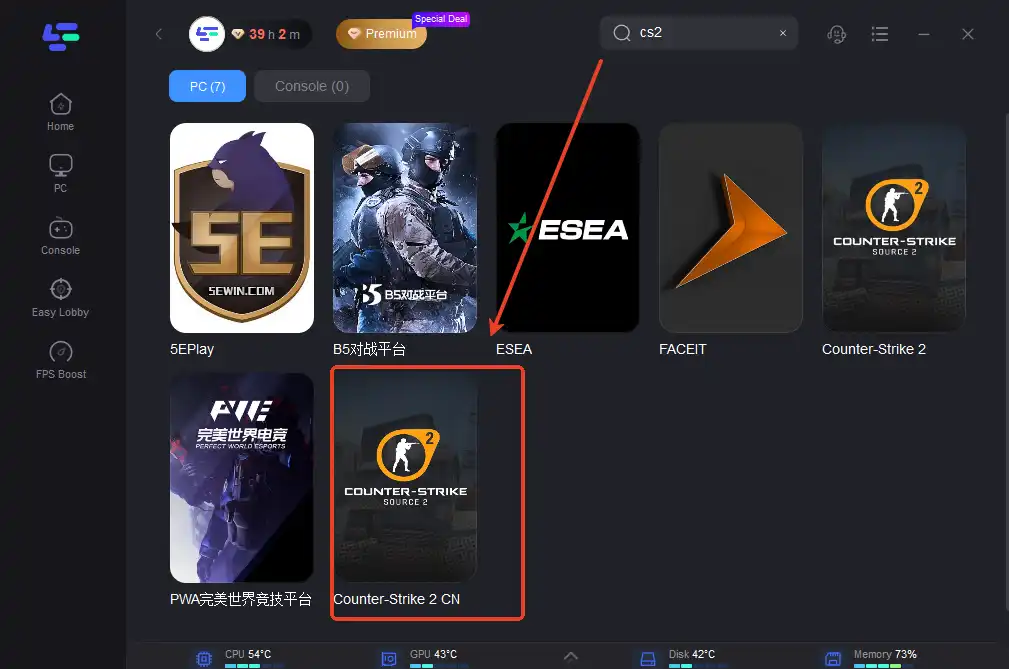
Step 3: Choose Server and Boost: Select the desired server region and click "Boost" to optimize your connection. You can choose 5E or Perfect World.
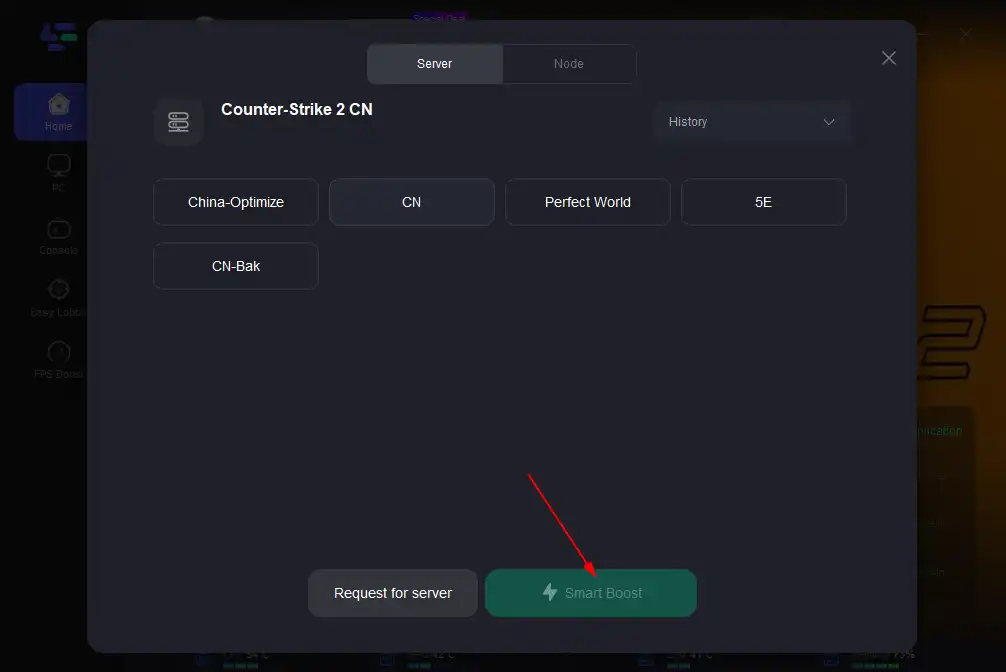
Step 4: After setting up, you can return to the game to experience a smooth network environment.
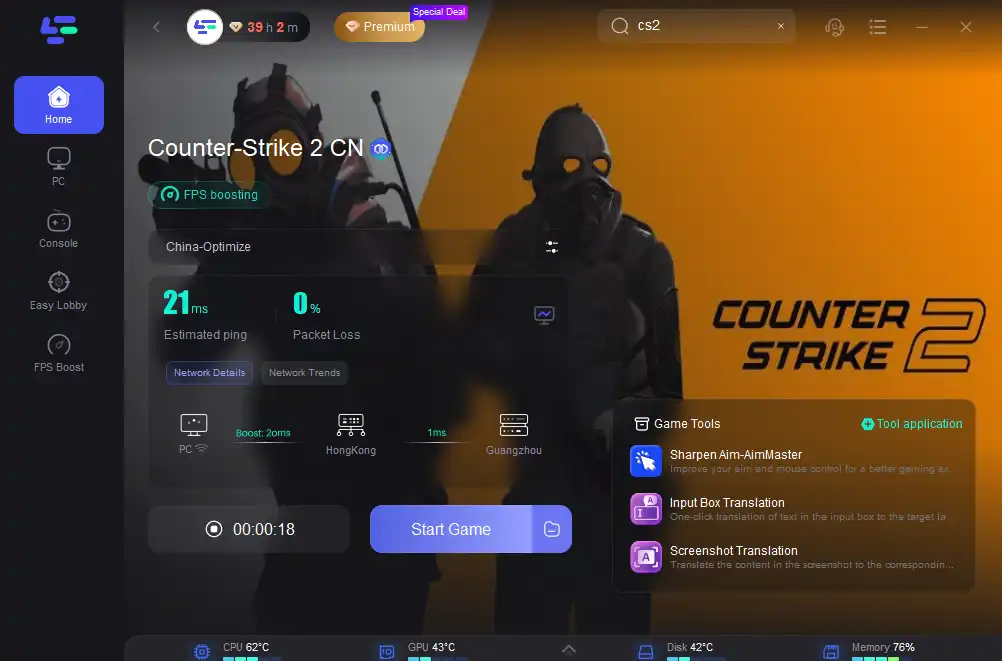
By integrating LagoFast into your gaming setup, you can achieve a more stable and responsive CS2 experience, crucial for competitive play.
Part 6: FAQs
Q1: How can I fix the CS2 character creation black screen issue?
This issue may be related to graphics driver problems or game file corruption. To resolve it:
- Update Graphics Drivers: Ensure your GPU drivers are up to date.
- Verify Game Files: In Steam, right-click CS2, select "Properties," go to "Local Files," and click "Verify Integrity of Game Files."
- Adjust In-Game Settings: Lower graphics settings to reduce the load on your system.
Q2: Can I make my own character in CS2?
CS2 does not feature character creation in the traditional sense. Players can customize their appearance through skins and cosmetic items, but these do not affect gameplay.
Q3: Can I change my character's appearance in CS2?
Yes, you can change your character's appearance by equipping different skins and cosmetic items. These changes are purely aesthetic and do not impact gameplay mechanics.
Q4: Is it possible to play CS2 with players from other regions?
While CS2's matchmaking system prioritizes connecting players within the same region to ensure low latency, you can increase the "Max Acceptable Matchmaking Ping" in settings to broaden your matchmaking range. However, this may result in higher latency during gameplay.
Q5: Are VPNs allowed in CS2?
Yes, using a VPN is permitted in CS2. A VPN can help reduce ping, protect against DDoS attacks, and allow access to servers in different regions. Ensure you use a reputable VPN service to maintain a stable and secure connection.
Conclusion
Playing CS2 in China involves navigating regional restrictions and optimizing your setup for the best experience. By registering through Perfect World, configuring your settings appropriately, and utilizing tools like LagoFast Game Booster, you can enjoy a smooth and competitive CS2 experience. Stay informed about updates and community strategies to continually enhance your gameplay in the evolving landscape of CS2.
Boost Your Game with LagoFast for Epic Speed
Play harder, faster. LagoFast game booster eliminates stutter and lags on PC, mobile, or Mac—win every match!
Quickly Reduce Game Lag and Ping!
Boost FPS for Smoother Gameplay!