

If you're a US, EU, or OCE (Oceanic) player diving into Aion 2, you've probably noticed something: the only available servers right now are in Taiwan (and Korea), which means latency (ping) can be challenging. High ping impacts your ability to play smoothly — especially in an action‑MMO like Aion 2 — so knowing how to manage it is crucial. Here we'll explain server locations, the best options for Western players, where most US players are, and most importantly, how to lower ping Aion 2 for US EU OCE players using practical tools and tips.

- ✅Less ping and crashes.
- ✅ Higher FPS and better PC performance.
- ✅ Support for 2000+ games.
- ✅ Stable connection and region switching.
Part 1. Aion 2 Server Location Explained
Part 2. What Is the Best Aion 2 Server for a US / EU Player
Part 3. What Server Are the Majority of US Players on Aion 2
Part 4. Why Is My Ping So High on Aion 2 TW Server
Part 5. How to Reduce Ping in Aion 2 for US EU OCE Players
Part 6. Other General Tips to Lower Ping
Part 1. Aion 2 Server Location Explained
At the time of writing, Aion 2 is officially launched only on Korea (KR) and Taiwan (TW) servers. There is currently no dedicated North America (NA), Europe (EU), or Oceanic (OCE) server. That means if you’re playing from the US, EU, or OCE, you're connecting over a long distance — likely across undersea cables — to reach TW or KR data centers. This inherently results in higher latency, depending on your ISP, routing, and how well-connected your region is to those Asian nodes.
Part 2. What Is the Best Aion 2 Server for a US / EU Player
With only a few options available, the Taiwan (TW) server is generally considered the best choice for US and EU players. For those on the US West Coast, TW typically offers a slightly lower ping compared to the East Coast and is straightforward to access. East Coast players can also use TW, benefiting from English-language support, although their latency may be higher due to the longer distance.
For European players, TW tends to offer a more stable route than the Korean server, making it the preferred option despite the long-distance connection. OCE players from Australia or New Zealand also primarily connect to TW. While ping may vary, many report acceptable performance for gameplay.
In short, given the lack of local servers in the US, EU, or OCE, Taiwan remains the most practical choice. It provides the best combination of accessibility, community presence, and overall playability, even if latency isn’t perfect.
Part 3. What Server Are the Majority of US Players on Aion 2
So, what server are the majority of US players on Aion 2? The answer is: the Taiwan server.
Based on community discussion, many Western players (especially from the US) are choosing the TW server because:
- It’s easier to register without needing a local number.
- The English client is available, and you don’t need complex workarounds.
- There’s already an active expat and English-speaking community. For example, players point to Bai Jieer / Vaizel and Trinelle as good servers for English speakers.
On Reddit, many OCE and US players talk about holding out on TW until a global or closer server launches, but for now, TW is the hub:
“Unless global includes a Singapore or Aus server … we won’t get better ping” — an OCE player.
“I’m getting like 160‑170 without any VPN … I could probably shave off a little bit.” — East Coast US player talking about ping to Taiwan.
Part 4. Why Is My Ping So High on Aion 2 TW Server?
If you're asking why your ping is so high on the Aion 2 TW server, you’re not alone. Several factors contribute:
- Geographic distance — You're physically far from the data center, so packets have to travel through multiple hops.
- Suboptimal ISP routing — Your internet provider might not have a great peering route to Taiwan, leading to inefficient paths or congestion.
- ISP-level throttling or limits — Certain ISPs may deprioritize gaming traffic or route it through slower or congested paths.
- Launcher/login handshake issues — Because of how the Purple launcher (NCSoft’s client) works, login routing can timeout or loop.
- Network instability on your end — Using Wi-Fi, outdated drivers, or background apps can worsen latency.
High ping is unfortunately common, especially for US East Coast and OCE players. Without optimization, players report 200–300+ ms in some cases, making it harder to react in fast-paced combat. But there are ways to improve it.
Part 5. How to Reduce Ping in Aion 2 for US EU OCE Players
Here’s a practical guide on how to lower ping Aion 2 for US EU OCE players, especially when playing on the TW server.
One of the most effective tools is LagoFast Game Booster, which is built to help with Aion 2 latency and connection issues. It automatically selects the best nodes for reducing latency and packet loss. And it works in the background to maintain a stable, low-latency path.
How to Use LagoFast with Aion2
Step 1: Click the Free Trial button on the official LagoFast website to download and install the software.
Step 2: Open LagoFast, click the PC icon on the left, and search Aion 2 in the search bar. Once it appears, click it to enter the optimization page.

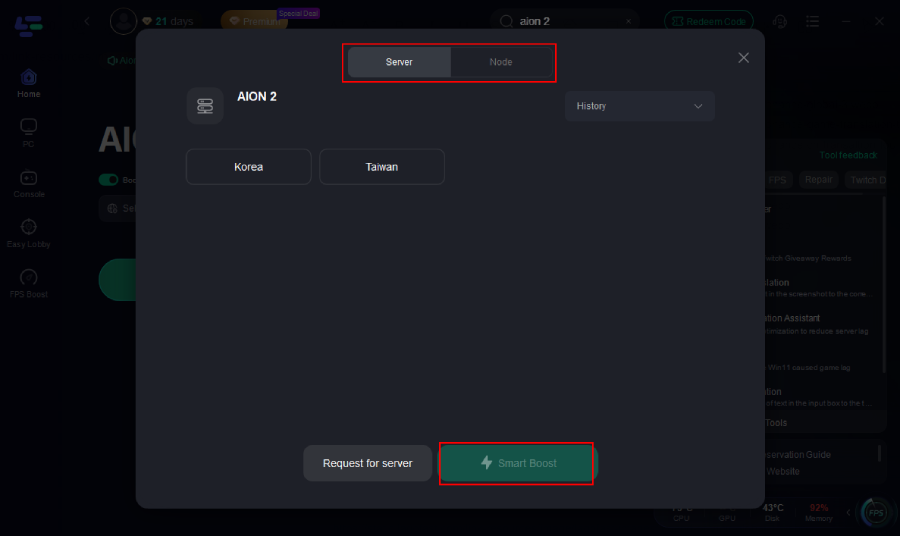
Step 3: Click on “Server” to select the best route for stable connectivity, then click “Smart Boost” to enable intelligent optimization.
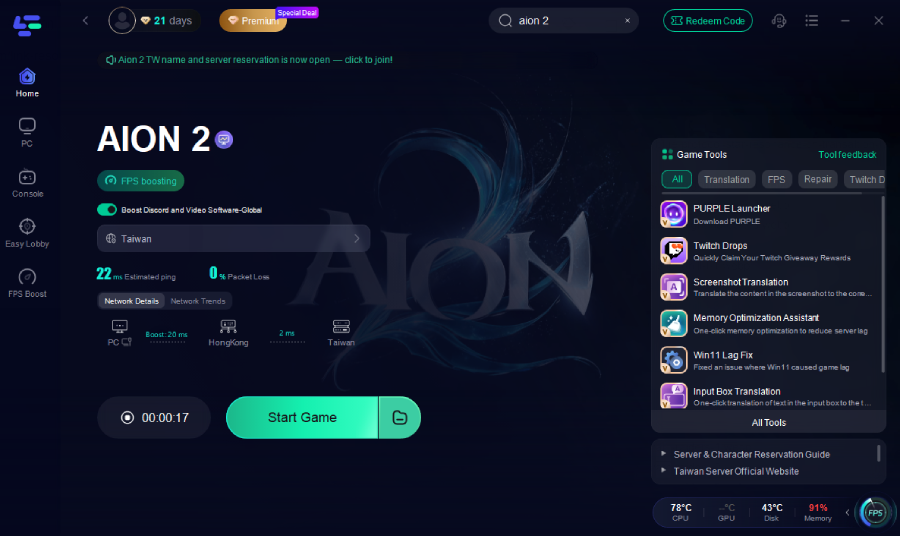
Step 4: On the right panel, check your ping, packet loss, and multi-path connection status to ensure the best route is applied.
Other Benefits of LagoFast
Apart from reducing ping, LagoFast offers several extra perks:
Aion 2 Translation Tool
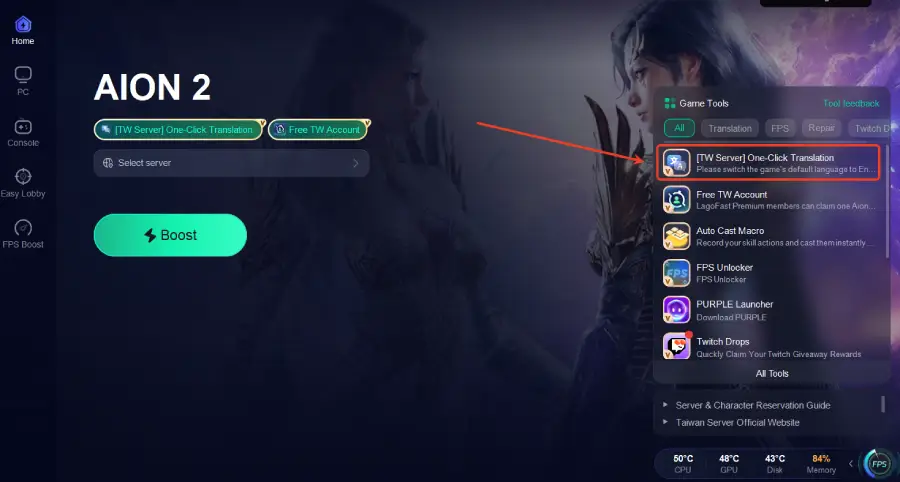
- One-Click Translation for TW Server: Supports Russian, Ukrainian, Brazilian Portuguese, French, German, Thai, Arabic, Turkish, Spanish, Filipino, and Japanese. To use the translation, the game’s default language must first be switched to English.
Step 1: Click the Translation Tool on the right.
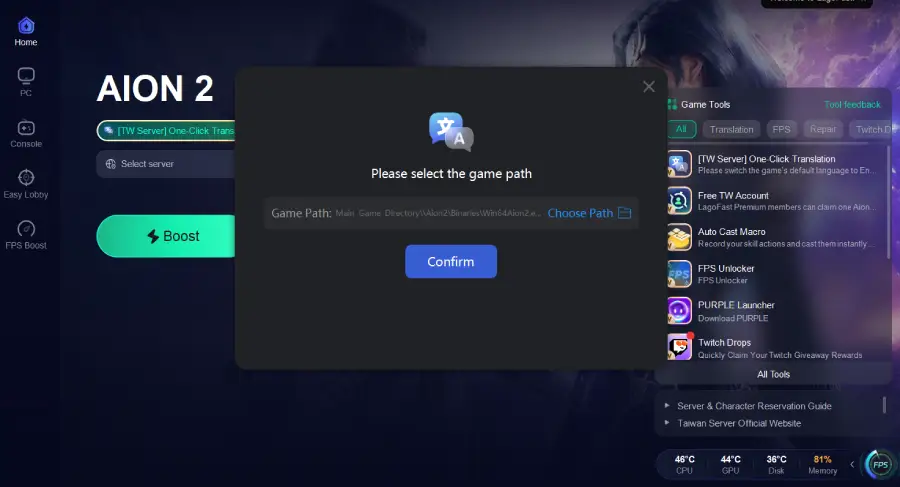
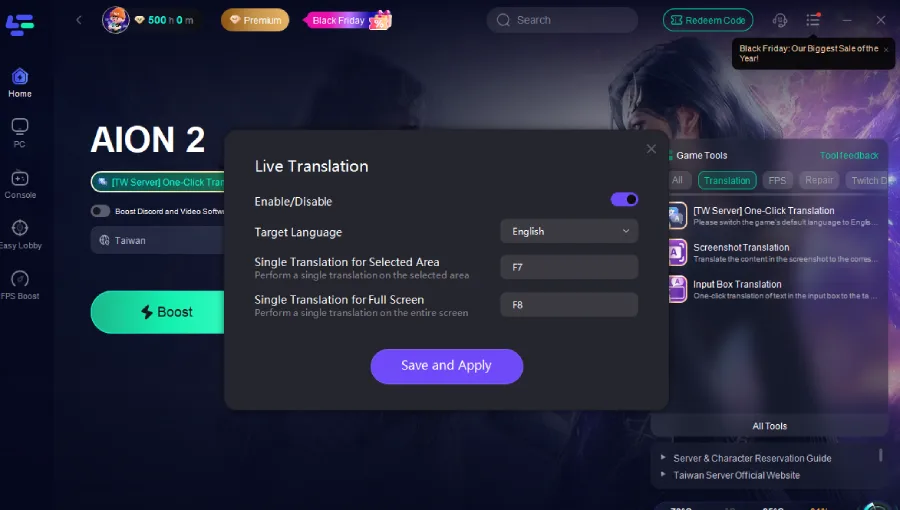
Step 2: Choose your target language and set up the hotkeys.
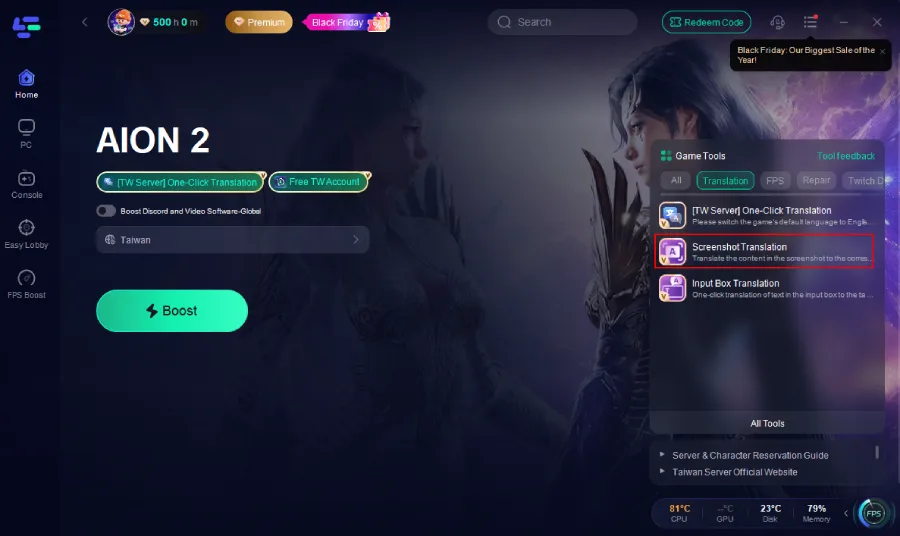
- Universal Screenshot Translation Tool: Provides translation for dozens of languages, allowing players to understand in-game text and interface elements easily.
Step 1. Click the Screenshot Translation tool.
Step 2. Set up the hotket and choose your target language.
Aion 2 TW Account Giveaway
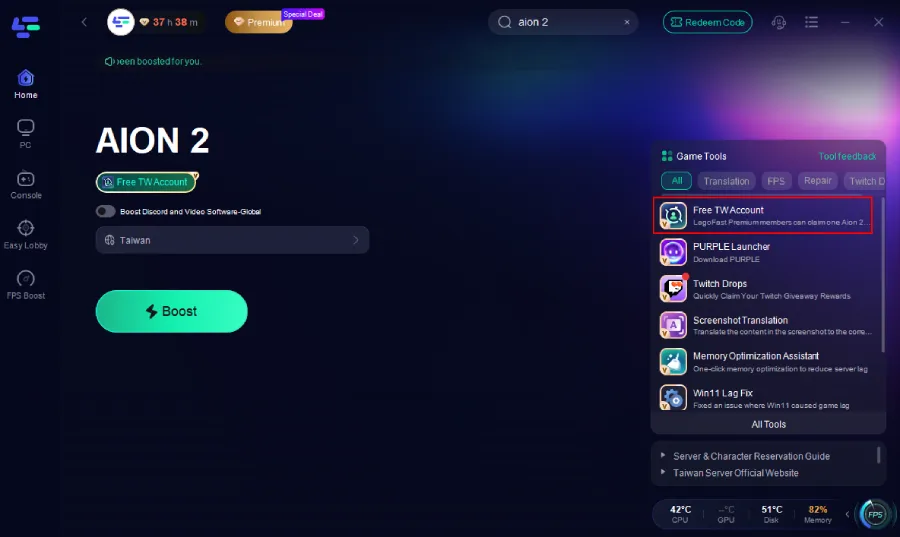
Registration can be tricky; LagoFast offers paid users a free TW account to bypass regional restrictions.
Step 1: In the LagoFast client, open the Free TW Account Tool on the right side.
Step 2: Click Claim Account.
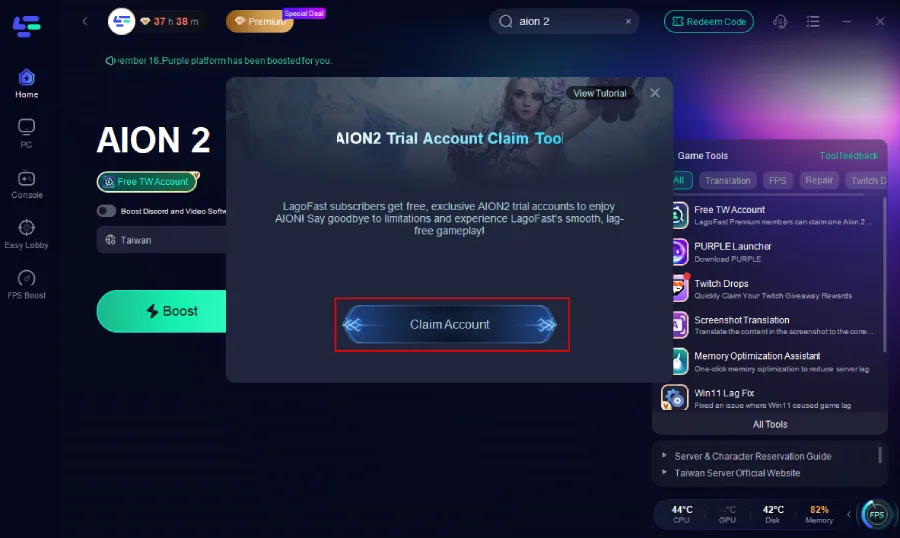
Step 3: A login email and password will be automatically generated. Copy the credentials and log in directly through Purple. A full tutorial is also available inside the tool for extra assistance.
Important Notice:
- This TW account is for temporary experience only.
- Long-term support or recovery is not guaranteed.
- Avoid making large purchases or top-ups on this temporary account.
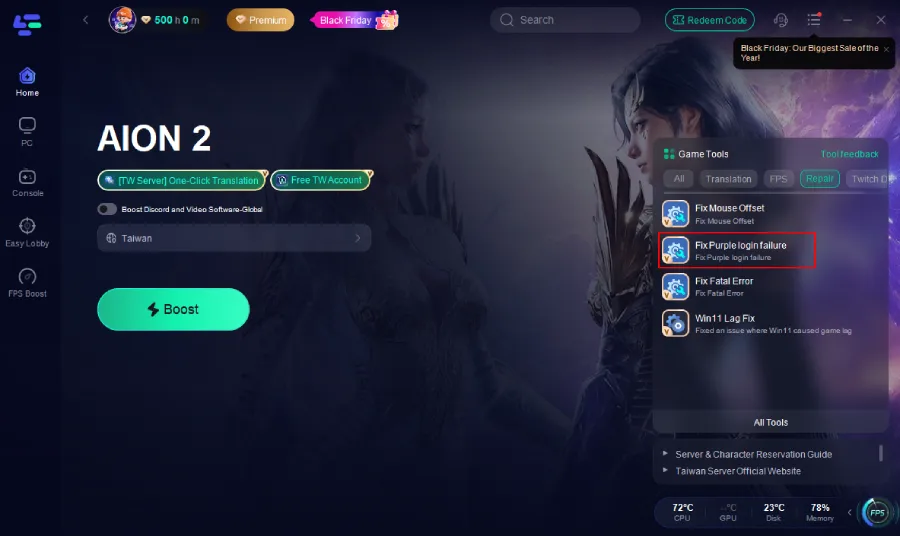
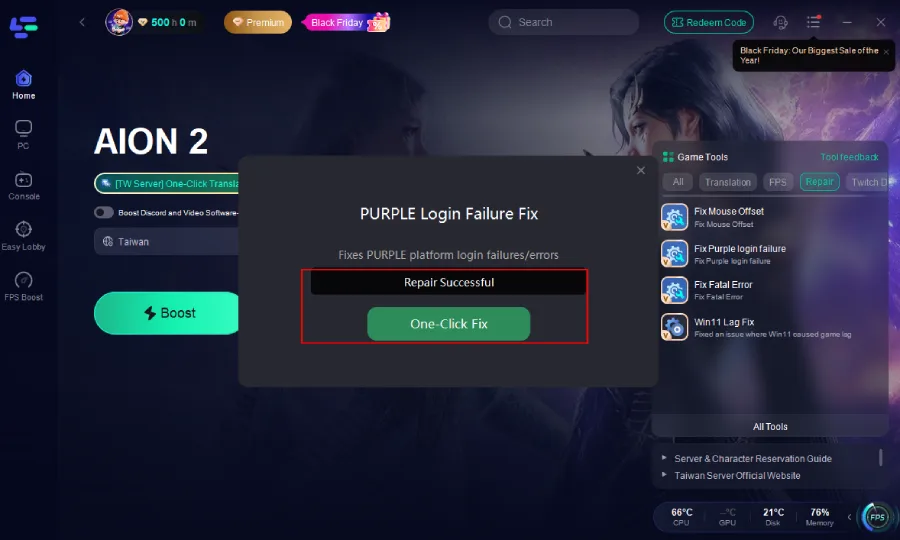
Purple Login Error & Fatal Error Fixer
One-click fixes for login failures and fatal crashes, helping Western players avoid launcher-related issues.
Click the Fix PURPLE Login Fail tool and click One-Click Fix.
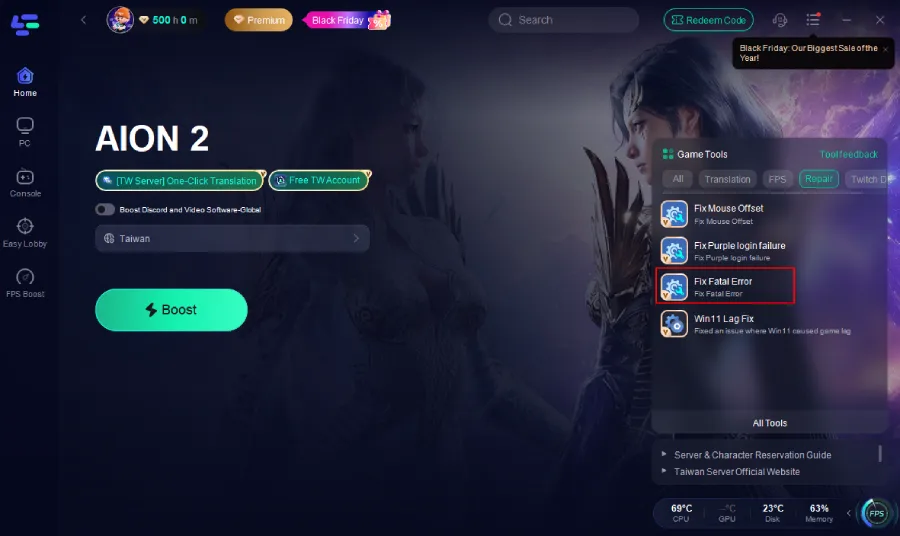
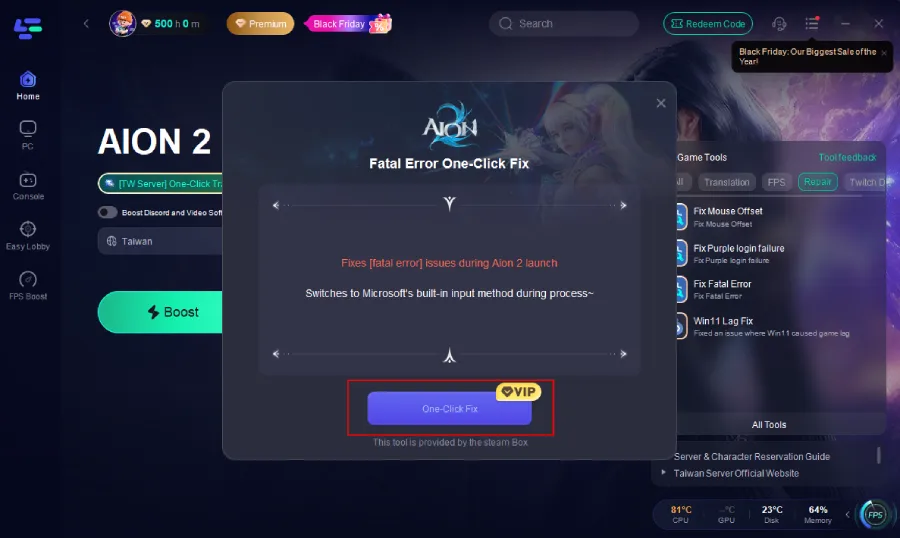
How to Fix Aion 2 PURPLE Fatal Error
1. Click the Fix Fatal Error tool on the right.
2. Click One-Click Fix.
Part 6. Other General Tips to Lower Ping
In addition to using a game booster, there are several general steps you can take to reduce ping and improve gameplay in Aion 2:
- Use a wired connection – A direct Ethernet connection is much more stable than Wi-Fi and reduces latency spikes.
- Close background programs – Applications that use the internet or high CPU resources can increase lag.
- Keep drivers updated – Regularly update network and GPU drivers to ensure optimal performance.
- Switch to a faster DNS – Using public DNS servers like Google (8.8.8.8) or Cloudflare (1.1.1.1) can slightly improve connection speed.
- Play during off-peak hours – Server congestion can affect latency; playing when fewer players are online can help.
- Optimize in-game settings – Reducing unnecessary visual effects or limiting background downloads can stabilize performance.
By combining these tips with server optimization tools, you can achieve a smoother experience even when playing on distant servers.
Conclusion
To wrap up, how to lower ping Aion 2 for US EU OCE players boils down to:
- Most Western and Oceanic players are on the Taiwan server due to accessibility and community.
- No local US/EU/OCE servers exist yet, so higher latency is unavoidable.
- High ping arises from distance, ISP routing, and launcher handshake issues.
- Using LagoFast Game Booster is one of the most effective ways to reduce lag, fix login/crash issues, and translate in-game text.
- Combine booster use with good network hygiene — wired connection, updated drivers, and DNS tweaks — for best results.
Following these steps gives you the best chance at a smoother, more playable Aion 2 experience even before global servers arrive.
Boost Your Game with LagoFast for Epic Speed
Play harder, faster. LagoFast game booster eliminates stutter and lags on PC, mobile, or Mac—win every match!
Quickly Reduce Game Lag and Ping!
Boost FPS for Smoother Gameplay!