
If you’re stuck because you need Silver for an upgrade in Subnautica 2, don’t waste time swimming around the starting area forever. Silver usually isn’t sitting right beside your pod. You need to move a little farther out and check rocky areas, cave walls, and resource-heavy zones.
The fastest way to find Silver is to search around the stalagmite area southeast of your Lifepod, then move toward deeper rocky zones if you still don’t have enough. Silver is easy to miss because it often blends into the terrain, so don’t just rush across the seafloor. Slow down and check walls, caves, and the base of large rock formations.

- ✅ Lower ping and fewer disconnects.
- ✅ More FPS and better PC performance.
- ✅ Support for 3000+ games.
- ✅ Stable connections and region switching.
What Is Silver Used For in Subnautica 2?
Silver is a crafting resource used for early and mid-game technology progression. You usually need it for electronic-style crafting, upgrades, and survival tools.
Players often start searching for Silver when they need to upgrade their oxygen capacity or craft equipment that requires more advanced components. Silver becomes important early because players may need it for oxygen tank upgrades before they fully unlock more advanced scanning tools.
If your crafting progress is blocked and the recipe needs Silver, you need to start searching outside the safest shallow areas.
Where to Find Silver in Subnautica 2
1. Necrolei Fields
One of the first useful Silver locations is the Necrolei Fields.
This area is roughly 370 meters north/northwest of the Lifepod, near the Wu “Wu” Lianghai marker. The area is recognizable because of its bright pink and blue plant life. Silver Ore can be found on the ground around the Necrolei plants and along cliff walls.
This is a good place to check if you want direct Silver Ore instead of relying only on outcrops.
Look around:
- the seafloor
- cliff walls
- plant-covered areas
- corners around large terrain formations
Do not just swim through the center of the biome. Silver is easy to miss if you are moving too fast.
2. Stalagmite Area Southeast of the Lifepod
Another strong early farming spot is the stalagmite area southeast of the Lifepod.
This area is around 200 meters southeast of the Lifepod, where many stalagmites rise from the seafloor toward the surface. This location is also near Chap’s Blackbox Signal, so many players naturally pass through it while following early objectives.
This area is especially useful for finding Silver Outcrops.
Search around:
- the base of stalagmites
- nearby caves
- cave walls
- rocky ground
- darker corners around the terrain
If you only search flat open ground, you may miss a lot of resource points.
3. Early Area South of the Lifepod
Silver location, roughly 100 meters south of the Lifepod as a good starting place for finding Silver during the early game.
This is useful because it gives new players a closer option before going deeper or farther away.
If you are still early in the game, try this route first:
- Start from the Lifepod.
- Swim south.
- Scan the seafloor and rocky surfaces.
- Check cave entrances carefully.
- Look for Silver-related resource nodes.
This is a safer first route if you do not want to travel too far from your starting point.
How to Get Silver Fast
Here’s the simple route:
- Start from your Lifepod.
- Head southeast toward the rocky stalagmite area.
- Check the base of the rock formations.
- Look along cave walls and small tunnels.
- Pick up Silver Ore or break resource nodes if you find them.
- Return before your oxygen gets low.
If you don’t find enough, don’t keep circling the same empty spot. Move to another rocky area and keep checking walls and caves.
Why You Can’t Find Silver
If you’ve been searching for a while and still can’t find Silver, you’re probably making one of these mistakes:
- You’re staying too close to the Lifepod.
- You’re only checking open sand.
- You’re ignoring caves.
- You’re swimming too fast.
- You’re not checking rock walls.
- You’re farming the wrong resource nodes.
- You don’t have enough oxygen to search properly.
Silver is not impossible to find. You just need to stop treating it like a common surface resource and start checking the places where valuable materials usually spawn.
Use LagoFast Resource Exploration to Find Silver Faster
If you don’t want to keep guessing where Silver is, you can use LagoFast Resource Exploration.
It can show resource points directly in-game, so you don’t have to swim around blindly hoping to spot the right node.
It helps you:
- see basic resource locations in the game
- select multiple resource types
- adjust how far resources are displayed
- find Silver faster
- plan a cleaner farming route
- avoid wasting oxygen on empty areas
This is useful when you’re trying to craft an upgrade but keep getting stuck because you can’t find one specific material.
How to Use It
1. Open LagoFast.
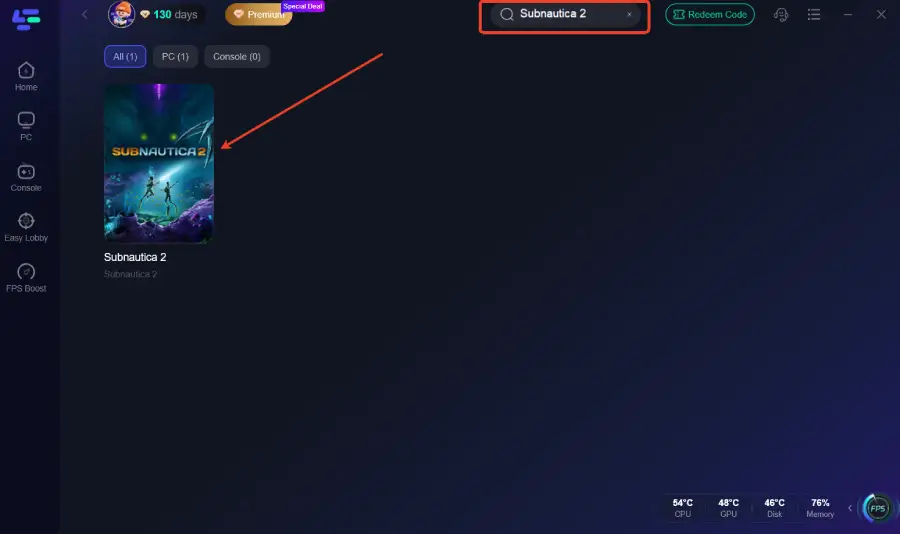
2. Search for Subnautica 2.
3. Enable Resource Exploration.
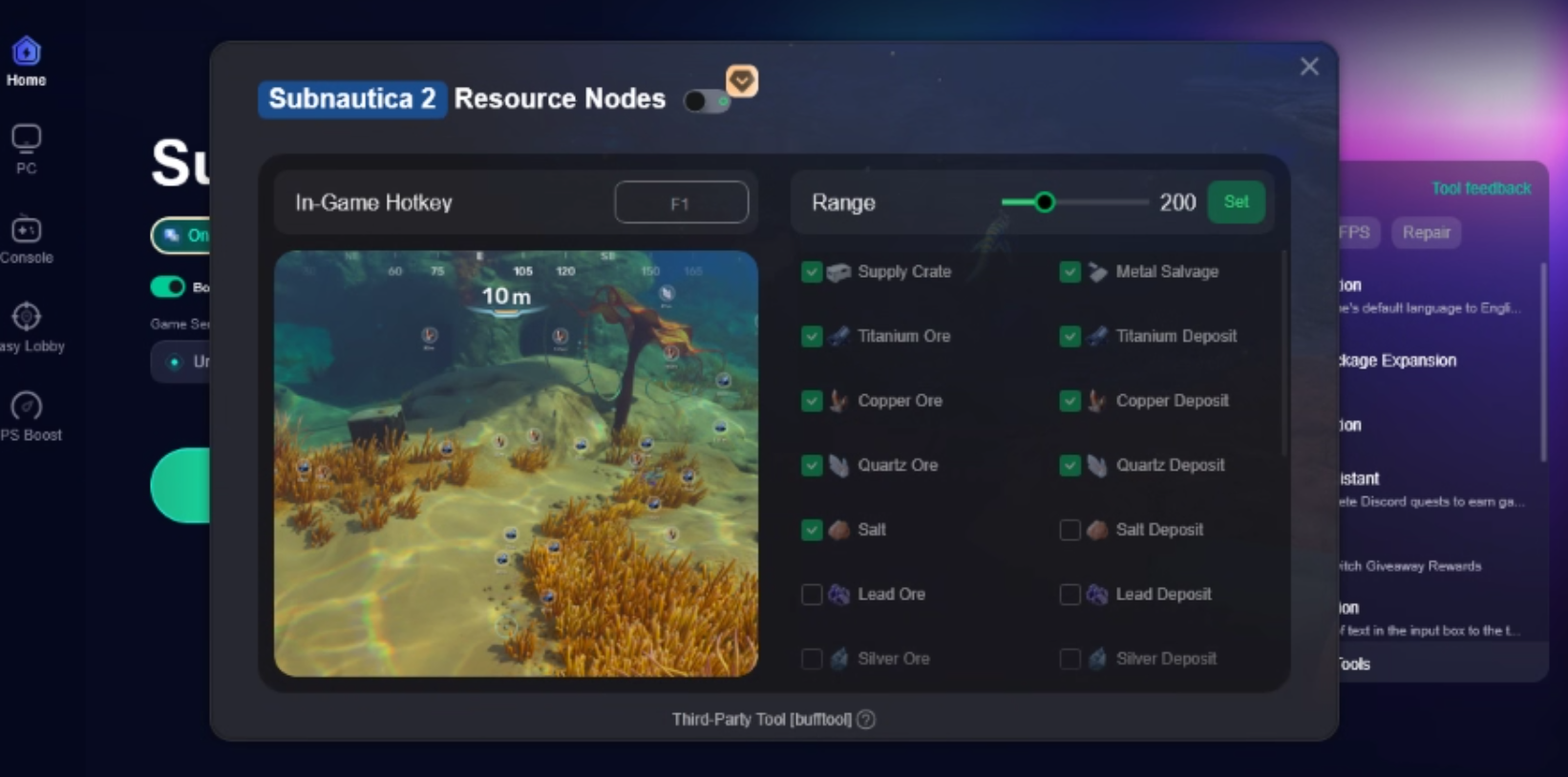
4. Select the resource you want to track.
5. Adjust the display range.
6. Enter the game and follow the resource markers.

Instead of checking every cave by hand, you can go straight toward the resource points and collect Silver much faster.
Final Tip
For Silver, don’t just swim randomly. Go to rocky areas, check caves, look along walls, and bring enough oxygen. If you want to save time, use LagoFast Resource Exploration to show resource points in-game and farm Silver without wasting half your run searching the wrong place.

Boost Your Game with LagoFast for Epic Speed
Play harder, faster. LagoFast game booster eliminates stutter and lags on PC, mobile, or Mac—win every match!
Quickly Reduce Game Lag and Ping!
Boost FPS for Smoother Gameplay!