
Deleting your Roblox account in 2025 isn’t as simple as opening the app and clicking “Delete.” Roblox doesn’t offer an instant in-app option—you’ll need to submit an official deletion request through the Roblox Support page. This guide covers everything you need to know for both phone and PC.
1. How to Delete Roblox Account on Phone (Step by Step)
2. How to Delete Roblox Account on PC (Step by Step)
3. Tips for Deleting or Recovering a Roblox Account in 2025
4. Managing Your Roblox Account Password
5. Optimize Your Gaming Experience with LagoFast
1. How to Delete Roblox Account on Phone (Step by Step)
Roblox doesn't offer a built-in "Delete Account" button in its mobile app (Android or iOS), but you can still request permanent deletion through the official support page in your phone browser. Here's exactly how:
Step-by-Step Instructions:
1. Open your mobile browser (Chrome, Safari, or any other).
2. Go to the official Roblox Support page: https://www.roblox.com/support
3. Log into the account you want to delete (if not already logged in).
4. On the support form page, fill out the following fields:
- First Name: Optional, can leave blank.
- Email Address: Must be the email linked to your Roblox account.
- Username: Enter the exact username of the account you want to delete.
- Issue Details:
Device: Select "Mobile Device"
Help Category: Choose “Data Privacy Requests”
Subcategory: Select “Right to be Forgotten (Account Deletion Request)”
5. In the large description box, write a clear request such as:
"Hello, I would like to request the permanent deletion of my Roblox account in accordance with the right to be forgotten. Please delete all data associated with my account."
6. Double-check that all the information is correct, then submit the form by tapping Submit or Send at the bottom of the page.
7. After submission, you will receive a confirmation email from Roblox Support within a few days. They may ask you to verify ownership of the account (e.g., by replying to the email or confirming a code).
8. Once verified, Roblox will permanently delete your account, usually within 7–10 business days.
Notes:
- If you used your phone number to register but didn’t link an email, you may not be able to submit the request without first adding an email to your account.
- If you’re under 13, a parent or guardian may need to submit the request for you using the same process.
- There's no way to delete an account from within the Roblox app itself as of 2025.
2. How to Delete Roblox Account on PC (Step by Step)
While the process on PC is similar to mobile, using a full browser makes it easier to complete. To request permanent account deletion on desktop:
1. Open your web browser and go to https://www.roblox.com/support.
2. Log in to the Roblox account you want to delete.
3. Fill out the form with your account information, including username and linked email.
4. Under Issue Details, select:
- Device: PC
- Help Category: Data Privacy Requests
- Subcategory: Right to be Forgotten (Account Deletion Request)
5. In the description box, clearly state your request (e.g., “I would like to permanently delete my Roblox account and associated data.”).
6. Submit the form.
7. Roblox Support may follow up by email to confirm your identity.
8. Once verified, account deletion is usually completed within a few business days.
3. Tips for Deleting or Recovering a Roblox Account in 2025
Deactivation vs. permanent deletion
Deactivating a Roblox account is a temporary action—you can return anytime by simply logging in. Permanent deletion, on the other hand, erases all data, progress, and purchases and cannot be undone once processed by Roblox Support.
Account recovery without email or phone
Regaining access to a deleted or lost account is nearly impossible without verified contact information. Roblox requires proof of ownership before approving any recovery, and requests without a linked email or phone are almost always denied.
30-day recovery window
If you submit a deletion or appeal request, you typically have around 30 days to reverse it. After that period, the account is considered unrecoverable and permanently removed from the platform.
Permanent deletion requirements
To remove an account entirely—including Robux, avatars, friends, games, and personal data—you must file a formal request through the Roblox Support page. Roblox will verify your identity before proceeding. Once confirmed, the deletion is final.
Already deleted accounts
If an account has already been removed by Roblox Support, no further action is needed—or possible. It cannot be deleted again or recovered.
Lost access to an old account
Still able to log in? Submit a deletion request normally. If the login or email is no longer accessible, you’ll need to prove ownership through Support. Otherwise, the account may remain undeletable.
Friend’s or someone else’s account
You cannot delete another user’s Roblox account. Only the account owner can submit a deletion request. If you believe an account is violating rules or impersonating someone, report it directly to Roblox.
Multiple accounts (second/alt accounts)
Each Roblox account must be deleted individually. Even if they’re linked to the same device or email, Support requires a separate login and form submission for every account you want to remove.
Google-based Roblox accounts
Signing up with Google doesn’t change the process. To delete a Roblox account linked to a Google login, access it as usual and submit a request via roblox.com/support. Note that deleting your Google account won’t affect your Roblox account unless you also delete it through Roblox.
Delete Roblox Account for Minors (Under 13)
Roblox allows minors (under 13) to create accounts with stricter privacy settings, but deleting those accounts follows the same official process. Roblox may require confirmation from a parent or legal guardian before processing the deletion of a minor’s account. The request must be submitted via the Roblox Support page, using the email associated with the child’s account or a verified parental contact.
4. Managing Your Roblox Account Password
Can You View Your Password in Roblox?
No—Roblox does not allow users to view their saved password at any time. For security reasons, all account passwords are encrypted and cannot be accessed through settings, profile pages, or browser tools. This applies across both mobile and desktop versions of the platform.
What If You Forgot Your Password?
If you’ve forgotten your Roblox password, the only way to reset it is by using the “Forgot Password or Username?” link on the Roblox login page. A reset email or SMS will be sent to the verified email address or phone number linked to your account.
If you no longer have access to either, password recovery becomes extremely difficult. In most cases, Roblox Support will require verified proof of account ownership to assist further—otherwise, recovery may not be possible.
5. Optimize Your Gaming Experience with LagoFast
If you want smoother gameplay, lower ping, and faster loading times while enjoying Roblox or other online games, consider using LagoFast. This game booster optimizes your internet route, reduces lag spikes, and stabilizes your connection in real-time. Whether you’re playing on PC or mobile, LagoFast can help you maintain a more responsive and enjoyable gaming experience, especially during peak server hours or when playing with friends across regions.
Click the "Free Trial" button to download and install LagoFast on your advice
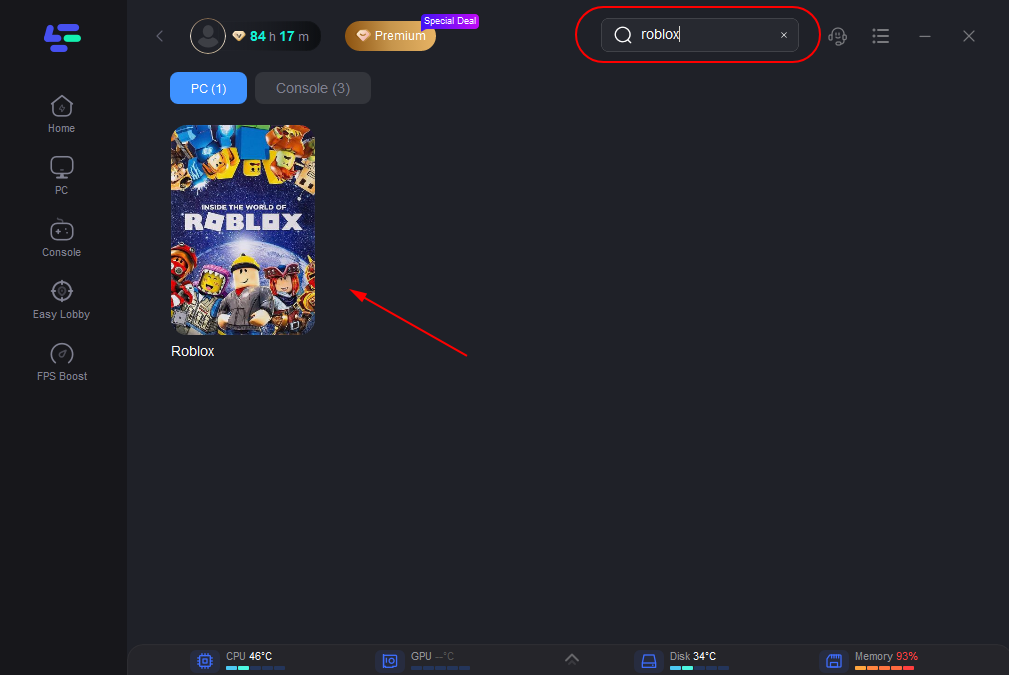
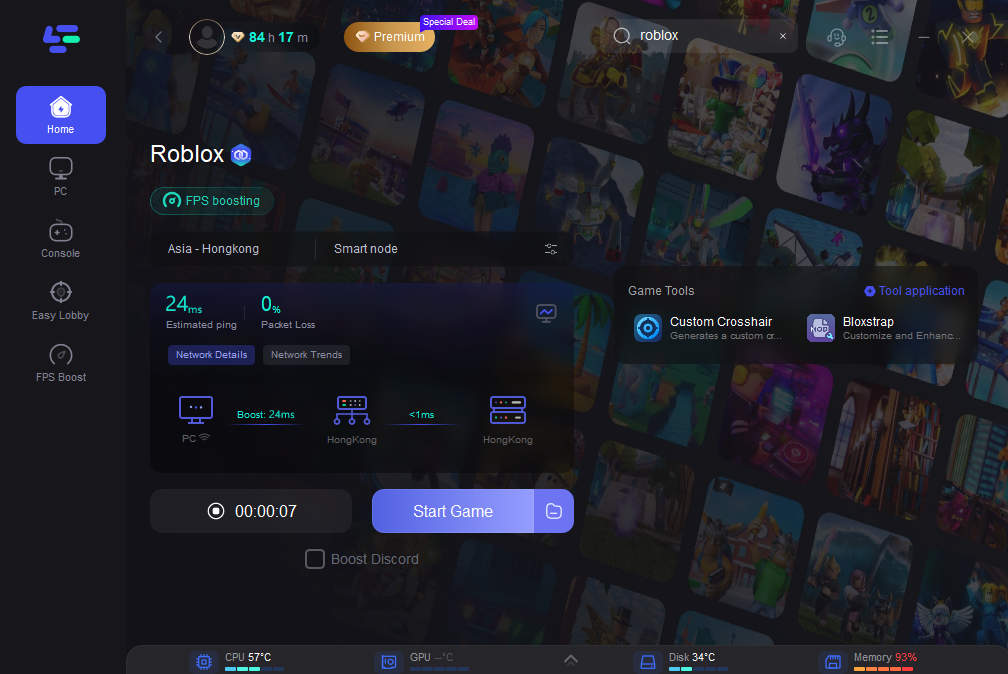
After installation, launch LagoFast. Type "Roblox" in the search bar, and click the game after he appears.
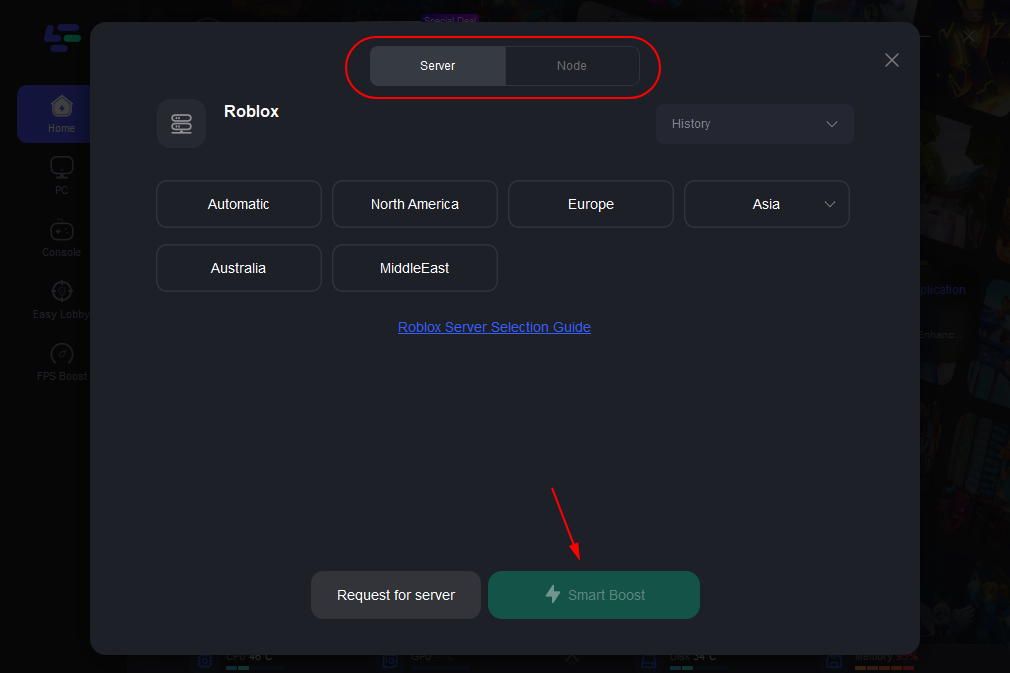
According to your geographic location and needs, choose the best server that allows you to enjoy a better gaming experience, and then click the "Smart Boost" button.
Then check the ping and packet loss before your Roblox journey.
Conclusion
Managing your Roblox account in 2025—whether deleting, recovering, or resetting credentials—requires direct action through Roblox Support. Permanent deletions are irreversible, and forgotten passwords can only be reset through verified contact info. Always keep your login details updated and secure, especially when managing multiple or older Roblox accounts.
Boost Your Game with LagoFast for Epic Speed
Play harder, faster. LagoFast game booster eliminates stutter and lags on PC, mobile, or Mac—win every match!
Quickly Reduce Game Lag and Ping!
Boost FPS for Smoother Gameplay!