

The world of Grounded 2 expands on the familiar backyard survival adventure introduced by Obsidian Entertainment, only this time with a grander scope, bolder storylines, and better tools for group survival. If the original game was about discovering how to survive at the size of an insect, this sequel is about thriving in a dangerous playground-turned-jungle, where every stick is a tree, and every shadow could be your last.
As fans dive into this sequel, many are asking the essential question: how many people can actually play Grounded 2 together? Multiplayer is a core part of the fun, and this article walks you through everything from co-op limits to joining friends and optimizing performance.

- ✅ Reduce Lag and High Ping.
- ✅ Boost FPS at the Same Time.
- ✅ Support 2000+ Popular Online Games.
- ✅ Change Server all over the World.
Part 1: How Many Players Is Grounded 2?
Part 2: How to Play Grounded 2 Multiplayer With Friends
Part 3: Multiplayer Features and What Makes Grounded 2 Unique
Part 4: How to Enjoy a Smooth Multiplayer Experience in Grounded 2
Part 5: FAQs About Grounded 2 Multiplayer
Part 1: How Many Players Is Grounded 2?

Let’s start with the big question: how many players is Grounded 2 multiplayer designed for? Just like the first game, Grounded 2 supports up to 4 players in co-op mode. This limit isn't arbitrary; it’s tightly integrated with the game's character-driven story and survival mechanics.
The four playable teens, Max, Hoops, Pete, and Willow, return from the original, and each has unique lines of dialogue and reactions that make the experience feel more cinematic and immersive. The narrative is built around this group, which makes the four-player cap feel intentional rather than restrictive.
At the time of writing, there are no modes for expanding this player limit to five or more, and no official roadmap announcements hinting at that changing. So if you were hoping for a six- or eight-player mode, you’ll have to split into smaller groups or take turns.
Part 2: How to Play Grounded 2 Multiplayer With Friends
Playing Grounded 2 with others is straightforward, whether you're hosting a game or joining a session. The system offers enough flexibility to suit different play styles, time commitments, and availability.
Hosting a Multiplayer Game
Step 1. Launch the game and go to the Main Menu.
Step 2. Select Multiplayer and then Host Online Game.

Step 3. Choose to Continue from a previous save or start a New Game.
Step 4. Decide between a Standard World or a Shared World:

- Standard World: Only the host can access the save. Friends can’t join if the host isn’t online.
- Shared World: Allows designated friends to host and play without the original creator being present.
Step 5. Select the game mode: Survival, Creative, or Custom.

Step 6. Choose your Teen character, then proceed to load the game.
Step 7. Invite friends through the Player List or directly via your Steam/Xbox friend list.
Joining a Friend’s Game
There are a couple of options for jumping into a friend’s session:
- From the Main Menu, go to Multiplayer and select Join Online Game and find the server in the list.
- Alternatively, accept a direct invite through Steam, Xbox Game Bar (Windows + G), or console notifications.
- If the game doesn't appear on the list, a direct invite is usually the best workaround, especially for new or private worlds.
Part 3: Multiplayer Features and What Makes Grounded 2 Unique
Grounded 2 builds on the multiplayer features of the first game with improved flexibility and new systems:

- Maximum of 4 Players: The co-op gameplay supports four players per session.
- Crossplay: Seamless cross-platform support between Xbox and PC (Steam + Microsoft Store).
- Shared World Option: Share hosting privileges with trusted friends.
- No Splitscreen: Local co-op is not available; each player needs their own device and copy.
- Game Modes: Choose from Survival (with resource management), Creative (build freely), or Custom (fine-tune mechanics).
Split screen fans might be disappointed, but the shared world system adds a modern layer of flexibility that makes it easier to coordinate with friends across time zones or schedules.
Part 4: How to Enjoy a Smooth Multiplayer Experience in Grounded 2
Nothing kills the excitement of a co-op survival game faster than lag, rubberbanding, or desync errors. Since Grounded 2 is still in Early Access, some multiplayer stability issues are expected. But there’s a way to minimize frustration and keep your experience smooth — LagoFast.
LagoFast is a specialized game booster designed to reduce latency, boost FPS, and optimize multiplayer connections. Whether you're hosting or joining, LagoFast helps ensure a stable and responsive experience, especially useful when dealing with large, detail-rich environments like Brookhollow Park.
Key Features of LagoFast:
- Dedicated game routes for Grounded 2
- Real-time ping reduction
- PC performance boost and resource optimization
- Global server support for smoother international connections
- Automatic game update optimization
With LagoFast, you don’t just reduce lag, you enhance the overall experience, ensuring your teamwork and survival strategies aren’t ruined by technical hiccups.
Tutorial to use LagoFast to enjoy a smooth multiplayer experience on PC:
Step 1: Click the button below to download LagoFast for free and install it on your PC.
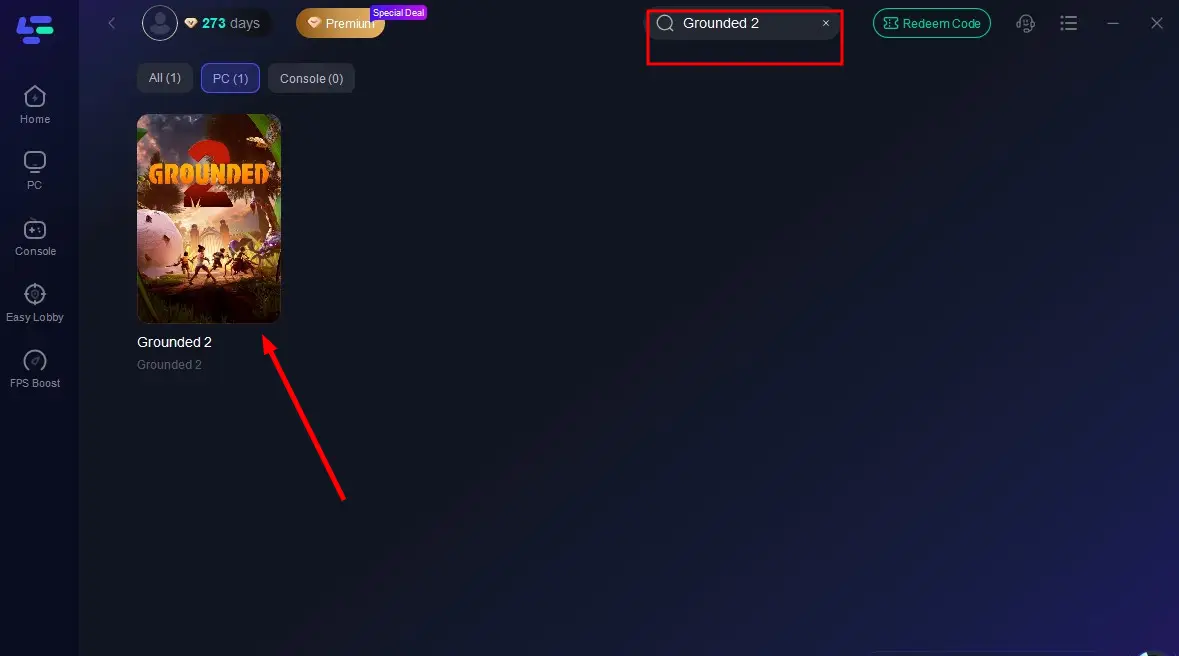
Step 2: Launch the LagoFast client after installation, then type "Grounded 2" into its search bar and click the result.
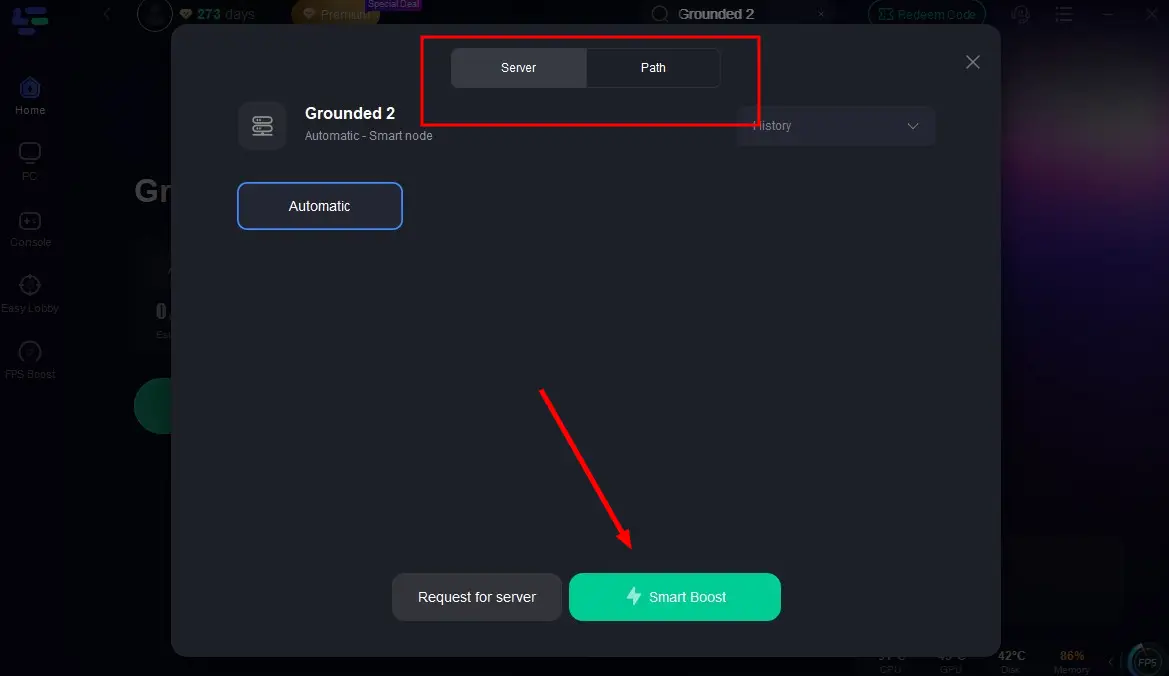
Step 3: Click "Select Server" to choose the closest or lowest-latency server node, then click "Smart Boost" to activate real-time optimization.
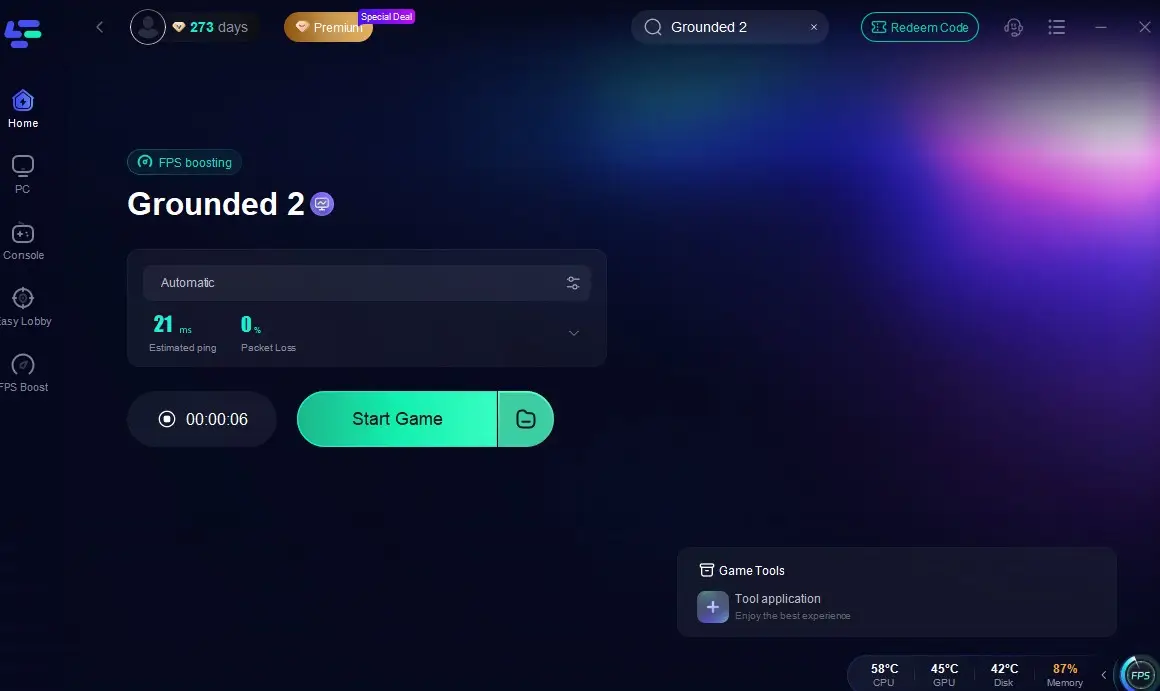
Step 4: Once optimization starts, you'll see reduced packet loss and ping in-game. Click "Start Game" to return to Grounded 2 and enjoy lag-free gameplay!
For Xbox Players
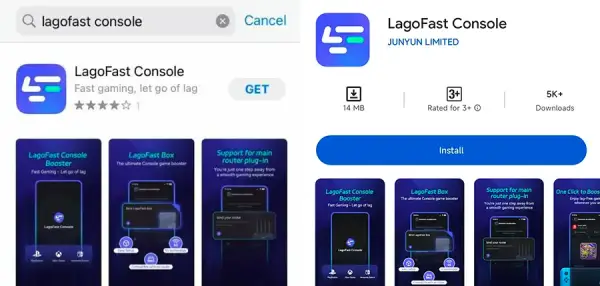
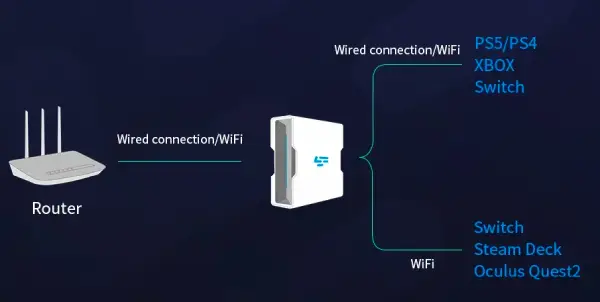
Step 1: Download the LagoFast Console App on your phone to control the LagoFast Box.
Step 2: Establish a connection between your LagoFast Box, router, and console, choosing between a wired or wireless connection.
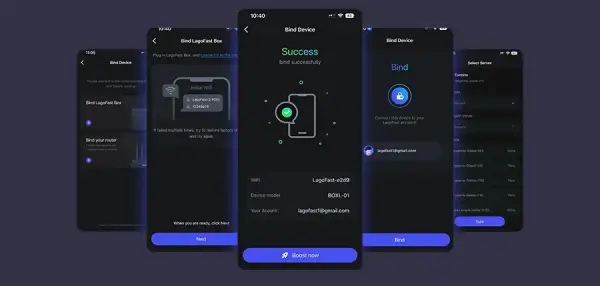
Step 3: Launch the LagoFast Console App and boost Grounded 2. Once you have completed the binding process with the LagoFast Box, proceed to boost this game within the LagoFast Console App.
Part 5: FAQs About Grounded 2 Multiplayer
How much bigger is Grounded 2 than the original Grounded?
The developers have significantly expanded the scope of the world in Grounded 2. While the first game was largely centered around a backyard, Grounded 2 unfolds in a much larger location, Brookhollow Park. Not only are there more biomes and verticality, but you can also explore vast manmade and natural structures, ride buggies, and discover deeper storylines.
Can you have 5 players in Grounded 2?
No. The maximum number of players supported in a single multiplayer session is still four, in line with the number of predefined characters. Any session with more than four would not be supported and may lead to compatibility or balance issues.
What do the current Steam charts say about Grounded 2’s popularity?
As of early August 2025, Grounded 2 has received mostly positive feedback on Steam, with 77% positive reviews out of more than 5,000 ratings. Player counts are steady, peaking at around 5,000+ concurrent players during major update days. It’s safe to say the game has carved out a solid niche within the co-op survival genre.
Does Grounded 2 support crossplay between Steam and Xbox?
Yes, Grounded 2 fully supports crossplay between Steam and Xbox platforms. Players on both systems can join each other’s multiplayer sessions seamlessly, making it easier to team up regardless of where the game was purchased.
Can you switch between Shared and Standard Worlds later?
No, once you've created a world as either Standard or Shared, that choice is locked in. If you want to change it, you'll need to create a new world and choose the desired type during setup.
Conclusion
Grounded 2 doesn’t just continue the survival legacy of its predecessor; it enhances it in meaningful ways. With support for four-player online co-op, flexible world-sharing, and crossplay compatibility, the game makes it easier than ever to shrink down and team up.
If you're looking to enjoy the game without multiplayer hiccups, tools like LagoFast offer an easy way to smooth out the experience. Whether you’re hosting or joining, battling bugs or uncovering secrets, Grounded 2 offers a well-rounded and thrilling co-op adventure, best enjoyed with your closest friends by your side.

Boost Your Game with LagoFast for Epic Speed
Play harder, faster. LagoFast game booster eliminates stutter and lags on PC, mobile, or Mac—win every match!
Quickly Reduce Game Lag and Ping!
Boost FPS for Smoother Gameplay!