
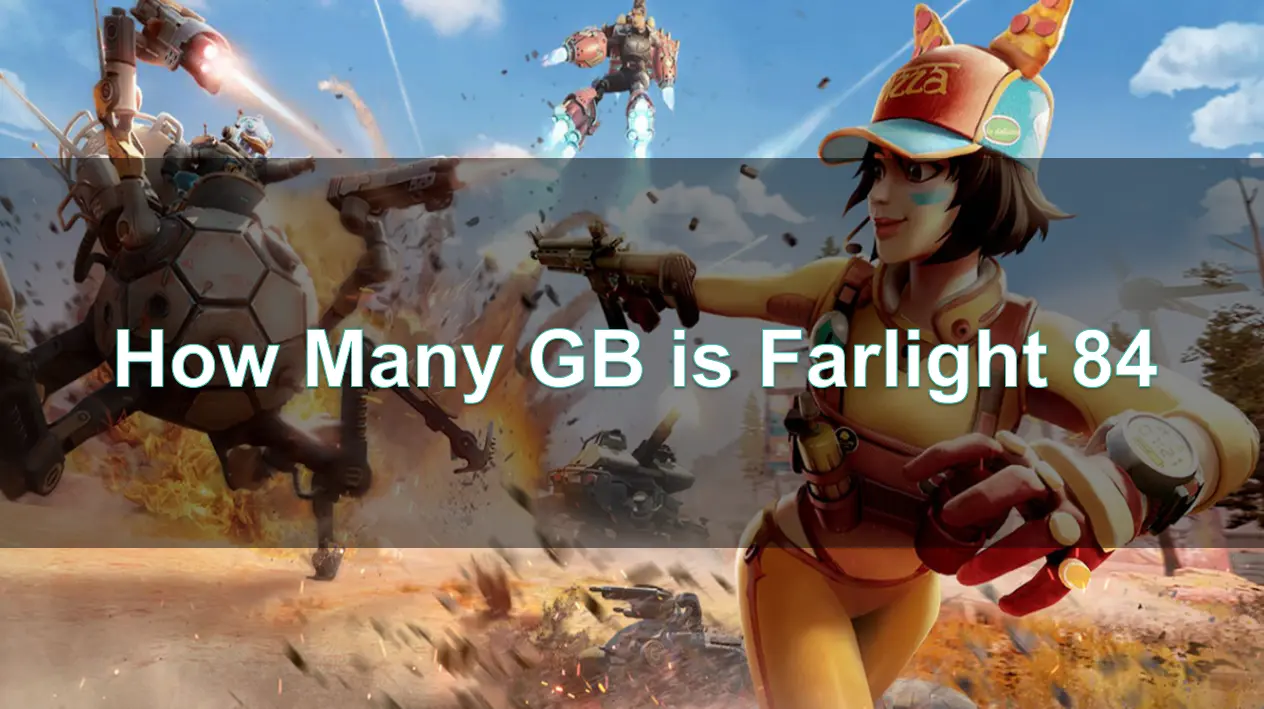
Farlight 84 has taken the global gaming community by storm again with its explosive battle royale experience, futuristic visuals, and cross-device appeal. Whether you're planning to join the battlefield on PC or mobile, one of the most common and essential questions before installation is: How many gigabytes (GB) is Farlight 84?
In this article, we'll cover not only the download size of Farlight 84 across different platforms but also offer tips on how to download it faster, ensure smoother gameplay, and optimize your system using LagoFast Game Booster.

Part 1: Introduction to Farlight 84
Part 2: How Many GB Is Farlight 84?
Part 3: How to download Farlight 84 for PC
Part 4: How to download Farlight 84 on Mobile
Part 5: How to Enhance Game Experience with LagoFast Game Booster
Part 1: Introduction to Farlight 84
Farlight 84 is a fast-paced hero shooter set in a post-apocalyptic wasteland. It merges jetpack-powered combat, character-based tactics, and highly dynamic mobility with a rich arsenal of futuristic weapons and vehicles.
Originally launched by Farlight Games (formerly Lilith Games), the game supports both PC and mobile platforms and now enters a new phase of popularity thanks to global open tests, visual upgrades, and frequent balance patches. With over 10 million downloads globally and growing traction in esports, it’s quickly becoming a favorite for players who love adrenaline-fueled, high-skill battle royale action.
But before you dive into the game, knowing its storage requirements can save you time and frustration.
Part 2: How Many GB Is Farlight 84?
PC Version:
- Download Size: ~3.8 GB
- Installation Size After Unpacking: Around 10 GB
- Updates: Frequent updates may require an additional 1-2 GB of free space
While the installer might initially seem lightweight, keep in mind that resource files, audio packs, textures, and shaders will expand the total size significantly after installation.
Tip: Ensure at least 15 GB of free space on your system drive to accommodate future patches and avoid failed updates.
Mobile Version (Android & iOS):
- Initial APK (Android): ~1.8 GB
- Installed Game Size After Extraction: ~3.5 GB to 5 GB depending on the device and downloaded content
- iOS Size (via App Store): Around 3.9 GB, but can grow post-install
If you're downloading Farlight 84 on mobile, the file size may vary slightly depending on your region and whether you're installing the global or CN test version. Post-installation, asset packs such as maps, HD textures, and voice-overs can add several GBs.
Part 3: How to download Farlight 84 for PC
You can download Farlight 84 on PC using any of the following platforms:
Official Platforms to Download:
- Steam
- Epic Games Store
- Official Website
- Chinese Version (CN) – for beta test servers
System Requirements Recap:
- Minimum: i3 CPU, 6 GB RAM, GeForce GT 640
- Recommended: Ryzen 5, 8 GB RAM, GTX 970
Make sure your PC has DirectX 11 and at least 10 GB of free storage before installing. High-speed internet is also essential, as installation files download from regional servers that may vary in speed.
Part 4: How to download Farlight 84 on Mobile
Mobile gamers can enjoy Farlight 84 either through the official app stores or via APK if you're participating in beta tests.
Android Users:
- Download from Google Play Store
- Or via official APK during test phases
- Recommended to use Wi-Fi due to large file size (2–5 GB)
iOS Users:
- Search and install via App Store
- Ensure your iPhone or iPad has at least 6 GB of free space
For players joining the Farlight 84 CN Mobile Test Server, downloading the APK directly from Chinese servers may result in slow speeds or region blocks. That’s where tools like LagoFast come in handy.
Part 5: How to Enhance Game Experience with LagoFast
Farlight 84’s CN Mobile or PC test servers are often restricted by region. LagoFast Game Booster solves this by unlocking China-only downloads and accelerating APK installation with one-click tools.
Key Features:
- One-Click Download Acceleration: Speeds up APK and patch downloads
- Bypass Regional Restrictions: Download CN server versions even if you're outside of China
- Reduce Lag & Ping: Up to 80% lower ping through multipath routing
- Stable Connection: Prevents packet loss and jitter during matches
- Real-Time Translation Tool: Translates Chinese text into your native language (Android only)
- Crosshair Enhancer: Customizes scope reticles for better aiming
How to Use It on PC:
Click the "Free Trial" button to download and install LagoFast.
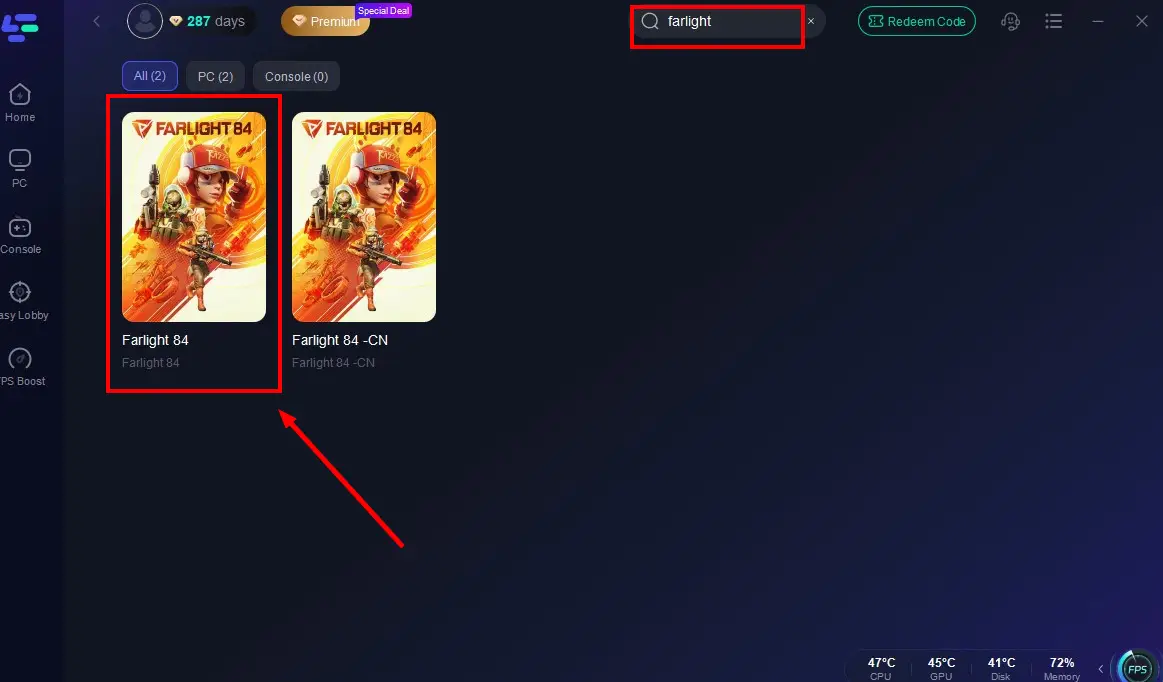
Launch LagoFast after installation, and search for "Farlight 84" in the search bar (LagoFast also supports accessing Chinese servers from other regions).
Select the optimal server to connect.

Once real-time game data optimization is confirmed, click "Start Game" to enjoy lag-free Farlight 84!

If you're looking for the fastest way to optimize Farlight 84, LagoFast is the best tool available—combining both FPS and connection optimization into a single, powerful package.
How to use LagoFast Game Booster on Mobile:
Step 1: Visit the official website of LagoFast, download the LagoFast Mobile APK file, and follow the prompts to complete the installation.

Step 2. Search for Farlight 84 CN: Open LagoFast, type the game’s name in the search bar, and select the first one.
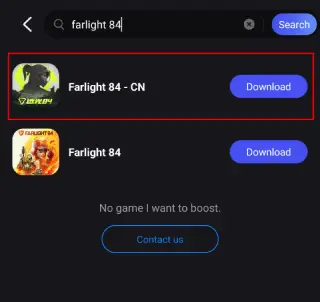
Step 3. One-Click Download: LagoFast will handle the APK download and installation, ensuring compatibility with your device.
Once installed, launch the game through LagoFast to enjoy optimized performance and reduced lag.
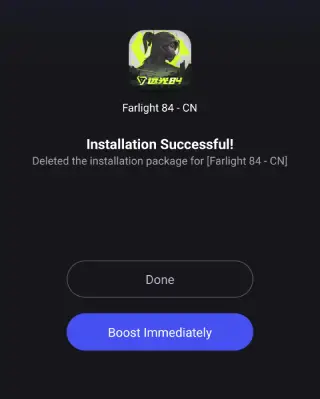
After successfully downloading Farlight 84 CN on Mobile, don't forget to activate LagoFast's optimization feature.
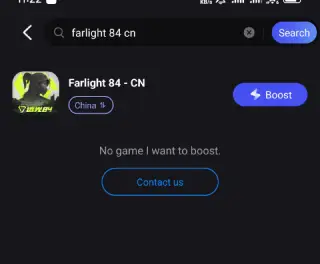
Search Farlight 84 in LagoFast Mobile's search bar.
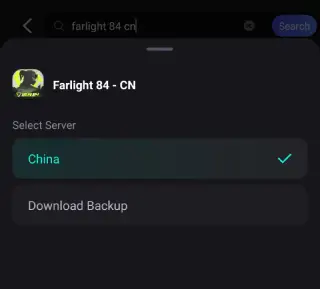
Choose a better server according to your location.
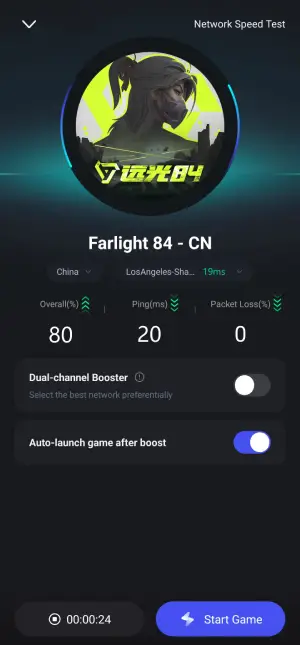
Check the game data in real-time and click the "Start Gane" button.
While playing Farlight 84 CN Mobile test server, the most difficult problem for international players is the language barrier, LagoFast can help to them to play Farlight 84 in native languages. Here are steps:
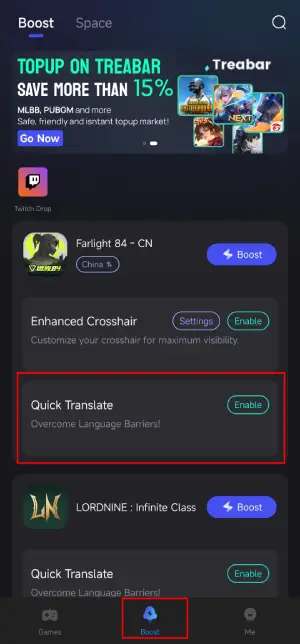
Step 1: Find Farlight 84 CN in the Boost tab of LagoFast Mobile, locate the Quick Translate tool below.
Step 2: Complete two settings:
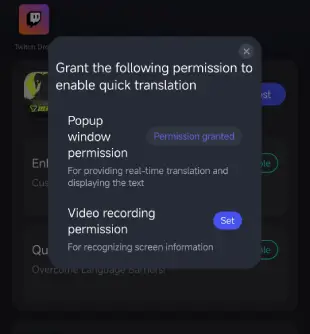
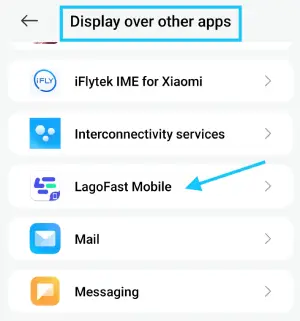
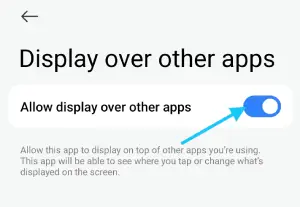
- Set popup window permissions: Enable "Display over apps.
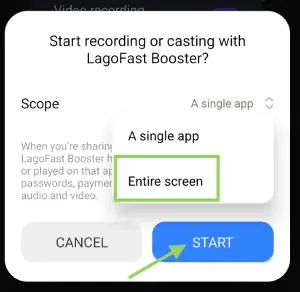
- Set video recording permissions: Tap the Set button, select Full Screen, then start the translation tool.
Step 3: Return to the game and use the floating translation ball provided by the tool to translate the Farlight 84 CN into your target language.
Important Note:
- This translation tool is only available for Android users.
- Before enabling the Valorant Mobile translation tool, ensure LagoFast's language settings are adjusted to your target language.
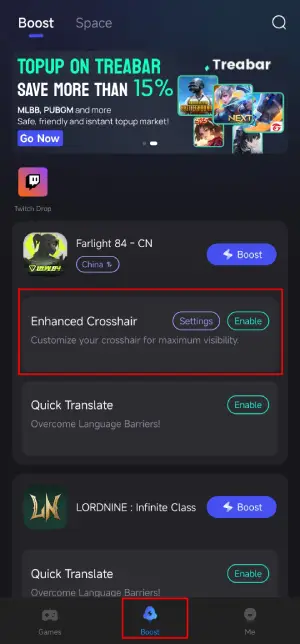
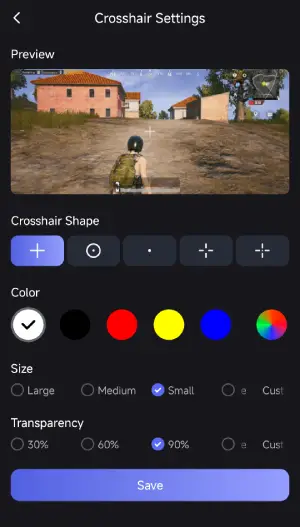
What's more, LagoFast provides the Enhanced Crosshair tool for players to further enhance their gameplay. This tool can help them to change the color and size of crosshair, improve the shooting experience. Here is how to use it:
Step 1: Find the Enhanced Crosshair tool in LagoFast Mobile.
Step 2: Complete the settings according to your gamplay habbit.
Now embark your seamless and enhanced gameplay in Farlight 84 CN open test with LagoFast!
Part 6: FAQs
How big is Farlight 84 on PC?
The game requires about 10 GB of free space post-installation, though the download itself is smaller (~3.8 GB).
Can I play Farlight 84 on low-end PCs?
Yes, but you may need to reduce the resolution and disable shadows/particles to get smoother FPS.
How much storage does Farlight 84 take on Android?
Approximately 3.5 to 5 GB, depending on downloaded content and device model.
Does LagoFast really improve Farlight 84’s performance?
Absolutely. Especially for global players connecting to CN test servers, LagoFast reduces ping, ensures faster downloads, and offers translation support for Chinese menus.
Conclusion
So, how many GB is Farlight 84? Depending on your platform, expect between 3 to 10 GB of storage required to play. For PC users, allocate around 10 GB+ for installation and updates. On mobile, having at least 6 GB free space is recommended to avoid issues.
And if you want a hassle-free setup with better performance and lower latency, LagoFast Game Booster is your best companion—speeding up downloads, optimizing connections, and giving international players an edge, especially on CN servers.

Boost Your Game with LagoFast for Epic Speed
Play harder, faster. LagoFast game booster eliminates stutter and lags on PC, mobile, or Mac—win every match!
Quickly Reduce Game Lag and Ping!
Boost FPS for Smoother Gameplay!