
Quick Answer:
To fix Honor of Kings: World issues like being stuck on the loading screen, encountering a black screen, or experiencing crashes, first ensure your network is stable and your device meets the minimum requirements. On PC, verify game files, update graphics drivers, and disable overlays. On Mobile, clear the game cache, free up RAM, or switch between Wi-Fi and mobile data. If these problems persist, a dedicated tool like LagoFast Game Booster can resolve underlying network instability and system optimization issues.
Honor of Kings: World is a massive open-world RPG that pushes the limits of both PC and mobile hardware. While the visuals are breathtaking, the technical complexity can lead to frustrating issues like being stuck on the boot screen, encountering a black screen on launch, or falling into an infinite loading loop. These problems are often tied to shader compilation, server-side handshaking, or corrupted local assets.

- ✅ Reduce Lag and High Ping.
- ✅ Boost FPS at the Same Time.
- ✅ Support 2000+ Popular Games.
- ✅ Fix Game Black Screen Issues.
- ✅ Honor of Kings: World Translation Tool
Part 1: Why is Honor of Kings: World Stuck on the Loading Screen?
Part 2: How to Fix Stuck on Loading Screen in Honor of Kings: World (PC)
Part 3: How to Fix Stuck on Loading Screen in Honor of Kings: World (Mobile)
Part 4: How to Fix an Infinite Boot Loop in Honor of Kings: World
Part 5: How to Enhance Your Game Experience with LagoFast Game Booster
Part 1: Why is Honor of Kings: World Stuck on the Loading Screen?
Understanding the "why" is crucial for a permanent fix. In a high-fidelity open-world game like HoK: World, these issues are often interconnected, stemming from a complex interplay of hardware, software, and network factors. The loading screen isn't just a progress bar; it's a critical sequence of asset streaming, shader compilation, and server synchronization. When any part of this chain breaks, you can encounter a freeze, a black screen, or an outright crash.
Common causes for these critical issues include:
- Shader Compilation Failures: On the first launch, after a major game update, or following a graphics driver update, the game must compile shaders. If this process is interrupted or encounters corrupted data, it can lead to a black screen or a crash during loading.
- Network Handshake Errors & Timeouts: If the game cannot establish a stable, low-latency connection to the game servers, it will often hang indefinitely at the "Connecting" phase, appearing as a stuck loading screen. High ping or packet loss can also cause disconnections that lead to crashes.
- Corrupted or Missing Game Data: A partial update, an interrupted download, or a faulty installation can leave the game with missing or corrupted files. This frequently results in a black screen on launch, an infinite loading loop, or immediate crashes.
- Insufficient Hardware Resources: Honor of Kings: World is graphically intensive. If your system's RAM, VRAM, or CPU resources are exhausted, the game may fail to load initial world assets, leading to a crash or a black screen. This is particularly common on older or lower-spec devices.
- Driver Incompatibility: Outdated or corrupted graphics drivers are a primary culprit for black screens and crashes, as they directly impact the game's ability to render visuals correctly.
- Conflicting Software: Third-party overlays, antivirus programs, or other background applications can interfere with the game's processes, causing it to freeze or crash.
Part 2: How to Fix Stuck on Loading Screen in Honor of Kings: World (PC)
For PC players, the loading screen issue is often related to hardware-software conflicts. Follow these steps in order:
1. Verify Game Integrity (Fixes Crashes & Black Screens)
If you are playing via a launcher, use the "Repair" or "Verify Files" function. This will scan your installation for corrupted assets and redownload only the necessary parts.
2. Update Graphics Drivers (Crucial for Black Screens & Crashes)
Honor of Kings: World utilizes modern rendering APIs. Ensure you are on the latest NVIDIA Game Ready or AMD Adrenalin drivers. A clean installation of drivers using DDU (Display Driver Uninstaller) can often resolve persistent black screen issues.
3. Clear Shader Cache (Resolves Black Screens & Stutters)
Sometimes the compiled shaders become corrupted. Navigate to your GPU control panel (NVIDIA Control Panel or AMD Software) and find the option to "Reset Shader Cache." This forces the game to recompile them on the next launch.
4. Disable Overlays (Prevents Conflicts & Crashes)
Third-party overlays like Discord, Steam, or MSI Afterburner can interfere with the game's initial boot sequence. Disable them entirely before launching the game.
Part 3: How to Fix Stuck on Loading Screen in Honor of Kings: World (Mobile)
Mobile devices face unique challenges, primarily related to memory management and network switching.
1. Clear Game Cache (Android - Often Fixes Crashes & Black Screens)
Go to Settings > Apps > Honor of Kings: World > Storage and tap Clear Cache. Do not tap "Clear Data" unless you have your account linked, as this will delete your local login info.
2. The Network Switch Trick
If you are stuck at 99% on the loading bar, try this:
1.Close the game completely.
2.Turn off Wi-Fi and enable Mobile Data (or vice versa).
3.Launch the game. Once you reach the main menu, you can switch back to your preferred connection.
3. Free Up System RAM (Prevents Crashes & Loading Freezes)
HoK: World is memory-intensive. Close all background apps (social media, browsers, etc.) before launching the game to ensure the OS doesn't kill the game process during the heavy loading phase.
4. Check for System Updates (Resolves Compatibility Crashes)
Ensure your Android or iOS version is up to date. Newer OS versions often include critical fixes for the graphics drivers used by high-end mobile games.
Part 4: How to Fix an Infinite Boot Loop in Honor of Kings: World
An infinite boot loop—where the game repeatedly starts, shows a logo, then restarts, or crashes to a black screen—is a strong indicator of a critical configuration error or persistent resource conflict.
- Delete Configuration Files (PC & Mobile): Corrupted settings can cause boot loops or black screens. Navigate to the game's local save folder (usually in %LOCALAPPDATA% on PC, or app data on Mobile) and delete the Saved or Config folder. The game will generate fresh, default settings on the next launch. For mobile, this might involve clearing app data (ensure your account is linked first!).
- Check Firewall/Antivirus (PC): An overly aggressive firewall or antivirus can block the game's network access, leading to boot loops or crashes. Ensure the game's executable is whitelisted in your security software.
- Reinstall the Launcher/Game (PC & Mobile): If all else fails, a complete reinstallation of the game (and its launcher on PC) can resolve deep-seated corruption issues causing boot loops, black screens, or persistent crashes. Remember to back up any local save data if applicable.
Part 5: How to Enhance Your Game Experience with LagoFast Game Booster
Many loading screen issues are actually "hidden" network problems. If the game can't talk to the server fast enough, it simply stops loading. LagoFast (LagoFast Game Booster - Get No Lag and Lower Ping) Game Booster is a professional tool designed to solve these exact problems by providing a dedicated, high-speed path to the game servers.
LagoFast features a unique multipath connection technology that reduces ping and eliminates packet loss, which are the primary causes of "infinite loading" at the 99% mark.
How to use LagoFast on PC:
Step 1: Click the Free Trial button to download and install LagoFast Free Trial.
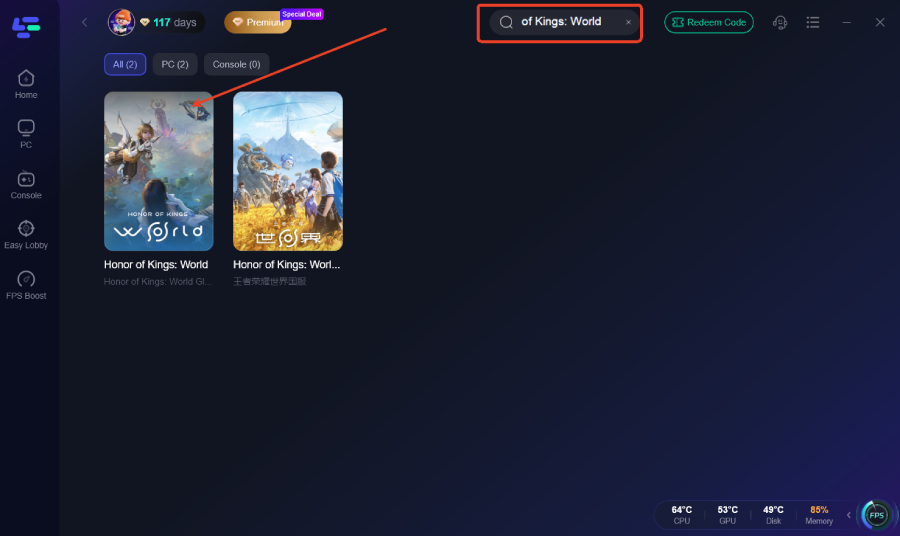
Step 2: Search for the Game: Type "Honor of Kings: World" in the search bar.
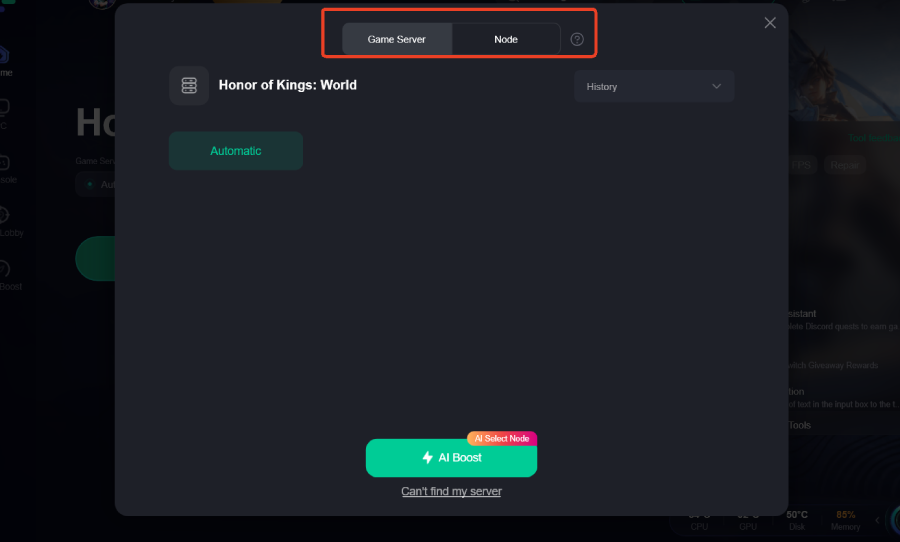
Step 3: Select Your Node: Choose the server node closest to your physical location.
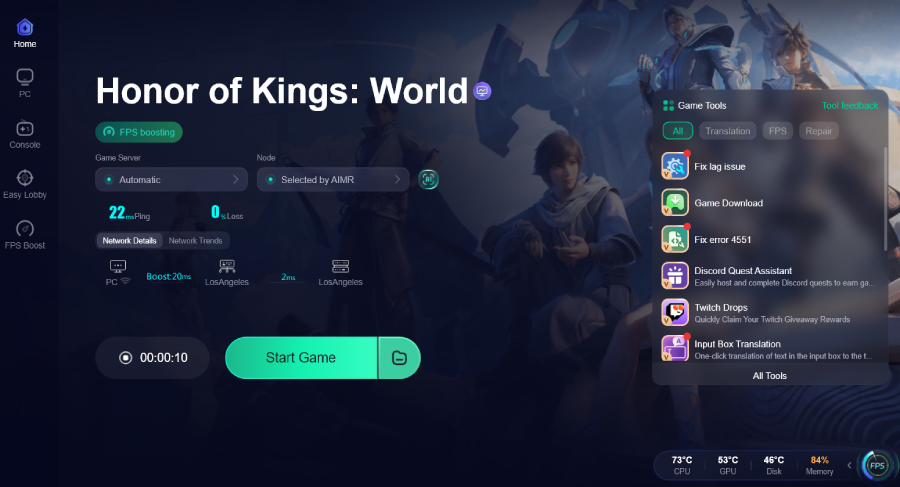
Step 4: Boost: Click the "Boost" button. LagoFast will optimize your network and system settings (like closing unnecessary background processes) before you launch the game.
How to use LagoFast Game Booster on Mobile
Step 1: Download LagoFast Mobile Booster

Step 2: Locate HoK: World: Open the app and find Honor of Kings: World in the game list.
Step 3: One-Tap Boost: Tap the "Boost" button. The app will establish a secure VPN-like tunnel (optimized for gaming) that bypasses ISP throttling and congestion.
Step 4: Launch Game: Open HoK: World directly from the LagoFast app for the best results.
Part 6: FAQs
1. Why is my screen black when I launch Honor of Kings: World?
A black screen usually indicates a failure to initialize the graphics engine. This is often caused by outdated drivers or an unsupported resolution. Try launching the game in windowed mode by pressing Alt + Enter.
2. Does Honor of Kings: World require an SSD?
While not strictly required, an SSD is highly recommended. The game streams massive amounts of data as you move through the world. On a traditional HDD, you will experience
significantly longer loading screens and potential "pop-in" issues.
3. How much RAM do I need for HoK: World?
For PC, 16GB is the recommended minimum for a smooth experience. For Mobile, devices with at least 8GB of RAM will perform significantly better during the initial loading phase.
4. Can a VPN fix the loading screen issue?
A standard VPN might actually make it worse by adding latency. However, a gaming-specific booster like LagoFast is designed to reduce latency and provide a more stable connection to game-specific servers.
5. Is the loading screen freeze always a bug?
Not necessarily. During the first launch, the game may be "pre-caching" assets. Give it at least 5-10 minutes on the first run before assuming it's stuck.
6. What should I do if Honor of Kings: World keeps crashing to desktop?
Frequent crashes often point to driver issues, insufficient RAM/VRAM, or conflicting background applications. Ensure your drivers are updated, close unnecessary programs, and verify game files. If the problem persists, check your system logs for crash reports to identify the root cause.
Key Takeaways
- Verify First: Always start by verifying game files to rule out corruption, which can cause loading freezes, black screens, or crashes.
- Network Matters: Many loading hangs are due to network timeouts. Ensure a stable connection, switch between Wi-Fi/mobile data, or use a booster.
- Update Drivers: Keep your GPU drivers current to prevent black screens, crashes, and shader compilation errors.
- System Resources: Ensure sufficient RAM/VRAM and close background apps to prevent crashes and loading freezes.
- Optimize with LagoFast: Use LagoFast Game Booster on both PC and Mobile to ensure a stable, high-speed connection, optimize system resources, and eliminate infinite loading loops, black screens, and unexpected crashes.
By following these steps, you'll be able to bypass the loading screen and jump straight into the vibrant world of Honor of Kings. See you in the game!
Boost Your Game with LagoFast for Epic Speed
Play harder, faster. LagoFast game booster eliminates stutter and lags on PC, mobile, or Mac—win every match!
Quickly Reduce Game Lag and Ping!
Boost FPS for Smoother Gameplay!