

Highguard is a fast-paced multiplayer game where strategy, teamwork, and timing are key to dominating battles. But even the best players can get frustrated by high ping, long login queues, or being stuck on a server far from friends. Choosing the right server can make a huge difference in gameplay smoothness and your overall experience.
In this guide, you’ll learn what Highguard server locations are, why switching servers can improve your gameplay, and the easiest way to do it. We’ll also touch on tools like LagoFast to help you enjoy smooth cross-region play.

- ✅ Reduce Lag and High Ping.
✅ Boost FPS at the Same Time.
✅ Support 2000+ Popular Online Games.
✅ Change Server without Latency.
✅ Boost Game Loading Speed.
Part 1: Highguard Server List & Locations
Part 2: Why Should You Change Server Locations in Highguard?
Part 3: The Best Way to Change Highguard Servers
Part 1: Highguard Server List & Locations
Before changing servers, it helps to know where Highguard servers are located. Different server locations can affect your ping, queue times, and overall stability.
Here’s the current Highguard server list by region:
- North America: Virginia (East Coast), Oregon (West Coast)
- Europe: Germany
- Asia: Japan, Singapore, Hong Kong
- South America: Brazil
- Oceania: Australia
Each server has its unique characteristics. For example, US servers may have lower ping for North American players, while Asia servers are best for players in Japan or Singapore. Understanding the Highguard server list is the first step toward improving your experience.
Part 2: Why Should You Change Server Locations in Highguard?
Switching servers isn’t something most players think about at first—but in Highguard, server location can quietly affect almost every part of your experience. Here are the most common reasons players decide to change servers:
1. High ping or input delay
Playing on a server far from your location often leads to delayed actions, unresponsive combat, and an overall “laggy” feeling, especially in fast-paced moments.
2. Long login queues and crowded servers
Popular regions tend to fill up quickly. During peak hours, this can mean long wait times or unstable performance once you’re in the game.
3. Friends playing on a different server
If your friends are on another server, you won’t be able to team up unless you switch. For many players, this is the main reason to change servers.
4. Different regional schedules or content
Some servers may receive events, updates, or promotions earlier, making certain regions more appealing depending on how you play.
Part 3: The Best Way to Change Highguard Servers
If you notice lag or unstable connections after switching to another server, a network acceleration tool like LagoFast can help smooth things out. LagoFast is designed to optimize your connection when playing across regions.
Why Choose LagoFast:
- Change Server Seamlessly without Lag: Switch regions instantly for smooth and stable gameplay.
- Real-Time Routing Optimization: Reroutes your traffic efficiently to the game server you select.
- Ping and Packet-Loss Reduction: Prioritizes stable communication paths for smooth gameplay.
- Cross-Game Performance Boosting: Improves connection quality and FPS stability in Highguard.
How to use LagoFast on PC
Step 1: Click the Free Trial button to download and install LagoFast.
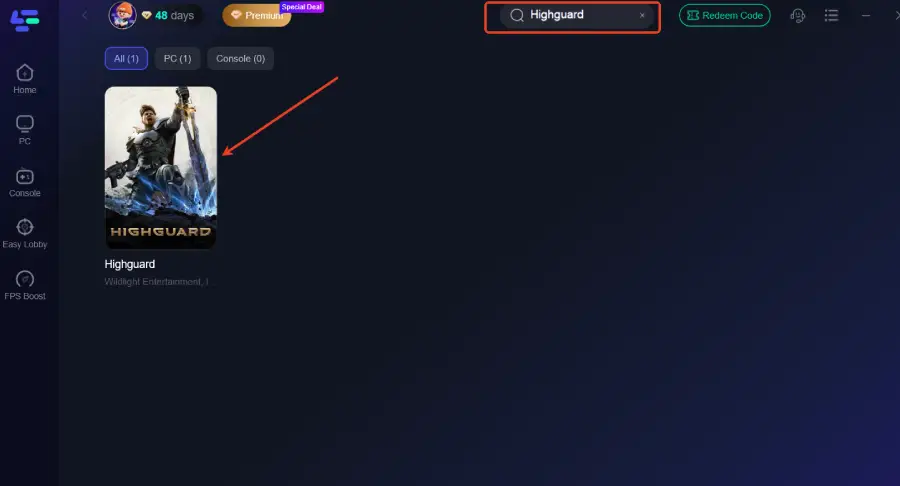
Step 2: After installation, search "Highguard" in the search bar and select the game.
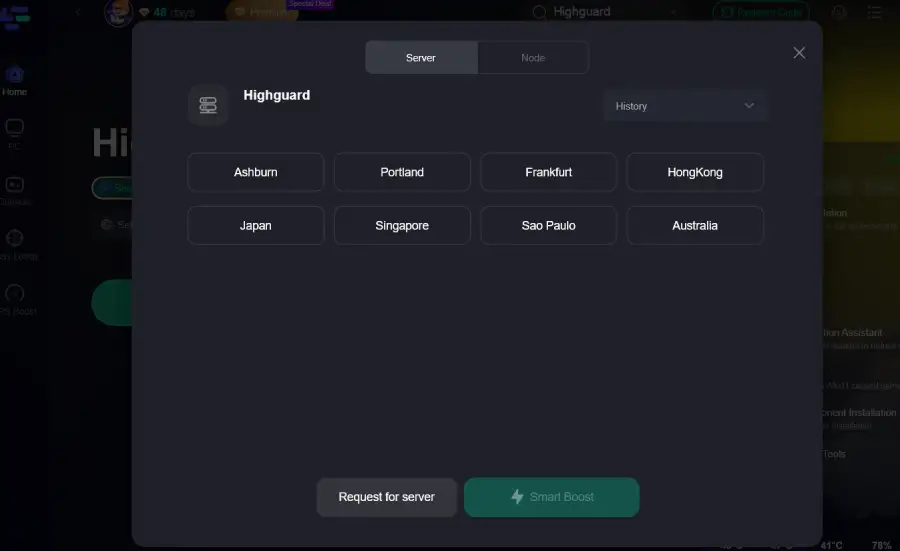
Step 3: Choose your preferred server node and click "Smart Boost" to start optimizing.
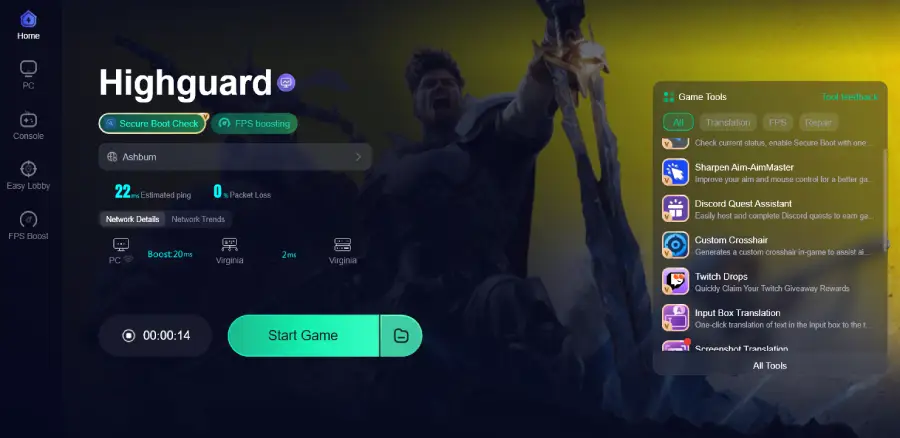
Step 4: Launch your game and enjoy smooth, optimized gameplay with lower ping and no stutter.
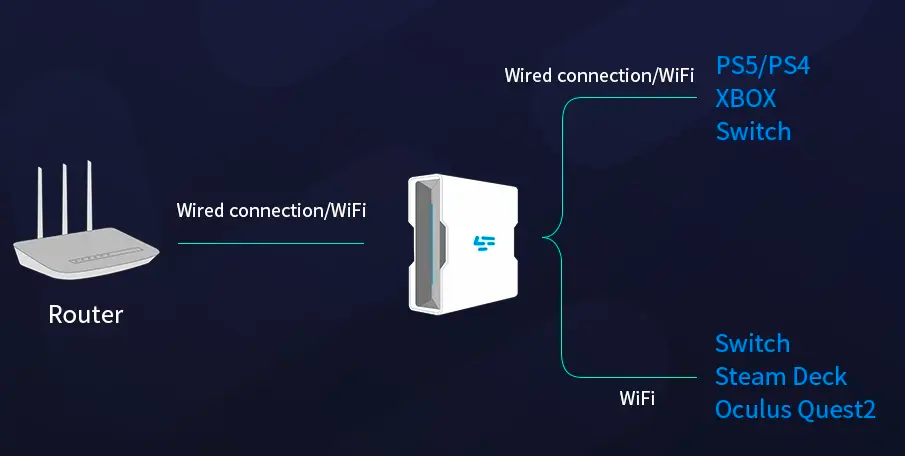
For console players, LagoFast also provides the LagoFast Box, a dedicated hardware solution that delivers the same server-switching and lag-reduction benefits on PlayStation and Xbox.
Tutorial on using LagoFast Box to fix Highguard lag on consoles:
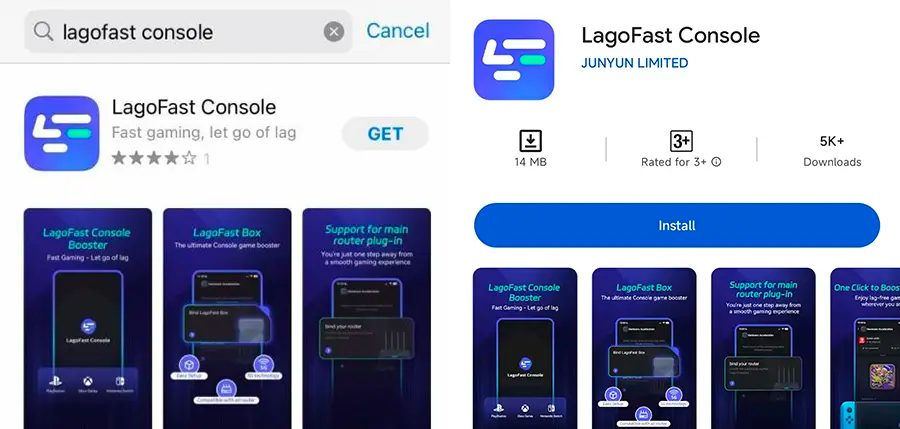
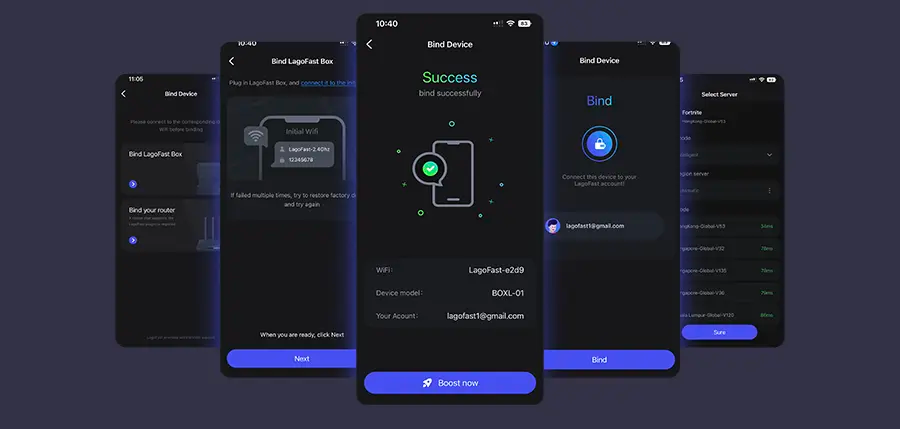
Step 1: Download the LagoFast Console App on your phone to control the LagoFast Box.
Step 2: Establish a connection between your LagoFast Box, router, and console, choosing between a wired or wireless connection.
Step 3: Launch the LagoFast Console App and boost Highguard. Once you have completed the binding process with the LagoFast Box, proceed to boost this game within the LagoFast Console App.
Part 4: FAQs
Q1: Can I keep my progress when changing servers?
A: Most Highguard servers are region-specific. This means your characters, levels, skins, and in-game progress usually do not carry over when switching servers. Always check your account before changing to avoid losing progress.
Q2: Can I play with friends in other regions?
A: Yes. You can either switch to the same server or use a tool like LagoFast for smoother cross-region play.
Q3: How often can I change servers?
A: Limits vary by account. Some allow multiple server changes, while others have cooldown periods. Check Highguard’s official rules before switching.
Conclusion
Choosing the right server in Highguard can make a big difference in gameplay, from reducing lag to connecting with friends across regions. Understanding server locations and knowing when to switch ensures a smoother and more enjoyable experience. Tools like LagoFast make cross-region play seamless, helping you maintain low ping and stable performance. By following these tips, you can get the most out of Highguard and focus on playing, not waiting.

Boost Your Game with LagoFast for Epic Speed
Play harder, faster. LagoFast game booster eliminates stutter and lags on PC, mobile, or Mac—win every match!
Quickly Reduce Game Lag and Ping!
Boost FPS for Smoother Gameplay!