
Portuguese (Brazil) Version: Melhor Redutor de Ping Alto e Solucionador de Lag para Warzone
Warzone, Call of Duty's second major battle royale title after Black Ops 4's "Blackout" (2018), redefines the genre with its cash-driven economy and emphasis on vehicles. Unlike traditional setups, it prioritizes in-game currency over equippable gear, enabling players to purchase revives or upgrades. Launching with 150-player matches (200 in special events), it expands beyond the typical 100-player cap. Core mechanics include a shrinking safe zone, persistent parachuting, and dynamic respawn systems like the Gulag—a 1v1 duel using basic weapons to earn redemption. Initial modes supported trios and solo play, later adding duos and quads.
While praised for its immersive design and engine, Warzone faces criticism for high ping and latency issues. Players experiencing lag or FPS drops can optimize performance using tools like LagoFast, a game booster that stabilizes connections and reduces network delays. This solution complements Warzone’s innovative features, ensuring smoother gameplay despite technical challenges. By balancing unique mechanics with accessibility, the game continues to attract millions, though addressing connectivity problems remains crucial for competitive integrity.

- ✅ Reduce Lag and High Ping.
- ✅ Boost FPS at the Same Time.
- ✅ Support 2000+ Popular Online Games.
- ✅ End Stuck & Crashing Issues.
Part 1: Best High Ping Warzone Fixer
Part 4: Other Solutions to High Ping Warzone
Best High Ping Warzone Fixer
There are several methods you can attempt if you want to know how to improve ping on warzone. But have you ever used LagoFast, a ping reducer? This method is the simplest, most efficient, and least expensive one. You could get a precise real-time ping test from LagoFast first. You can identify the cause of the latency in your game and then take the best action to achieve 0 ping. And LagoFast can shorten the time required for transfer by using its special data transmission technique. Additionally, you might be able to resolve network connection problems with the help of the global nodes and exclusive routes. Depending on where you are geographically and the node's condition, you can pick one node. After that, reduce the transmission distance noticeably while also enhancing the network connection. And unlike other high-ping reducers for PC games, LagoFast has introduced a plan per minute. You can pause the company's ping reducer service at any time and won't be charged while the service is turned off. So if you don't regularly play video games, LagoFast is the most affordable choice for you!
To get LagoFast for free and see whether it helps you fix call of duty high ping, follow the four streps.
Step 1: Click the Free Trial button.
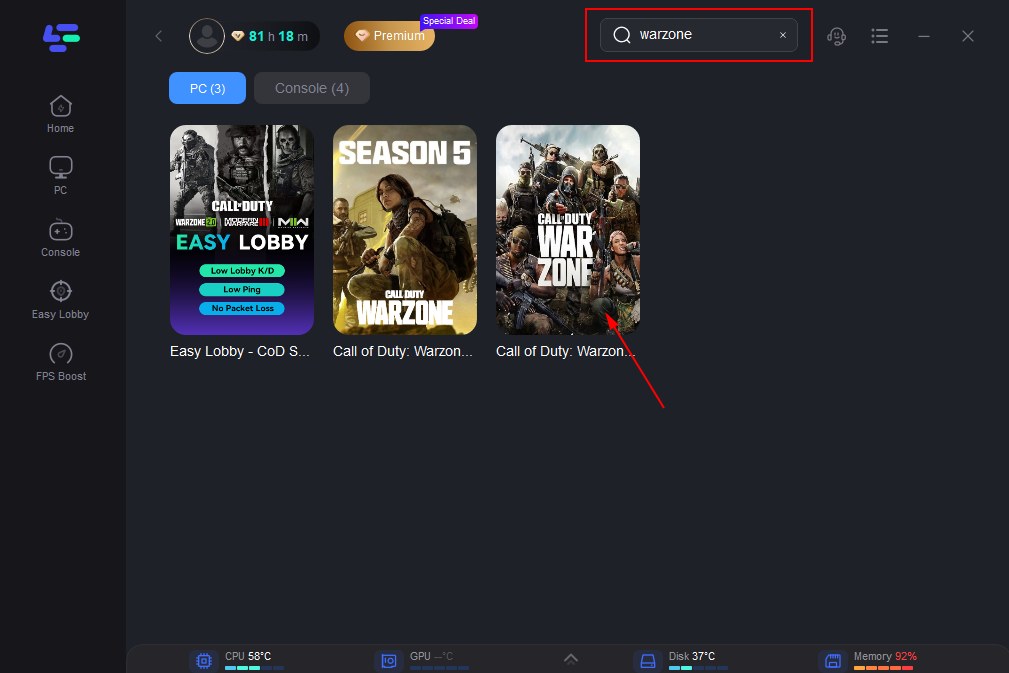
Step 2: Type warzone in the Search box and choose it among the results.
Step 3: Choose your needed server.
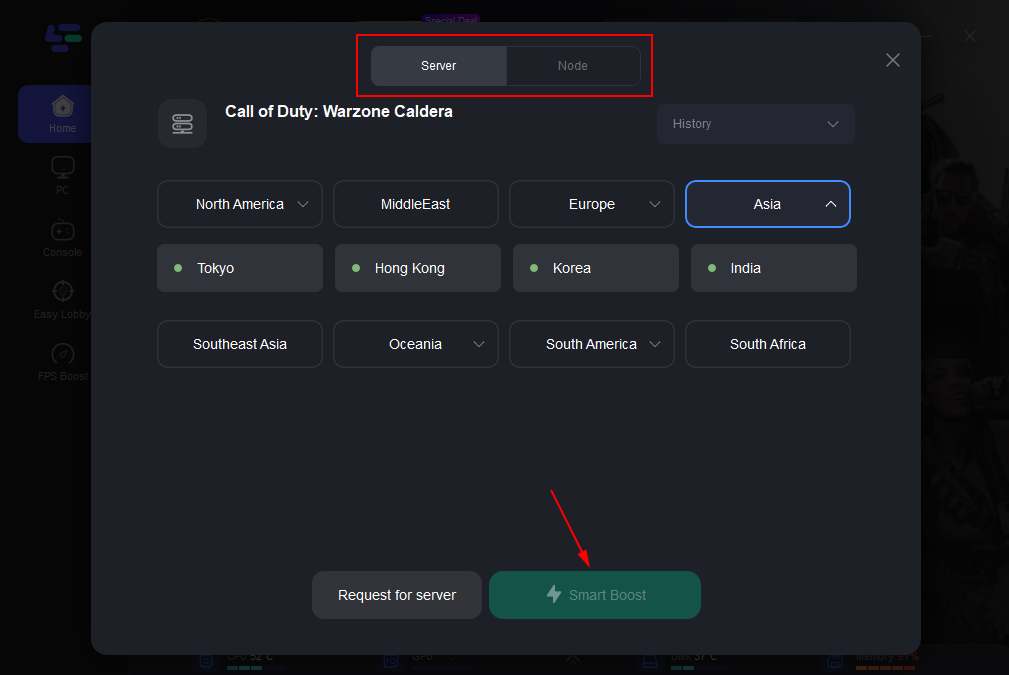
Step 4: To begin boosting, click the Boost button.
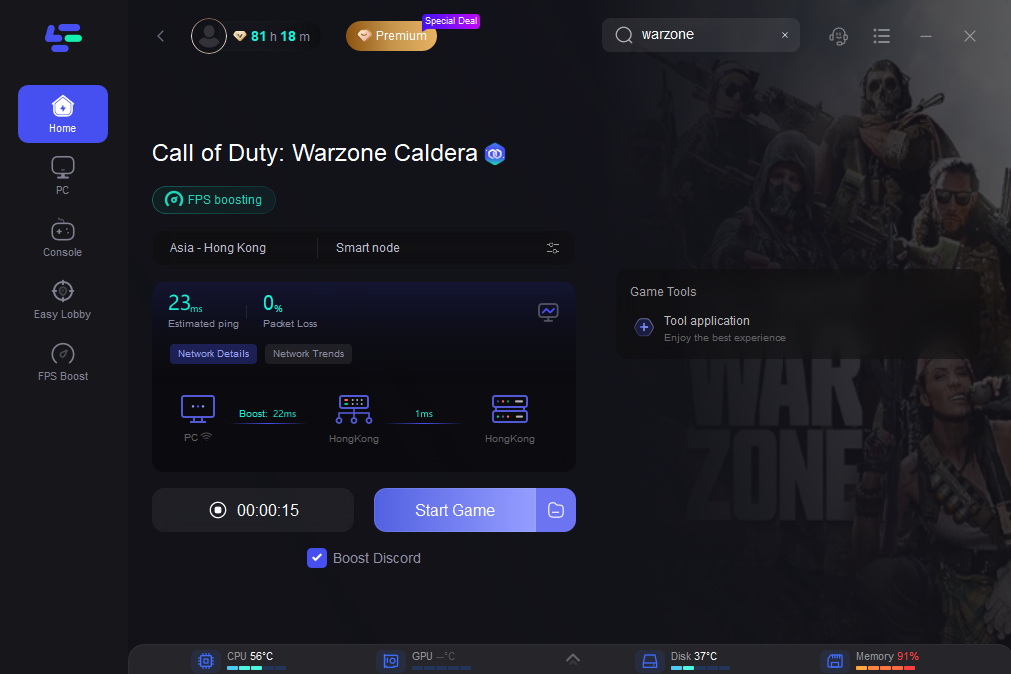
You may view your real-time ping and packet loss rate, which are directly related to your frame rate performance, on this page.
What is Ping?
Ping is the amount of time that it takes for data to move back and forth from the PC to the gaming server. It is always related to lag problems in video games. Generally speaking, the lesser the ping, the smoother your game will run. Furthermore, lag will be apparent if your ping rises above 100 or even 150. While having a low ping is preferable, having a connection that occasionally experiences ping spikes and dropped packets may be more important for online gaming. Ping spikes occur when your ping abruptly increases to a very high level, such as over 200, and you experience a loss of arm control and the sensation that your body has been hit.
Why ping spikes?
Some players want to know why my warzone ping spikes. Just follow the article. Your ping may rise when you're playing warzone for a variety of reasons. The primary and most common cause of these factors may be the network connection.
- Internet connection speed: A slow connection is one of the most common culprits. The majority of websites for online gaming advise a connection with a minimum of 3 Mbps download and 1 Mbps upload. Additionally, the caliber of your internet connection is crucial; concentrating on low latency speeds will enable speedier download and upload. ,
- Server issues: Lag can also be caused by problems off your network, as when gaming servers fail. Updates are provided back to clients with delays when servers don't get packets in a timely manner.
- Antivirus and firewall interference: Antivirus software may be the cause of sluggish PC performance while playing games. Some packages have restrictions on specific gameplay elements, which reduces the power and efficiency of the game. This could result in slowness along with the power-sharing needed to run the software.
- Other programs using a lot of computing power: Your computer can be running other apps in the background even while you are unaware of it. Your laptop can have other programs running in the background that are taking processing resources and causing latency.
- Games settings: Occasionally, the problem is only your in-game settings. Your maximum FPS may be constrained by a frame constraint in some games. V-sync may potentially reduce your maximum FPS and interfere with your gaming experiences when it is activated.
Other Solutions to High Ping Warzone
It is very hard to fix warzone high ping. When your ping is lower than 50, you don’t need to take measures to reduce warzone high ping.
- Use the server that is closest to your location to try. As was already established, ping in a game is the length of time it takes for data to travel between your location and the game server. Therefore, choosing a gaming server close to where you are will reduce the distance and ping.
- Purchase a wired connection. Wired connections produce less interference than wireless connections do. For instance, the Ethernet-connected connection might not be able to see other wireless connections. Additionally, if there were no concrete walls or other barriers, data would be transported through the cable connection more quickly and with greater reliability. Switching to an improved network connection will help you avoid ping spikes and bad ping in video games by increasing network connection speed and reliability.
- Eliminate Extra Load. When playing games, unnecessary load is a key contributor to network congestion problems. Make sure nothing is downloaded while you play the game to avoid this. Additionally, make sure there aren't many other players on the same internet connection as you.

Boost Your Game with LagoFast for Epic Speed
Play harder, faster. LagoFast game booster eliminates stutter and lags on PC, mobile, or Mac—win every match!
Quickly Reduce Game Lag and Ping!
Boost FPS for Smoother Gameplay!