

Heartopia is a cozy life simulation game that has attracted a global audience since its release. With its relaxing gameplay, social interactions, and creative freedom, it quickly became popular among players looking for a slower, more peaceful gaming experience. Available on both PC and mobile platforms, Heartopia allows players to build homes, explore a charming town, interact with NPCs, and connect with other players online.
However, as the player base grows worldwide, many users have started reporting network-related issues such as Heartopia highping and Heartopia lag. These problems can seriously affect the experience, especially in a game that relies on smooth online interactions. In this guide, we’ll explain what Heartopia is, why ping can be so high for some players, and what you can do to reduce lag on both PC and mobile.

Part 1. Heartopia Game Overview
Part 2. Why Is My Heartopia Ping So High and So Laggy?
Part 3. All-in-One Solution: Fix High Ping and Latency
Part 4. Other Ways to Reduce Heartopia Lag
Part 1. Heartopia Game Overview
Heartopia is a free-to-play life simulation game designed for players who enjoy casual, stress-free gameplay. Instead of focusing on combat or competition, the game emphasizes creativity, exploration, and social connection. Players can customize their characters, decorate their homes, develop hobbies like fishing or gardening, and participate in community activities at their own pace.
One of Heartopia’s core features is its online component. The game world is shared with other players, making real-time interaction an important part of the experience. You can meet friends in town, chat, visit other players’ spaces, and take part in events together. This always-online design means that network stability and latency play a big role in how smooth the game feels.
Heartopia supports both PC and mobile devices, allowing players to enjoy the game across different platforms. While the system requirements are relatively friendly, the reliance on remote servers means that even players with good hardware can experience lag if their network connection is not optimal.
Part 2. Why Is My Heartopia Ping So High and So Laggy?
Many players report that Heartopia feels laggy, especially during peak hours or when interacting with other players. Common complaints include delayed character movement, slow interactions, chat lag, and occasional disconnects. These issues are often described as sudden ping spikes rather than constant low performance.
A large number of players mention that their local internet connection is stable in other games, which suggests that Heartopia lag is not always caused by local hardware or bandwidth issues.
Most Likely Reason: Server Location and Distance
One of the main reasons for Heartopia high ping is server geography. Based on community discussions and player testing, Heartopia servers are mainly located in the following regions:
- HK-MO-TW – Hong Kong
- SEA – Singapore
- Asia – Japan
- America – Virginia, USA
For players who live far from these regions, network packets must travel a long distance to reach the game servers. This physical distance increases latency and can result in higher ping. Players in Europe, South America, Africa, or Oceania are especially likely to experience higher latency because there are no nearby server options.
Even players within Asia may still face lag if servers are congested or if their internet service provider uses inefficient routing paths. As a result, ping can fluctuate heavily, causing unstable gameplay.
Part 3. All-in-One Solution: Fix High Ping and Latency with LagoFast
If you are dealing with persistent Heartopia high ping, using a game network optimizer like LagoFast Game Booster can be an effective solution.
Why LagoFast Helps
LagoFast is designed to improve connection quality by optimizing the routing path between your device and the game server. Instead of relying on default ISP routes, it selects faster and more stable paths to reduce latency, packet loss, and jitter.
Key advantages include:
- Support for both PC and mobile platforms
- Optimized routes for long-distance connections
- More stable ping during peak hours
- Reduced sudden lag spikes
How to Use LagoFast to Boost Heartopia on PC:
Step 1: Begin by clicking the Free Trial button to download and install the LagoFast Free Trial.
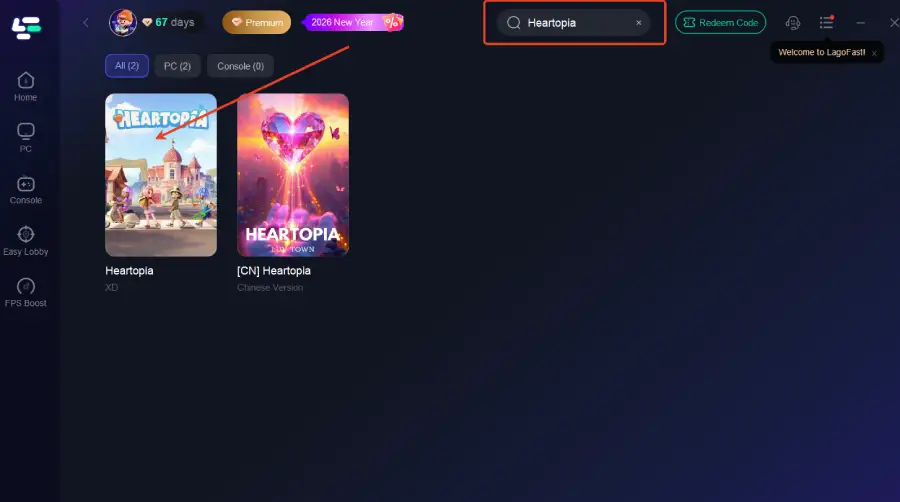
Step 2: Open LagoFast, and use the search bar to find Heartopia.
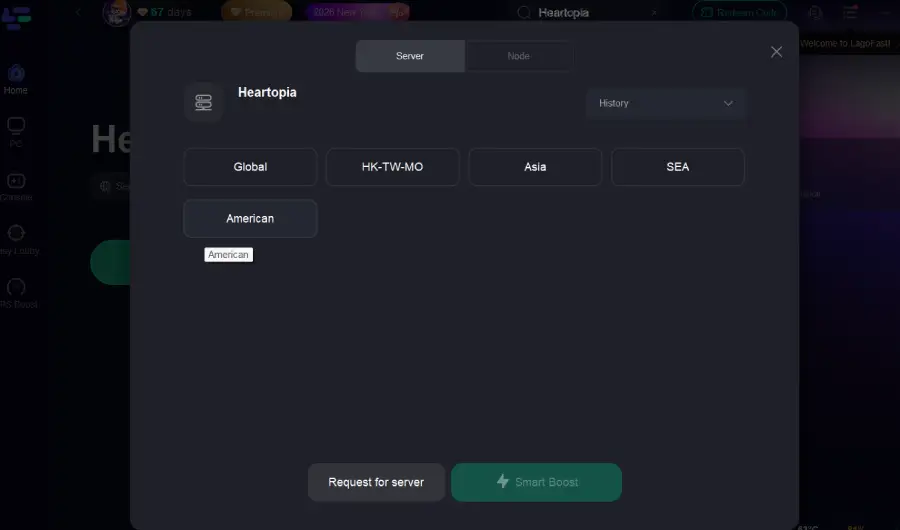
Step 3: Select the best server or route for your region to ensure optimal stability.
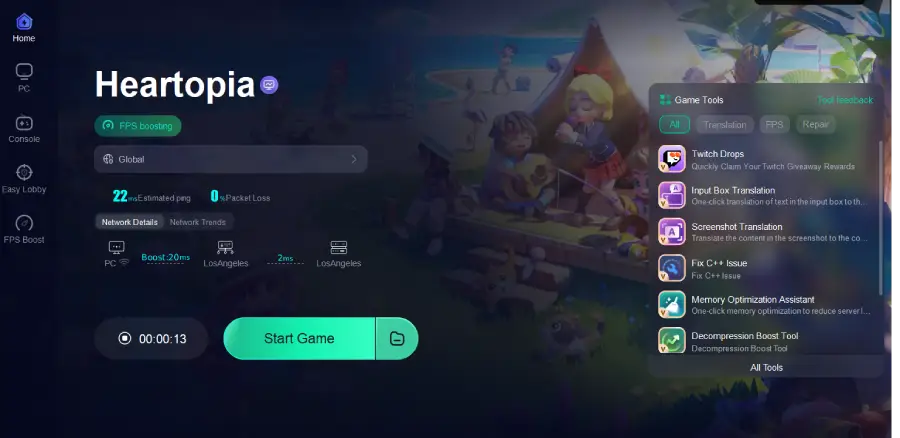
Step 4: Optimize network settings—LagoFast will automatically select the best connection path to minimize lag, packet loss, and high latency for smoother gameplay.
How to Use LagoFast to Boost Heartopia on Mobile:
Step 1: Visit the official website of LagoFast, download the LagoFast Mobile APK file, and follow the prompts to complete the installation.

Step 2: Search Heartopia and click the result.
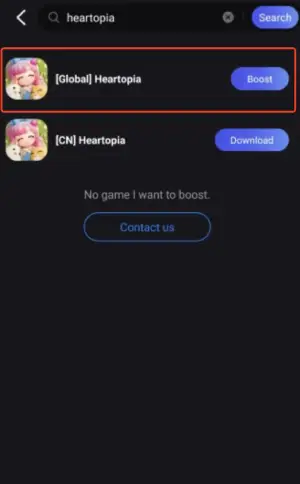
Step 3: Choose the Server you like, then click the Boost button.

Step 4: Use LagoFast's optimization features to enhance network stability and reduce lag during gameplay.
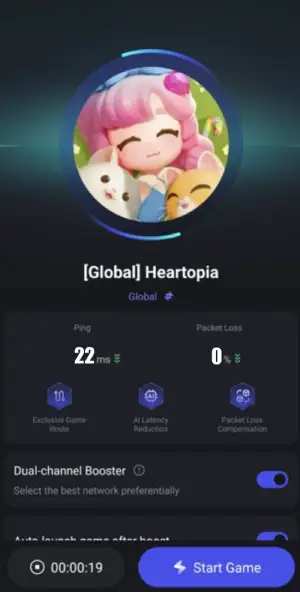
Since Heartopia is available on both PC and mobile, having a single solution that works across platforms makes LagoFast especially practical. Many players find that using a booster significantly improves responsiveness, particularly when connecting to overseas servers.
Part 4. Other Ways to Reduce Heartopia Lag
While a booster can help a lot, these basic optimizations can further reduce Heartopia lag, depending on your platform.
For PC Players
- Use a wired Ethernet connection whenever possible. Wi-Fi is more unstable and can cause random ping spikes.
- Close background apps that use the internet, such as browsers, cloud sync tools, or launchers.
- Avoid downloads or streaming while playing to prevent bandwidth congestion.
- Restart your router occasionally to refresh the network connection.
For Mobile Players
- Switch between Wi-Fi and mobile data to see which offers lower and more stable ping.
- Play on a strong signal to avoid latency caused by weak or fluctuating networks.
- Close background apps that may consume data.
- Restart the device if lag continues.
Using these steps together with a network booster usually delivers the most stable experience and helps minimize Heartopia lag.
Conclusion
Heartopia offers a relaxing and social gaming experience, but network issues like Heartopia highping and lag can disrupt that enjoyment. The main causes are server distance, limited regional coverage, and inefficient routing for international players.
While server expansion may improve things in the future, players today can take action by optimizing their network setup and using tools like LagoFast to reduce latency. With the right approach, you can enjoy Heartopia smoothly on both PC and mobile without constant lag interruptions.

Boost Your Game with LagoFast for Epic Speed
Play harder, faster. LagoFast game booster eliminates stutter and lags on PC, mobile, or Mac—win every match!
Quickly Reduce Game Lag and Ping!
Boost FPS for Smoother Gameplay!