
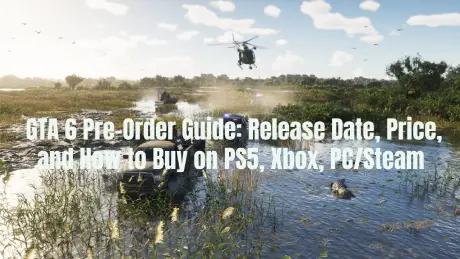
GTA 6 Pre-Orders Finally Go Live on June 25, and Most Players Are Asking the Same Questions:
Can I pre-order GTA 6 right now?
How much will GTA 6 cost?
Will GTA 6 be available on PS5, Xbox, PC, or Steam?
Can players in Russia or Kazakhstan pre-order the game?
Should I buy the digital version or wait for the physical edition?
Here's everything you need to know before placing your pre-order.

- ✅ Reduce Lag and High Ping.
✅ Boost FPS at the Same Time.
✅ Support 2000+ Popular Online Games.
✅ Change Server without Latency.
✅ Boost Game Loading Speed.
Can You Pre-Order GTA 6 Right Now?
GTA 6 pre-orders officially begin on June 25, 2026.
Until then, most players can only add the game to their wishlist in the PlayStation Store or Microsoft Store. The Pre-Order button is expected to appear once the stores update.
Avoid random third-party websites before June 25. If a site is already selling GTA 6 PC keys, Steam pre-order keys, beta access, or early download access, treat it as untrustworthy unless it has been officially confirmed by Rockstar Games or the platform's official store.
GTA 6 Pre-Order Overview
|
Question |
Answer |
|
Pre-Order Start Date |
June 25, 2026 |
|
Release Date |
November 19, 2026 |
|
Confirmed Platforms |
PS5, Xbox Series X|S |
|
PS4 / Xbox One |
Not Announced |
|
PC / Steam |
Not Announced Yet |
|
Price |
Not Officially Announced |
|
Physical Edition |
Expected from selected retailers, with more details coming later |
|
Pre-Order Bonuses |
Not Revealed Yet |
How to Pre-Order GTA 6 on PS5
PS5 players should pre-order through the PlayStation Store or a trusted retailer.
Digital Pre-Order on PS5
Search for Grand Theft Auto VI.
Open the official Rockstar Games product page.
Review the available editions.
Check the price, bonus content, and release date.
Select Pre-Order.
Complete your purchase using your PlayStation account.
Before paying, make sure the product page lists PS5 as the platform and Rockstar Games as the publisher.
Pre-Ordering the Physical Edition for PS5
If you prefer a physical copy, wait until major retailers begin offering the official PS5 disc edition.
Avoid buying from unknown sellers using fake cover art or placeholder pricing. GTA 6 is one of the biggest game releases ever, so fake listings are likely to appear quickly.
How to Pre-Order GTA 6 on Xbox
Xbox players should use the Microsoft Store or authorized retailers.
Digital Pre-Order on Xbox
Open the Microsoft Store on your Xbox Series X|S.
Search for Grand Theft Auto VI.
Open the official game page.
Compare the available editions if more than one is offered.
Check the price and included content.
Select Pre-Order.
Complete your purchase with your Microsoft account.
Xbox Series S owners can only purchase the digital version because the console does not include a disc drive.
Xbox Series X owners can choose either the digital version or wait for the physical edition.
Can You Pre-Order GTA 6 on PC or Steam?
No, not at this time.
Rockstar Games has not officially announced GTA 6 pre-orders for PC or Steam. At launch, the only confirmed platforms are PS5 and Xbox Series X|S.
That means you should avoid:
- GTA 6 Steam keys
- GTA 6 PC pre-order codes
- GTA 6 beta downloads
- GTA 6 early access links
- Fake Rockstar Games Launcher installers
- Cheap "global keys" from unknown websites
A PC version may arrive later, but until Rockstar officially confirms it, there is no legitimate GTA 6 pre-order for PC or Steam.
How Much Does GTA 6 Cost?
Rockstar has not officially announced the price of GTA 6 yet.
Pricing may vary depending on:
- Your country or store region
- Digital or physical edition
- Standard Edition or premium edition
- Taxes
- Individual retailer pricing
- A possible Collector's Edition
Don't trust random leaked prices before the official store pages are updated. On June 25, check the PlayStation Store, Microsoft Store, or trusted retailers directly.
Should You Buy the Digital Version or the Physical Edition?
That depends on how you usually play games.
Choose the Digital Version if You Want:
- No disc swapping
- Preload access if it becomes available
- Instant access on launch day
- Easy purchasing through the PlayStation Store or Microsoft Store
- Compatibility with Xbox Series S
Choose the Physical Edition if You Want:
- A physical game collection
- The option to resell your copy later
- Retail discounts
- A boxed copy
- A chance to get a Collector's Edition
For GTA 6, many players may prefer to wait and see whether a special physical edition is announced before making a final decision.
What Do You Get for Pre-Ordering GTA 6?
Rockstar has not revealed any official pre-order bonuses yet.
Before you buy, check whether your edition includes:
- The base game only
- Bonus vehicles
- GTA Online content
- In-game currency
- Cosmetic items
- Early access
- Preload access
- Physical collectibles
Don't assume every edition includes the same bonuses. Some rewards may be exclusive to digital editions, selected retailers, or specific versions of the game.
Can You Pre-Order GTA 6 in Russia?
It's a little more complicated.
Players in Russia should not expect GTA 6 to be available directly through every official digital storefront. Payment methods, account region, local store availability, and retailer stock may all affect whether you can purchase the game.
Before placing your order, check:
- Whether GTA 6 appears in your regional PlayStation Store or Xbox Store
- Whether your payment method is supported
- Whether the edition matches your account region
- Whether DLC and bonus content will work with your account
- Whether you can purchase a physical copy from a trusted retailer
Don't buy a random key just because it's labeled as a "global key." GTA 6 will almost certainly attract fake listings, region-locked keys, and unsafe payment pages.
Can You Pre-Order GTA 6 in Kazakhstan or Other Regions?
Players in Kazakhstan, India, and other regions should always check the store linked to their actual PlayStation or Xbox account.
Don't rely only on US or EU pricing. Regional prices may differ, and in some countries, physical copies are mainly distributed through local retailers.
Before placing your pre-order, confirm:
- Your store region
- Local pricing
- Supported payment methods
- Available language support
- Refund policy
- Whether the physical edition is compatible with your account region
What Time Do GTA 6 Pre-Orders Go Live on June 25?
Rockstar has confirmed the date but has not announced an exact global launch time.
That means pre-orders may become available when:
- The PlayStation Store updates
- The Microsoft Store updates
- Retailers publish their product listings
- Regional stores refresh their catalogs
If the Pre-Order button doesn't appear immediately in your country, wait a while and check again. Store updates are not always rolled out worldwide at the same time.
Should You Pre-Order GTA 6 on Day One?
Pre-order on the first day if:
- You're definitely playing on PS5 or Xbox Series X|S
- You want your digital copy ready for launch
- You want to receive any available pre-order bonuses
- You don't plan to wait for reviews
- You're confident your account region and payment method are compatible
Wait before pre-ordering if:
- You're waiting for the PC or Steam version
- You want a Collector's Edition
- You prefer a physical copy
- Your region has uncertain store availability
- You want to compare prices
- You're not sure which edition is right for you
What Players Should Do on June 25
Once pre-orders go live:
Go directly to the PlayStation Store, Microsoft Store, the official Rockstar website, or a trusted retailer.
Search for Grand Theft Auto VI.
Make sure Rockstar Games is listed as the publisher.
Confirm the platform is PS5 or Xbox Series X|S.
Compare all available editions carefully.
Read the included pre-order bonuses.
Check the final price in your local currency.
Review the refund and cancellation policy.
Avoid unofficial PC, Steam, or beta links.
Only place your pre-order if the product page is official and matches your platform.
How to Enjoy Smooth Gameplay in GTA 6
For a massive, highly detailed game like GTA 6, maintaining a smooth gaming experience is essential. Whether you're exploring the streets of Vice City or taking part in high-speed heists, a fast and stable internet connection can make a huge difference. That's where LagoFast comes in.
LagoFast is a game booster designed to optimize your network while you play. Reducing latency and packet loss, it helps deliver a smoother gaming experience even during intense online sessions. Whether you're racing through Vice City or pulling off heists with friends, LagoFast helps keep you one step ahead of the competition.
In addition to network optimization, LagoFast also offers server selection and real-time network monitoring, giving you more control over your gaming experience. With LagoFast, you can enjoy GTA 6 without worrying about lag or connection issues.
Follow these steps to use LagoFast for smoother gameplay:
Step 1: Click the Free Trial button to download and install LagoFast.
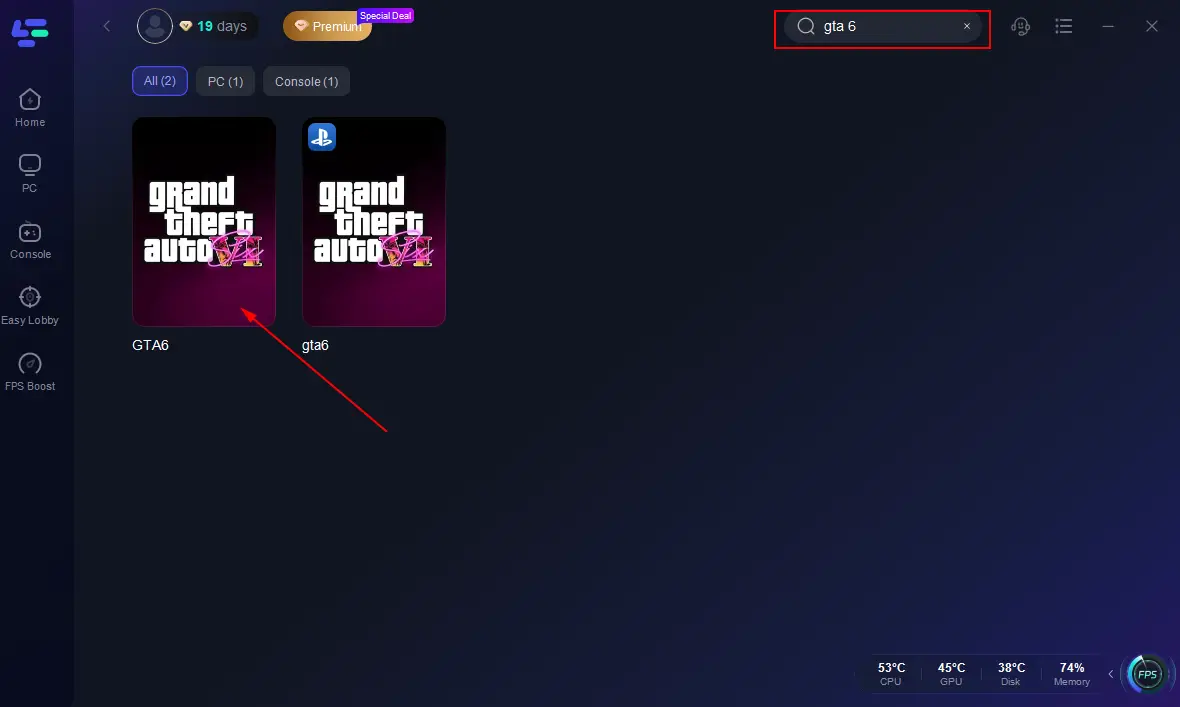
Step 2: Launch LagoFast, click PC on the left, search for GTA 6, and select the game when it appears.
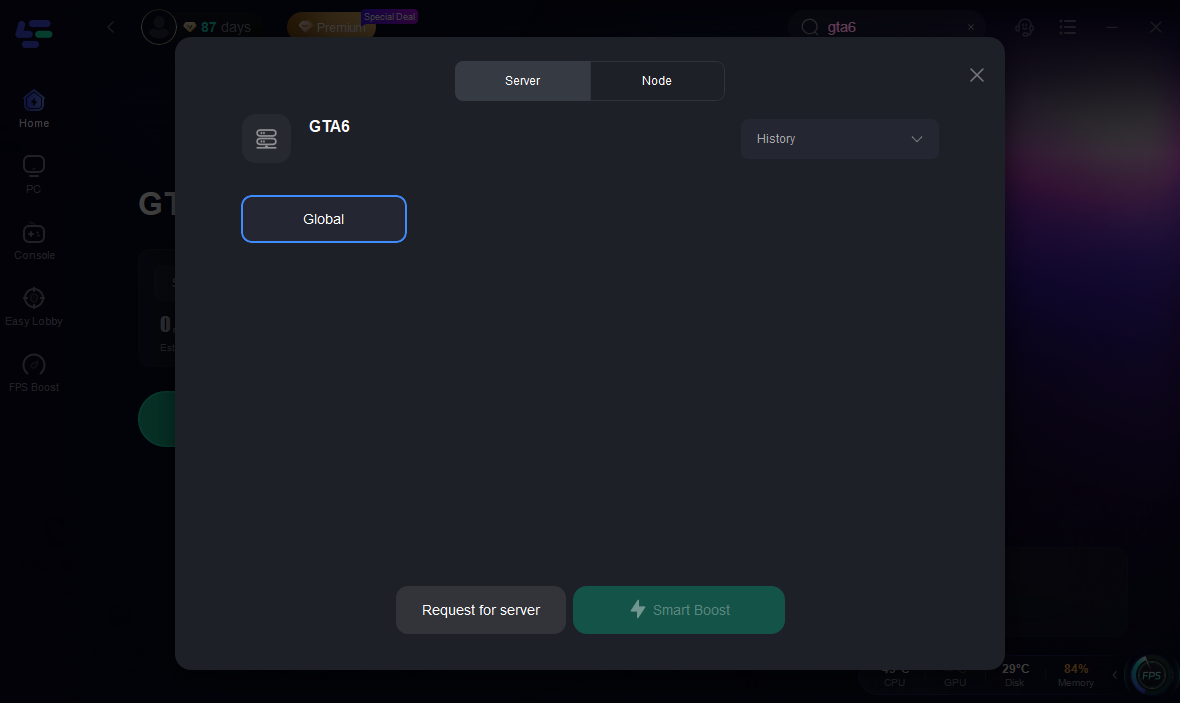
Step 3: Click Server to choose the best server for a smoother connection, then click Smart Boost.
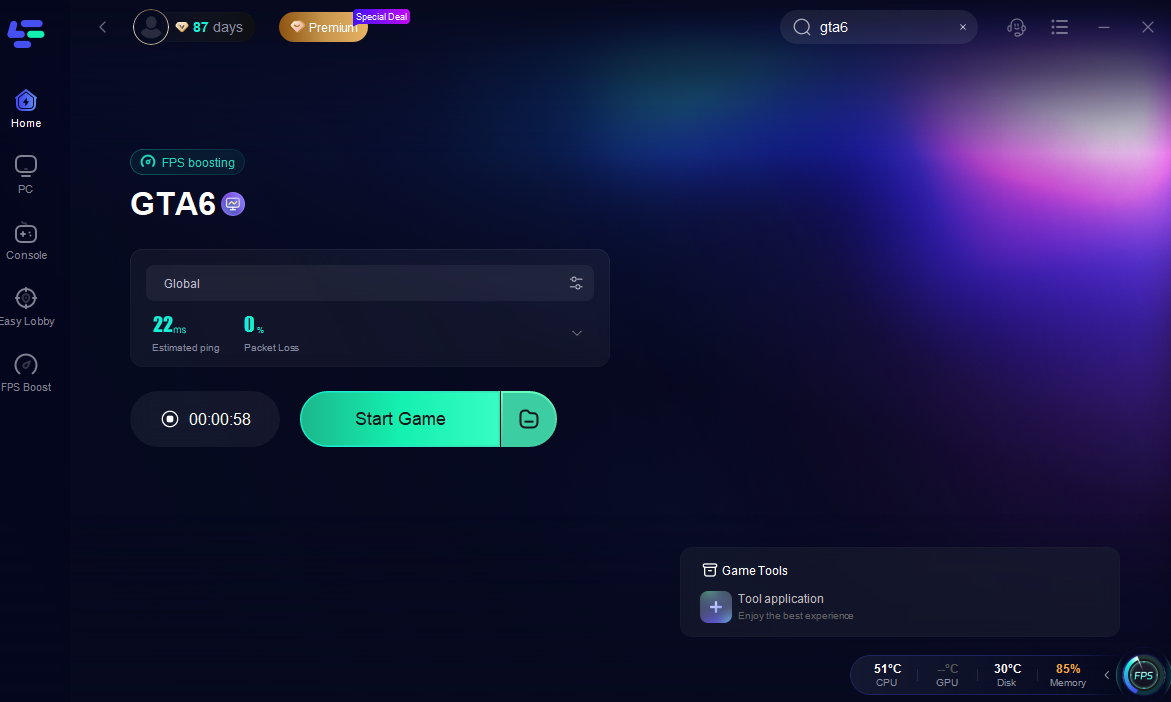
Step 4: Check your real-time ping, packet loss, and multi-path connection status on the right. Finally, click Start Game to launch GTA 6.
Conclusion
GTA 6 pre-orders begin on June 25, 2026, but the safest approach is to wait for the official product pages to go live before making any payment.
PS5 and Xbox Series X|S players should be ready to check their platform stores on June 25. PC and Steam players should wait, as Rockstar has not officially opened PC pre-orders yet.
For players in Russia, Kazakhstan, India, and other regions, it's especially important to verify your actual store region, supported payment methods, and retailer availability before purchasing.
Don't buy fake keys. Don't download "GTA 6 beta" files. Don't trust unofficial Steam pages.
Always use the official store page first, compare the available editions carefully, and then decide whether to pre-order GTA 6 immediately or wait for more confirmed details.
Boost Your Game with LagoFast for Epic Speed
Play harder, faster. LagoFast game booster eliminates stutter and lags on PC, mobile, or Mac—win every match!
Quickly Reduce Game Lag and Ping!
Boost FPS for Smoother Gameplay!