
Quick Answer: How to Translate Granblue Fantasy: Relink - Endless Ragnarok?
If you are looking for an immediate way to translate Granblue Fantasy: Relink - Endless Ragnarok into a language not natively supported by the developers, the most effective solution is using LagoFast.
While the game features a solid list of built-in localization options, millions of players globally speak languages left out of the official build. LagoFast provides a specialized, real-time AI translation overlay that reads the on-screen text and translates it instantly without modifying any internal game files. This allows you to experience the story, menus, and combat UI in your native tongue without risking an account ban.
Granblue Fantasy: Relink has captivated action RPG fans with its high-flying cooperative combat, complex character builds, and expansive endgame content. With the introduction of the Endless Ragnarok update, players face tougher challenges than ever before. However, a major hurdle for international players remains the language barrier. Missing a crucial status effect description or failing to understand a boss mechanic because of a language gap can quickly ruin your raid. This guide breaks down the official language support available and shows you exactly how to break down those barriers using advanced gaming translation tools.

- ✅ Reduce Lag and High Ping.
✅ Boost FPS at the Same Time.
✅ Support 2000+ Popular Online Games.
✅ Change Server without Latency.
✅ Boost Game Loading Speed.
Part 1: Granblue Fantasy: Relink - Endless Ragnarok Officially Supported Languages
Part 4: Bonus Tips: Optimize Your Entire Gaming Experience With LagoFast
Part 1: Granblue Fantasy: Relink - Endless Ragnarok Officially Supported Languages
Before looking into external tools, it is helpful to know exactly what options the developers provided out of the box. The game includes full text localization for several major markets, alongside high-quality voice acting in two primary languages.
|
Language |
Interface Supported |
Subtitles Supported |
Full Audio Voiceover |
|
English |
Yes |
Yes |
Yes |
|
Japanese |
Yes |
Yes |
Yes |
|
French |
Yes |
Yes |
No |
|
German |
Yes |
Yes |
No |
|
Spanish (Spain) |
Yes |
Yes |
No |
|
Italian |
Yes |
Yes |
No |
|
Portuguese (Brazil) |
Yes |
Yes |
No |
|
Korean |
Yes |
Yes |
No |
|
Simplified Chinese |
Yes |
Yes |
No |
|
Traditional Chinese |
Yes |
Yes |
No |
Part 2: How to Change Languages Manually in Granblue Fantasy: Relink - Endless Ragnarok: Step-by-Step
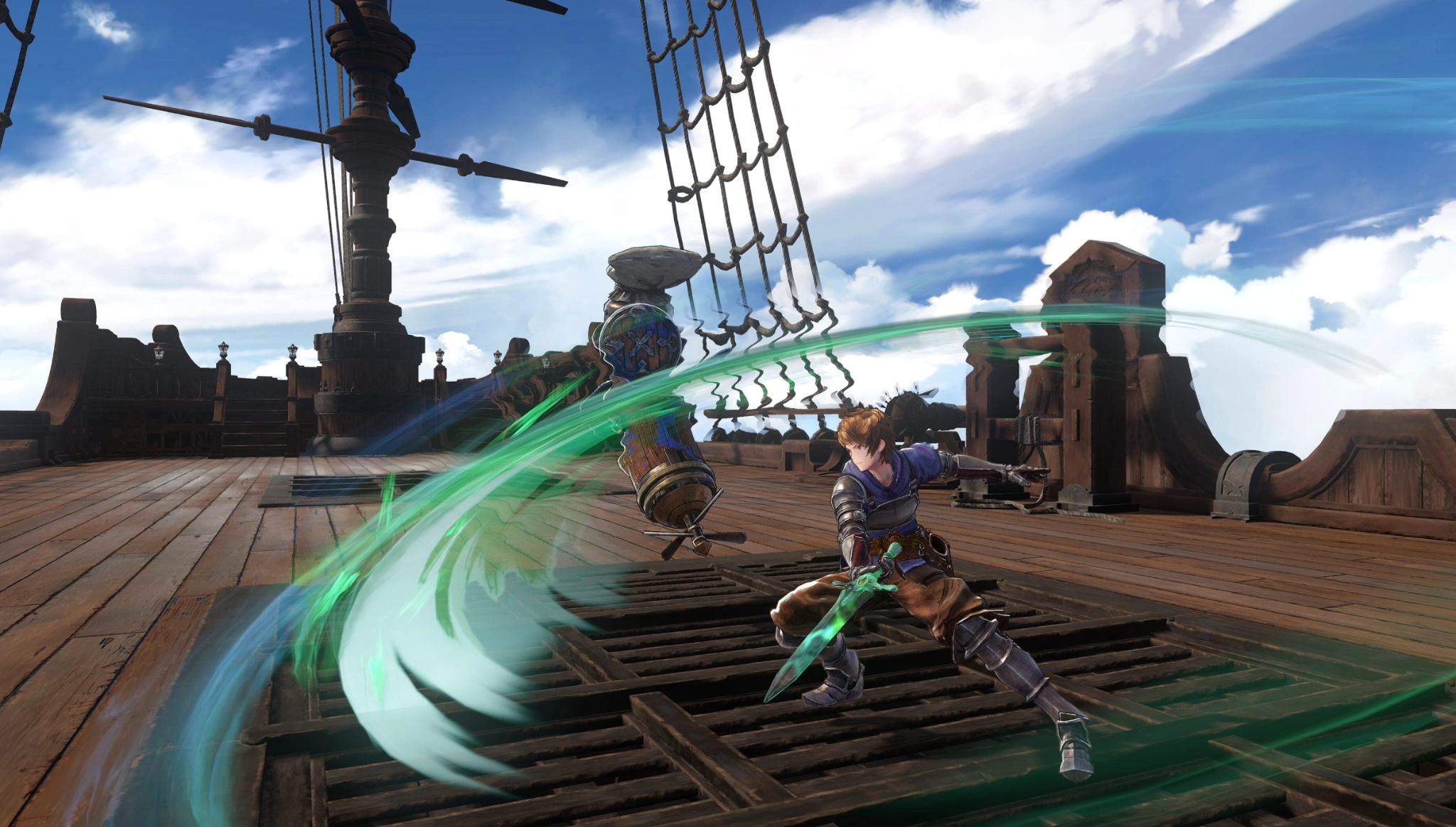
If your preferred language is listed in the official table above, you can easily toggle it via the in-game software settings. Depending on whether you are adjusting this from the main menu or while actively playing, follow these steps:
Changing Language From the Main Title Menu
Step 1. Launch the game and wait for the main splash screen to load.
Step 2. Select Game Settings from the primary menu list before loading your save file.
Step 3. Scroll down to the Language category.
Step 4. Adjust the Display Language slider left or right until your preferred text option appears.
Step 5. Save your changes and load your game data.
Changing Language While In-Game (Skykomish Deck / Towns)
Step 1. Open the main pause menu by pressing Options on your controller or Escape on your keyboard.
Step 2. Navigate to the System tab on the far right.
Step 3. Select Options, then head into the Language Settings sub-menu.
Note that while you can change subtitle and interface text here, certain audio changes may require you to return to the title screen to fully apply.
Part 3: How to Translate Granblue Fantasy: Relink - Endless Ragnarok When Your Preferred Language Isn't Supported?
When the language you read best isn't an option in the official settings, relying on slow mobile camera apps or copying text into online web translators completely breaks the flow of high-speed combat. Missing a button prompt during a Full Chain Burst because you cannot read the screen will actively let your multiplayer team down.
This is where the LagoFast Game Translator steps in. Specifically designed to remove regional language boundaries, LagoFast applies a smart, real-time AI-powered translation overlay directly over your game screen. It works fluidly across immersive story cutscenes, intricate sigil upgrade menus, and chaotic raid UI boards, delivering fast localization without modifying your core game installation files.
Key Translation Features of LagoFast:
- AI Real-Time In-Game Translation: Automatically translates all dialogue boxes, story elements, and user interfaces as you actively play through the Endless Ragnarok update.
- Auto Chat & Input Translation: Converts global or matchmaking chat logs into your native language instantly, allowing you to converse with international teammates seamlessly during complex raids.
- Ultra-Fast OCR Technology: Uses context-aware Optical Character Recognition to identify complex stylized fantasy fonts or busy UI grids in under one second.
- Multi-Platform Flexibility: Works smoothly on both dedicated desktop PC clients and mobile devices, ensuring accessibility wherever you play.
- Floating Translation Bubble (Mobile): Android users can tap a handy on-screen floating ball to instantly translate any visual elements without switching apps.
- Multi-Engine Game Support: Optimized to run perfectly alongside major game engines, ensuring it won't crash or slow down your system during intensive boss fights.
Step-by-Step Tutorial to Use LagoFast Translation Tool:
Step 1. Click the Free Trial button to download and install LagoFast.
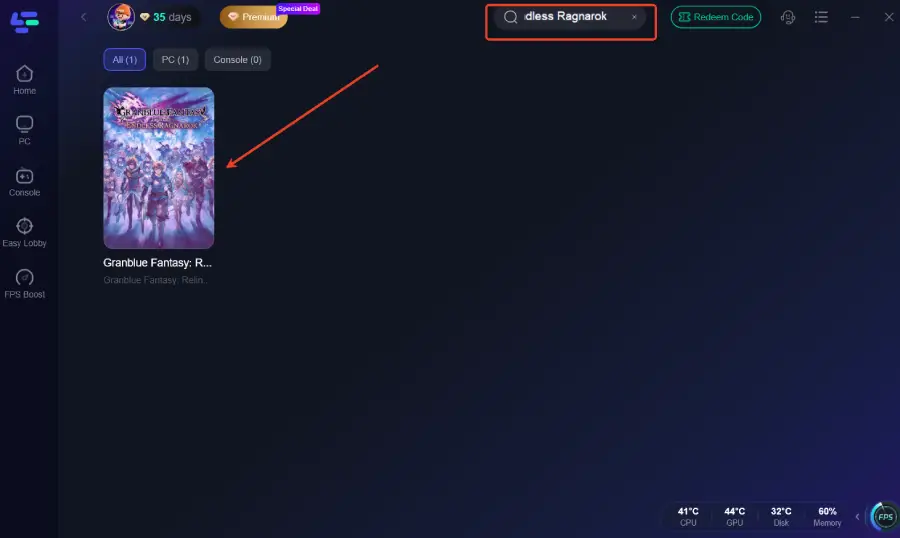
Step 2. Type Granblue Fantasy: Relink - Endless Ragnarok into the search bar and add it to your game list.
Step 3. Enable Translation: On the game’s dashboard within LagoFast, look for the "Translation Tool" icon on the right-hand sidebar.
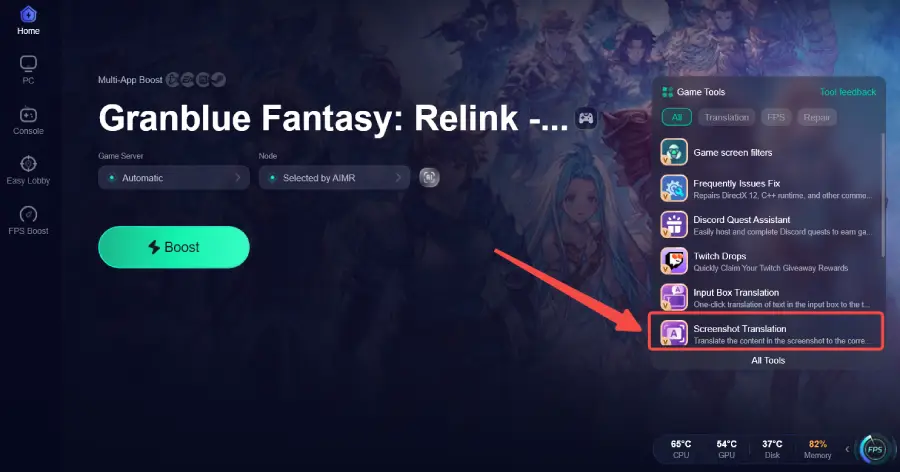
Step 4. Set Your Language: Select your target language (e.g., Turkish or Thai).
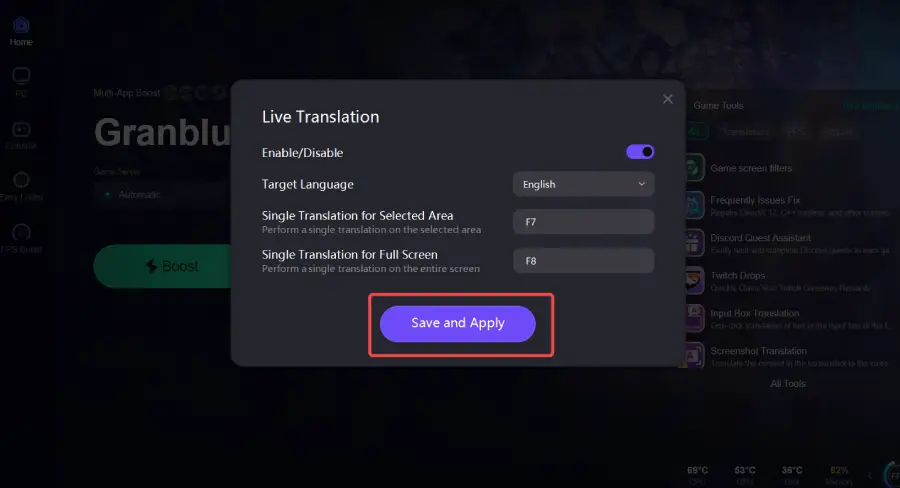
Step 5. Launch & Play: Start the game through LagoFast. Your game language will be automatically translated into the language you selected.
Part 4: Bonus Tips: Optimize Your Entire Gaming Experience With LagoFast
A great action RPG requires precise timing during dodge rolls and smooth framerates when pulling off massive ultimate skill chains with your party. Lag spikes or sudden frame rate drops can ruin a perfect run on a difficult endgame boss. Beyond its translation capabilities, LagoFast serves as an advanced, all-in-one game booster. By identifying and connecting your machine to the fastest possible regional data nodes, LagoFast stabilizes your network connection and clears out background system clutter. This guarantees optimal performance and a smooth, stutter-free gaming experience.
Key Performance Optimization Features:
- One-Click FPS Boost: Instantly cleans up background system resource hogs and reallocates memory directly to your game to stop framerate drops and micro-stutters during heavy graphical effects.
- High Ping Reducer: Bypasses congested internet pathways to secure the shortest route to the multiplayer servers, lowering high ping and preventing frustrating connection drops during co-op raids.
- One-Click Crash Fix: Analyzes common network anomalies and local system bottlenecks that cause desktop crashes, applying instant configuration fixes before you boot up.
- Global Server Access: Grants you the power to download, update, and patch region-locked updates easily, making it simple to play overseas client builds without regional restrictions.
Tutorial to Use LagoFast to Optimize Your Granblue Fantasy: Relink - Endless Ragnarok Gaming Experience:
Step 1: Click the Free Trial button to download and install LagoFast.
Step 2: Open LagoFast, then click the PC button on the left, search for Granblue Fantasy: Relink - Endless Ragnarok in the search bar, and click it after it appears.
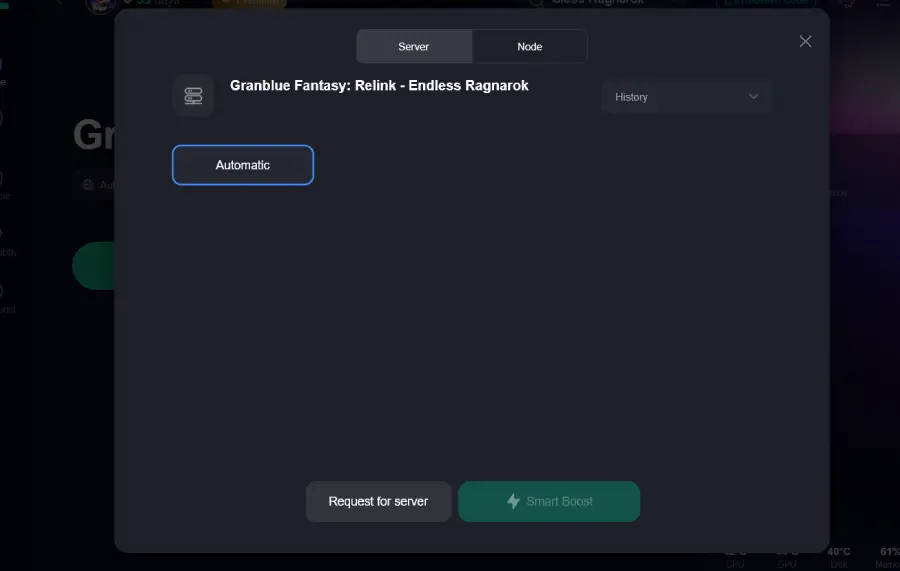
Step 3: Click on “Server” to change to a better server that ensures a better gaming experience, then click on “Smart Boost” to fix Granblue Fantasy: Relink - Endless Ragnarok lag and stuttering.
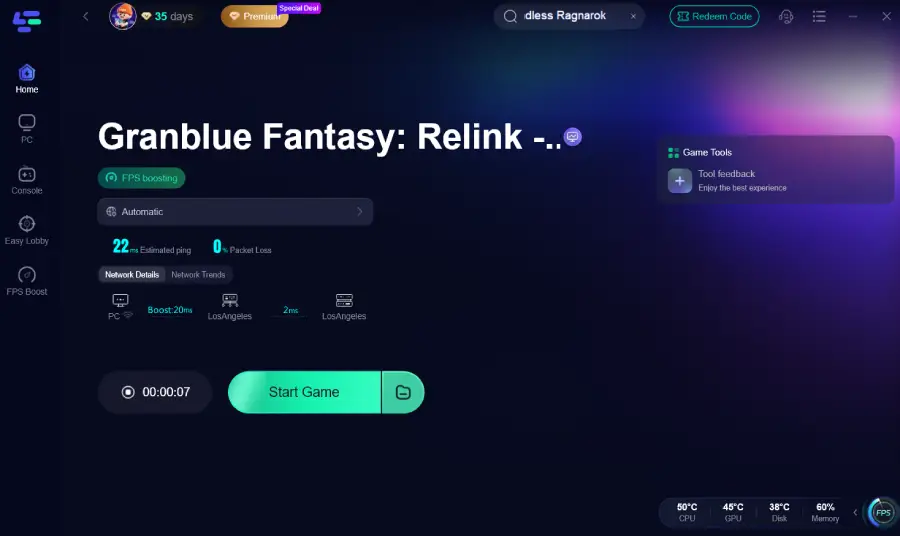
Step 4: Check the specific game ping, packet loss, and multiple path connections on the right side. Finally, click “Start Game” to play the game.
Part 5: FAQs
Can I use LagoFast to change text languages while keeping Japanese voice acting?
Yes. Because LagoFast works as a visual overlay over the displayed text, it operates entirely independently of your in-game audio settings. You can set your official voice options to Japanese or English in the game menu, and use LagoFast to translate the subtitle text into whatever language you prefer.
Does LagoFast translate text inside multiplayer text chat logs?
Yes, the software features an Auto Chat & Input Translation system. When international players type callouts or messages in the group text channel, the tool interprets the text string and outputs it in your chosen language, helping you coordinate during complex endgame encounters.
Why is my game still lagging after setting up a translation tool?
The translation overlay itself uses very little processing power, but underlying network routing issues can still cause lag. To fix this, make sure you activate the Smart Boost option inside the LagoFast panel before launching the game, which stabilizes your connection to the server hosts.
Does the FPS boost feature modify my graphics card configuration?
No, it does not safely overclock or alter your hardware settings. Instead, the one-click FPS boost closes unnecessary background applications, stops rogue Windows processes from eating up CPU cycles, and optimizes system RAM allocation so your PC can dedicate maximum processing power directly to running your game smoothly.
Do I need a high-end computer to run the LagoFast translation tool overlay?
Not at all. The OCR technology and translation engine are optimized to run lightweight in the background. It will not compete with your graphics card or processor for vital resources, ensuring your frame rates remain smooth even during visually intensive boss battles.
Can I use LagoFast on a Steam Deck or mobile setup for remote play?
Yes, LagoFast offers flexible platform configurations. If you are streaming or playing via supported mobile setups or handheld systems, you can utilize the LagoFast mobile network booster apps and optimization features to maintain a clean, stable gaming session away from your main desktop.
Conclusion
Language barriers should never prevent you from enjoying the deep mechanics and cinematic storytelling of the Endless Ragnarok update. Whether you are using the built-in language configurations or deploying the real-time AI overlay through LagoFast, getting the correct localization makes a massive difference in your gameplay success. Clean up your network routing, turn on your translation tools, and dive back into the skies with absolute confidence.
Boost Your Game with LagoFast for Epic Speed
Play harder, faster. LagoFast game booster eliminates stutter and lags on PC, mobile, or Mac—win every match!
Quickly Reduce Game Lag and Ping!
Boost FPS for Smoother Gameplay!