
Quick Answer: Why Dead by Daylight Won’t Launch
If Dead by Daylight did not launch correctly, the most common causes are:
- A broken or unstable game patch
- Corrupted local game data
- Easy Anti-Cheat (EAC) startup failure
- Launcher or file integrity issues
- Network or NAT-related initialization errors
Fastest fixes to try first:
- Restart your PC and launcher
- Verify game files
- Repair Easy Anti-Cheat
- Delete the PersistentDownloadDir folder
- Check for patch-related issues

- ✅ Reduce Lag and High Ping.
- ✅ Boost FPS at the Same Time.
- ✅ Support 2000+ Popular Online Games.
- ✅ Stable Server Connections.
- ✅ End Crashing & Black Screen Issues.
Part 1. What Does “Game Did Not Launch Correctly” Mean?
Part 2. Is This a Steam or Epic Problem?
Part 3. How to Fix Dead by Daylight Not Launching
Part 4. Other Symptoms You Might Experience
Part 1. What Does “Game Did Not Launch Correctly” Mean?
This error usually appears as:
“The game has initialized incorrectly and may not save your game properly.”
Unlike typical crashes, this message points to a startup initialization failure, meaning the game couldn’t properly load essential systems at launch.
Common triggers include:
- Corrupted cached files
- Failed connection to servers during startup
- Broken update deployment
- Permissions or system conflicts
If your game freezes on the Trapper logo or crashes right after launching, it’s likely tied to this initialization problem.
Part 2. Is This a Steam or Epic Problem?
Many players assume the issue comes from Steam or Epic Games—but that’s not always true.
When it’s likely NOT the launcher:
- The problem started right after a new patch
- Many players report the same issue simultaneously
- Reinstalling the launcher doesn’t help
When it MIGHT be the launcher:
- Game doesn’t respond when clicking “Play”
- File verification detects missing files
- Overlay or permissions issues interfere with startup
In most cases, launcher problems are secondary. The root cause is usually the game itself or corrupted local data.
Part 3. How to Fix Dead by Daylight Not Launching
1. Use LagoFast Game Booster (For Network Issues)
If your issue seems more like a failure in network routing or the initialization handshake—rather than corrupted game files—then a routing-focused solution may be worth trying.
In situations like this, LagoFast (LagoFast Game Booster - Get No Lag and Lower Ping) can serve as an additional diagnostic step. If Dead by Daylight shows an initialization error, struggles during network startup, or your connection is unstable due to routing paths or NAT configuration, a network optimization tool may help. By providing a more stable route, it can sometimes allow the game to complete its initial handshake process more reliably.
Use this approach only when your symptoms clearly point to unstable connections, routing issues, NAT problems, or inconsistent startup authentication. It is not intended for cases involving damaged files, broken patches, or Easy Anti-Cheat errors.
If your issue seems related to network initialization or NAT, a routing optimization tool can help.
LagoFast Game Booster can:
- Reduce ping and packet loss
- Stabilize network routing
- Improve connection during startup authentication
This is particularly useful if:
- The game hangs during initialization
- You suspect NAT or routing issues
- Connection instability affects launch
How to Use LagoFast Game Booster
Step 1: Click the Free Trial button to download and install LagoFast Free Trial.
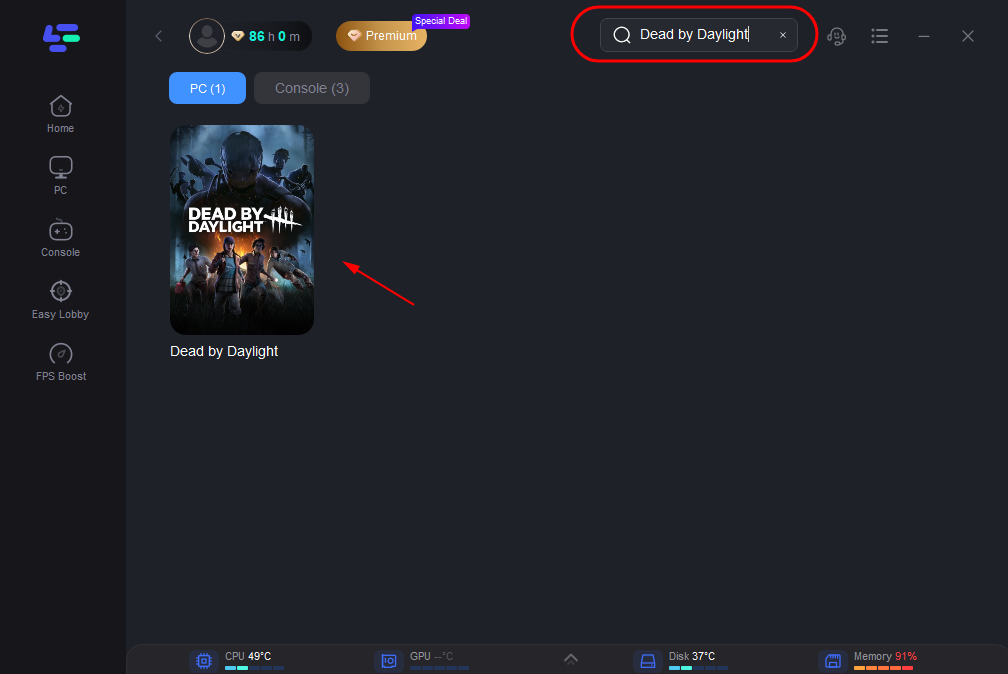
Step 2: Open the application and select Dead by Daylight from the list of supported games.
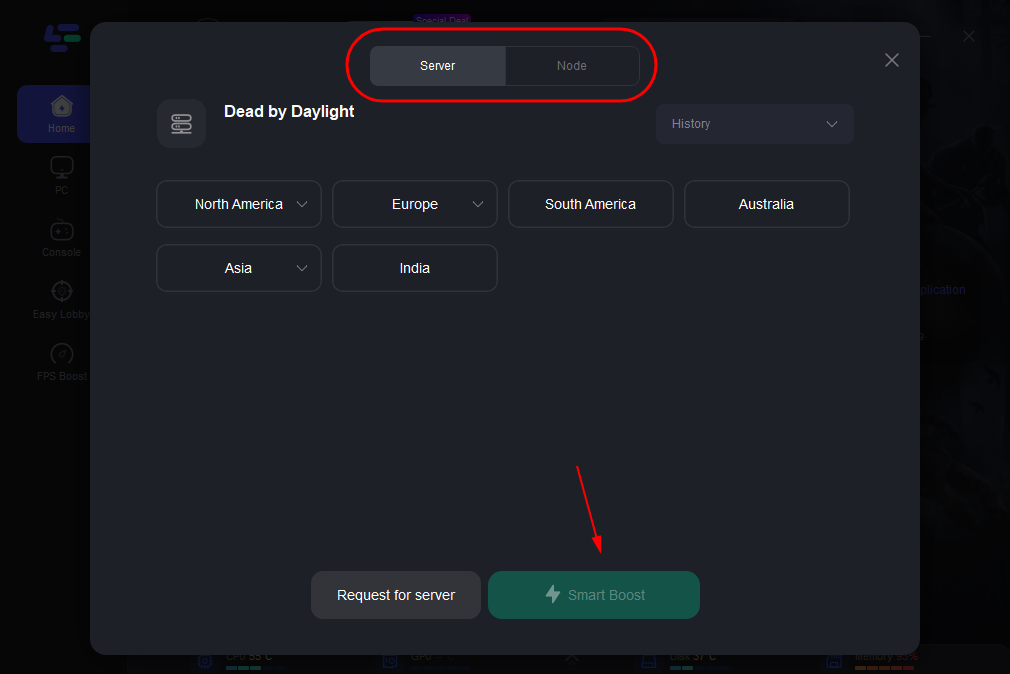
Step 3: Choose automatic or lowest ping routing to regional matchmaking servers.
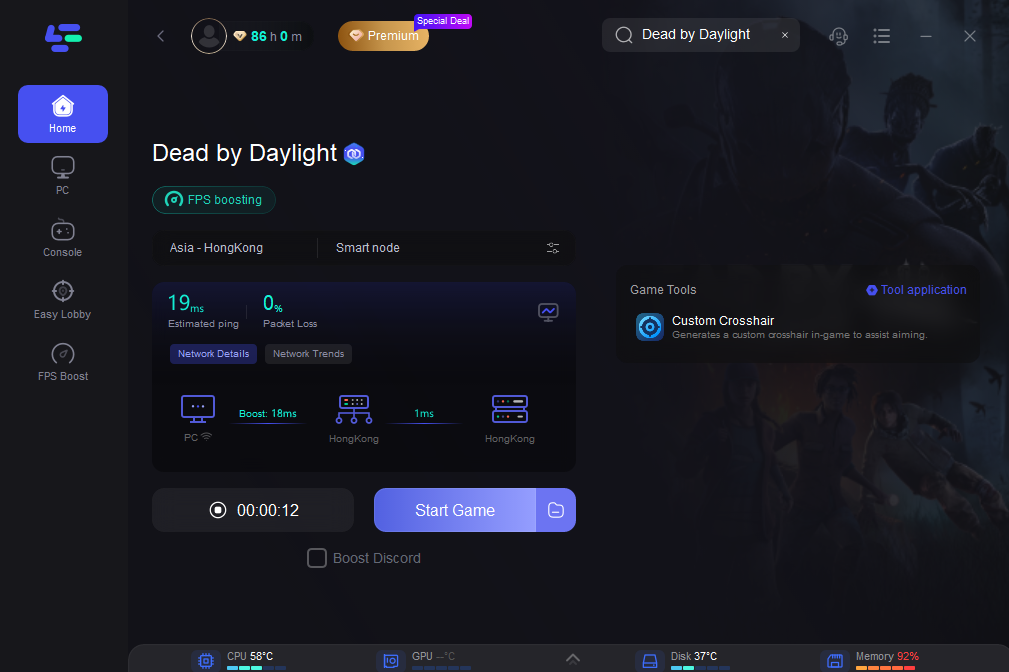
Step 4: With optimized routing, your game should connect more smoothly, reducing disconnects that can impact matchmaking success.
2. Check Patch Status First
Before doing anything complicated, check if the issue started after an update.
Some updates (like version 7.7.0) have caused widespread launch failures. If many players are affected, the problem may be server-side—and reinstalling won’t help.
3. Restart Everything
A full restart is simple but effective:
- Close Steam or Epic completely
- Restart your PC or console
- Launch the game again
This resolves temporary launch conflicts and memory issues.
4. Verify Game Files
Corrupted or missing files are a common cause.
- On Steam: Use “Verify integrity of game files”
- On Epic: Use “Verify” in library settings
5. Repair Easy Anti-Cheat
If the game crashes before fully opening, EAC is a major suspect.
Steps:
- Navigate to the Easy Anti-Cheat folder in the game directory
- Run the EAC setup file
- Select “Repair”
This often resolves startup crashes immediately.
6. Delete PersistentDownloadDir (Highly Effective Fix)
This is one of the most reported solutions for initialization errors.
Steps:
- Press Windows Search
- Enter:
%localappdata%\DeadByDaylight\Saved\ - Delete the folder: PersistentDownloadDir
- Restart launcher and game
This clears corrupted cached data causing startup issues.
7. Update GPU Drivers
Outdated drivers can cause crashes during launch or loading.
- Update NVIDIA / AMD drivers
- Restart system after update
Especially important if the game crashes after the first loading screen.
8. Run as Administrator
Permission issues can prevent the game from launching.
- Right-click Steam/Epic or the game executable
- Select “Run as administrator”
9. Disable Overlays and Antivirus Temporarily
Conflicts with overlays (Discord, Steam overlay) or antivirus software can cause crashes.
Try launching with:
- Overlays disabled
- Antivirus temporarily paused
10. Install Game on C: Drive
Some players report better stability when the game is installed on the system drive.
This isn’t guaranteed, but worth testing if all else fails.
Part 4. Other Symptoms You Might Experience
Players have reported several variations of this issue:
1. Game Stuck on Trapper Logo
Often linked to patch issues or driver problems
2. Crash After First Loading Screen
Usually tied to EAC or GPU drivers
3. Easy Anti-Cheat Error Before Launch
Requires repair or reinstall of EAC
4. Initialization Error Message
Strongly linked to corrupted cache or network startup failure
5. Console Issues (Xbox / PlayStation)
- Full system restart often helps
- Clearing persistent storage (Xbox) may work in rare cases
Part 5: FAQs
1. Why does Dead by Daylight say “game initialized incorrectly”?
This usually means the game failed during startup initialization, often due to corrupted data, patch issues, or network errors.
2. Can Easy Anti-Cheat stop the game from launching?
Yes. If EAC fails during loading, the game may close before fully opening.
3. Does reinstalling fix the issue?
Not always. Many players report reinstalling doesn’t help if the issue is patch-related or tied to cached data.
4. How do I know if it’s a server-side problem?
If many players report the same issue after an update, it’s likely on the developer’s side.
5. Is this problem only on PC?
No. Console players (Xbox and PlayStation) can also experience initialization errors.
Conclusion
The “Game Did Not Launch Correctly” error in Dead by Daylight can feel overwhelming, but in most cases, it comes down to a few key causes: patch instability, corrupted data, Easy Anti-Cheat issues, or network problems.
Start with the basics—check patch status, restart your system, and verify files. If that doesn’t work, move on to targeted fixes like deleting PersistentDownloadDir or repairing Easy Anti-Cheat.
And remember: if the issue started right after an update and many players are affected, the problem may not be on your end at all.
With the steps in this guide, you should be able to diagnose and fix the issue quickly—and get back to surviving (or hunting) in the fog.
Boost Your Game with LagoFast for Epic Speed
Play harder, faster. LagoFast game booster eliminates stutter and lags on PC, mobile, or Mac—win every match!
Quickly Reduce Game Lag and Ping!
Boost FPS for Smoother Gameplay!