
The EA Sports FC 26 Web App is one of the most powerful tools for Ultimate Team players to get a head start on their squad before the game officially launches. From early trading opportunities to coin-making strategies, this year’s Web App is even more feature-packed and player-friendly than FC 25’s version. Below, we’ll cover everything you need to know, including its release date, features, what’s new, how to access it, and expert strategies for maximizing your in-game wealth.

- ✅ Reduce Lag and High Ping.
- ✅ Boost FPS at the Same Time.
- ✅ Support 2000+ Popular Online Games.
- ✅ Change Server without Latency.
- ✅ End Stuck & Crashing Issues.
Part 1: When Does EA FC 26 Web App Release
Part 2: What Are the Confirmed EA SPORTS FC 26 Web / Companion App Features
Part 3: FC 26 Web App Features VS FC 25 Web App Features (What’s New)
Part 4: How To Access the EA SPORTS FC 26 Web App
Part 5: How to Make Coins on FC 26
Part 6: Enhance Your FC 26 Gaming Experience with LagoFast
Part 1: When Does the EA SPORTS FC 26 Web App Release
These are confirmed dates from EA:
- Web App launch: September 17, 2025
- Companion App refresh: September 18, 2025
- Early Access for Ultimate Edition players: begins September 19, 2025
- Standard (worldwide) release: September 26, 2025 across all major platforms
So if you’re waiting to use the Web App, September 17 is the key date—this is when Web App functionality begins for EAFC 26.
Part 2: What Are the Confirmed EA SPORTS FC 26 Web / Companion App Features
From the official EA “Launch Update / Pitch Notes,” here’s what we know the Web App (and Companion App) will support or involve:
- Web + Companion Apps are part of the launch plan—Web App goes live September 17; Companion App updates on September 18.
- The “graduated access” system: New FUT players will have limited Transfer Market access until they complete certain Foundation Objectives. Returning players skip that.
- Pre-season rewards from EA SPORTS FC 25 will be claimable starting October 14, 2025, once FC 26 is live.
Other relevant game-wide features (which the Web/Companion Apps are likely to reflect, though not all are explicitly called out for Web behavior):
- New pace of progression/reward balancing (“power curve” is slower) to reduce extreme stat gaps.
- Chemistry styles are updated (boost models with smaller increments), which may affect how players behave in FUT, including in Web App trading/market dynamics.
Part 3: FC 26 Web App Features VS FC 25 Web App Features (What’s New)
While FC 25’s Web App already offered most FUT features, FC 26 introduces key upgrades and quality-of-life improvements:
- Improved Playstyle Plus Display: Cards now clearly show Playstyle Plus abilities on the Web App, helping traders quickly spot high-demand players.
- Dynamic Market Pricing Insights: FC 26 integrates early analytics, giving clearer price trends to help avoid undercutting valuable cards.
- Streamlined SBC Navigation: EA has restructured SBC menus for faster completion and added clearer chemistry requirements.
- Unified Account Linking: Easier connection between console, PC, and mobile accounts, reducing login issues seen in FC 25.
- Updated Companion Features: Web App and Companion App now share real-time sync, making it easier to switch between desktop and mobile seamlessly.
Part 4: How To Access the EA SPORTS FC 26 Web App
Here’s what you must do, based on EA’s announcements:
1. Have an EA Account with your previous Ultimate Team activity (especially from FC 25) for “returning player” benefits. Returning players skip certain restrictions.
2. Log in with that EA account when the Web App launches (starting September 17, 2025).
3. Pre-order / Own the Game for early access to some features:
- Ultimate Edition pre-orders get early access to full game (19 Sept).
- EA Play / EA Play Pro may have early access or trial windows.
4. Complete the Foundation Objectives / Early Objectives if you’re new or haven’t fulfilled the returning-player criteria, in order to unlock full Transfer Market access.
Part 5: How to Make Coins on FC 26
Making coins early is the key to building a competitive Ultimate Team without spending extra money. Based on proven FC 25 and FC 26 trading strategies, here are actionable tips:
Open Your Welcome Back Packs First
Your Welcome Back packs contain tradable silver and gold cards that can be sold immediately. Even silver players can sell for thousands of coins early on if they’re part of meta squads or SBC solutions.
Flip Kits and Badges
Rare club kits (Barcelona, Real Madrid, Liverpool) often sell for 3,000–4,000 coins early. Quick-sell all unwanted kits and stadium items to build your starter coin balance.
Master Manager Trading
French, Brazilian, Dutch, and US managers can fetch 500–5,000 coins due to chemistry demand. Snipe these low and resell at peak prices.
Use Sniping Filters
Filters like Gold > France > Real Madrid have been profitable year after year. Meta defenders like Ferland Mendy often skyrocket in price in the first few days.
Chemistry Style Arbitrage
Buy cheap Shadow, Hunter, Anchor chem styles and flip them at inflated prices. Many players stockpile these before the console launch.
SBC Solution Trading
Monitor SBC solutions on FUTBIN. Buy cards before they spike in price due to popularity and resell at a premium.
Quick Bid Method
Identify cards around 1,000 coins and bid 200–300 coins lower than Buy Now. Sell for full price to earn quick, low-risk profit.
By combining these strategies, traders can easily hit 100,000 coins within days of Web App launch.
Part 6: Enhance Your FC 26 Gaming Experience with LagoFast
Once FC 26 launches, smooth performance is essential for Weekend League, Rivals, and Squad Battles. LagoFast Game Booster is a top-tier optimization tool designed for competitive gaming:
- Lower Ping & Stable Connections: LagoFast uses global routing nodes to reduce packet loss and latency spikes.
- One-Click Optimization: Auto-selects the best server routes for your location.
- FPS Boost Mode: Adjusts system resources to prioritize game performance, reducing stutter and lag.
- Cross-Platform Support: Works on PC, console, and mobile devices, so your FUT gameplay is always responsive.
- Free Trial Available: Players can test LagoFast’s effectiveness risk-free.
For serious FUT traders and competitors, pairing early Web App trading with a low-latency gaming setup ensures you dominate from Day 1.
How to use LagoFast Game Booster on PC
Step 1. Download LagoFast by clicking the "Free Trial" button.
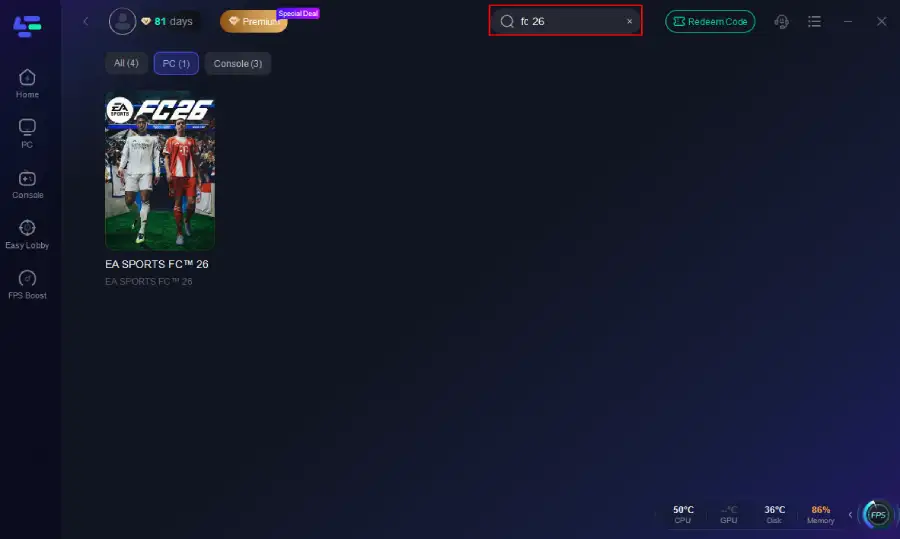
Step 2. Before you start your game, search for it within the LagoFast application to ensure it's supported.
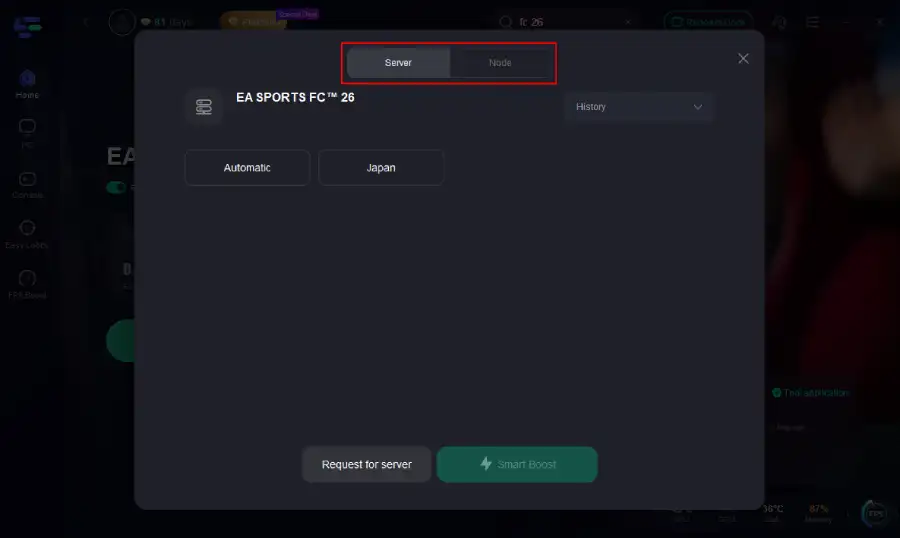
Step 3. Navigate to "Select Server" to choose the most stable server. Follow up by selecting the best Node available on the right to optimize your connection.
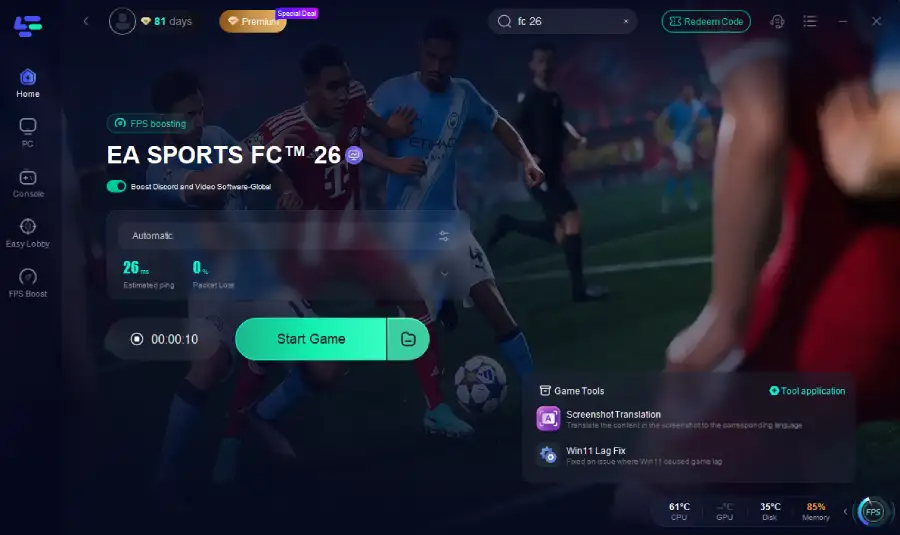
Step 4.Click the "Smart Boost" button to get real-time data on your game's ping, packet loss, and network type, which helps in monitoring and adjusting for optimal performance.
How to use LagoFast Game Booster on Console (PS5 / PS4)
To bring the same low-latency experience from PC to your console, LagoFast offers LagoFast Box and app that simplifies network optimization for PS5 and PS4 players.
Step 1. Download the LagoFast Console App to control the LagoFast Box

Step 2. Connect your LagoFast Box to your router and Console. You can use either wired connection or wireless connection.

Step 2. Launch LagoFast Console App and Boost FC 26. After you finish LagoFast Box binding, you can boost the game in LagoFast Console App.

How to Use LagoFast Game Booster on Mobile
For gamers on the go, LagoFast ensures your mobile FUT sessions stay smooth and responsive, providing optimized routing and reduced lag wherever you play.
Step 1: Search “LagoFast Mobile booster” in the Google App Store or Apple App Store. Alternatively, click here to download the APK File.
Step 2: Click the “Download” button, then install and launch “LagoFast Mobile Booster”.
Step 3: Start FC 26, then switch to LagoFast Mobile and search for it.
Step 4. Select and click FC 26 in the interface.
Step 5: Enter the server selection interface, where you can change to a stable server, then click the “Boost” button to fix high ping and enhance the gaming experience
Step 6: Finally, go back to FC 26 and start playing it without any lag.
Final Thoughts
The EA Sports FC 26 Web App is your ticket to dominating the FUT market early. With its updated features, market tools, and accessibility, players can build a strong club before even touching their console. By following proven trading strategies and leveraging LagoFast’s optimization tech, you’ll stay ahead of the competition—whether you’re trading, grinding Rivals, or hitting the Weekend League.
Boost Your Game with LagoFast for Epic Speed
Play harder, faster. LagoFast game booster eliminates stutter and lags on PC, mobile, or Mac—win every match!
Quickly Reduce Game Lag and Ping!
Boost FPS for Smoother Gameplay!