
Quick Answer:
Embers of the Uncrowned is currently region-locked in several territories, including South Korea, North Korea, Taiwan, Iran, Syria, Cuba, and Ukraine, preventing players in these areas from even viewing the game on Steam. To access and play the game, players may need to utilize VPN services to bypass geographical restrictions or consider changing their Steam store region, though these methods come with their own considerations. For a more stable and optimized gaming experience, especially after bypassing region locks, LagoFast Game Booster offers a reliable solution to reduce ping and ensure a smooth connection.

- ✅ Reduce Lag and High Ping.
- ✅ Higher FPS and better PC performance.
- ✅ Support for 2000+ games.
- ✅ Stable connection and region switching.
Part 1: Why Embers of the Uncrowned Is Not Available in Some Regions
Part 2: Embers of the Uncrowned Server Regions
Part 3: Embers of the Uncrowned Download Not Showing: Steam Store Issues
Part 4: Bypassing Region Locks: Strategies to Access Embers of the Uncrowned
Part 5: How to Enhance Your Game Experience with LagoFast Game Booster
Part 1: Why Embers of the Uncrowned Is Not Available in Some Regions
The highly anticipated MMORPG Embers of the Uncrowned has garnered significant attention, but for a segment of the global gaming community, the excitement is tinged with frustration: the game is region-locked in several territories. This means that players residing in these specific countries are unable to access the game, often finding its Steam store page, demo, or even official announcements completely invisible.
Region locking, or geo-blocking, is a common practice in the entertainment industry, including video games. It involves restricting access to content based on the user's geographical location. For Embers of the Uncrowned, the explicitly excluded regions are:
- South Korea
- North Korea
- Taiwan
- Iran
- Syria
- Cuba
- Ukraine
The reasons behind such restrictions are multifaceted and can include:
- Licensing Agreements: Publishers often enter into agreements with local distributors that grant exclusive rights to publish and operate the game within specific territories. This can lead to region locks to prevent competition or to ensure compliance with local market strategies.
- Legal and Regulatory Compliance: Different countries have varying laws regarding content, data privacy, and online services. Developers and publishers must adhere to these regulations, which can sometimes necessitate restricting access to certain regions.
- Political and Economic Sanctions: In some cases, international sanctions or political considerations can prevent companies from operating or distributing products in specific countries.
- Market Strategy: A staggered global release or a focus on particular markets can also lead to temporary or permanent region locks. This allows publishers to concentrate resources and tailor their marketing and support efforts.
For players in these affected regions, the experience is particularly disheartening. Unlike a server outage or a login error, the game simply does not appear as an option on platforms like Steam. This means no store page, no demo download, and no direct way to purchase or play the game through official channels. This digital barrier creates a significant hurdle for enthusiastic gamers eager to join the fight in Embers of the Uncrowned.
Part 2: Embers of the Uncrowned Server Regions
Even for players who manage to bypass initial region locks, understanding the game's server infrastructure is crucial for a smooth gameplay experience. Embers of the Uncrowned, being an MMORPG, relies heavily on stable connections to its game servers. The physical location of these servers relative to the player directly impacts latency (ping), which is a critical factor in real-time online gaming.
During the demo phase, the developers indicated that there were no plans for dedicated SEA (Southeast Asia) or LATAM (Latin America) servers. This suggests that players in these vast geographical areas, even if not explicitly region-locked from purchasing the game, would likely connect to servers located in North America or Europe. The consequence of this can be significantly higher ping, leading to noticeable lag, delayed actions, and a less responsive gameplay experience.
High ping can manifest as:
- Delayed Skill Activation: Your abilities might fire a fraction of a second after you press the button.
- Rubberbanding: Your character might appear to move back to a previous position.
- Desynchronization: Discrepancies between what you see on your screen and what the server registers.
- Difficulty in PvP/Raids: High latency makes precise dodging, parrying, and coordinated attacks extremely challenging, putting players at a significant disadvantage.
While the absence of dedicated regional servers at the demo stage doesn't necessarily mean they won't be implemented for the full launch, it's a critical consideration for players in these areas. Even if you gain access to the game, a poor connection to distant servers can severely diminish your enjoyment. This highlights the importance of network optimization tools, which we will discuss later, to mitigate the effects of high latency.
Part 3: Embers of the Uncrowned Download Not Showing: Steam Store Issues
One of the most immediate and frustrating symptoms of region locking for Embers of the Uncrowned is the complete absence of the game on the Steam store for affected users. Unlike a game that's simply not yet released, players in restricted regions won't see the store page, the demo, or any option to wishlist or download the game. This isn't a bug; it's a direct consequence of Steam's geo-restriction policies enforced by the publisher.
Steam's regional restrictions work by identifying a user's geographical location, primarily through their IP address and the region associated with their Steam account. If your IP address or account region matches one of the restricted territories (South Korea, North Korea, Taiwan, Iran, Syria, Cuba, Ukraine), the Steam store will simply filter out Embers of the Uncrowned from your view. This means:
- No Store Page Access: You cannot browse the game's official page, view screenshots, read descriptions, or check system requirements.
- No Demo Download: The demo, even during events like Steam Next Fest, will be unavailable for download.
- No Purchase Option: Naturally, without access to the store page, purchasing the game is impossible.
- No Wishlist Functionality: You cannot add the game to your wishlist, missing out on notifications for release or sales.
This level of restriction is more profound than simply being unable to launch a game after purchase; it prevents any interaction with the game's presence on the platform. It's a clear indicator that the publisher has made a deliberate decision to exclude these regions from the game's distribution on Steam. For players determined to play, this necessitates finding methods to circumvent these digital borders, which often involves altering their perceived location to Steam.
Part 4: Bypassing Region Locks: Strategies to Access Embers of the Uncrowned
For players in region-locked territories, the desire to play Embers of the Uncrowned often leads to exploring methods to bypass these geographical restrictions. While some methods are more straightforward than others, it's important to approach them with caution and awareness of potential risks.
Using a Virtual Private Network (VPN)
A VPN is a common tool used to mask your IP address and make it appear as though you are browsing from a different location. By connecting to a VPN server in a region where Embers of the Uncrowned is available, you can potentially access the game's Steam store page and initiate downloads. Here's how it generally works:
- Choose a Reputable VPN: Select a VPN service with servers in a country where the game is available (e.g., USA, Canada, Germany).
- Connect to a Server: Launch the VPN client and connect to a server in your chosen region.
- Access Steam: Open your Steam client or browser and navigate to the Embers of the Uncrowned store page. You should now be able to see it.
- Download and Play: Once the game is downloaded, you might need to keep the VPN active to launch and play, especially if the game performs region checks at startup.
Caution: While VPNs can be effective, using them to bypass Steam's region restrictions can sometimes violate Steam's Subscriber Agreement. Repeated or egregious violations could potentially lead to account penalties. Additionally, free VPNs often come with security risks, data caps, or slower speeds, which are detrimental to gaming.
Changing Your Steam Store Region
Steam allows users to change their store region, but this process is designed to reflect a genuine change in residence and has strict rules:
- Purchase from the New Region: To change your store region, you typically need to make a purchase using a payment method tied to the new country. This means using a local credit card or a gift card from that region.
- IP Address Match: Your IP address must also match the new region during the purchase.
- Cooldown Period: Once changed, there's usually a cooldown period (e.g., three months) before you can change it again.
Caution: Falsifying your location to change your Steam region is against Steam's terms of service and can result in your account being locked or banned. This method is generally only recommended for users who have genuinely moved to a new country.
Acquiring Game Keys from Authorized Resellers
Sometimes, region-locked games can be activated using game keys purchased from authorized third-party resellers that operate globally. These keys are often region-free or specific to a broader region that includes your location. However, always ensure the reseller is legitimate to avoid purchasing invalid or revoked keys.
These methods offer pathways for players to access Embers of the Uncrowned, but it's crucial to weigh the convenience against the potential risks and ensure you understand the terms of service of both Steam and any third-party services you use.
Part 5: How to Enhance Your Game Experience with LagoFast Game Booster
Even after successfully bypassing region locks to access Embers of the Uncrowned, players in geographically distant locations or those with unstable internet connections might still face significant challenges, primarily high ping and network instability. This is where a specialized tool like LagoFast Game Booster becomes invaluable, transforming a potentially frustrating experience into a smooth and enjoyable one.
LagoFast(LagoFast Game Booster - Get No Lag and Lower Ping) is a powerful game optimization tool designed to provide PC and mobile gamers with the smoothest possible online experience. It addresses the core issues of latency and network instability, which are often exacerbated when playing games from outside their primary server regions. Here's how LagoFast can significantly enhance your Embers of the Uncrowned experience:
- Intelligent Routing for Lower Ping: LagoFast utilizes a proprietary data transmission protocol and a vast global network of optimized servers. It intelligently analyzes your network and routes your game traffic through the most efficient pathways, bypassing congested routes and reducing latency. This is particularly beneficial for players connecting to distant Embers of the Uncrowned servers (e.g., from SEA/LATAM to NA/EU).
- Reduced Packet Loss: By optimizing the data path, LagoFast minimizes packet loss, ensuring that game data arrives complete and on time. This prevents frustrating hitches, rubberbanding, and disconnections that can plague online gameplay.
- Stable Connection: It helps stabilize your network connection, preventing sudden lag spikes and disconnections that are common when playing across long distances or on less reliable networks.
- Region Access (VPN-like functionality for games): While not a general-purpose VPN, LagoFast's network optimization can effectively mask your IP for game traffic, allowing you to access game servers that might otherwise be restricted. This can be a more gaming-focused and potentially safer alternative for accessing region-locked games compared to a generic VPN, as its primary function is game optimization.
Steps to Use LagoFast Game Booster for Embers of the Uncrowned:
Click the Free Trial button to download and install LagoFast Free Trial.
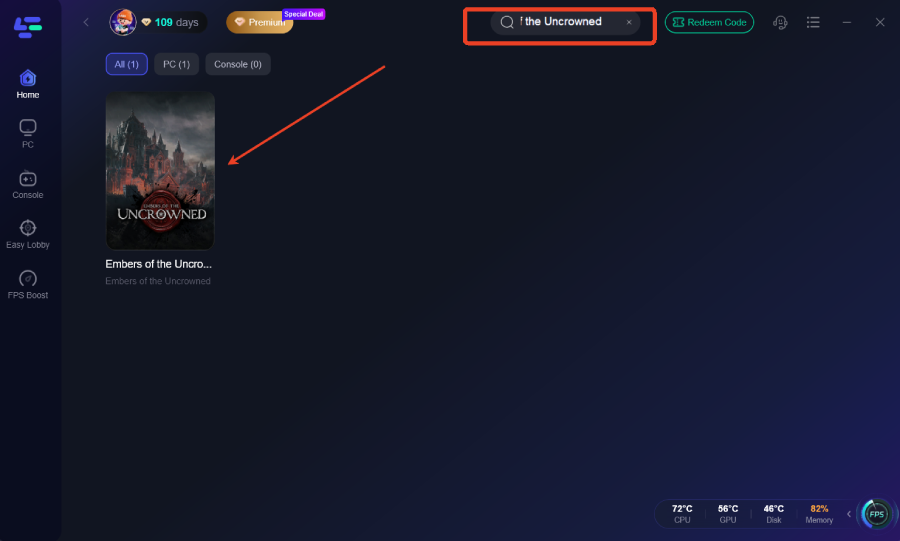
Launch LagoFast and Search for the Game: Open the LagoFast application. In the search bar, type "Embers of the Uncrowned" and select the game from the results. If the game isn't listed, you can often add it manually as a custom game.
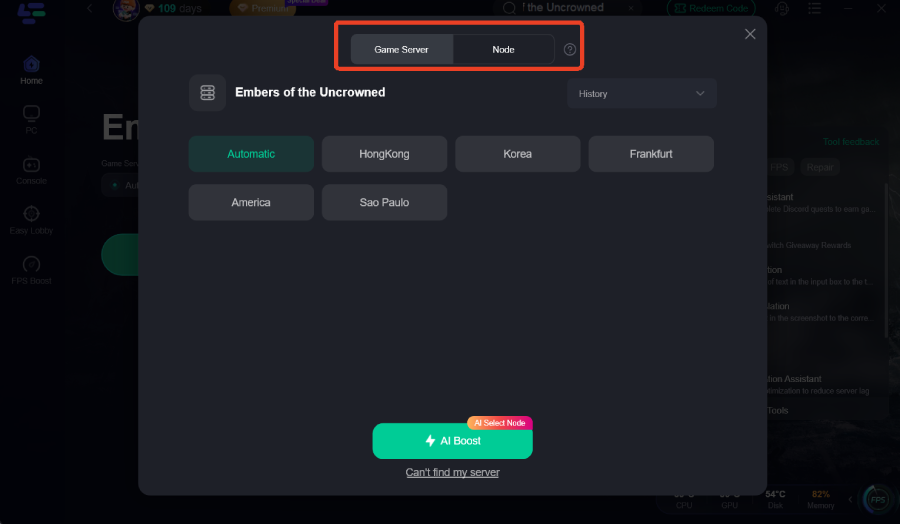
Select Optimal Server and Node: LagoFast will automatically recommend the most optimal server and node based on your current location and the game's server locations. You can accept this recommendation or manually choose a different node if you prefer, especially if you know which region's servers you are trying to connect to.
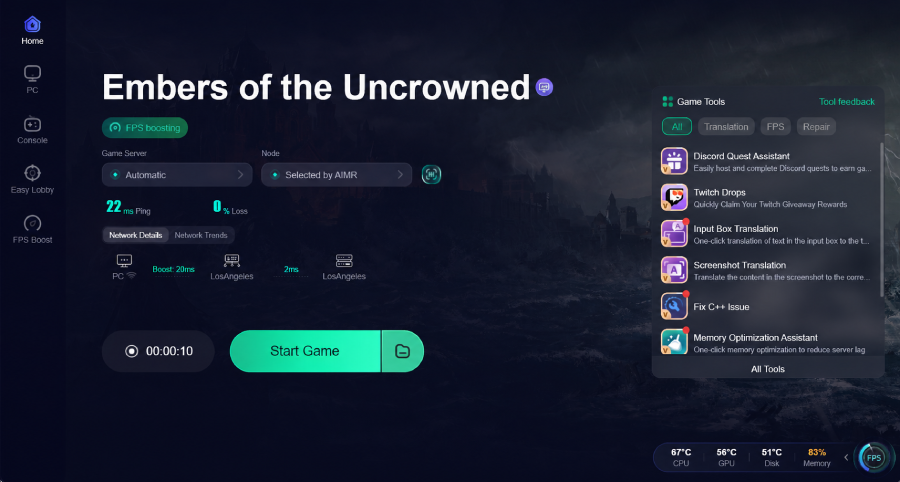
Start Boosting: Click the "Start Boosting" button. LagoFast will then establish an optimized connection, and you will see real-time metrics for your ping and network stability, confirming the boost is active.
Launch and Play Embers of the Uncrowned: With LagoFast actively boosting, launch Embers of the Uncrowned through your Steam client. You should immediately notice a more responsive and stable gaming experience, with significantly reduced ping.
By integrating LagoFast into your gaming setup, you can overcome the challenges of region locks and distant servers, ensuring that your journey through the world of Embers of the Uncrowned is as smooth and immersive as possible.
Part 6: FAQs
Q1: What is region locking in video games?
A: Region locking is a digital rights management (DRM) technique that restricts the use of a product or service to a specific geographical area. In gaming, it can prevent players in certain countries from purchasing, downloading, or playing a game.
Q2: Why are games region-locked?
A: Games are region-locked for various reasons, including licensing agreements with local distributors, compliance with regional laws and regulations, political or economic sanctions, and strategic market segmentation by publishers.
Q3: Can I change my Steam account region to access region-locked games?
A: Steam allows users to change their store region, but it requires making a purchase with a payment method tied to the new country and a matching IP address. Falsifying your location to change your region is against Steam's terms of service and can lead to account penalties.
Q4: Is it legal to bypass region locks?
A: The legality of bypassing region locks varies by jurisdiction and the specific method used. While using a VPN for personal privacy is generally legal, using it to circumvent digital rights management or terms of service can be a grey area and may violate platform policies.
Q5: Will Embers of the Uncrowned have dedicated servers for all regions at launch?
A: During the demo phase, the developers stated there were no plans for dedicated SEA or LATAM servers. While this might change for the full launch, players in these regions should anticipate connecting to servers in North America or Europe, which could result in higher ping.
Key Takeaway
Embers of the Uncrowned faces significant region locking, preventing access for players in several countries. While methods like VPNs and Steam region changes exist to bypass these restrictions, they come with potential risks. For players who manage to gain access, optimizing network performance with a tool like LagoFast Game Booster is crucial to mitigate high ping and ensure a stable, enjoyable gaming experience, making the journey into the Uncrowned world smoother and more immersive.

Boost Your Game with LagoFast for Epic Speed
Play harder, faster. LagoFast game booster eliminates stutter and lags on PC, mobile, or Mac—win every match!
Quickly Reduce Game Lag and Ping!
Boost FPS for Smoother Gameplay!