
Quick Answer
If you're encountering login errors or connection issues in Embers of the Uncrowned, start by checking the official server status and ensuring your internet connection is stable. Verify your game files through Steam, and temporarily disable your firewall/antivirus to rule out conflicts with NGS Anti-Cheat. For persistent problems, especially those related to region locks or high ping, consider using a specialized game booster like LagoFast to optimize your network routing and bypass potential geographical restrictions.

- ✅ Reduce Lag and High Ping.
- ✅ Higher FPS and better PC performance.
- ✅ Support for 2000+ games.
- ✅ Stable connection and region switching.
Part 1: Why Embers of the Uncrowned May Fail to Login
Part 2: Check Demo Availability and Region Lock First
Part 3: Check Steam and Nexon Server Status
Part 4: Fix Connection Timeout or Disconnect Issues
Part 5: Fix Matchmaking or Raid Connection Problems
Part 6: Check NGS Anti-Cheat and Firewall Settings
Part 7: Reduce High Ping in SEA, LATAM, and Unsupported Regions - LagoFast
Part 8: How to Enhance Your Game Experience with LagoFast Game Booster
Part 9: Frequently Asked Questions (FAQs)
Part 1: Why Embers of the Uncrowned May Fail to Login
Embers of the Uncrowned, Nexon's highly anticipated dark fantasy MMORPG, promises brutal combat and a rich, gloomy world. However, the journey into this realm can sometimes be halted before it even begins by frustrating login errors and connection issues. Unlike simple game crashes, login problems often point to a complex interplay of factors beyond just your PC's hardware. These can range from authentication server overload, conflicts with the game's robust anti-cheat system (NGS), network routing inefficiencies, or even geographical restrictions.
When you attempt to log in, your client initiates a series of handshakes: with Steam (if applicable), with Nexon's authentication servers, and finally with the game's specific regional servers. Any disruption in this chain—be it a blocked port, an outdated network driver, or a server-side hiccup—can manifest as a generic "Login Error" or "Unable to Connect to Server" message. Understanding that the problem is often rooted in these authentication layers is crucial. If you've already verified that your internet is working for other apps, the bottleneck is likely how your PC communicates with Nexon's specific infrastructure, which requires more than just raw speed—it requires stability and correct configuration.
Part 2: Check Demo Availability and Region Lock First
Before diving into deep technical troubleshooting, it is essential to verify if the game service is actually active for your account. Embers of the Uncrowned often runs limited-time playtests or demos (like those during Steam Next Fest). If you are trying to log in outside of these specific windows, you will inevitably face a login failure. Furthermore, Nexon games are notorious for strict regional availability. Even if you managed to download the demo via a direct link or a third-party site, the game client performs a secondary IP check during the authentication phase.
If you find that the "Start" button is grayed out or you receive a "Service not available in your region" message immediately upon launching, you are likely hitting a region lock. However, if the game launches successfully but hangs indefinitely at the "Connecting" screen, the problem is more likely related to your network's ability to maintain a stable handshake with the authentication servers rather than a hard block.
Part 3: Check Steam and Nexon Server Status
When thousands of players try to storm the gates of a new MMORPG at once, server infrastructure can buckle. If you are getting a generic "Login Error" or "Unable to Connect to Server," your first stop should be official channels. Check the Embers of the Uncrowned official X (formerly Twitter) account or the Steam Community Hub for any announcements regarding emergency maintenance or known server outages.
Nexon often uses a centralized authentication system. If their primary login servers are down, even if the game servers themselves are healthy, you won't be able to get past the title screen. If other players are reporting the same issue, the best course of action is patience. No amount of local troubleshooting can fix a server-side problem.
Part 4: Fix Connection Timeout or Disconnect Issues
If the servers are confirmed to be up but you are still getting timed out, the issue lies within the path between your PC and the game's data center. MMORPGs are incredibly sensitive to packet loss. A single dropped packet during the login sequence can cause the entire authentication process to fail.
Start by power-cycling your router. This clears out any stale DNS cache or routing tables that might be causing a bottleneck. Additionally, switch to a wired Ethernet connection if you are on Wi-Fi. The "jitter" associated with wireless signals is a common cause for connection timeouts in high-performance games like Embers of the Uncrowned. You should also try flushing your DNS via the command prompt (ipconfig /flushdns) and switching to a more reliable DNS provider like Google (8.8.8.8) or Cloudflare (1.1.1.1) to ensure your PC is resolving Nexon's server addresses correctly.
Part 5: Fix Matchmaking or Raid Connection Problems
In Embers of the Uncrowned, the transition from a town hub to an instanced raid or matchmaking lobby requires a secondary connection to a different set of servers. Many players find they can log in just fine but get disconnected the moment they try to enter a dungeon. This is often caused by "strict" NAT settings or firewall configurations that block the specific ports used for instanced gameplay.
Ensure that your router's UPnP (Universal Plug and Play) is enabled, or manually forward the ports required for Steam and Nexon services. If your network is overly restrictive, the game may fail to establish a peer-to-peer or dedicated server connection for the raid, leading to a "Matchmaking Failed" error. This is particularly common in university dorms or corporate networks where security policies are tighter than average.
Part 6: Check NGS Anti-Cheat and Firewall Settings
Nexon Game Security (NGS) is a mandatory component for Embers of the Uncrowned. This anti-cheat runs at a deep system level and is known to be quite sensitive. If NGS fails to initialize or is blocked by your antivirus, the game will either close immediately or refuse to let you log in.
Check your Windows Security or third-party antivirus (like Bitdefender or Norton) and ensure that both the game's main executable (EOTU.exe) and the NGS folder (usually found within the game's installation directory) are added to the whitelist. Sometimes, a corrupted NGS update can cause persistent login errors. Navigating to the BlackCipher or NGS folder and deleting its contents (forcing the game to redownload a clean version upon the next launch) is a classic fix for veteran Nexon players.
Part 7: Reduce High Ping in SEA, LATAM, and Unsupported Regions - LagoFast
For players in Southeast Asia, Latin America, or other regions that may not have local servers during the playtest phase, high latency is the primary enemy. When your ping exceeds a certain threshold (often 300ms+), the game's login server may interpret the delay as a timeout and drop your connection entirely. This isn't necessarily a region lock, but a physical limitation of the internet's infrastructure.
Standard VPNs often add more "hops" to your connection, which can actually increase your ping. This is where specialized gaming network tools become vital. By using dedicated gaming routes that bypass congested public nodes, you can stabilize your connection enough to satisfy the game's authentication requirements, even if you are playing from thousands of miles away.
Part 8: How to Enhance Your Game Experience with LagoFast Game Booster
If you've confirmed that your hardware is fine but you're still plagued by login errors, high ping, or constant disconnects, LagoFast Game Booster is the most effective tool in a PC gamer's arsenal. Unlike a standard VPN, LagoFast(LagoFast Game Booster - Get No Lag and Lower Ping) is built specifically for gaming traffic, optimizing the route between your PC and the Embers of the Uncrowned servers to ensure the lowest possible latency and maximum stability.
Detailed Steps to Use LagoFast for Embers of the Uncrowned:
Click the Free Trial button to download and install LagoFast Free Trial.
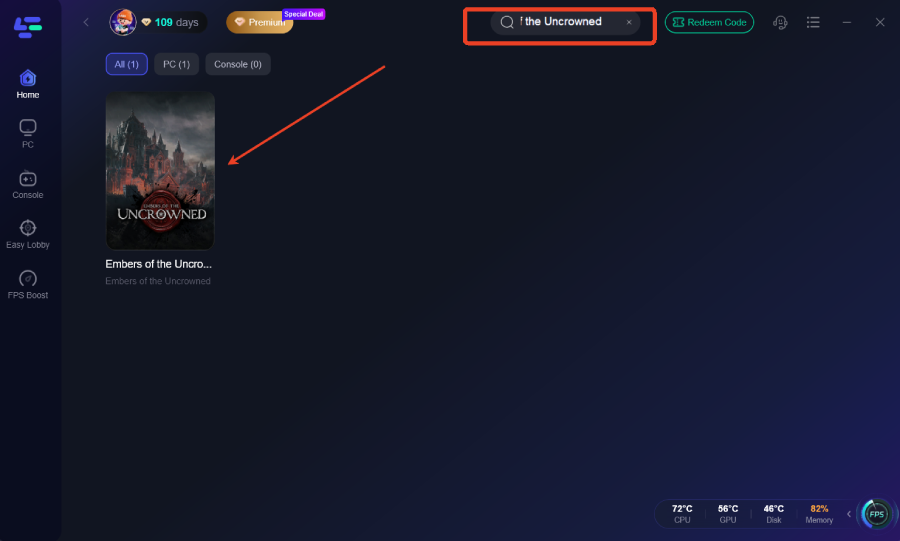
Search for the Game: Open the LagoFast app and type "Embers of the Uncrowned" into the search bar at the top.
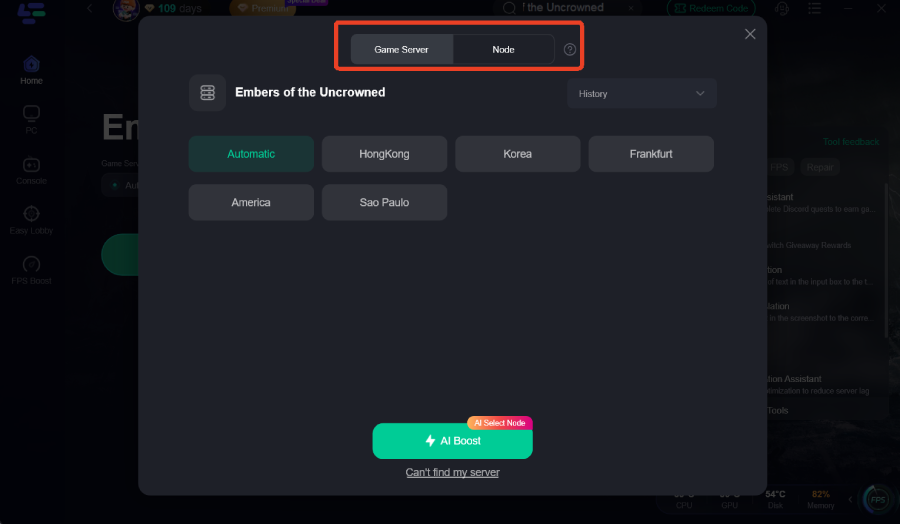
Select Your Server: Choose the server location that is closest to the game's actual data center (usually North America or Europe for the playtests) to get the best results.
Smart Boost: Click the "Boost" button. LagoFast will automatically analyze the available routes and select the one with the lowest ping and zero packet loss.
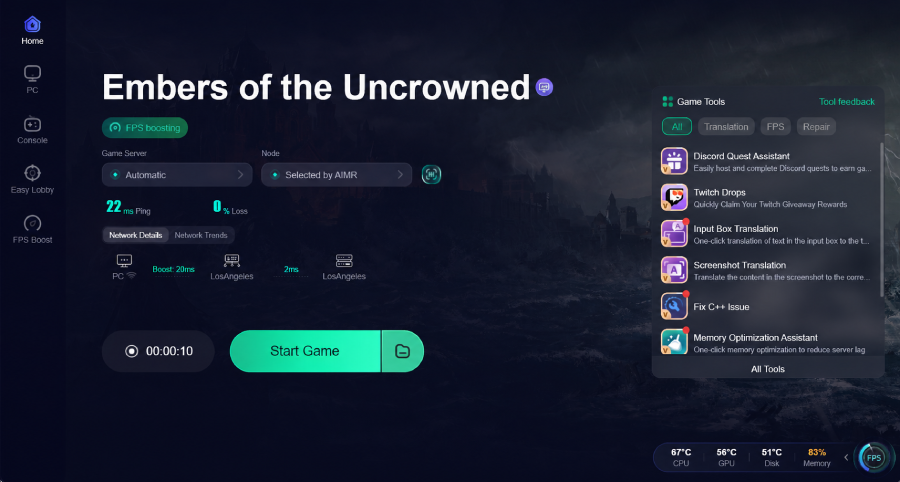
Launch and Play: With the boost active, launch the game from Steam. You will notice a significantly smoother login process and much more responsive combat in raids.
By optimizing your network at the packet level, LagoFast removes the "invisible" barriers that cause many of the connection errors players face during high-traffic MMORPG launches.
Part 9: FAQ
Q1: Why does my game get stuck at the "Connecting" screen indefinitely?
A1: This is usually a sign that your PC is unable to complete the handshake with the authentication server. It is often caused by a firewall blocking the game or unstable DNS settings. Try flushing your DNS and adding the game to your antivirus whitelist.
Q2: Is Error Code 10009 a permanent ban?
A2: No, Error Code 10009 is a technical connectivity error related to specific OS environments or network configurations. It is not a ban. Check for Windows updates and ensure your network drivers are current.
Q3: Can I play the demo if I'm in an unsupported region?
A3: While Nexon may restrict access in certain areas, many players find they can log in if they use a network optimizer to stabilize their connection. However, be aware that official support may be limited in these regions.
Q4: Does the NGS anti-cheat conflict with other games?
A4: Occasionally, yes. If you have other anti-cheat software (like Vanguard or Easy Anti-Cheat) running in the background, they may conflict with NGS. It is best to close other game launchers and anti-cheat services before starting Embers of the Uncrowned.
Q5: How do I know if the servers are actually down?
A5: The best way to check is the official Steam Community Hub or the game's official social media pages. If the "Server Status" indicator in the game launcher is red, it's a server-side issue.
Key Takeaway
Login errors in Embers of the Uncrowned are rarely a single-source problem. While region locks and server outages are possible, most persistent issues for players who have already launched the game stem from network instability, firewall blocks, or NGS anti-cheat conflicts. By systematically checking your server status, whitelisting the game in your security software, and using a dedicated tool like LagoFast Game Booster to stabilize your connection, you can overcome these hurdles and get back to the brutal combat you're looking for. Don't let a "Connection Timeout" end your journey—optimize your setup and claim your place among the Uncrowned.
Boost Your Game with LagoFast for Epic Speed
Play harder, faster. LagoFast game booster eliminates stutter and lags on PC, mobile, or Mac—win every match!
Quickly Reduce Game Lag and Ping!
Boost FPS for Smoother Gameplay!