

Elden Ring is a masterpiece that continues to captivate players with its vast open world and immersive gameplay. However, technical issues such as being stuck on the loading screen during the Nightreign can be frustrating. In this article, we’ll identify the common causes of these loading issues in Elden Ring Nightreign and provide step-by-step solutions to help you get back to your adventure quickly and smoothly. Additionally, we’ll introduce LagoFast, a tool to optimize your gaming experience.

Part 1: What Is Elden Ring Nightreign?
Part 2: Why Elden Ring Nightreign Is Not Working
Part 3: How to Fix Elden Ring Nightreign Stuck on Loading Screen
Part 4: Optimize Elden Ring Gaming Experience With LagoFast
Part 1: What Is Elden Ring Nightreign?
Elden Ring Nightreign brings an exciting new chapter to the beloved Elden Ring universe. Expanding on the rich lore and core gameplay of the base game, Nightreign immerses players in a dark and treacherous realm teeming with formidable foes, fresh mechanics, and compelling storytelling. Featuring stunning visuals and groundbreaking gameplay innovations, this expansion aims to take the Elden Ring experience to unparalleled levels of immersion and excitement.
Notably, Bandai Namco announced that the Nightreign online test registration opened on January 10, 2025, with the test set to begin in February 2025. Players can sign up in official website.I'm sure you are eagerly awaiting this masterpiece are encouraged to register to participate in the testing phase.
Hot Related: Elden Ring Nightreign Network Test: Details and More
Part 2: Why Elden Ring Nightreign Is Not Working
Several factors could cause Nightreign to not function correctly, particularly during loading screens. Here are four common reasons:
- System Requirements Not Met:
Elden Ring Nightreign’s enhanced graphics and features demand a high-performing system. Outdated hardware may struggle to load the game properly. - Corrupted Game Files:
Missing or corrupted files can interrupt the loading process, especially for new expansions like Nightreign. - Outdated Software or Drivers:
Outdated graphics drivers, operating systems, or even the game client itself can lead to compatibility issues. - Server Overload or Connectivity Issues:
With the hype surrounding Nightreign, servers may become overloaded, causing delays or loading screen problems.
Part 3: How to Fix Elden Ring Nightreign Stuck on Loading Screen
If you’re stuck on the loading screen, here are steps to resolve the issue:
1. Verify System Requirements
Ensure your PC meets the game’s minimum requirements. Upgrade hardware if necessary, or adjust in-game settings to lower performance demands.
2. Update Drivers and Software
- Update your graphics drivers via Nvidia GeForce Experience or AMD Radeon Software.
- Ensure your operating system is up to date.
- Check for Elden Ring updates on Steam or your platform of choice.
3. Verify Integrity of Game Files
On Steam, right-click Elden Ring, go to "Properties," and select "Verify Integrity of Game Files." Steam will replace any corrupted or missing files.
4. Check Server Status:
Before proceeding with any technical fixes, check if the servers are down. You can find this information on The Hidden Ones official website or social media channels. If the servers are down, the only thing to do is wait until they are up and running again.
5. Optimize Network Connection
Switch to a wired connection if possible and close background applications consuming bandwidth. Check server status for potential outages.
6. Reinstall Elden Ring
As a last resort, uninstall and reinstall the game. Make sure to back up your save files beforehand.
Part 4: Optimize Elden Ring Gaming Experience With LagoFast
Nightreign features a multiplayer cooperative mode, making low latency and stable connections essential for smooth gameplay. To further enhance your experience, you can also use mods—such as Fix Game Crash or Two-Player Online Co-op Mod—and explore many other mod-supported games available through LagoFast. Whether you’re on PC or mobile, LagoFast optimizes your network connection, reduces lag, and ensures uninterrupted gameplay. Here’s how LagoFast can improve your Elden Ring experience:
- Low-Latency Gaming: LagoFast ensures a smoother connection, reducing in-game lag and preventing disconnections.
- Customized Settings: Adjust network routes for optimal gaming performance.
- Easy to Use: With an intuitive interface, LagoFast is accessible for all players.
Steps to Use LagoFast to Fix Stuck on the Loading Screen in Elden Ring Nightreign on PC:
Step 1. Download LagoFast by clicking the Free Trial button.
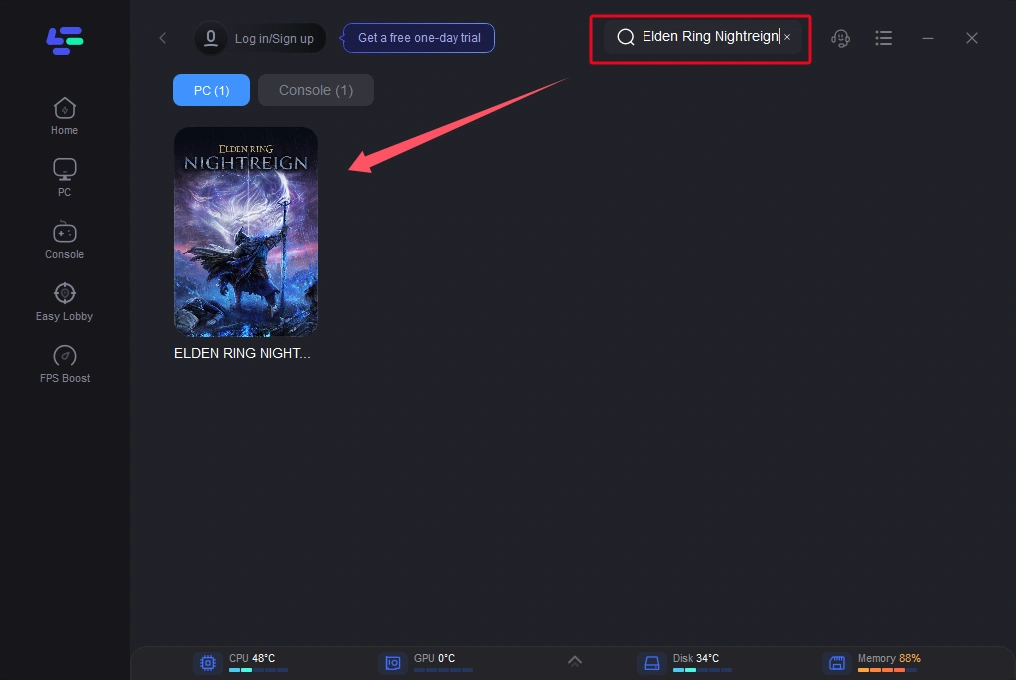
Step 2. Search for Elden Ring Nightreign in LagoFast before launching the game.
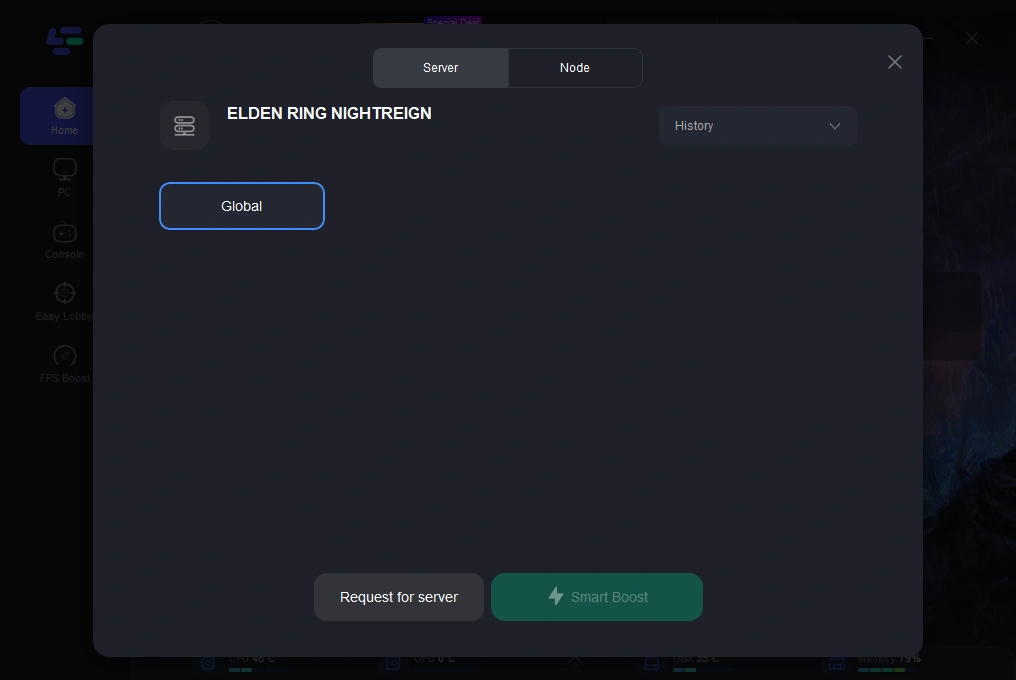
Step 3. Choose a stable server and select the best Node for your connection.
Step 4. Click the “Smart Boost” button to view real-time data on ping, packet loss, and network type.
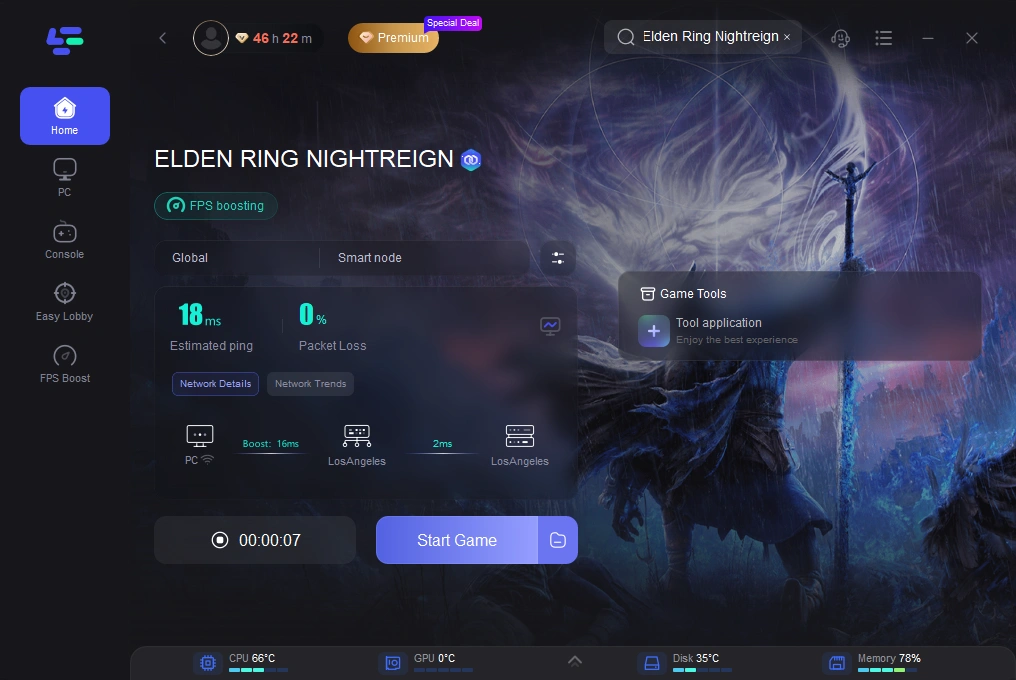
By following these simple steps, LagoFast can optimize your connection, helping you reduce lag and enjoy Elden Ring Nightreign without interruptions. Try it today for a more seamless and enjoyable gaming experience.
Conclusion
Being stuck on the loading screen during Elden Ring Nightreign can be frustrating, but the solutions outlined above should help you resolve the issue. By addressing system requirements, updating drivers, and optimizing your connection, you can ensure smooth gameplay. Enhance your experience further with LagoFast, and don’t forget to register for the Nightreign online test to explore the latest expansion.

Boost Your Game with LagoFast for Epic Speed
Play harder, faster. LagoFast game booster eliminates stutter and lags on PC, mobile, or Mac—win every match!
Quickly Reduce Game Lag and Ping!
Boost FPS for Smoother Gameplay!