

As a cooperative survival action role-playing game, Elden Ring Nightreign really shines because of its player-cooperative PvE (Player versus Environment) mode. In this mode, three players can team up to explore the game's randomly generated areas and fight bosses together. They succeed by working together and coordinating their efforts. But many players have said that when they try to play with friends, they can't finish the matchmaking process. This means they can't play together.
This article will focus on why Elden Ring Nightreign matchmaking won't work for some people. We'll explain how the game's matchmaking system works, find out why there are issues, and give you the best solutions to fix them!

- ✅ Reduce Lag and High Ping.
- ✅ Boost FPS at the Same Time.
- ✅ Explore Game System Requirements.
- ✅ Change Servers all over the World.
Part 1: What Is Matchmaking System of Elden Ring Nightreign
Part 2: Causes of Elden Ring Nightreign Matchmaking Won't Work
Part 3: How to Fix Elden Ring Nightreign Matchmaking Won't Work
Part 4: How to Ensure Successful Matchmarking in Elden Ring Nightreign
Part 1: What Is Matchmaking System of Elden Ring Nightreign
In Elden Ring Nightreign, "Matchmaking" refers to the process by which players connect through the online cooperative mode to form teams. Once matched successfully, players will join forces as a trio, collaborating and strategizing to interact with the game environment, complete missions, and ultimately earn experience and resources.
To successfully complete the matchmaking process, players need to meet the following conditions and requirements:
- Hub Area: The main hub area in Elden Ring Nightreign is the Roundtable Hold. Players start here when they enter the game and can access the matchmaking menu by interacting with the Table of Lost Grace. Additionally, this area allows players to access the upgrade system or use the training grounds.
- Select a Target: Before initiating matchmaking, players need to choose a final boss based on their abilities and aspirations. This target essentially represents the final challenge they aim to conquer during their playthrough.
- Set a Matchmaking Password: If players wish to team up with specific friends, they can set a matchmaking password and share it with their friends. As long as friends enter the correct password, they will be successfully matched into the same team.
Part 2: Causes of Elden Ring Nightreign Matchmaking Won't Work
Encountering issues "Elden Ring Nightreign Matchmaking Won't Work" can undoubtedly diminish a player's gaming experience. Understanding the causes behind these problems can help players take appropriate measures to improve their matchmaking success rate. Here are the common causes why Matchmaking in Elden Ring Nightreign may not work:
- Network Test Restrictions: During the initial network setup of Elden Ring Nightreign, a large number of players reported difficulties in successfully connecting to servers, particularly when using multiplayer matchmaking passwords. To troubleshoot and address these issues promptly, FromSoftware temporarily disabled this feature.
- Server Load or Latency: Similar to other online games, matchmaking in Elden Ring Nightreign relies on servers. During peak gaming hours, server load or latency issues can arise, making it difficult for players' matchmaking requests to be fulfilled.
- Technical Glitches or Bugs: Issues with unmatchable connections or unstable connections often occur when the game experiences technical glitches or bugs.
- Cross-Platform Limitations: While Elden Ring Nightreign supports multiplayer gaming, it currently does not support cross-platform matchmaking. This means that players using different platforms (such as PS and Xbox) cannot matchmake with each other.
- Connection Issues: As an online game, Elden Ring Nightreign requires players to have a stable internet connection; otherwise, matchmaking may fail. Additionally, if a player's device is overburdened or running inefficiently, it can also lead to unstable connections and unsuccessful matchmaking.
Part 3: How to Fix Elden Ring Nightreign Matchmaking Won't Work
Knowing the cuases why Matchmaking in Elden Ring Nightreign may not work is the first step toward solving the problem. Here are some effective solutions:
- Avoid Using Matchmaking Passwords During Network Test Periods: Steering clear of using matchmaking passwords during peak gaming hours or while FromSoftware is conducting network tests can significantly increase your chances of successfully matching with other players.
- Optimize Your Network Connection: If you frequently experience network disconnections that prevent successful matchmaking, consider switching your network connection or using an Ethernet cable to ensure a stable connection. This creates a favorable network environment for successful matchmaking.
- Close Background Programs: If other applications are consuming bandwidth or system resources while you're gaming, temporarily close them to free up resources for the game. This ensures that the game has ample space to run smoothly.
- Stay Updated with Patches or Game Updates: When a large number of players report matchmaking issues, FromSoftware often releases patches or game updates to address them. Stay informed about official updates and install them promptly to improve the game's performance and increase your chances of successful matchmaking.
- Join Community Forums or Groups: Elden Ring Nightreign has active community discussion groups on various platforms, such as Reddit groups or Discord communities. Players from around the world gather here to discuss various issues, including matchmaking and connection problems. Participating in these forum discussions can help you discover the most effective methods for successful matchmaking.
Part 4: How to Ensure Successful Matchmarking in Elden Ring Nightreign
For those frequently encountering matchmaking issues in Elden Ring Nightreign due to unstable connections, using a game acceleration tool can help stabilize your connection—and you can also enhance your gaming experience with mods, such as Fix Game Crash or Two-Player Online Co-op Mod, as well as explore many other games with mods available on LagoFast. LagoFast remains a top-tier choice among such tools, favored by players worldwide, offering:
- Global Server Network: Access low-latency nodes worldwide for stable connections.
- Packet Loss Prevention: Advanced algorithms minimize data loss for smooth gameplay.
- Smart Routing Optimization: Dynamically selects the fastest path to game servers.
- FPS Enhancement: Optimizes system resources to reduce frame drops.
Tutorial on Playing Elden Ring Nightreign on PC with LagoFast
Download and Install LagoFast: Click on the "Free Trial" button to download LagoFast on your computer and complete the installation process.
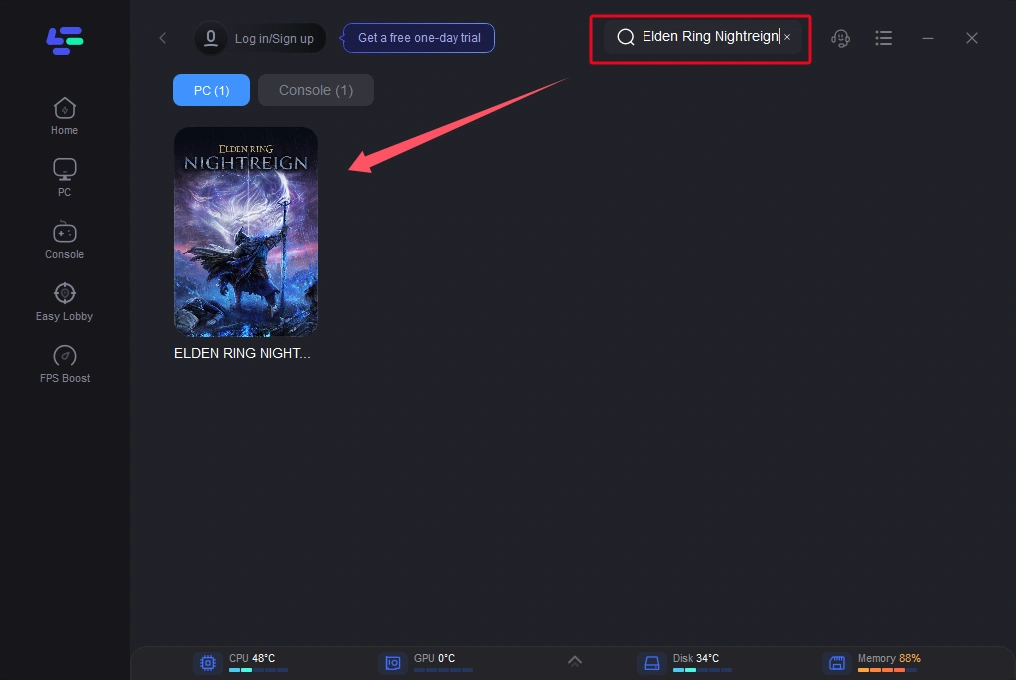
Launch and Select the Game: Open LagoFast and search for Elden Ring Nightreign. Click to select it.
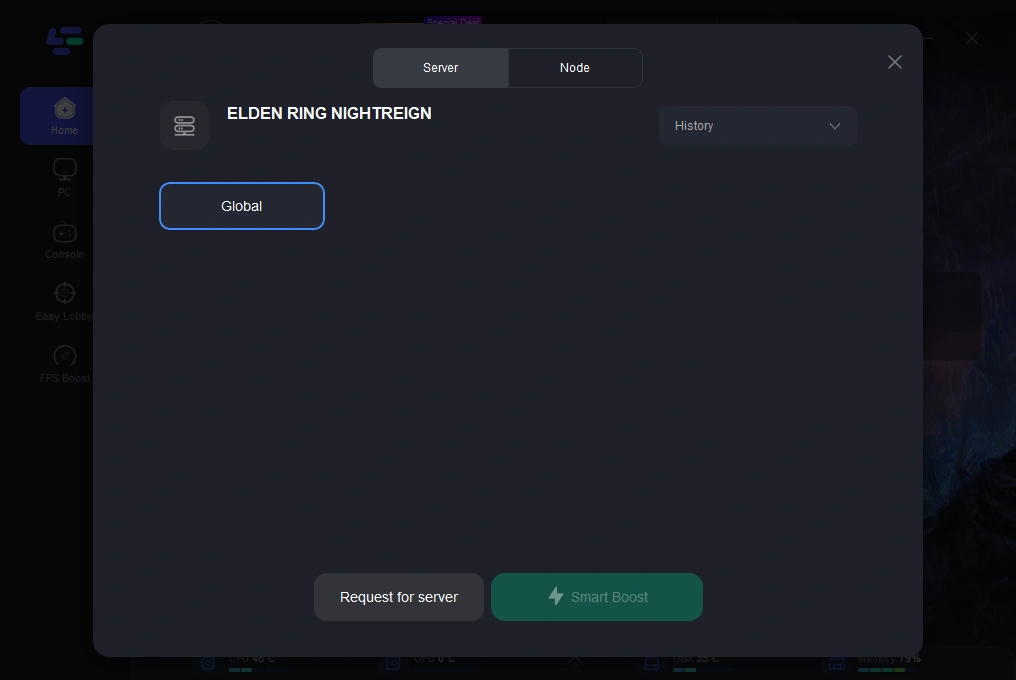
Choose the Best Server: Based on your geographical location and desired gaming performance, pick an optimal server. Then, click on "Smart Boost" to initiate acceleration.
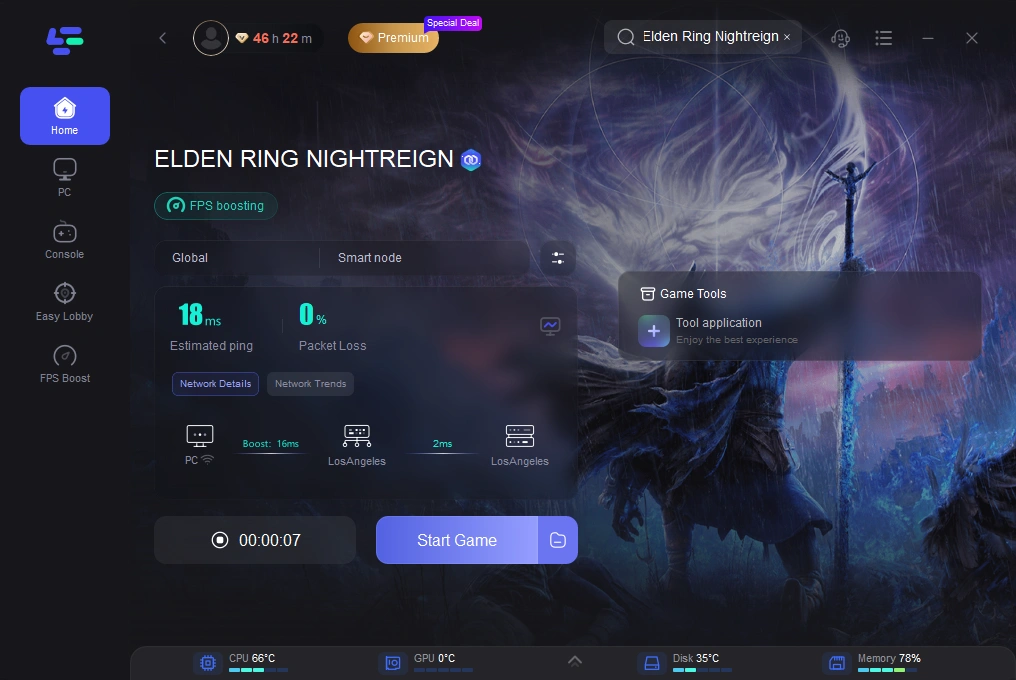
Check Real-Time Metrics and Start Gaming: Monitor the game's real-time ping and packet loss rate. Once satisfied, click "Start Game" to return to the game and begin matchmaking.
Conclusion
The matchmaking mechanism in Elden Ring Nightreign opens up endless gaming possibilities for players, providing crucial support for their survival and progression within the game. By understanding the reasons behind Elden Ring Nightreign matchmaking won't work and troubleshooting to implement corresponding solutions, players can enhance their chances of successful matchmaking. Additionally, using LagoFast is highly recommended to circumvent matchmaking problems caused by network connection issues, thus avoiding wasted time and preserving a smooth gaming experience.
Boost Your Game with LagoFast for Epic Speed
Play harder, faster. LagoFast game booster eliminates stutter and lags on PC, mobile, or Mac—win every match!
Quickly Reduce Game Lag and Ping!
Boost FPS for Smoother Gameplay!