
There's nothing more frustrating than entering EA Sports FC 26 only to be greeted by a failed login screen. Whether you're blocked by a connection error, account restrictions, or server issues, being unable to log in stops the game before it even starts. This guide will walk you through the causes, quick fixes—including using LagoFast—and in-depth solutions to get you back online faster.

Part 1: Why Can’t I Login to Play EA FC 26?
Part 2: Quick Fix to EA FC 26 Login & Connection Issues
Part 3: Other Solutions to FC 26 Login into Online Services Error
Part 1: Why Can’t I Login to Play EA FC 26?
Here are the most common reasons behind login failures:
1. EA Server Outage or Maintenance
You may not be able to log in simply because EA servers are down. Always check the official EA server status page before troubleshooting your setup.
2. Network Connection Issues
Unstable or wireless internet causes frequent login errors. Many players overcome login failures by switching to a wired connection for a more reliable experience.
3. EA Account or Credential Issues
If your account is suspended, outdated, or your password has expired, you may be blocked from logging in. Email or password changes are especially frequent causes.
4. Software Conflicts or Firewall Blocks
Anti-virus, VPNs, or corrupted files within the EA App often disrupt gameplay. These have been reported as common culprits in login failure threads
5. Platform-Specific Bugs or Beta Glitches
Some users report being unable to access in-game modes due to ongoing beta or version issues—these glitches can also affect login attempts.
Part 2: Quick Fix to EA FC 26 Login & Connection Issues
When login issues stem from poor connection quality, LagoFast Game Booster gives you a simple, powerful fix.
How to use LagoFast Game Booster on PC
Step 1. Download LagoFast by clicking the "Free Trial" button.
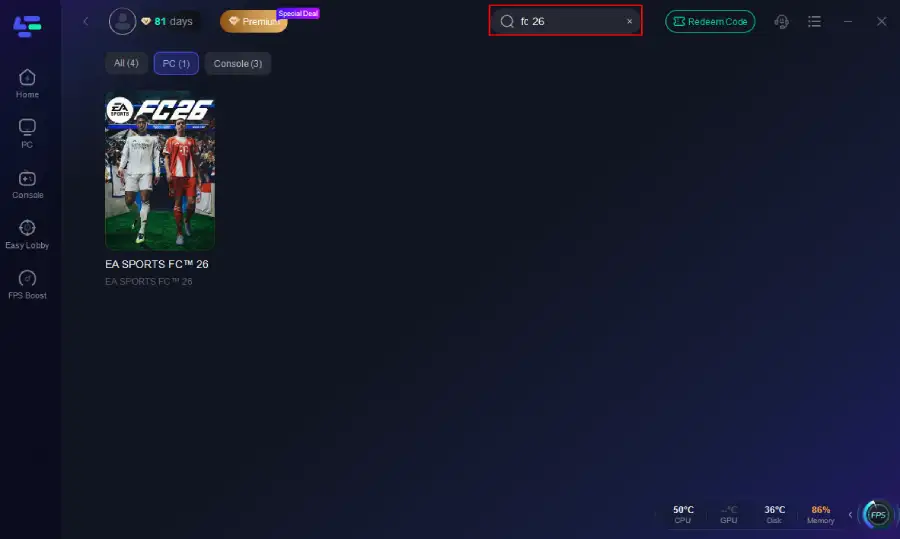
Step 2. Before you start your game, search for it within the LagoFast application to ensure it's supported.
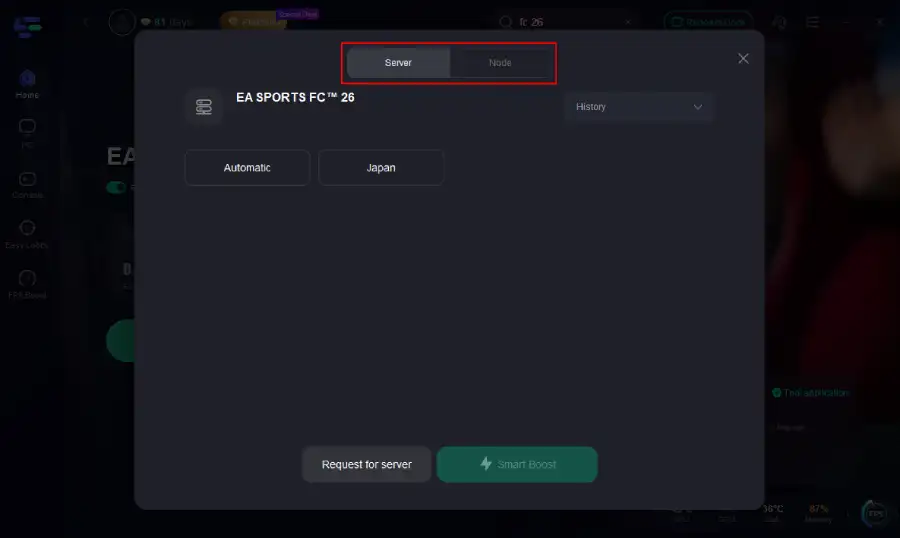
Step 3. Navigate to "Select Server" to choose the most stable server. Follow up by selecting the best Node available on the right to optimize your connection.
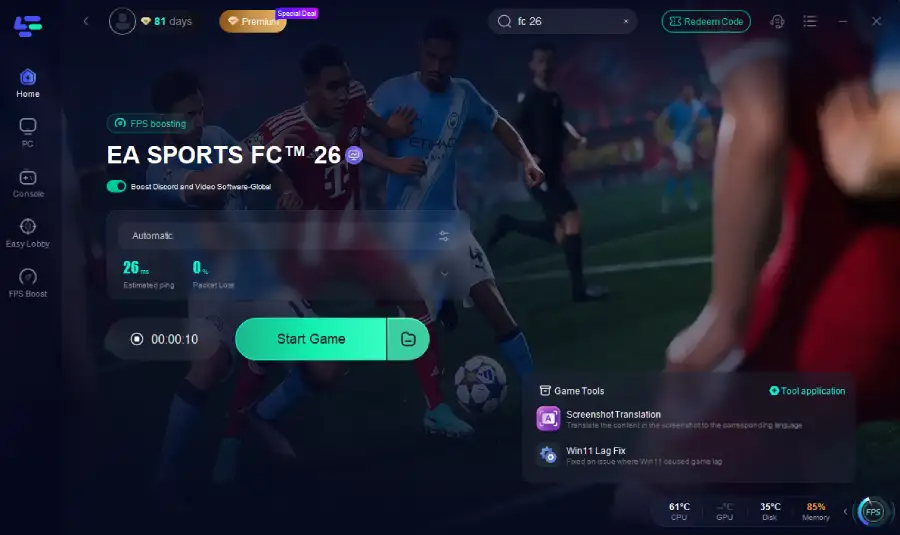
Step 4.Click the "Smart Boost" button to get real-time data on your game's ping, packet loss, and network type, which helps in monitoring and adjusting for optimal performance.
How to use LagoFast Game Booster on Console (PS5 / PS4)
LagoFast Box offers a simple, one-click method to optimize your game connection and reduce lag on PS5 or PS4:
Step 1. Download the LagoFast Console App to control the LagoFast Box

Step 2. Connect your LagoFast Box to your router and Console. You can use either wired connection or wireless connection.

Step 2. Launch LagoFast Console App and Boost FC 26. After you finish LagoFast Box binding, you can boost the game in LagoFast Console App.

Follow the tutorial to use the LagoFast Mobile to fix login issues on your mobile devices:
Step 1: Search “LagoFast Mobile booster” in the Google App Store or Apple App Store. Alternatively, click here to download the APK File.
Step 2: Click the “Download” button, then install and launch “LagoFast Mobile Booster”.
Step 3: Start FC 26, then switch to LagoFast Mobile and search for it.
Step 4. Select and click FC 26 in the interface.
Step 5: Enter the server selection interface, where you can change to a stable server, then click the “Boost” button to fix high ping and enhance the gaming experience
Step 6: Finally, go back to FC 26 and start playing it without any lag.
LagoFast improves launch stability by optimizing server communication, which can make game startup smoother.
Part 3: Other Solutions to FC 26 Login into Online Services Error
If network optimization doesn’t resolve the login error, try these targeted fixes:
1. Confirm EA and Game Server Status
Before deep-diving, check if EA servers or specific FC 26 services are down. You can monitor real-time updates on EA’s server status page or their official social channels.
2. Reset Password & Recover EA Account
Forgotten or expired passwords often cause login blocks. Reset your EA Account password, and if needed, recover your email or linked accounts.
3. Use Linked Account Login
If you're having trouble with your direct EA Account, try logging in with a linked account like PlayStation, Xbox, Steam, Google, or Facebook.
4. Temporarily Disable VPNs, VPN proxies, or Firewall blocks
VPNs and strict firewalls may block EA’s login servers. Disable these services temporarily and try logging in again.
5. Reinstall or Repair the EA App
Corrupted launcher files can cause login errors. Using the EA App's Repair tool or reinstalling the app can fix these issues.
6. Reconnect via Different Platform
Sometimes the issue is isolated to one platform. Try logging in via PC, then reload on console—or vice versa.
7. Contact EA Support for Account Restrictions
If you receive messages indicating account restrictions or bans, follow EA’s prompts to resolve them, or contact support directly.
Part 4: FAQs
Q1: What should I do if EA FC 26 Steam is not launching or logging in?
Attempt first to repair the game files on Steam, then apply network optimizations with LagoFast.
Q2: Why is my EA FC 26 not launching on PC?
Login failure may stem from expired credentials, network disconnection, or blocked firewall rules. Resetting your password and clearing launcher cache often helps.
Q3: How to fix EA FC 26 not launching after the splash screen?
This can be a network handshake problem—LagoFast helps, and also check for hanging services or lingering overlays.
Q4: General troubleshooting for FC 26 not logging in?
Key steps: confirm server status, reset credentials, optimize network with LagoFast, disable VPN/firewalls, and contact support if issues persist.
Conclusion
Login issues in EA Sports FC 26 are common but highly solvable. Start by ruling out server outages, reset your credentials if needed, and optimize your network connection—LagoFast offers a powerful boost to get past network-related barriers. For account-specific or software conflicts, follow EA’s recovery steps or reach out to support.
Boost Your Game with LagoFast for Epic Speed
Play harder, faster. LagoFast game booster eliminates stutter and lags on PC, mobile, or Mac—win every match!
Quickly Reduce Game Lag and Ping!
Boost FPS for Smoother Gameplay!