

Dune: Awakening is one of the most anticipated survival MMOs of the decade, plunging players into the harsh world of Arrakis with rich mechanics, vast open environments, and dynamic multiplayer interaction. However, since its closed beta and subsequent advanced access periods, many players have reported severe lag, stuttering, and connection issues.
If you’ve found yourself asking, “Why is Dune Awakening lagging so much?” or “How do I fix Dune Awakening lag spikes?”, you’re not alone. This guide will walk you through all the reasons behind the issues and provide actionable solutions to fix them, including the best tool currently available to reduce lag and improve performance: LagoFast.

Part 1: Dune: Awakening Release Date Update
Part 2: Why Is Dune Awakening Lagging?
Part 3: How to Fix Dune Awakening Lag?
Part 1: Dune: Awakening Release Date Update

Originally scheduled for May 20, 2025, Dune: Awakening has experienced a slight delay. As of the latest update, the full launch is now set for June 10, 2025, with advanced access beginning on June 5, 2025, for players who purchase premium editions.
The game will not be launching in Early Access, which is a unique approach in the survival genre. According to Funcom, this decision allows for a more polished release and stable experience from day one. Despite this, many users have still encountered issues with lag and stuttering during beta phases and advanced access periods.
Part 2: Why Is Dune Awakening Lagging?
Lag in Dune: Awakening can be caused by various factors, including:
- Server Overload: Massive influxes of players during advanced access or launch periods can strain the servers.
- Network Issues: Your own internet connection or ISP routing can affect ping and latency.
- System Performance: CPU, GPU, and RAM bottlenecks can cause game stutters and freezing.
- Graphics Settings: Misconfigured or too-high settings can overwhelm your hardware.
- Background Apps: Apps like browsers, Discord, or antivirus software may consume system resources.
- Server Region Mismatch: Playing on distant servers significantly increases ping and can lead to packet loss.
Many players on forums and Reddit threads are asking, “Why are the Dune Awakening servers so laggy?” or reporting frequent rubberbanding and frame drops. Thankfully, there are multiple ways to fix these issues, starting with the most effective method available today.
Part 3: How to Fix Dune Awakening Lag?
1.Use LagoFast - The Ultimate Lag Reducer & Ping Booster
If you want a fast, reliable solution to fix Dune: Awakening lag, LagoFast is your best bet. LagoFast is an advanced game booster and ping optimizer designed to provide the fastest routing and lowest latency possible by connecting you through dedicated game nodes.
Why LagoFast Works So Well for Dune: Awakening?
- Smart Server Routing: LagoFast finds the best route between your PC and Dune's game servers, reducing ping drastically.
- Real-Time Optimization: It dynamically adjusts to network traffic, avoiding congestion.
- Global Server Access: If you're in a region where the game’s servers are overcrowded or distant, LagoFast can connect you to a smoother location.
- System Boosting: It shuts down background apps and improves hardware efficiency for a better FPS experience.
- One-Click Fix: The user interface is beginner-friendly, and setup takes under a minute.
- Affordable Subscription: Compared to hardware upgrades or expensive ISPs, LagoFast is cost-effective and risk-free with its free trial.
How to Enhance Dune: Awakening with LagoFast on PC:
Step 1: Download & Install: Click the free trial button to get LagoFast on PC.
Step 2: Launch & Search: Open LagoFast and type "Dune: Awakening" into the search bar.
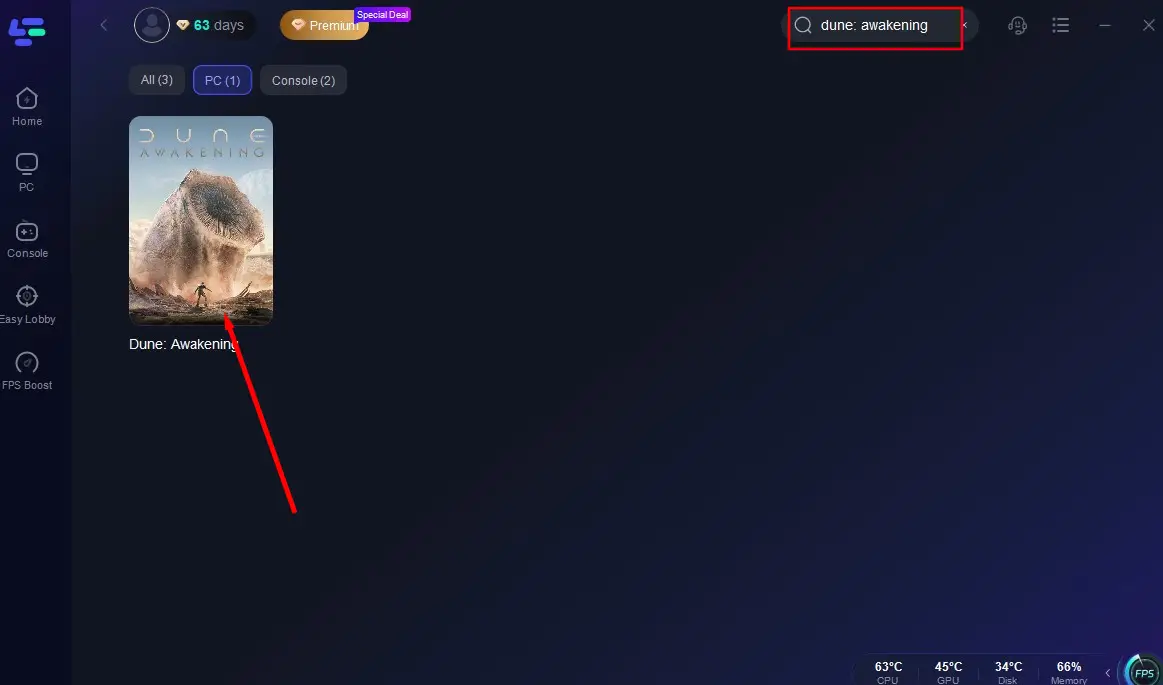
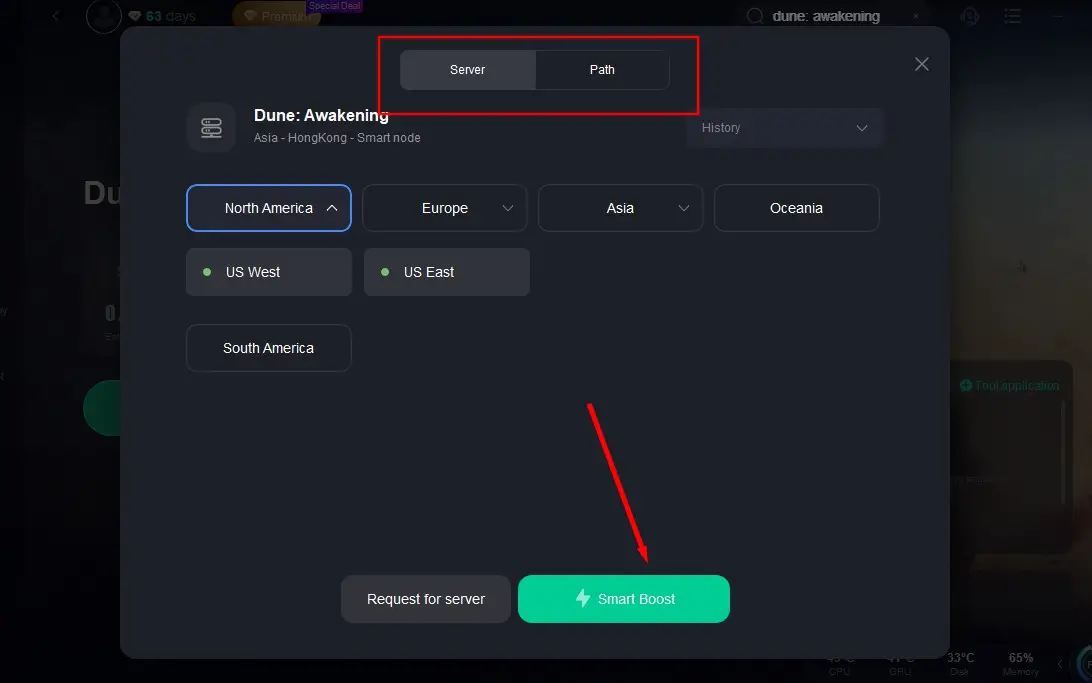
Step 3: Global Server Selection: Let LagoFast auto-scan the globe for the top-performing server node for your region, then hit "Smart Boost".
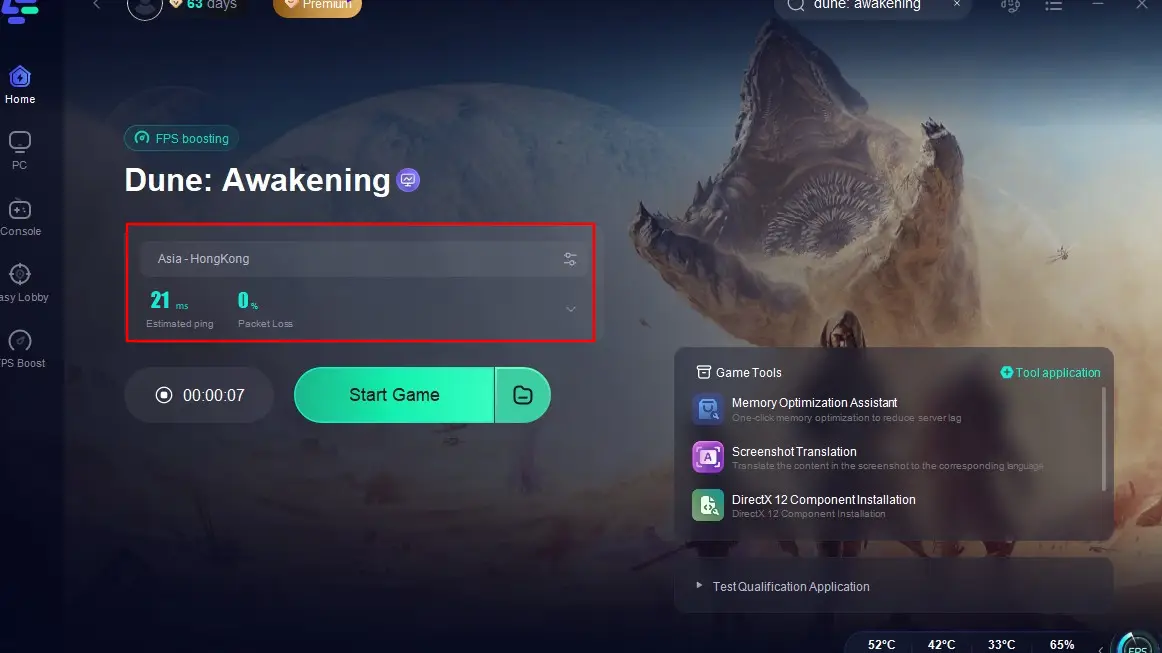
Step 4: Dive In, Lag-Free: Once optimized, monitor real-time performance data in-app and conquer Arrakis without delay!
2. Lower In-Game Graphics Settings
Your system might be struggling to render the vast environments of Arrakis. Here's how to lower graphics settings to improve performance:
Step 1. Launch Dune: Awakening and go to Settings and select Graphics.
Step 2. Set the Resolution to your monitor's native resolution (avoid upscaling).
Step 3. Change Texture Quality to Medium or Low.
Step 4. Set Shadow Quality to Low; shadows consume a lot of GPU resources.
Step 5. Disable Motion Blur and V-Sync to reduce input delay and stutter.
Step 6. Apply changes and restart the game.
This simple configuration can help reduce both FPS drops and stuttering.
3. Switch to a Closer Server Region
Playing on a server that's far from your geographical location is a common cause of lag.
Step 1. Open the game and go to Settings and select Network then click Server Region.
Step 2. Identify the server closest to your real location.
Step 3. Select that region manually, avoid “Auto” as it may misroute.
Step 4. Confirm your choice and restart the game.
Step 5. Check the ping by pressing F1 or enabling network stats in settings.
Step 6. If ping is still high, use LagoFast to connect through optimized routing.
This is a must if you're experiencing rubberbanding or delay during combat.
4. Update Graphics Drivers
Outdated GPU drivers can cause crashes, freezes, and stuttering, especially in new games.
Step 1. Open Device Manager on your PC.
Step 2. Under Display Adapters, right-click your GPU and select Update driver.
Step 3. Choose Search automatically to let Windows find updates.
Step 4. Alternatively, go to your GPU manufacturer’s website (NVIDIA/AMD/Intel).
Step 5. Download and install the latest stable drivers for your model.
Step 6. Restart your PC and launch the game again.
Drivers optimized for new releases often provide massive performance boosts.
5. Disable Background Programs
Background apps can drain bandwidth and system resources, leading to lag.
Step 1. Press Ctrl + Shift + Esc to open Task Manager.
Step 2. Go to the Processes tab.
Step 3. End tasks like Google Chrome, Steam downloads, or Windows Updates.
Step 4. Disable unnecessary startup programs.
Step 5. Use a lightweight antivirus or temporarily disable heavy scans.
Step 6. Relaunch the game with minimal background activity.
For added convenience, LagoFast can automate this system optimization.
6. Flush DNS and Reset Network Configuration
Corrupt DNS caches and poor routing from your ISP can cause persistent ping spikes.
Step 1. Open Command Prompt as Administrator.
Step 2. Type the following commands one by one:
- ipconfig /flushdns
- netsh winsock reset
- netsh int ip reset
Step 3. Press Enter after each command.
Step 4. Restart your computer.
Step 5. Reconnect to your Wi-Fi or Ethernet.
Step 6. Launch Dune: Awakening and check your ping.
This solution often fixes odd, intermittent network lag issues.
Conclusion
Dune: Awakening is shaping up to be a genre-defining survival MMO, but that experience can quickly sour if you're battling lag, stutters, and high ping. The good news? These issues are fixable. From tweaking settings and updating drivers to choosing the correct server region, there are several effective ways to fix Dune Awakening lag. However, the fastest and most comprehensive solution is using LagoFast, a game-changer for any online gamer facing latency issues. So, if you're still wondering, “Why does Dune Awakening lag so much?”, try LagoFast today and experience the desert world of Arrakis the way it was meant to be smooth, immersive, and lag-free.

Boost Your Game with LagoFast for Epic Speed
Play harder, faster. LagoFast game booster eliminates stutter and lags on PC, mobile, or Mac—win every match!
Quickly Reduce Game Lag and Ping!
Boost FPS for Smoother Gameplay!