

League of Legends remains a titan in the gaming industry, captivating millions of players worldwide with its competitive gameplay and strategic depth. Developed by Riot Games, this Multiplayer Online Battle Arena (MOBA) game has continued to evolve through regular updates, attracting both new players and seasoned veterans alike.
If you’re looking to embark on your journey in the vibrant world of Runeterra, knowing how to download and install League of Legends is your first step. This comprehensive guide will walk you through the entire process, ensuring that you can start playing with minimal hassle and optimal performance.
Vietnamese version: Cách tải xuống League of Legends: Hướng dẫn từng bước

- ✅ Reduce Lag and High Ping.
- ✅ Boost FPS at the Same Time.
- ✅ Support 2000+ Popular Online Games.
- ✅Change Servers All over the World.
Part 2: Getting Started: System Requirements
Part 3: How to download League of Legends
Part 4: Optimizing the Installation
Part 5: How to Use LagoFast Enhance your Game Experience
Part 1: Introduction
League of Legends (LoL) remains one of the most popular multiplayer online battle arena (MOBA) games globally, boasting millions of active players. Whether you're a newcomer eager to dive into the world of Runeterra or a returning player looking to reinstall the game, this comprehensive guide will walk you through the process of downloading and installing League of Legends, ensuring a smooth start to your gaming experience.
Part 2: Getting Started: System Requirements
Before downloading League of Legends, it's crucial to ensure your system meets the necessary requirements for optimal performance.
Minimum System Requirements
- Operating System: Windows 10 (Build 19041+), Windows 11 (TPM 2.0 must be enabled)
- Processor: Intel Core i3-530 / AMD A6-3650
- RAM: 2 GB
- Graphics Card: NVIDIA GeForce 9600GT / AMD HD 6570 / Intel HD 4600 Integrated Graphics
- DirectX: Version 10
- Storage: 16 GB HDD
Recommended System Requirements
- Operating System: Windows 10 (Build 19041+), Windows 11 (TPM 2.0 must be enabled)
- Processor: Intel Core i5-3300 / AMD Ryzen 3 1200
- RAM: 4 GB
- Graphics Card: NVIDIA GeForce GTX 560 / AMD Radeon HD 6950 / Intel UHD 630 Integrated Graphics
- DirectX: Version 11
- Storage: 16 GB SSD
Note: ARM-based systems are not supported.
Part 3: How to download League of Legends
Follow these steps to download and install League of Legends on your PC:
Step 1: Access the Official Website
Navigate to the official League of Legends download page: https://www.leagueoflegends.com/en-us/download/
Step 2: Create or Log in to Your Riot Games Account
If you're new to League of Legends, click on "Create Account" and follow the prompts to register. Existing players can simply log in with their Riot Games credentials.
Step 3: Choose Your Region
Select the region closest to your location to ensure optimal server performance and reduced latency during gameplay.
Step 4: Download and Install the Game Client
Click the "Download for Windows" or "Download Mac Installer" button, depending on your operating system. Once the installer is downloaded, run it and follow the on-screen instructions to install the game client.
Step 5: Launch the Game and Update
After installation, launch the League of Legends client. The game will automatically download and install the latest patches and updates. This process may take some time, depending on your internet speed.
Part 4: Optimizing the Installation
To ensure the best possible gaming experience, consider the following optimization tips:
Stable Internet Connection
Use a wired Ethernet connection instead of Wi-Fi to reduce latency and prevent disconnections during gameplay.
Install on an SSD
Installing League of Legends on a Solid State Drive (SSD) can significantly reduce loading times and improve overall performance.
Close Background Applications
Before launching the game, close unnecessary background applications to free up system resources and ensure smoother gameplay.
Update Drivers
Ensure your graphics card and other system drivers are up to date to prevent compatibility issues and enhance performance.
Part 5: How to Use LagoFast Enhance your Game Experience
LagoFast is a game booster and ping reducer designed to optimize your gaming experience by providing a more stable connection and reducing lag. Here's how to use it with League of Legends:
How LagoFast Improves League of Legends Gameplay:
- Reduces Ping and Lag: LagoFast routes your internet connection through optimized servers, minimizing latency.
- Stabilizes Connections: If disconnections are a frequent issue, LagoFast ensures a smoother and more stable connection.
How to Use LagoFast with League of Legends:
Step 1: Begin by clicking the Free Trial button to download and install the LagoFast Free Trial.
Step 2: Open the LagoFast application and log in or create an account if necessary.
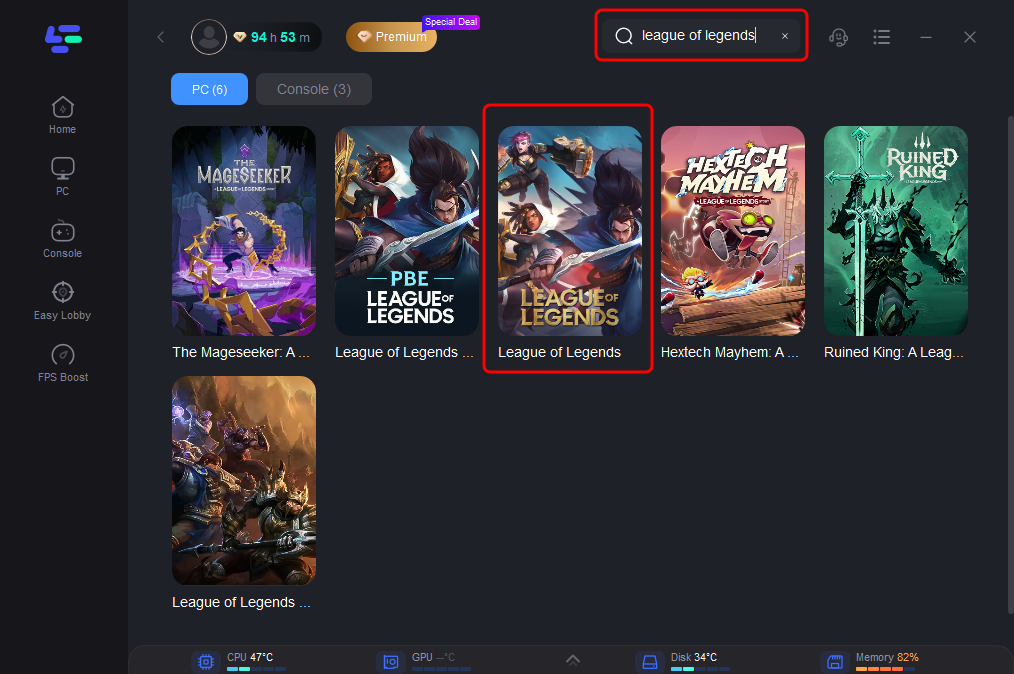
Step 3: In the LagoFast interface, find and select League of Legends from the list of supported games.
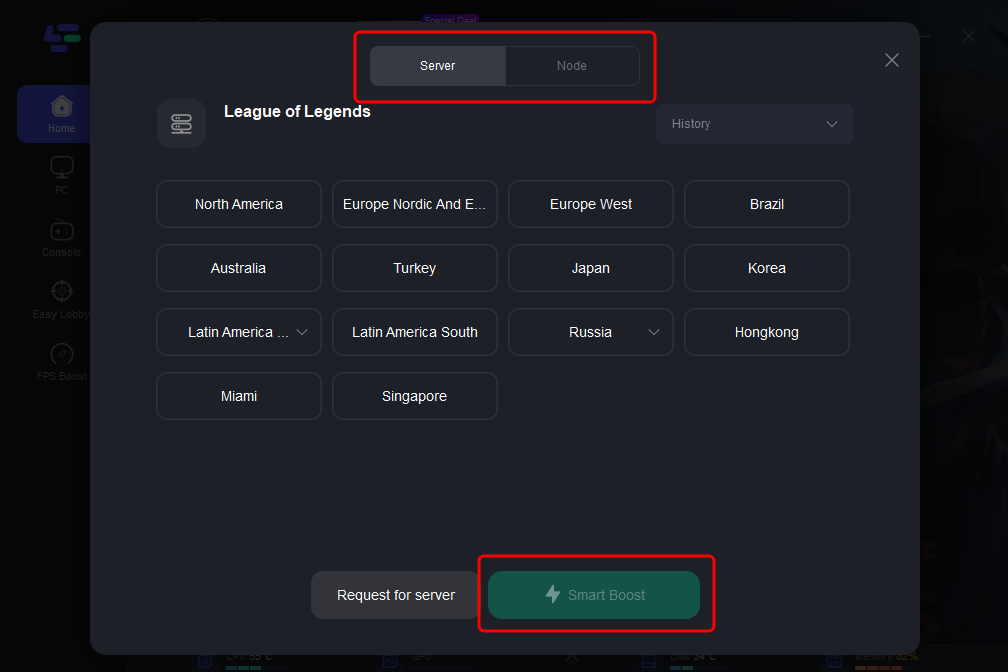
Step 4: Choose the server region closest to your location and let LagoFast optimize the best route for your connection.
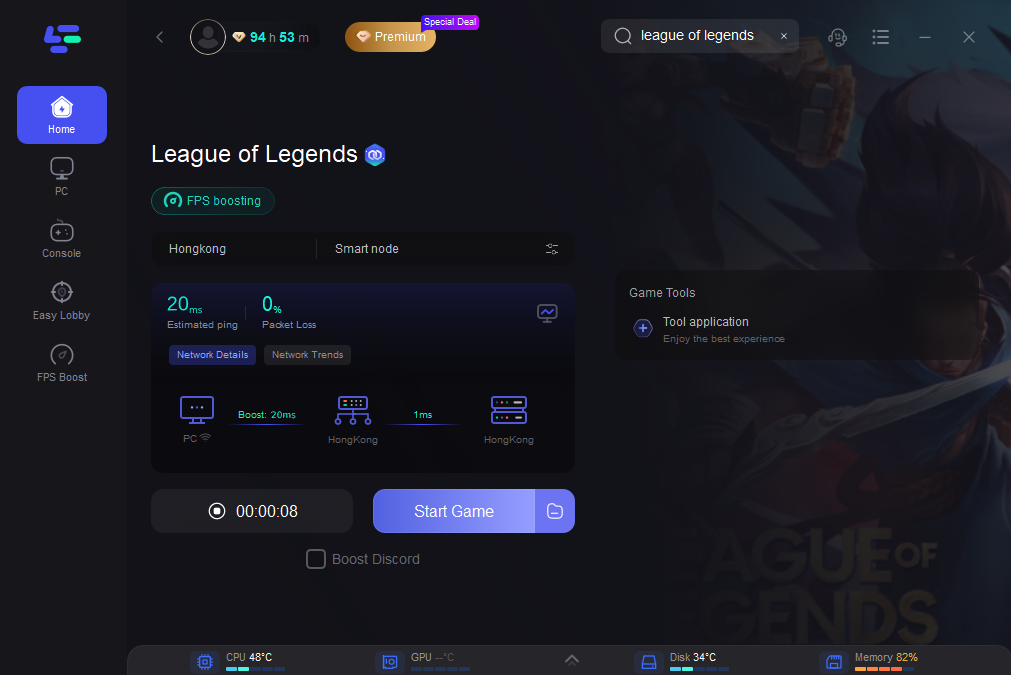
By optimizing your internet connection, LagoFast reduces latency and stabilizes your network, allowing for faster downloads of game clients and updates. This means you can spend less time waiting for patches and installations, and more time diving into the action. With its user-friendly interface, LagoFast automatically adjusts your connection settings, ensuring a smoother and more efficient download process. Whether you're a new player eager to get started or a returning player looking to reinstall, LagoFast can significantly accelerate your League of Legends setup, making it easier than ever to join the fray in Runeterra.
Part 6: FAQs
Q1: Is League of Legends free to play?
Yes, League of Legends is completely free to play. While there are in-game purchases available, they are optional and primarily cosmetic.
Q2: Can I play League of Legends on macOS?
Yes, League of Legends is available for macOS. Ensure your system meets the minimum requirements before downloading.
Q3: How much storage space does League of Legends require?
The game requires approximately 16 GB of storage space. It's recommended to have additional free space for future updates and patches.
Q4: What should I do if I encounter installation issues?
Ensure your system meets the minimum requirements, disable any antivirus software temporarily during installation, and run the installer as an administrator. If issues persist, consult the official Riot Games support page.
Q5: Can I change my region after creating an account?
Changing your region is possible but may require assistance from Riot Games support and could involve transferring your account, which might have limitations.
Conclusion
Downloading and installing League of Legends is a straightforward process that sets the stage for an exciting gaming experience in the world of Runeterra. By ensuring your system meets the necessary requirements, following the step-by-step download guide, and optimizing your installation, you can prepare yourself for countless hours of engaging gameplay. Additionally, utilizing tools like LagoFast can greatly enhance your performance, allowing you to focus on what matters most: enjoying the game and honing your skills. Welcome to the League of Legends community, and may your journey be filled with victories!
Boost Your Game with LagoFast for Epic Speed
Play harder, faster. LagoFast game booster eliminates stutter and lags on PC, mobile, or Mac—win every match!
Quickly Reduce Game Lag and Ping!
Boost FPS for Smoother Gameplay!