
Warframe is known for its fast-paced combat, deep progression system, and massive sci-fi world—and now that experience is coming to mobile. Warframe Mobile brings the core gameplay, missions, and progression to your phone, letting you jump into the Origin System wherever you are.
Getting started with Warframe Mobile can be confusing at first. Between limited availability, unclear setup steps, and concerns about performance, many players aren’t sure how to begin.
This guide breaks down how to download and play Warframe Mobile, what to expect from the gameplay, and how to get a smoother experience.

- ✅ Reduce Lag and High Ping.
✅ Boost FPS at the Same Time.
✅ Support 2000+ Popular Online Games.
✅ Change Server without Latency.
✅ Boost Game Loading Speed.
Part 1: Warframe Mobile Release Date & Gameplay Details
Part 2: How to Download and Play Warframe Mobile
Part 3. Enhance Your Gaming Experience with LagoFast
Part 1: Warframe Mobile Release Date & Gameplay Details
Is Warframe Mobile Officially Released?
After a successful Android closed beta, Warframe Mobile began its Android rollout in 2026. Tenno located in Canada were the first to jump into the action on February 11, 2026, followed by a broader global rollout starting around February 18, 2026. Since the release is staged, availability may vary by region and device.
On iOS, Warframe Mobile was released earlier on February 20, 2024, allowing iPhone and iPad players to access the game ahead of the Android rollout.
To play the game properly, you’ll need a compatible device: a 64-bit Android system with an ARM64 processor, Android 12 or higher, and at least 4GB of RAM. As a full-scale action game, performance depends heavily on your hardware.
Key Gameplay Details
Warframe Mobile keeps the core gameplay intact while adapting controls and performance for mobile devices.
- Combat & Controls: Optional auto-fire and auto-melee are available and can be turned off for manual control. Touch controls are designed for mobile, with a sensor ring to help locate enemies and objectives.
- Movement: Core movement mechanics like sliding, jumping, and parkour are fully supported, keeping combat fast and fluid rather than slowed down for mobile.
- Content Parity: Players have access to the same core content as other platforms, including story quests, missions, and open-world areas, rather than a limited mobile-only version.
- Cross-Save Support: Progress is shared across mobile, PC, and consoles, allowing you to continue the same account on different platforms without starting over.
Part 2: How to Download and Play Warframe Mobile
iOS:
On iOS, Warframe Mobile is available directly from the App Store. To get started:
1. Open the App Store on your iPhone or iPad.
2. Search for Warframe Mobile.
3. Install the game and sign in with your Warframe account.
If the game doesn’t appear, your device may not meet the requirements, or your region may not be included in the current release phase. Avoid unofficial downloads, as these can cause crashes or account issues.
Android:
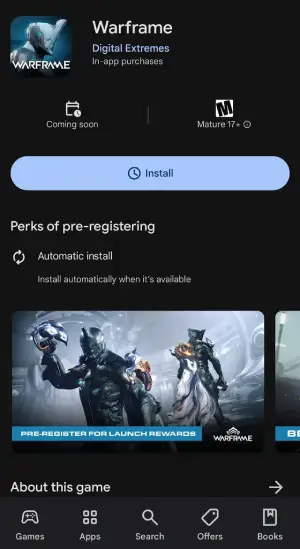
On Android, Warframe Mobile is rolling out gradually, but you can pre-register on the Google Play Store today to secure a special launch reward: the Cumulus Collection. This reward is available until March 4, 2026.
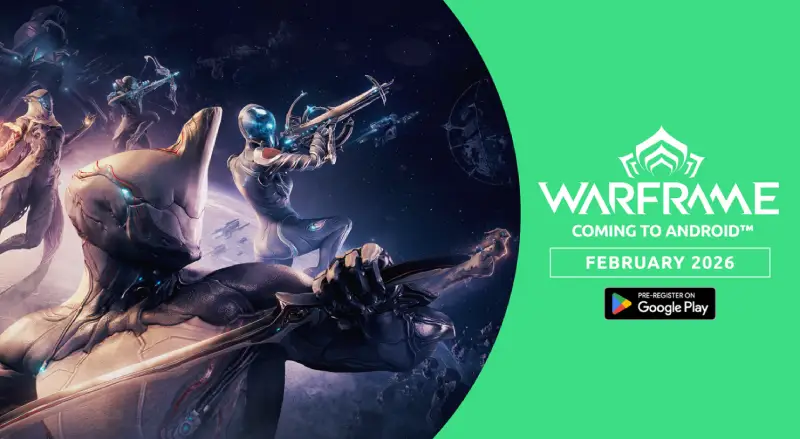
To get started on Android:
1. Open the Google Play Store.
2. Search for Warframe Mobile and pre-register
3. Once available, install the game and log in with your Warframe account.
Part 3. Enhance Your Gaming Experience with LagoFast
Even on powerful phones, network issues like high ping, delayed ability activation, or random disconnects can ruin Warframe Mobile. This is where LagoFast comes in: it helps reduce ping, optimize your network path, stabilize routing, and minimize packet loss, ensuring smoother gameplay. In addition to improving connection quality, LagoFast provides practical tools to enhance your overall mobile gaming experience, making combat more responsive, missions more reliable, and frustrating disconnects less frequent—especially when playing across regions or on mobile networks.
How to Optimize Gaming Experience with LagoFast Mobile
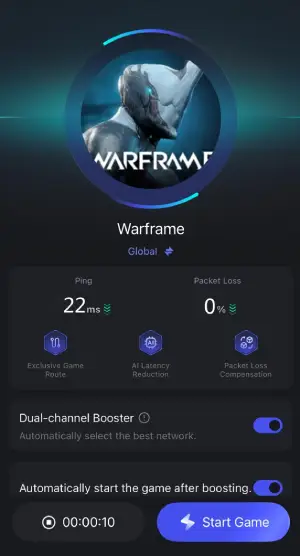
Step 1: Search “LagoFast Mobile booster” in the Google App Store or Apple App Store. Alternatively, click here to download the APK file.
Step 2: Open LagoFast, then search for Warframe in LagoFast Mobile.

Step 3: Click boost and select your corresponding server region to connect.

Step 4: Once optimized performance is confirmed, click "Start Game" to launch the game.
Part 4: Warframe Mobile FAQs
Is Warframe Mobile free to play?
Yes. Like the PC and console versions, it’s free with optional in-game purchases.
Can I use the same account across platforms?
Yes. Cross-save lets you continue your progress on mobile, PC, or console.
Why can’t I find Warframe Mobile yet?
The game may not be available in your region, your device might not be supported, or the rollout is still in progress.
Will Warframe Mobile drain my battery quickly?
Yes. It’s a high-performance game, so long sessions can heat your device and drain battery. Lowering graphics settings helps.
Can I use a controller or customize touch controls?
Yes. Warframe Mobile supports Bluetooth controllers (like PlayStation or Xbox) and allows full touch control customization. You can adjust your HUD and enable assist options, like aim assist and automatic shooting or melee, for a smoother experience on smaller screens.
Conclusion
Warframe Mobile brings the full Warframe experience to your phone, letting you play missions, progress your account, and enjoy fast-paced combat on the go. By following the right download steps and ensuring your device meets the requirements, you can avoid common setup issues. Tools like LagoFast can further improve performance and reduce lag for smoother gameplay. Whether you’re continuing your journey from PC or starting fresh on mobile, Warframe Mobile makes it easy to jump into the action anywhere.
Boost Your Game with LagoFast for Epic Speed
Play harder, faster. LagoFast game booster eliminates stutter and lags on PC, mobile, or Mac—win every match!
Quickly Reduce Game Lag and Ping!
Boost FPS for Smoother Gameplay!