
Are you ready to dive into the dark, gothic world of Silver and Blood? This highly anticipated mobile RPG from Moonton Games and Vizta Games is set to launch globally on June 26, 2025 for Android and iOS. With its strategic gameplay, stunning visuals, and immersive story, this vampire-themed epic is already generating buzz among gamers worldwide. In this guide, we’ll break down everything you need to know about the game, including how to download and play it seamlessly—even across regions—using LagoFast Mobile. Let’s get started!
Part 1. Silver and Blood Release Date & Gameplay Details
Part 2. How to Download and Play Silver and Blood Asia
Part 3. Enhance Your Gaming Experience with LagoFast
Part 4. Silver and Blood System Requirements
Part 1. Silver and Blood Release Date & Gameplay Details
Release Date: Mark your calendars! Silver and Blood officially drops on June 26, 2025 for all mobile devices. Pre-registration is already live, and players who sign up early will receive exclusive rewards like in-game currency, rare characters, and even an SSR vassal named Hati.
Gameplay:
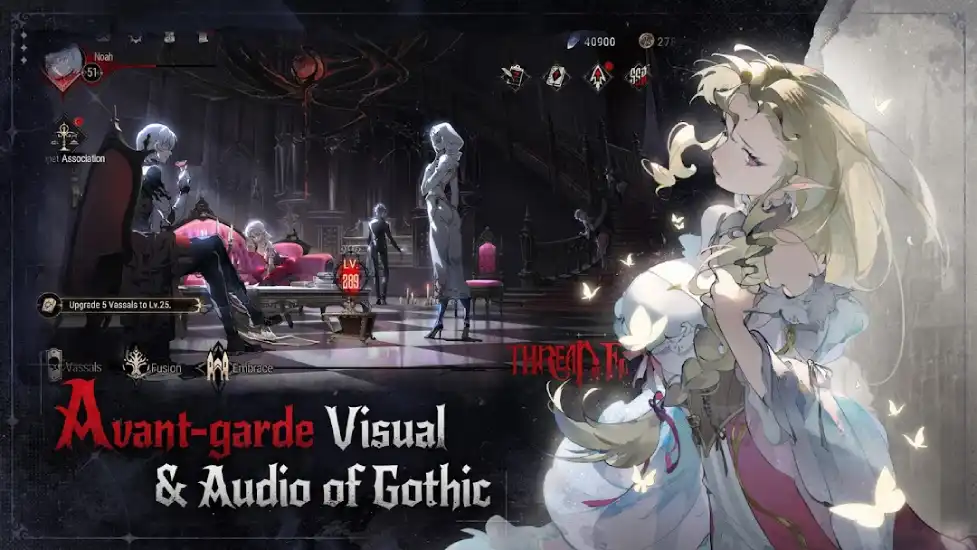
- Strategic Card Battles: Engage in fast-paced, turn-based combat on a 9x9 grid, where positioning your vassals (heroes) and timing your ultimate skills are key to victory. The unique “lunar phase” system builds up to powerful “blood moon” bursts that can turn the tide of battle.
- Castle Restoration: As the vampire lord, you’ll rebuild and manage a decaying gothic castle, gathering resources and making choices that shape your leadership style—benevolent or domineering.
- Deep Storyline: Uncover the secrets of the bloodborn and the Chronos Church in a narrative filled with political intrigue, ancient prophecies, and moral dilemmas.
- Gorgeous Visuals: The game’s gothic watercolor art style and anime-inspired cutscenes create a hauntingly beautiful world.
Part 2. How to Download and Play Silver and Blood Asia
Silver and Blood offers two main versions: the Global Server (English, Japanese, Korean) and the Asia Server (with Thai language support). Depending on your location or preference, you might want to play on a specific server. So for a hassle-free experience, especially if you’re targeting the Asia Server, use LagoFast Mobile—a powerful tool designed for seamless cross-region gaming:
Step 1: Visit the official website of LagoFast, download the LagoFast Mobile APK file, and follow the prompts to complete the installation.

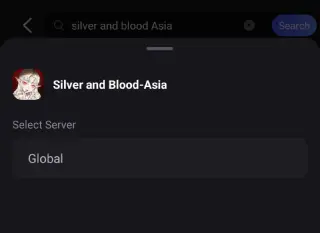
Step 2. Search for Silver and Blood AP: Open LagoFast, type the game’s name in the search bar, and select the Asia Server (Asia) version.
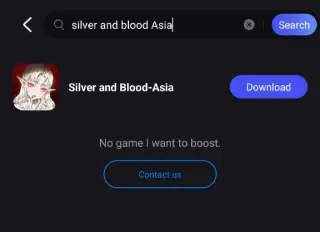
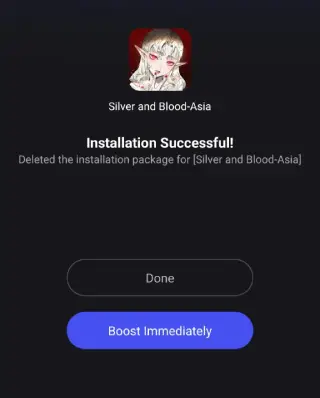
Step 3. One-Click Download: LagoFast will handle the APK download and installation, ensuring compatibility with your device.
Once installed, launch the game through LagoFast to enjoy optimized performance and reduced lag.
Part 3. Enhance Your Gaming Experience with LagoFast
LagoFast isn’t just for downloads—it’s a complete gaming toolkit:
Network Optimization:
- Stable Connections: LagoFast’s global server network reduces ping and eliminates lag, crucial for real-time PVP battles in the Blood Arena.
- FPS Boost: Boost your frame rate for smoother animations and faster decision-making during combat.
Translation Tool:
The Asia Server supports Thai but lacks Indonesian and Vietnamese. LagoFast’s real-time translation feature lets you play the game in Indonesian or Vietnamese. Simply enable the tool in the app settings to translate menus, dialogues, and quests on the fly.
How to use LagoFast Mobile's Quick Translate tool:
Step 1: Visit the Boost tab in LagoFast Mobile to locate Silver and Blood Asia, the click the Enable button after the Quick Tranlate tool.
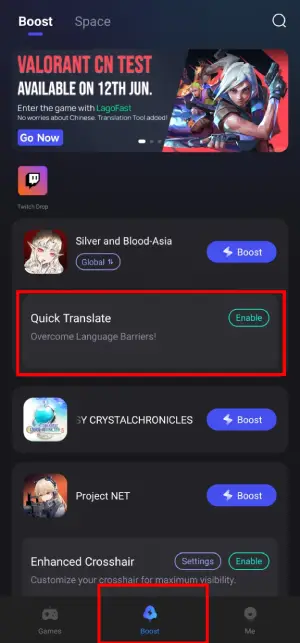
Step 2: Complete Complete the necessary settings:
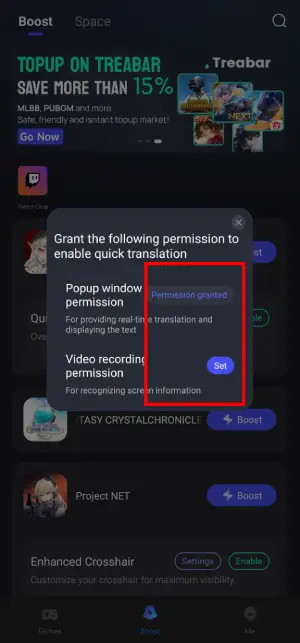
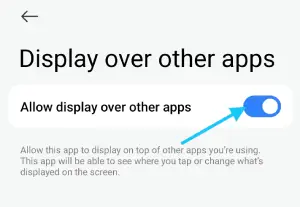
- Set popup window permissions: Enable "Display over apps."
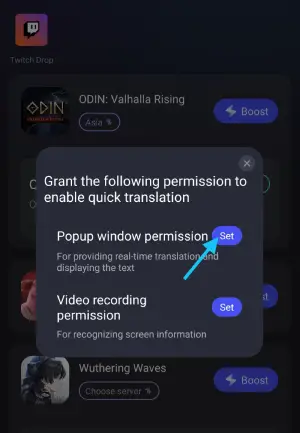
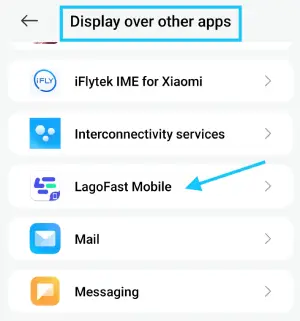
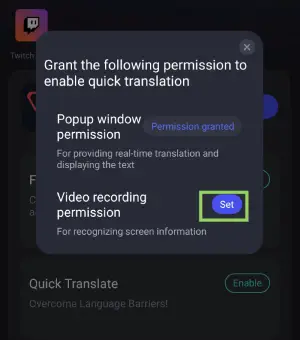
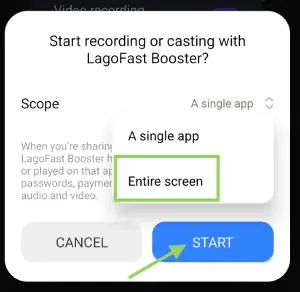
- Set video recording permissions: Tap the Set button, select Entire Screen, then start the translation tool.
This ensures low-ping gameplay and smooth UI translation where store or language support is lacking.
How to Use LagoFast to Get Better Gaming Experience in Silver and Blood Asia:
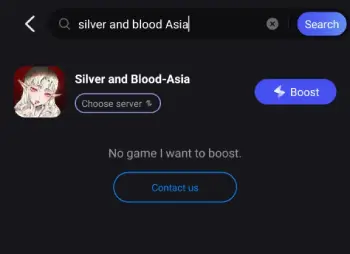
Step 1. Search for Silver and Blood Asia: Open LagoFast, type the game’s name in the search bar, and select the Asia Server (AP) version.
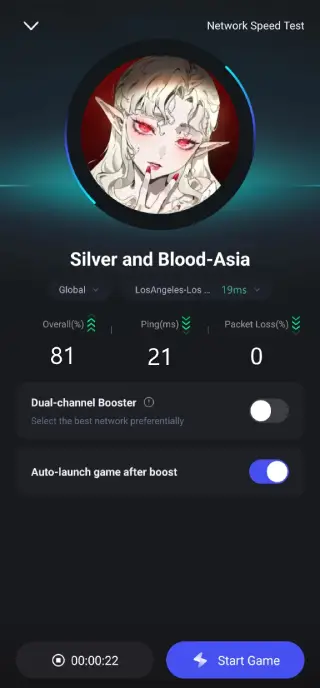
Step 2. Select the best server and route.
Step 3: Check the game real-time performance.
Part 4. Silver and Blood System Requirements
To ensure smooth gameplay, your device should meet these minimum specs:
- Android: OS 6.0 or higher, 2GB RAM, 500MB free storage.
- iOS: iOS 12.0 or higher, 2GB RAM, 500MB free storage.
For the best experience, we recommend:
- Android: OS 8.0+, 4GB RAM, and a Snapdragon 660 or equivalent.
- iOS: iPhone X or newer with iOS 14.0+.
Conclusion
Silver and Blood is shaping up to be a must-play RPG for 2025, combining deep strategy, stunning visuals, and a captivating story. With its global launch just around the corner, now’s the time to prepare—pre-register for rewards, download LagoFast for seamless cross-region gaming, and gear up to become the ultimate vampire lord. Whether you’re battling in the Blood Arena or restoring your castle, LagoFast ensures you’ll enjoy every moment without lag or language barriers.
Boost Your Game with LagoFast for Epic Speed
Play harder, faster. LagoFast game booster eliminates stutter and lags on PC, mobile, or Mac—win every match!
Quickly Reduce Game Lag and Ping!
Boost FPS for Smoother Gameplay!