
Shadowverse: Worlds Beyond, a new strategy card game launched based on the Shadowverse CCG released in 2016, officially met players on June 17, 2025. Building on its predecessor, it introduces brand-new content such as the Super-Evolution mechanic and "Shadowverse Park." This article will focus on all the information you need to download and play Shadowverse: Worlds Beyond, including its release date, the updated features of the game, and the best ways to enhance your gaming experience.

- ✅ Reduce Lag and High Ping.
- ✅ Boost FPS at the Same Time.
- ✅ Support 2000+ Popular Online Games.
- ✅ End Stcuks & Crashing Issues.
- ✅ Support Game Translation Tool.
Part 1: Shadowverse: Worlds Beyond Release Details
Part 2: Shadowverse: Worlds Beyond New Features
Part 3: How to Download and Play Shadowverse: Worlds Beyond
Part 4: How to Enhance Gaming Experience in Shadowverse: Worlds Beyond
Part 5: Shadowverse: Worlds Beyond FAQs
Part 1: Shadowverse: Worlds Beyond Release Details
Shadowverse: Worlds Beyond was originally scheduled for release in the summer of 2024. However, to fully listen to player feedback and add more features, thereby crafting a more polished game for players, the developers extended the time for refinement and testing. Finally, it has been confirmed that the game will be officially launched globally on June 17, 2025.
This time, the release platforms for Shadowverse: Worlds Beyond include Mobile platforms (iOS and Android) and the PC platform (via Steam and Epic Games Store). Players can go to the corresponding platforms according to their own device needs to download and play this game that offers a brand-new gaming experience for free.
Part 2: Shadowverse: Worlds Beyond New Features
As an upgraded and innovative iteration of Shadowverse, Cygames aims to carry forward and even surpass the achievements of its predecessor through Shadowverse: Worlds Beyond. While retaining the original game settings, it adds brand-new content, striving to offer players a more immersive and dynamic experience. Here are the highlights of its gameplay:
- Card Types: The card categories have been expanded to eight, just like physical cards. The Necromancer and Vampire classes have been merged into a new class called "Nightmare" (formed by combining "Necromancer" and "Vampire").
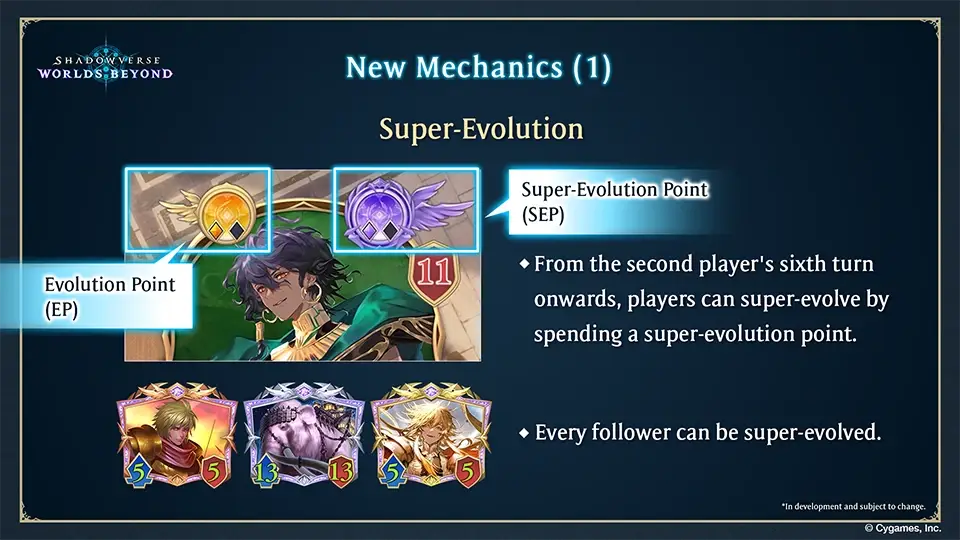
- Strategic Elements: A new "Super-Evolution" mechanism has been introduced. This not only deepens the strategic complexity but also enhances the game's visual appeal.
- Class Selection: Players can choose from seven different classes to suit their playstyle, constructing their own original decks. They can customize their decks based on strategy and personal preferences, enjoying the fun of card battles.
- Story Mode: There's a fully-voiced new story that unfolds around seven distinct protagonists with unique personalities. The epic narrative will gradually reveal itself (with voice acting available in both Japanese and English).
- Shadowverse Park: This is divided into the Plaza, Personal Space, and Guild Lounge areas. Players can create virtual avatars, design personalized 3D spaces, and move freely within them. They can interact, battle, or collaborate with other players.

- Social Interaction: Players can communicate with others through text and emotes. The game supports a guild system, allowing players to join guilds and participate in activities together with guild members.
Part 3: How to Download and Play Shadowverse: Worlds Beyond
This time, Shadowverse: Worlds Beyond is being released simultaneously on iOS, Android, and PC, supporting cross-device login and online gameplay. Players can choose the platform to download and play Shadowverse: Worlds Beyond based on their own gaming needs. Here are the download methods for different platforms:
For iOS Players:
Go to the App Store, search for "Shadowverse: Worlds Beyond". When the search result appear, click on the game, and then click the "Get" button to start downloading and installing it. Once the installation is complete, you can directly enter Shadowverse: Worlds Beyond and start playing.
For Android Players:
Head to the Google Play Store, enter "Shadowverse: Worlds Beyond" in the search bar. Click on the search result to go to the detail page, and then click the "Install" button to start downloading. After the installation is finished, launch the game to start enjoying it.
For PC Players (via Steam):
Go to the Steam platform. After logging in to your Steam account, use the search bar at the top to look up "Shadowverse: Worlds Beyond". Click the "Play Game" button below, and the download will begin. Once the download and installation are complete, start the game.
Downloading via the Official Website:
Of course, if you prefer not to use third-party platforms to download Shadowverse: Worlds Beyond, you can directly visit its official website and select the version corresponding to your device for download.
Part 4: How to Enhance Gaming Experience in Shadowverse: Worlds Beyond
Successfully downloading Shadowverse: Worlds Beyond is just the first step. As a card game where strategy is key to victory, a player's reactions and timing during battles are crucial. Even a slight latency can allow your opponent to seize the initiative, putting you at a disadvantage. To enjoy the smoothest gaming experience, it's essential to use LagoFast to help reduce latency, bypass congested networks, and ensure that every strategic move you make is executed promptly.
Key Features of LagoFast
- Global Server Network: Access low-latency nodes worldwide for stable connections.
- Packet Loss Prevention: Advanced algorithms minimize data loss for smooth gameplay.
- Smart Routing Optimization: Dynamically selects the fastest path to game servers.
- FPS Enhancement: Optimizes system resources to reduce frame drops.
- User-Friendly Interface: One-click solutions for gamers of all skill levels.
Tutorial for Enhancing Shadowverse: Worlds Beyond Experience on PC with LagoFast
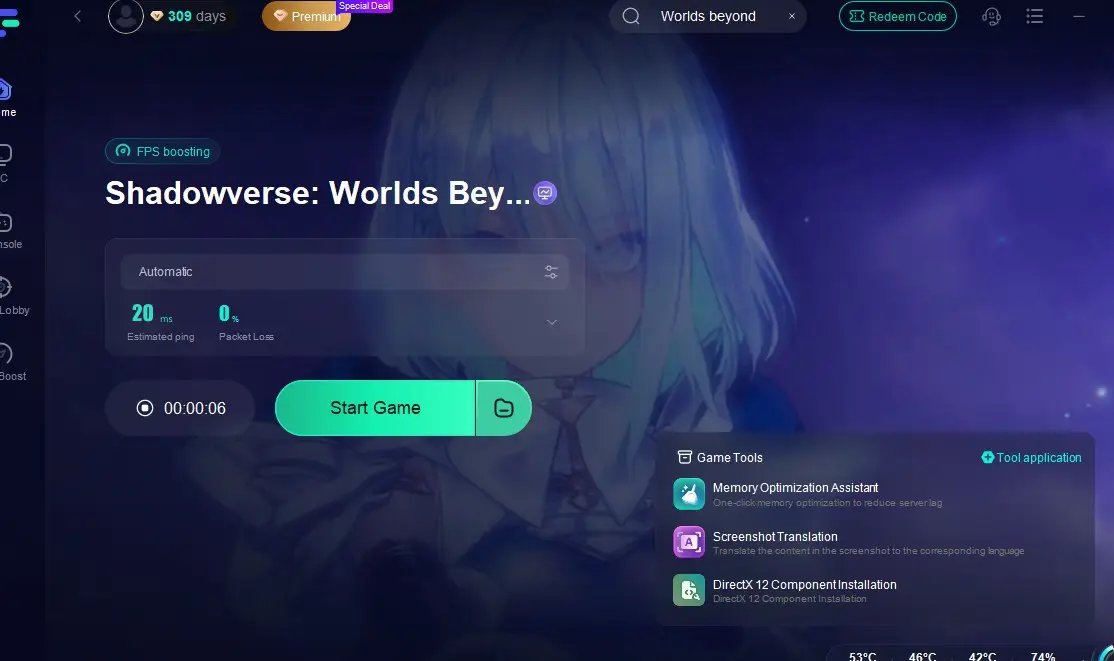
Step 1: Click the free trial button below to get LagoFast and complete the installation.
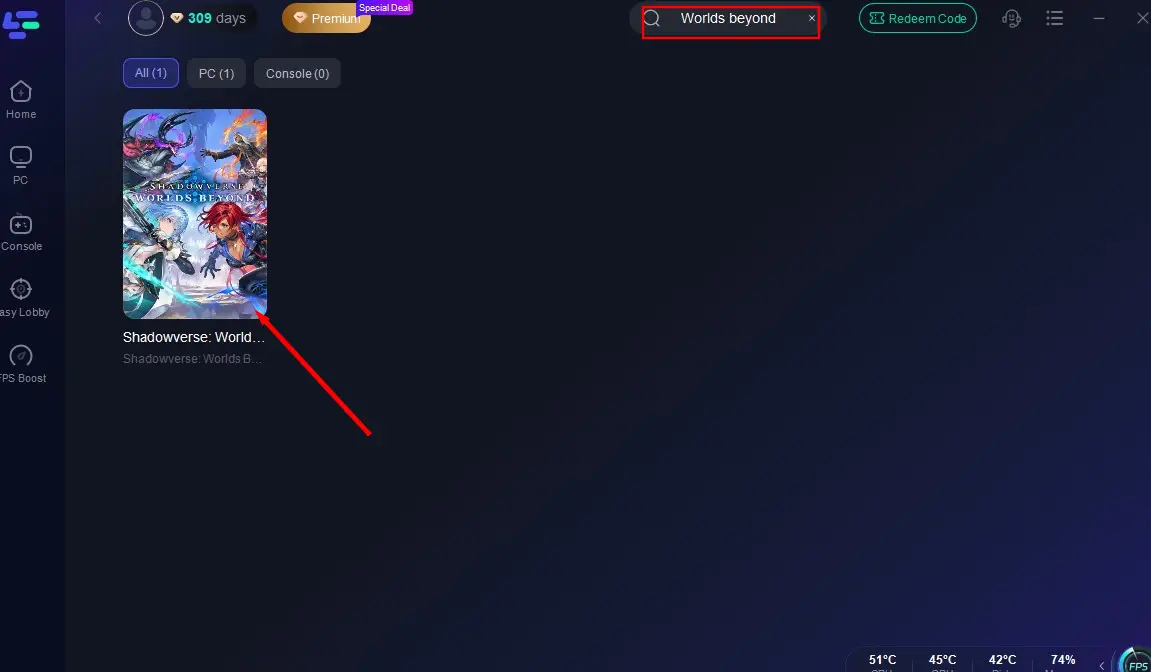
Step 2: Launch LagoFast, find Shadowverse: Worlds Beyond in the search bar, and click on it.
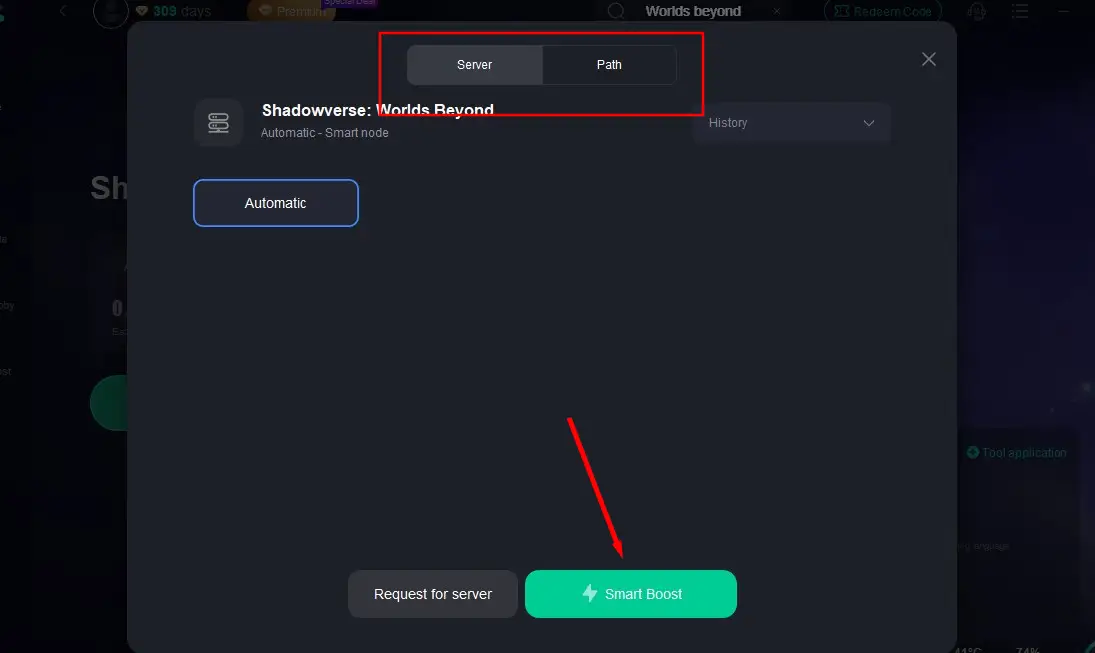
Step 3: Select a server with the best performance to connect to, and click "Smart Boost" to start accelerating.
Step 4: After confirming that the game acceleration has started, click "Start Game" to begin playing Shadowverse: Worlds Beyond.
How to Enhance Shadowverse: Worlds Beyond Experience on Mobile
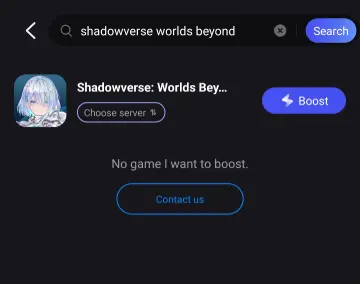
Step 1: Go to the Google Play Store or App Store to download LagoFast Mobile, or scan the QR code in the image below to get it.

Step 2: Launch LagoFast Mobile, search for Shadowverse: Worlds Beyond, and click the "Boost" button.
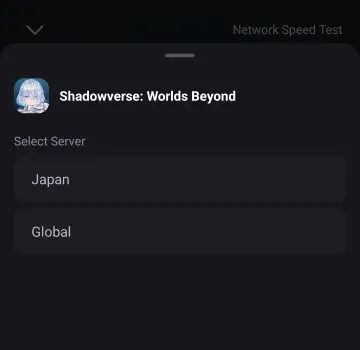
Step 3: Choose the best server to connect to based on your needs.
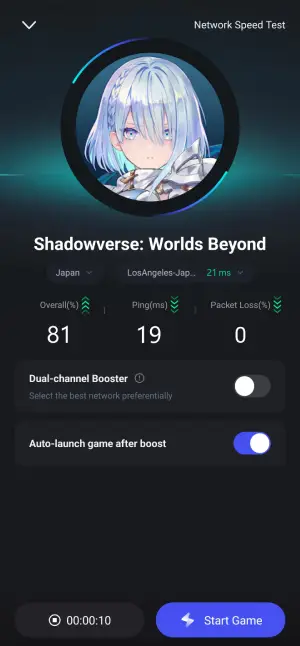
Step 4: After confirming that the game's packet loss rate and ping have been optimized, click "Start Game" to begin playing.
Part 5: Shadowverse: Worlds Beyond FAQs
Q1: Will Shadowverse: Worlds Beyond be free
A1: Shadowverse: Worlds Beyond is free to play for players worldwide. You can directly go to the corresponding platforms to download and play it.
Q2: Is Shadowverse: Worlds Beyond a new game
A2: Yes, although it is an upgraded and innovative creation by Cygames based on Shadowverse, it is a brand-new game that will bring players a completely fresh gaming experience.
Q3: What time does Shadowverse: Worlds Beyond release
A3: Shadowverse: Worlds Beyond will be officially released globally on June 17, 2025, available on both Mobile and PC platforms.
Q4: What are the PC system requirements of Shadowverse: Worlds Beyond
A4: The following are the system requirements for playing Shadowverse: Worlds Beyond on PC:
Minimum:
- Requires a 64-bit processor and operating system
- OS: Windows® 10 / Windows® 11
- Processor: Intel® Core™ i5-8500 Processor / AMD Ryzen™ 5 3500
- Memory: 8 GB RAM
- Graphics: GeForce GTX™ 970 / AMD Radeon™ RX 6500 XT
- DirectX: Version 11
- Storage: 20 GB available space
Recommended:
- Requires a 64-bit processor and operating system
- OS: Windows® 10 / Windows® 11
- Processor: Intel® Core™ i7-10700K Processor / AMD Ryzen™ 7 3700X
- Memory: 16 GB RAM
- Graphics: GeForce GTX™ 1660 / AMD Radeon™ RX 6600 XT
- DirectX: Version 11
- Storage: 20 GB available space
Conclusion
The introduction of the new Super-Evolution mechanic and the creation of an entirely new social interaction space will definitely make Shadowverse: Worlds Beyond a must-play for digital card game enthusiasts. Hurry up and choose your preferred gaming platform, get LagoFast ready, download and play Shadowverse: Worlds Beyond, and embark on an exciting journey filled with strategy, thrills, and endless possibilities!

Boost Your Game with LagoFast for Epic Speed
Play harder, faster. LagoFast game booster eliminates stutter and lags on PC, mobile, or Mac—win every match!
Quickly Reduce Game Lag and Ping!
Boost FPS for Smoother Gameplay!