

Are you ready to dive into the cutting-edge world of Farlight 84 Mobile before anyone else? The highly anticipated Farlight 84 Mobile test server is globally live on 7 August, offering players a chance to experience upcoming updates, new features, and gameplay tweaks firsthand. In this guide, we’ll walk you through everything you need to know, from game features to accessing the test server and optimizing your gameplay with LagoFast Game Booster. Let’s get started!
Part 1. Farlight 84 Game Features
Part 2. Farlight 84 Mobile Test Date - Latest News
Part 3. How to Download and Play Farlight 84 Mobile Test Server
Part 4. Ensure Smooth Gaming in Farlight 84 Mobile Test Server from Anywhere
Part 1. Farlight 84 Game Features
Farlight 84 Mobile is a futuristic battle royale that blends intense shooter mechanics with innovative hero abilities, vehicles, and jetpacks. Here’s what makes it stand out:
- Hero Abilities: Choose from diverse heroes like Phantom (stealth specialist) or Maychelle (area-control expert), each with unique skills to dominate the battlefield .
- Jetpacks & Vehicles: Soar through the air with jetpacks or pilot armored vehicles like the Blazing Infantry or War Spider for fast-paced combat .
- Maps & Modes: Battle across dynamic maps like Lapton and Subset City, or try modes like Hunt (bounty hunting) and Deathmatch .
- Cross-Platform Play: Play seamlessly on mobile and PC with a single account .
The game’s 2025 updates include revamped hero skills, new weapons, and the return of jetpacks for even more aerial combat .
Part 2. Farlight 84 Mobile Test Date - Latest News
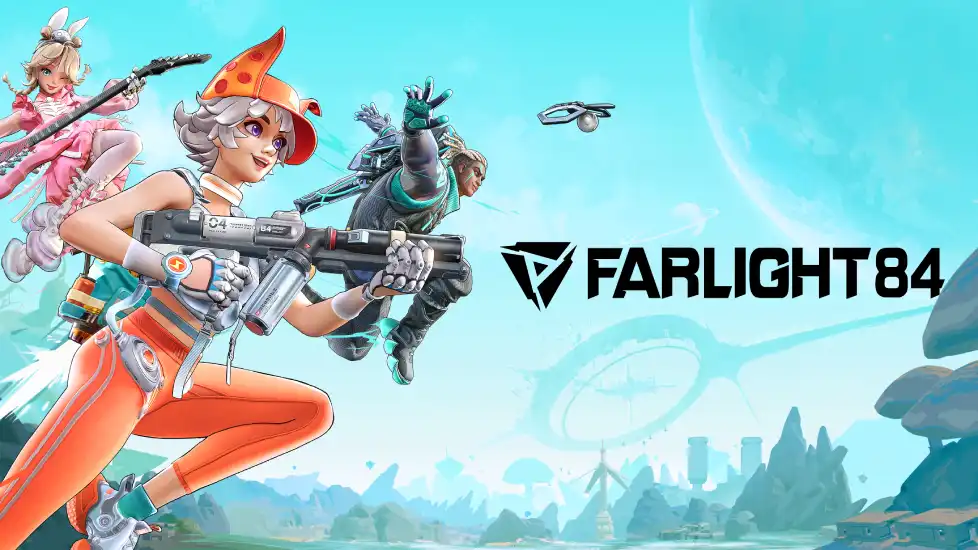
The New Farlight 84 MOBILE China Test Server for August 2025 is now open! Here’s what you need to know:
- Test Date: Starts on 7 August, 2025, at 10: 00 (GMT+8)
- Region: Global
- Platform: iOS & Android
For Android players, it is very important to prepare the system requirements for downloading Farlight 84 CN Mobile:
Minimum System Requirements
- CPU: Snapdragon 660 / MediaTek Helio G85 (Mali-G52 MP2)
- RAM: 4GB and above
- Version: Android 7.0 and above
Recommended System Requirements
- CPU: Snapdragon 8Gen2 processor and above
- RAM: 6GB and above
- Version: Android 12.0 and above
Part 3. How to Download and Play Farlight 84 Mobile Test Server
Starting August 7, 2025, at 10:00 AM (GMT+8)! Players from all over the world are welcome to join—just head over to the official website to download and start playing!
Of course, if you're having trouble downloading Farlight 84 CN Mobile due to server distance or regional restrictions, LagoFast has you covered. LagoFast provides optimized download routes within its client, helping players bypass congested paths and download the game quickly—so you can jump into this eye-catching title without delay!
Here's a step-by-step guide:
Step 1: Visit the official website of LagoFast, download the LagoFast Mobile APK file, and follow the prompts to complete the installation.

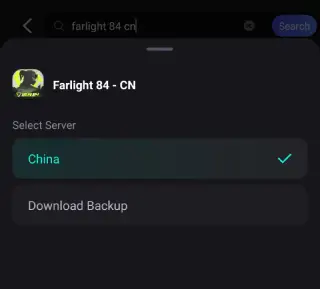
Step 2. Search for Farlight 84: Open LagoFast, type the game’s name in the search bar, and select the first one.
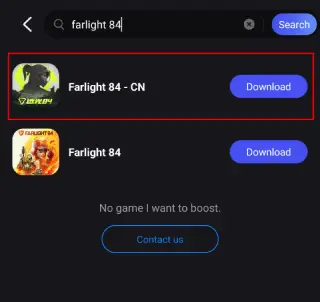
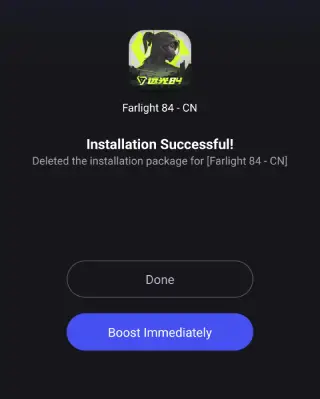
Step 3. One-Click Download: LagoFast will handle the APK download and installation, ensuring compatibility with your device.
Once installed, launch the game through LagoFast to enjoy optimized performance and reduced lag.
Why LagoFast?
- Region Unblocking: Overcomes China-only restrictions, letting you download the test server from anywhere .
- Faster Downloads: Reduces download times by optimizing your connection .
Part 4. Ensure Smooth Gaming in Farlight 84 Mobile Test Server from Anywhere
Even after downloading, playing the test server from outside China may cause lag. Here’s how LagoFast helps:
- Server Optimization: Switch to the nearest server (e.g., Singapore or Japan) to minimize latency .
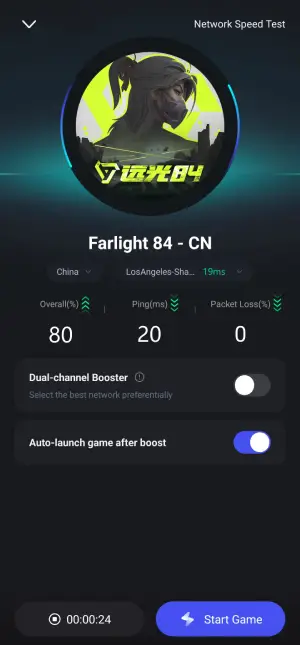
- Ping Reduction: LagoFast’s multipath technology routes your connection through the fastest servers, cutting ping by up to 80% .
- Stable Connection: Eliminates packet loss and ensures a smooth experience, even during intense firefights .
How to Use LagoFast for Gaming:
Step 1. Search for Farlight 84: Open LagoFast, type the game’s name in the search bar, and select the first one.
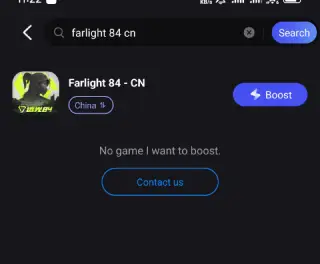
Step 2. Select the best server and route.
Step 3: Check the game real-time performance.
While playing Farlight 84 CN Mobile test server, the most difficult problem for international players is the language barrier, LagoFast can help to them to play Farlight 84 in native languages. Here are steps:
Step 1: Find Farlight 84 CN in the Boost tab of LagoFast Mobile, locate the Quick Translate tool below.
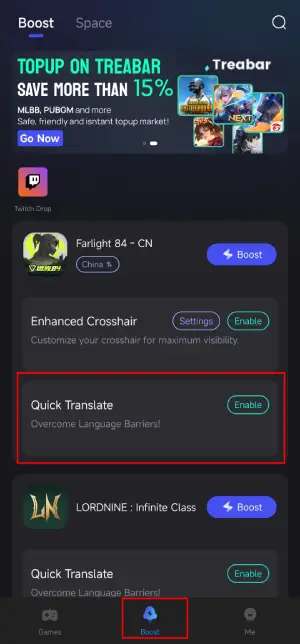
Step 2: Complete two settings:
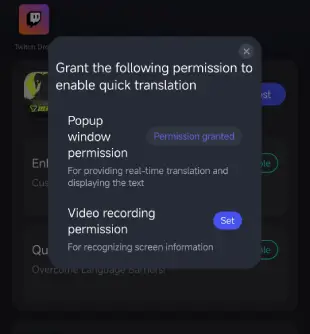
- Set popup window permissions: Enable "Display over apps.
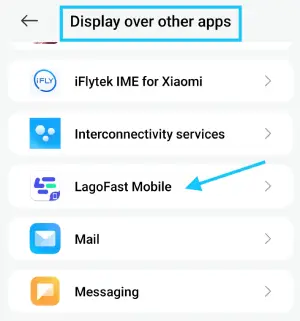
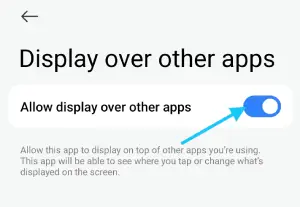
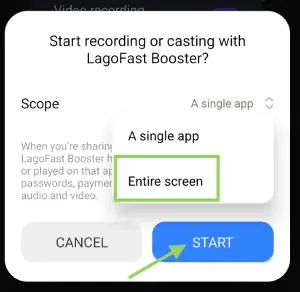
- Set video recording permissions: Tap the Set button, select Full Screen, then start the translation tool.
Step 3: Return to the game and use the floating translation ball provided by the tool to translate the Farlight 84 CN into your target language.
Important Note:
- This translation tool is only available for Android users.
- Before enabling the Valorant Mobile translation tool, ensure LagoFast's language settings are adjusted to your target language.
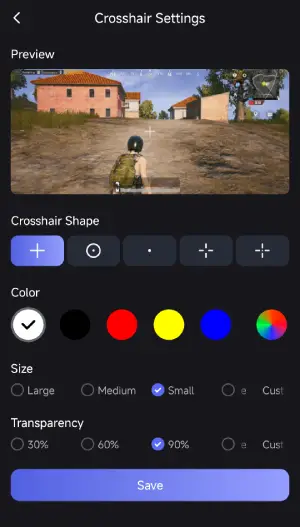
What's more, LagoFast provides the Enhanced Crosshair tool for players to further enhance their gameplay. This tool can help them to change the color and size of crosshair, improve the shooting experience. Here is how to use it:
Step 1: Find the Enhanced Crosshair tool in LagoFast Mobile.
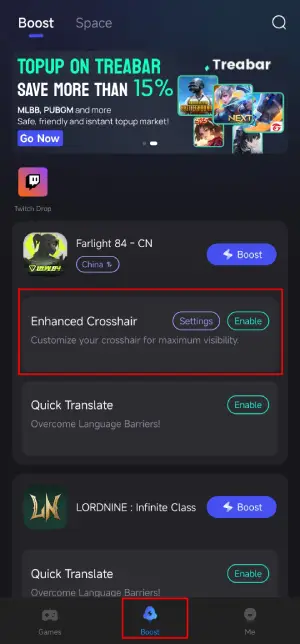
Step 2: Complete the settings according to your gamplay habbit.
Now embark your seamless and enhanced gameplay in Farlight 84 CN open test with LagoFast!
Conclusion
The Farlight 84 Mobile test server is your gateway to experiencing the future of battle royale gaming. With LagoFast, you can bypass restrictions, download the test server effortlessly, and play lag-free from anywhere in the world. Don’t miss this chance to shape the game’s development—join the global test today!

Boost Your Game with LagoFast for Epic Speed
Play harder, faster. LagoFast game booster eliminates stutter and lags on PC, mobile, or Mac—win every match!
Quickly Reduce Game Lag and Ping!
Boost FPS for Smoother Gameplay!