

This article covers everything you need to know about how to download and play Architect: Land of Exiles, the highly anticipated Korean MMORPG built with Unreal Engine 5. Developed by Drimage (also known as Dream Age) and published by Aqua Tree, Architect: Land of Exiles combines breathtaking visuals, seamless open-world exploration, and deep class-based gameplay. With its launch date fast approaching, many global players are eager to experience this next-generation fantasy world—even before an international release has been confirmed. If you’re outside South Korea but still want to dive into the game early, don’t worry. This guide explains the official release details, download timing, and practical steps for installing and playing Architect: Land of Exiles smoothly from anywhere.

Part 1: Architect: Land of Exiles Release Date
Part 2: When Can I Download Architect: Land of Exiles?
Part 3: How to Download and Play Architect: Land of Exiles?
Part 1: Architect: Land of Exiles Release Date
After months of anticipation, Architect: Land of Exiles officially launches in South Korea on October 22, 2025. The release follows its successful showcase at G-Star 2024, where the developers first revealed the five playable classes — Battle Priest, Assassin, Wizard, Hunter, and Warrior. The game’s official trailer impressed fans with seamless world exploration, dynamic combat, and breathtaking Unreal Engine 5 graphics. While the initial launch focuses on the Korean market, global players can expect international release details soon, as publisher Aqua Tree has hinted at expansion plans following strong pre-registration numbers and growing worldwide interest.
Part 2: When Can I Download Architect: Land of Exiles?
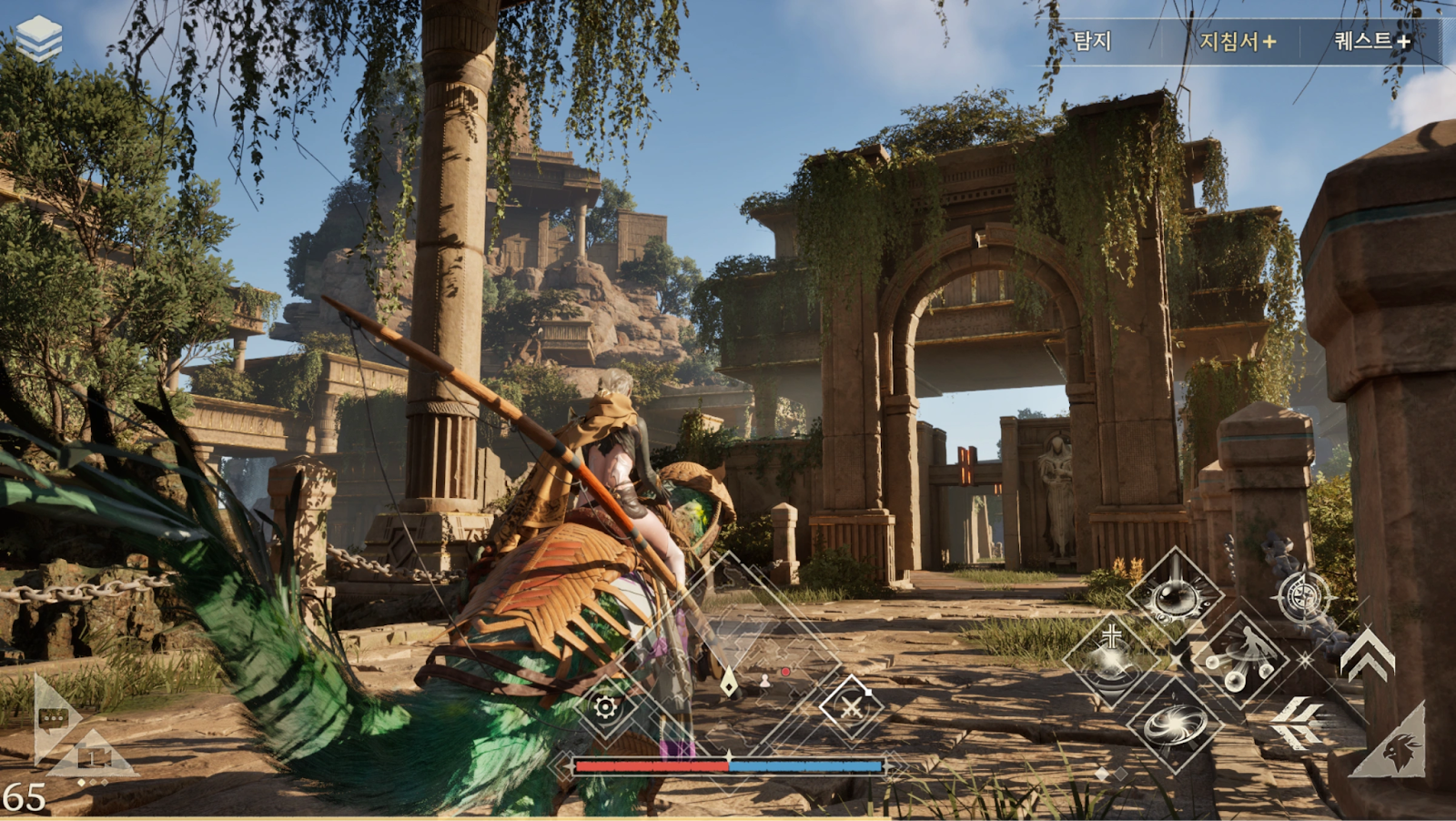
Players in South Korea can pre-download Architect: Land of Exiles a few days before launch, starting around October 19, 2025. This allows fans to create characters early, explore class abilities, and prepare for the official release.
For international fans, since the game’s servers and app stores are initially region-locked to South Korea, global users will not be able to download it directly from Google Play or the App Store without assistance. However, there are easy methods to bypass this — you can either use LagoFast’s one-click download solution or install the game manually with a few extra steps.
Part 3: How to Download and Play Architect: Land of Exiles
One-Click Download Solution — LagoFast
If you’re looking for the easiest way to download and play Architect: Land of Exiles, LagoFast is your best option. It removes regional restrictions, simplifies setup, and guarantees smooth gameplay—all with just one click.
Key Features:
- One-Click Download: No need to install the Korean Google Play Games or verify multiple accounts. LagoFast provides a direct installation package inside its app so you can start playing instantly.
- Korean IP Access: The game requires a Korean IP for account creation and verification. LagoFast automatically connects you to a secure Korean server, ensuring seamless login and stable performance.
- One-Click Translation: An upcoming feature will allow real-time translation of menus and dialogue, making the game more accessible to global players.
- Cross-Device Boosting: Work across PC, mobile, and consoles, ensuring optimized performance, low ping, and smooth gameplay no matter which device you use.
Why choose LagoFast?
Instant setup, optimized performance, and secure downloads make LagoFast the simplest way to play Architect: Land of Exiles without region locks or technical hassles.
How to use LagoFast to download and smoothly play Architect: Land of Exiles on PC:
Step 1: Click the Free Trial button to download and install LagoFast.
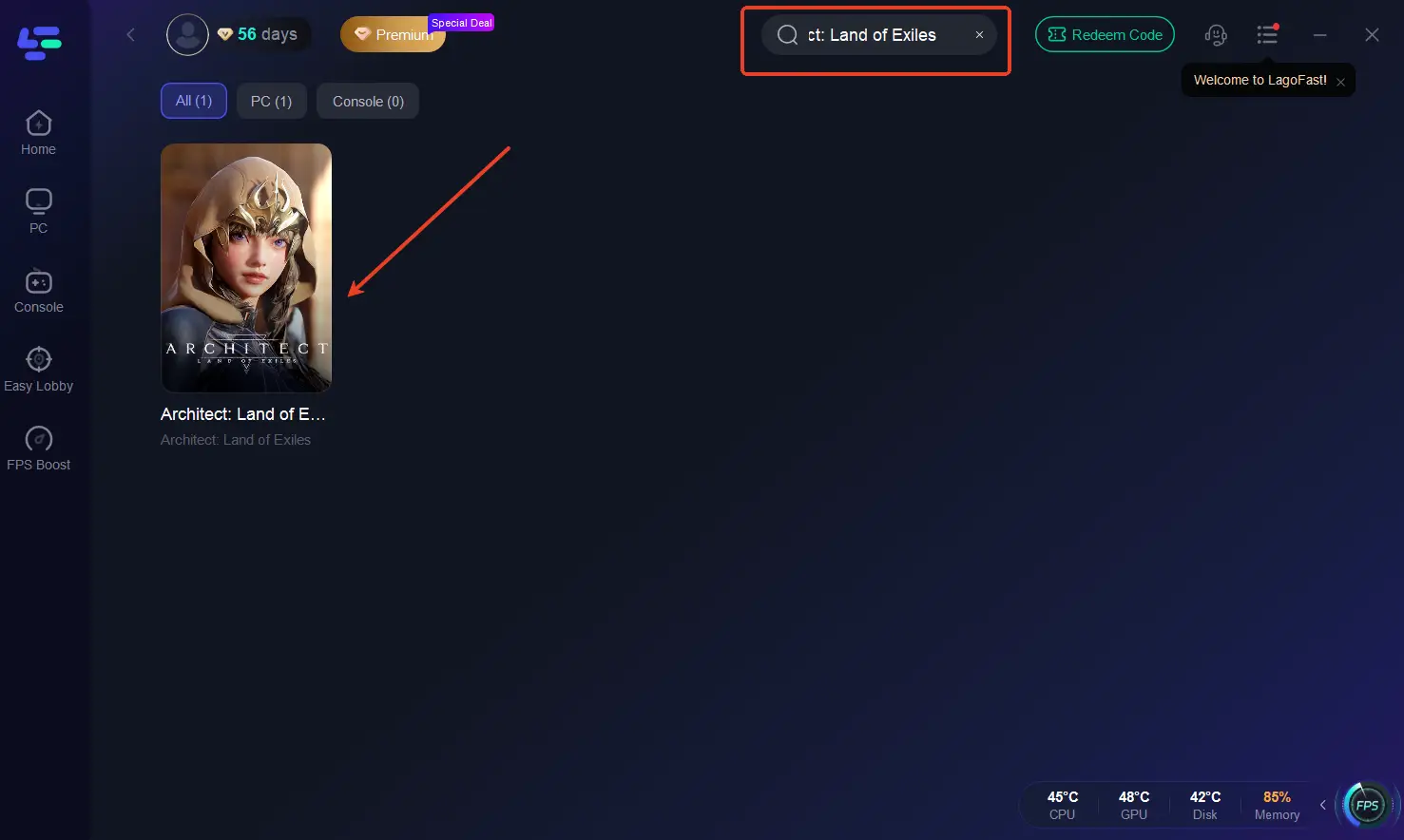
Step 2: Open LagoFast, then click the PC button on the left and search Architect: Land of Exiles in the search bar.
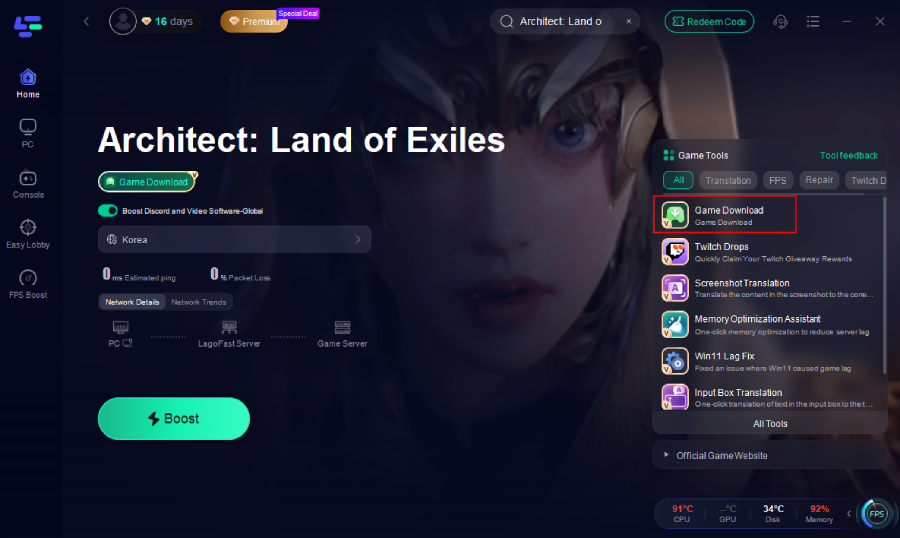
Step 3. Click the Game Download button on the interface to download Architect: Land of Exiles to your PC.
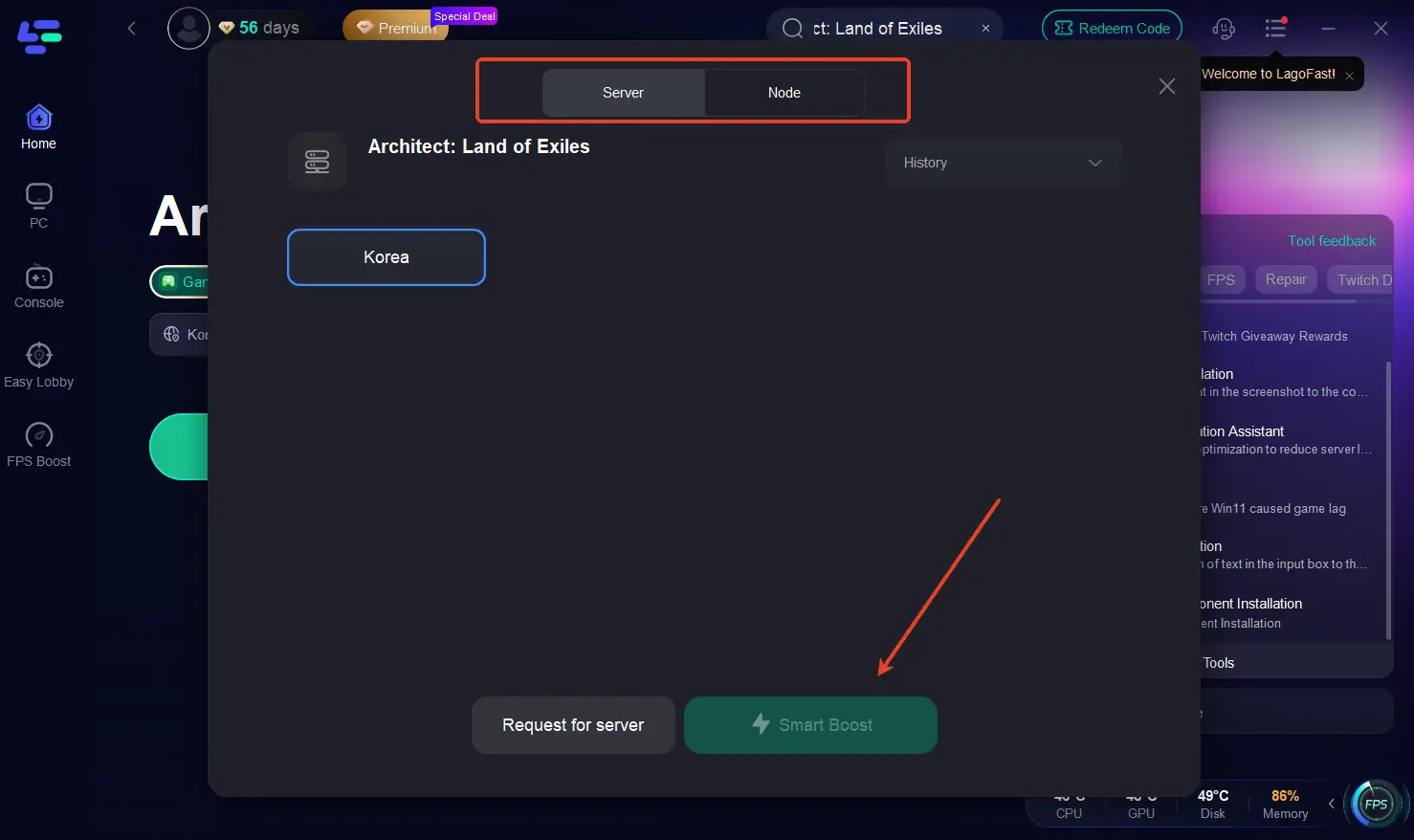
Step 4: Click the Boost button on the left side to fix lag and ensure a smooth gaming experience. Choose the best server and node.
Step 5: Finally, check the specific game ping, packet loss, and multiple path connections on the right side. Finally, click the “Start Game” to fix all the game issues and play the game.
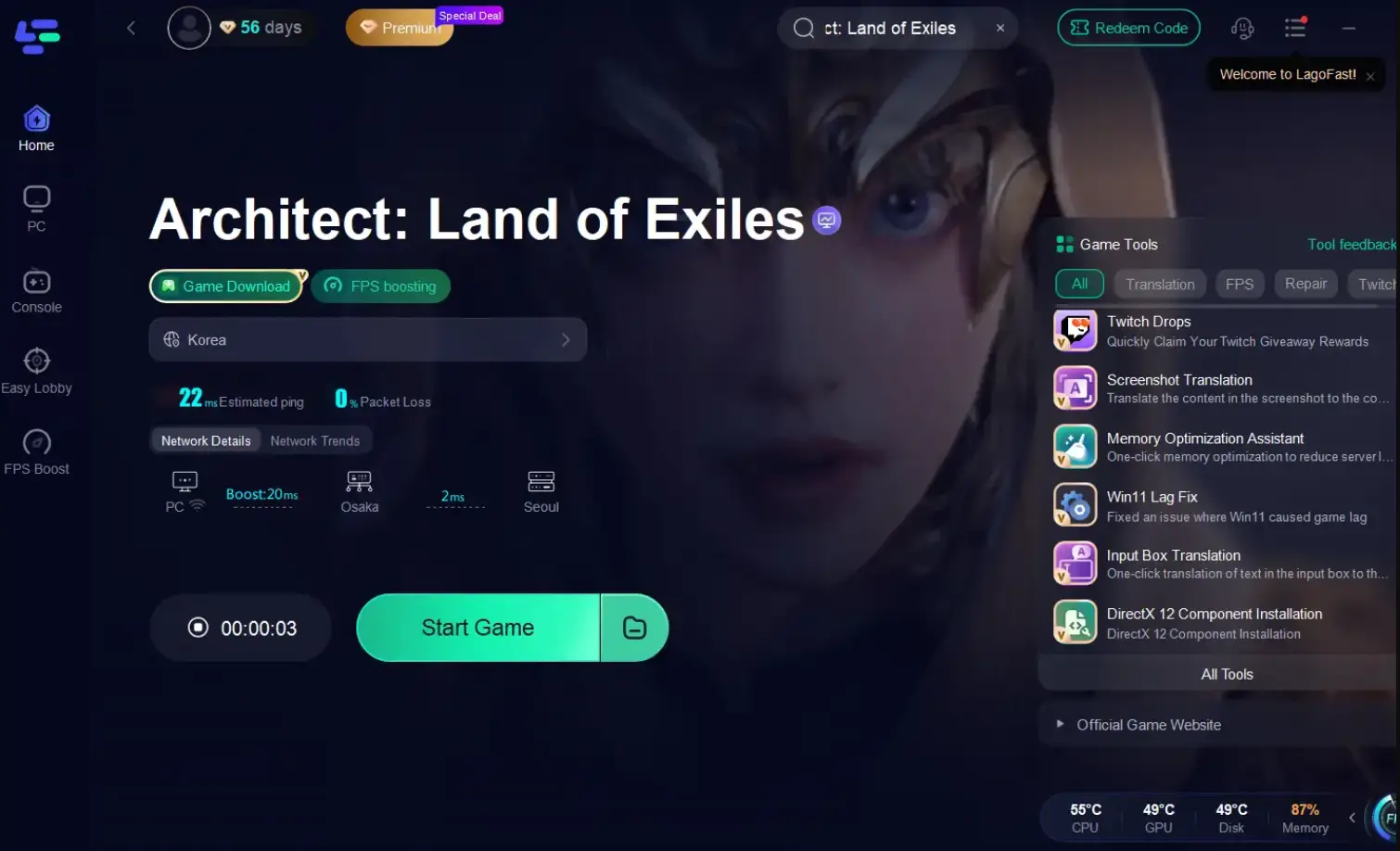
How to Use LagoFast Translation tool for Architect: Land of Exiles:
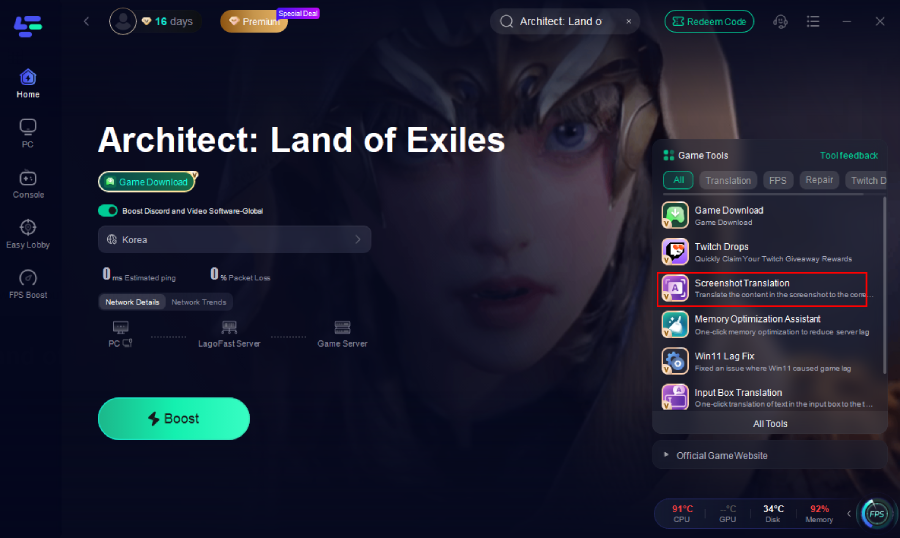
The translation tool is on the right.
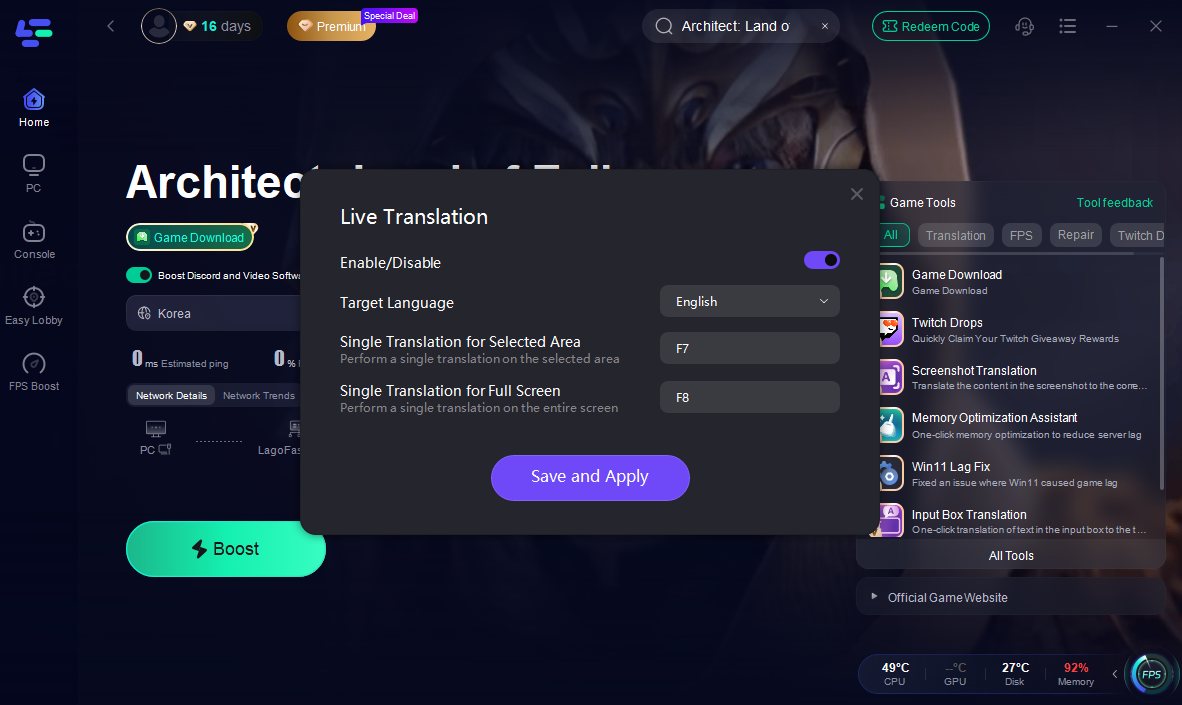
Choose your target language and set up the hotkeys.
How to use LagoFast to download and smoothly play Architect: Land of Exiles on mobile:
To enhance mobile gameplay further, you can use LagoFast’s Mobile Booster. It helps reduce lag and optimize your mobile connection for a smoother Architect: Land of Exiles
Step 1. Download LagoFast Mobile Booster
Search for LagoFast Mobile Booster in the App Store (iOS) or Google Play (Android), or scan the QR code to start a free trial.

Step 2: Open the App & Search for Architect: Land of Exiles
Step 3: Choose Route & Boost
Common Ways to Download Architect: Land of Exiles on PC and Mobile
If you prefer a hands-on approach, here’s how to manually download Architect: Land of Exiles on PC and mobile. Keep in mind, this process is more time-consuming and also requires LagoFast.
For PC:
Step 1. Install a VPN with Korean Servers (such as LagoFast or another reliable gaming VPN).
Step 2. Set your location to South Korea.
Step 3. Visit the official Architect: Land of Exiles website (hosted by Aqua Tree or Drimage).
Step 4. Locate the PC client download link (usually labeled “다운로드” in Korean).
Step 5. Download the installer and run it on your computer.
Step 6. During installation, you may need to create a Korean account using your email.
Step 7. If prompted, complete mobile number verification (Korean SIM may be required).
Step 8. Once done, launch the game and adjust your graphics or control settings as needed.
For Android:
Step 1. Install a VPN (like LagoFast) with a Korean IP on your Android device.
Step 2. Open the Google Play Store, go to Settings → Account, and switch your region to Korea.
Step 3. Search for “Architect: Land of Exiles (아키텍트: 랜드 오브 엑자일)” and tap Install.
Step 4. If it doesn’t appear, you can manually download the APK from trusted Korean APK sites (use caution).
Step 5. After installation, log in and begin playing once servers are live.
For iOS:
Step 1. Sign out of your current Apple ID.
Step 2. Create a new Apple ID with region set to South Korea.
Step 3. Open the App Store, sign in with the new ID, and search for “Architect: Land of Exiles.”
Step 4. Download and install the game.
Step 5. Launch the game and complete registration (Korean number may be needed).
While other methods gives you more control, it’s more complex and time-intensive. For most international players, LagoFast’s one-click method remains the simplest and most reliable solution.
Conclusion
Architect: Land of Exiles is set to redefine the MMORPG genre with its breathtaking visuals, seamless open world, and robust class system. While the game’s initial release targets South Korea on October 22, 2025, global players can still enjoy it early by using tools like LagoFast’s one-click download and acceleration. Whether you prefer an automated or manual setup, both methods allow you to experience one of the most anticipated fantasy worlds of the year. Don’t miss your chance to explore, fight, and build your legacy in Architect: Land of Exiles today.

Boost Your Game with LagoFast for Epic Speed
Play harder, faster. LagoFast game booster eliminates stutter and lags on PC, mobile, or Mac—win every match!
Quickly Reduce Game Lag and Ping!
Boost FPS for Smoother Gameplay!