
Known for its adrenaline-pumping gameplay, demon-slaying action, and relentless pace, Doom has been a staple in the gaming community for decades. The latest addition to this esteemed series, Doom: The Dark Ages is expected to bring the same intensity and excitement to players, this time, players will jump into a new era of demonic warfare and battle with the demons. To celebrate this highly anticipated release, Bethesda and Twitch have teamed up to offer exclusive in-game rewards through the Doom: The Dark Ages Twitch Drops program. In this comprehensive guide, we'll explore everything you need to know about these drops, how to claim them, and how to enhance your gaming experience.

- ✅ Reduce Lag and High Ping.
- ✅ Boost FPS at the Same Time.
- ✅ Support 2000+ Popular Online Games.
- ✅ Enhance Gaming Experience.
Part 1: Introduction to Doom: The Dark Ages
Part 2: Doom: The Dark Ages Twitch Drops Overview
Part 3: How to Claim Doom: The Dark Ages Twitch Drops
Part 4: How to Improve Doom: The Dark Ages Gameplay-LagoFast
Part 1: Introduction to Doom: The Dark Ages
Doom: The Dark Ages serves as a prequel to the modern Doom saga, taking players back to a time when the world was still shrouded in mystery and the forces of Hell were beginning their insidious infiltration. The game retains the core elements that have made Doom a fan favorite—fast-paced combat, an array of devastating weapons, and hordes of demons to annihilate—while introducing new environments, enemies, and storylines that delve deeper into the lore of the Doom universe.
Set in a medieval-inspired world, Doom: The Dark Ages offers a fresh take on the series' iconic gameplay. Players will traverse dark forests, haunted castles, and ancient ruins, all while wielding an arsenal of weapons that blend medieval and futuristic technology. The game's visuals are stunning, with detailed environments and gruesome enemy designs that capture the essence of the Doom franchise.
Part 2: Doom: The Dark Ages Twitch Drops Overview
Twitch Drops are a way for game developers and publishers to reward viewers for tuning into live streams of their games on Twitch. By watching participating streams for a set amount of time, viewers can earn exclusive in-game items, skins, or other rewards. These drops are a fantastic way to engage with the community, promote new content, and give back to loyal fans.
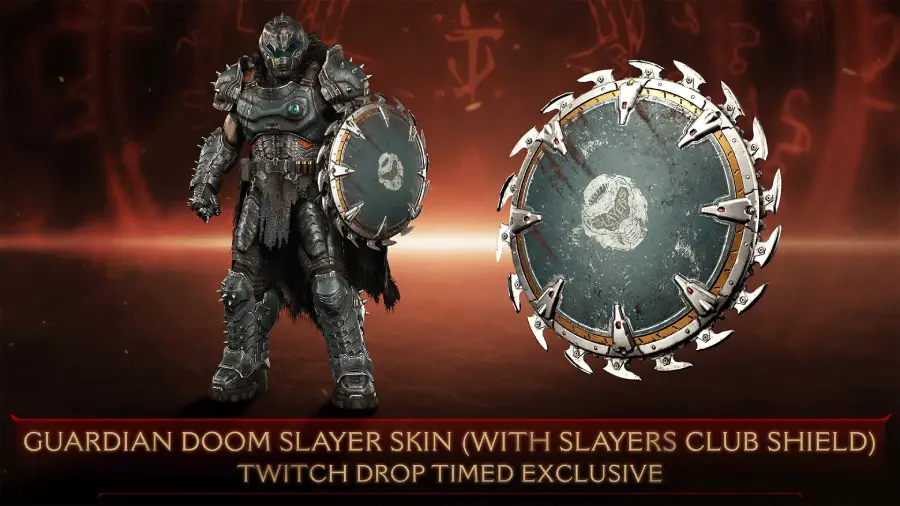
In the case of Doom: The Dark Ages, Bethesda has partnered with Twitch to offer a special cosmetic skin for the Doom Slayer Guardian skin, featuring the Slayers Club logo on the Shield Saw. This skin is exclusive to the Twitch Drops program and will only be available for a limited time, making it a must-have for collectors and fans alike.
Part 3: How to Claim Doom: The Dark Ages Twitch Drops
Participating in the Twitch Drops program for Doom: The Dark Ages is traditionally simple, but there are a few steps you'll need to follow to ensure you receive your exclusive Guardian skin.
Step 1: Visit Bethesda.net and click on "Log In/Sign Up" at the upper-right corner to create or log in your Bethesda.net account
Step 2: Once logged into Bethesda.net, navigate to your account settings. Look for the "Linked Accounts" section and click on it. Find the Twitch option and click "Connect." You'll be redirected to Twitch to authorize the connection between your Bethesda.net and Twitch accounts.
Step 3: Tune into any Doom: The Dark Ages gameplay stream on Twitch between May 12 and June 2. (Note: Ensure that the streamer has enabled Twitch Drops for their channel. ) Watch the stream for at least one hour to be eligible for the drop.
Step 4: Once you've met the viewing requirement, you'll receive a notification on Twitch that the Doom Slayer Guardian skin code has been added to your Twitch inventory.
You can check your Twitch Drops inventory to confirm that the code has been received.
Step 5: Return to Bethesda.net and log in to your account. Click on the Menu icon at the upper-left corner, go to the "Shop" heading, and click on "Redeem Code." Enter the Doom Slayer Guardian code you received and click "Redeem."
Then launch Doom: The Dark Ages and log in to your Bethesda.net account, you will find that the twitch drops has be available in your inventory!
The simplest and easiest way to obtain the Doom: The Dark Ages Twitch Drops-LagoFast
Does the thought of going through all those complicated steps already seem like a hassle? Not to mention having to spend an hour watching the live stream after completing the process. Is there a convenient and quick way to obtain the Doom: The Dark Ages Twitch Drops? Absolutely! LagoFast's Twitch Drops tool comes to the rescue! It can help you automatically claim the Twitch Drops for Doom: The Dark Ages with just one click.
Here are the steps to use LagoFast to help you secure the Doom: The Dark Ages Twitch Drops:
Click the "Free Trial" button to install LagoFast on your PC.
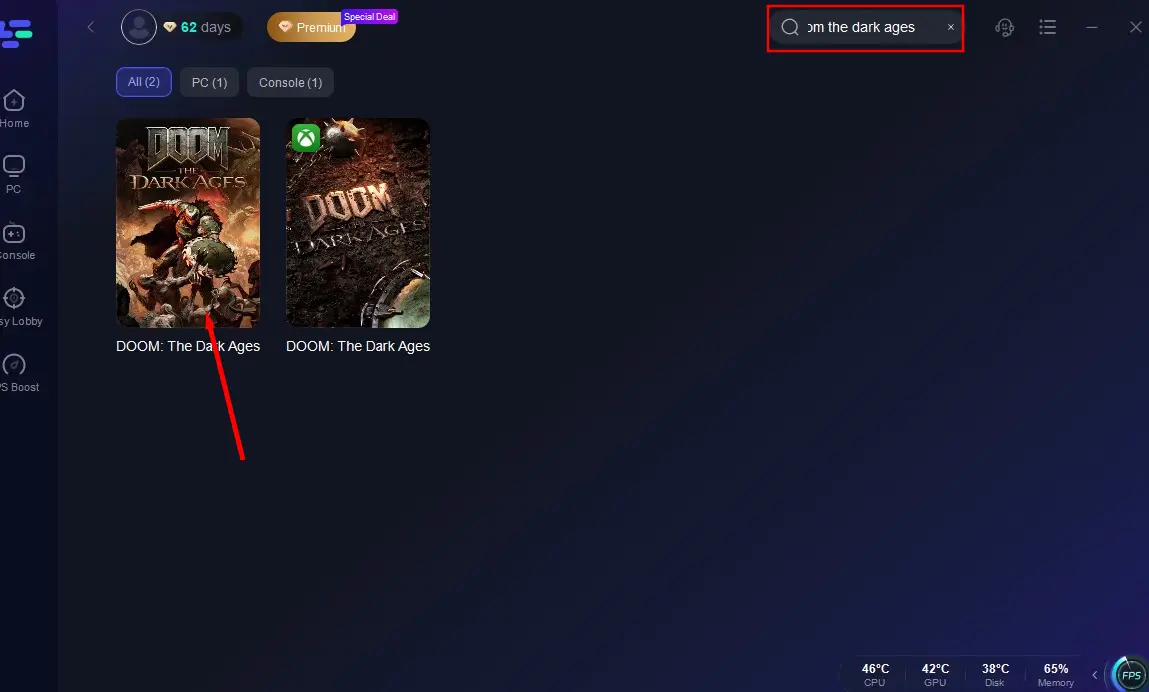
Search for "Doom: The Dark Ages" using the search bar.
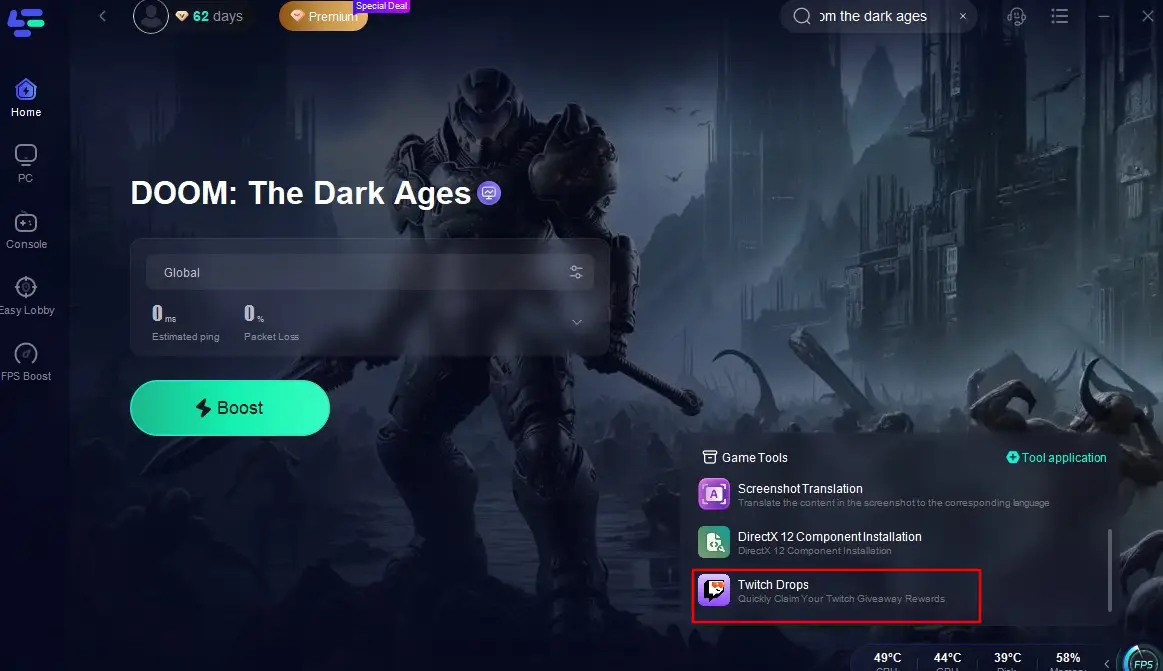
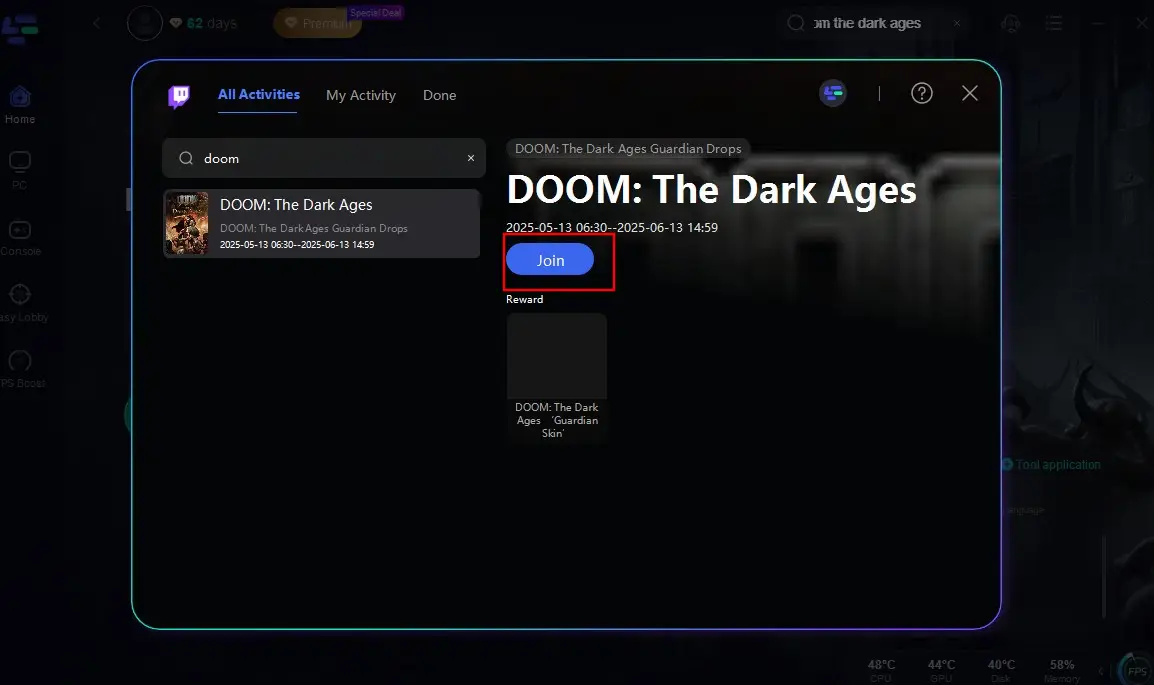
Click on the Twitch Drops tool located at the bottom right corner of the screen.
Search for "Doom: The Dark Ages" again on the popup page and click the "Join" button. This way, you can skip the one-hour video-watching requirement and automatically claim the Guardian skin with just one click!
Part 4: How to Improve Doom: The Dark Ages Gameplay-LagoFast
After claiming the Twitch Drops for Doom: The Dark Ages through LagoFast, don't forget about one of LagoFast's greatest strengths—enhancing your gaming experience! It reduces ping spikes and latency during gameplay, ensuring a stable network connection.
Here are the main highlights of LagoFast:
- Stabilizes Connections: If disconnections are a frequent issue, LagoFast ensures a smoother and more stable connection.
- Reduced Lag: Minimizes latency issues, ensuring real-time responsiveness during combat.
- Stable Connection: Provides a consistent network connection, preventing disconnections during crucial moments.
- Optimized Performance: Enhances system performance, allowing for smoother graphics and faster load times.
Follow these steps to use LagoFast to guarantee smooth gameplay in Doom: The Dark Ages on PC:
Download LagoFast for free and complete the installation.
Enter "Doom: The Dark Ages" in the search box and click on the search result.
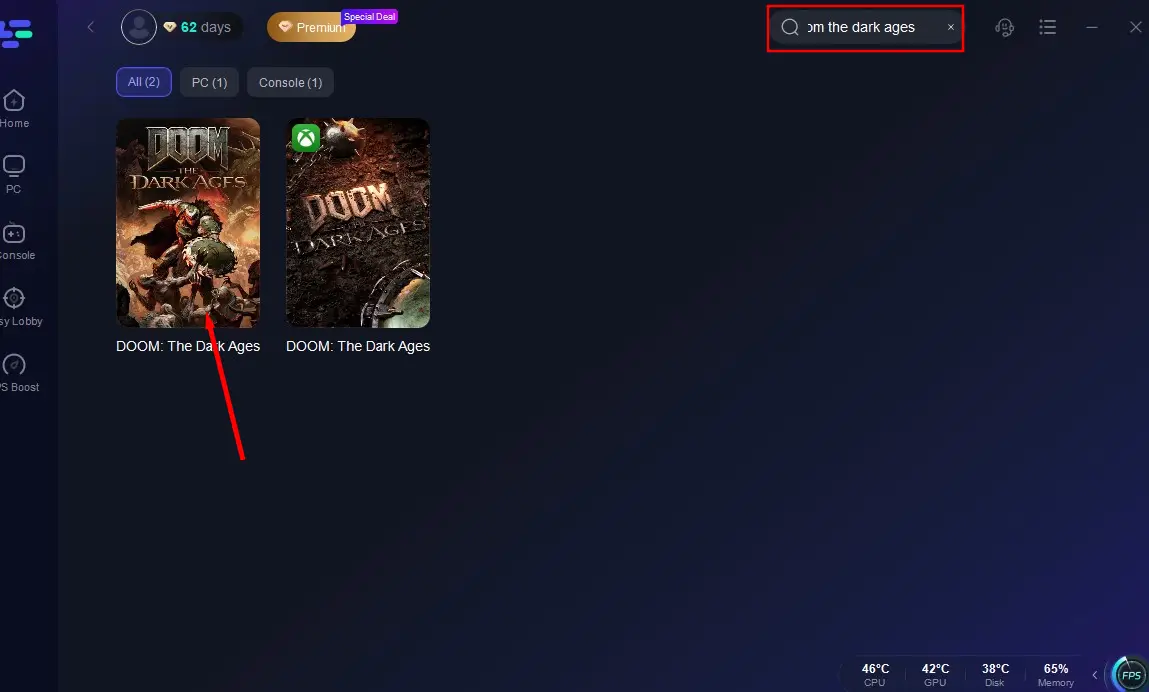
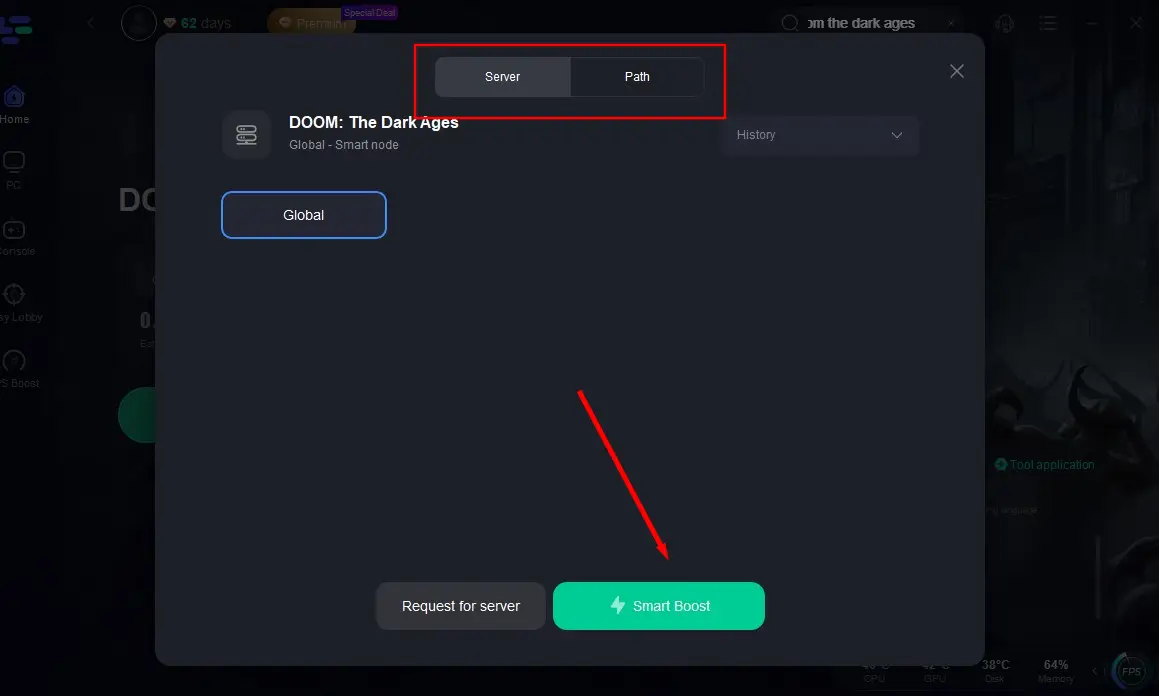
Click "Select Server" to choose a server with better performance and then click "Smart Boost".
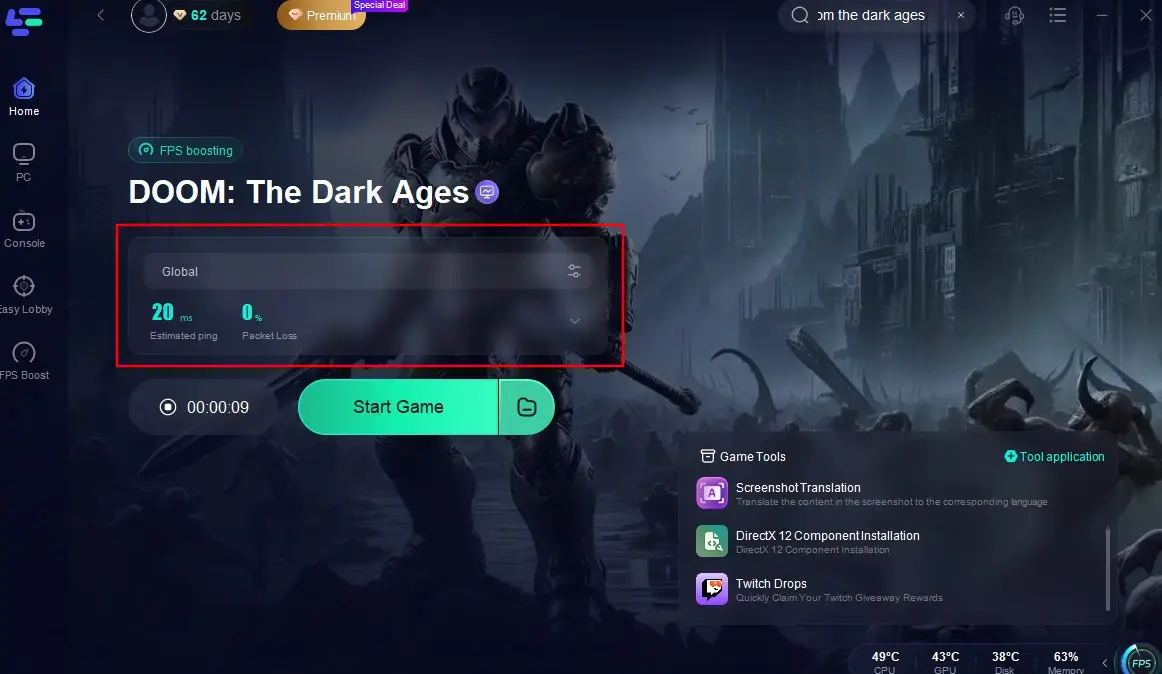
After confirming the real-time ping and packet loss rate for the game, click "Start Game". You can then dive back into Doom: The Dark Ages without any delay and start playing worry-free!
Conclusion
The Doom: The Dark Ages Twitch Drops program is an exciting opportunity for fans of the franchise to earn an exclusive in-game reward while engaging with the community. By following the steps outlined in this article or usingLagoFast, you can ensure that you claim your Doom Slayer Guardian skin and show it off in your next demon-slaying adventure.

Boost Your Game with LagoFast for Epic Speed
Play harder, faster. LagoFast game booster eliminates stutter and lags on PC, mobile, or Mac—win every match!
Quickly Reduce Game Lag and Ping!
Boost FPS for Smoother Gameplay!