
Doom: The Dark Ages, the highly anticipated FPS from id Software, is set to launch on May 15, 2025, promising a brutal medieval-themed combat experience with cutting-edge graphics and gameplay. However, early reports and technical analyses suggest that even high-end systems may struggle to maintain consistent frame rates, especially when pushing the limits of ray tracing and DLSS 4 technologies. This guide will explore why FPS drops occur in Doom: The Dark Ages, introduce the best FPS booster tools like LagoFast, and provide actionable solutions to optimize your gameplay.

- ✅ Reduce Lag and High Ping.
✅ Boost FPS at the Same Time.
✅ Support 2000+ Online Games
✅ Change Server Without Latency.
✅ Multiplatform: PC, Console, Mobile.
✅ End Stuck, Connection & Crashing Issues
Part 1. Why Doom: The Dark Ages FPS Drops
Part 2. Best Doom: The Dark Ages FPS Booster
Part 3. Other Solutions to Fix Low FPS in Doom: The Dark Ages
Part 1. Why Doom: The Dark Ages FPS Drops
Hardware Intensity
The id Tech 8 engine demands ray tracing, DLSS 4, and dynamic physics, requiring RTX 2060 Super/RX 6600 (minimum) or RTX 3080/RX 6800 (recommended). Mid-range GPUs like RTX 5060 Ti struggle at 4K, while even high-end CPUs (e.g., Ryzen 7 3700X) face bottlenecks in multi-threaded physics-heavy scenes.
Optimization Gaps
Shader compilation during the first playthrough causes stuttering, while unoptimized AI and physics code strain CPUs, especially during shield-saw melee combat.
Network Latency
Online modes suffer from frame inconsistency due to high ping or packet loss, impacting combat responsiveness.
Part 2. Best Doom: The Dark Ages FPS Booster
If you want to boost FPS in Doom: The Dark Ages, then LagoFast is your best choice.
LagoFast is a leading game optimization software designed to address FPS drops and latency issues. Here’s how it can help:
- Dynamic Resource Allocation: LagoFast prioritizes CPU and GPU resources for Doom: The Dark Ages, reducing background processes that consume bandwidth. This ensures that your system dedicates maximum power to the game, minimizing FPS drops during intense battles.
- Shader Pre-Caching: The tool pre-compiles shaders in the background, eliminating stuttering during the first playthrough.
How to Use LagoFast to Boost Doom: The Dark Ages:
Step 1. Click Free Trial to download LagoFast.
Step 2. Click the FPS Boost feature on the home page.
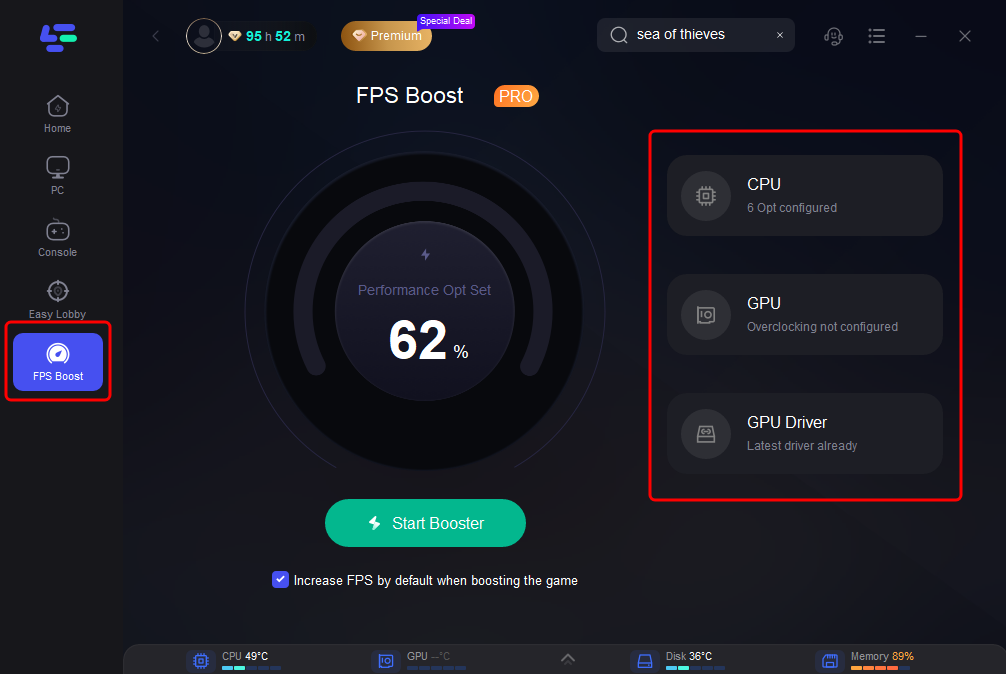
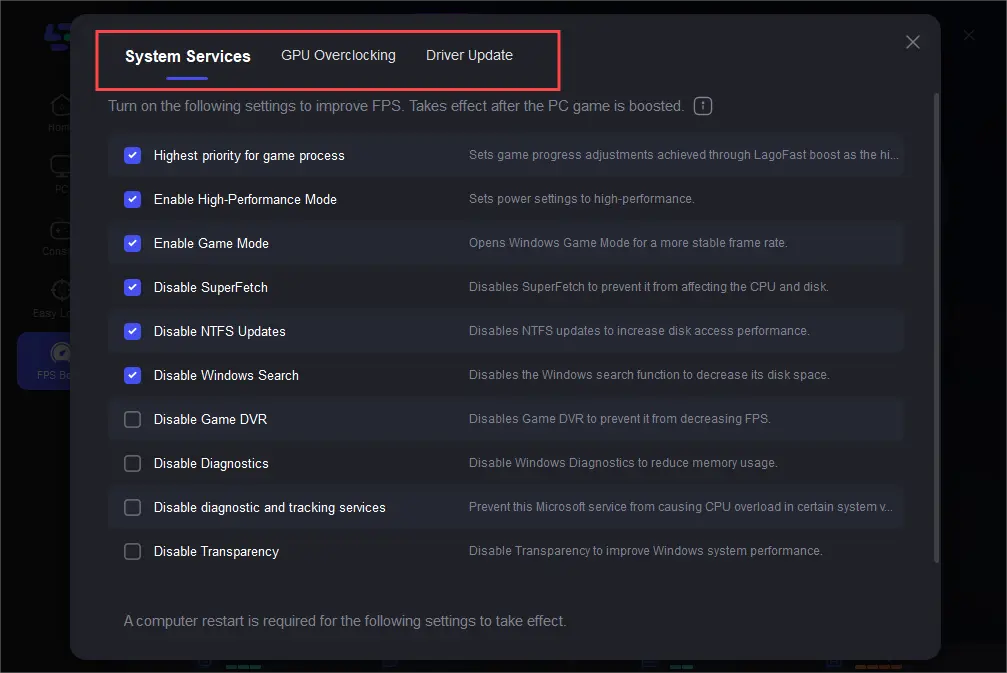
Step 3. You can click on the right to adjust the CPU and GPU settings.
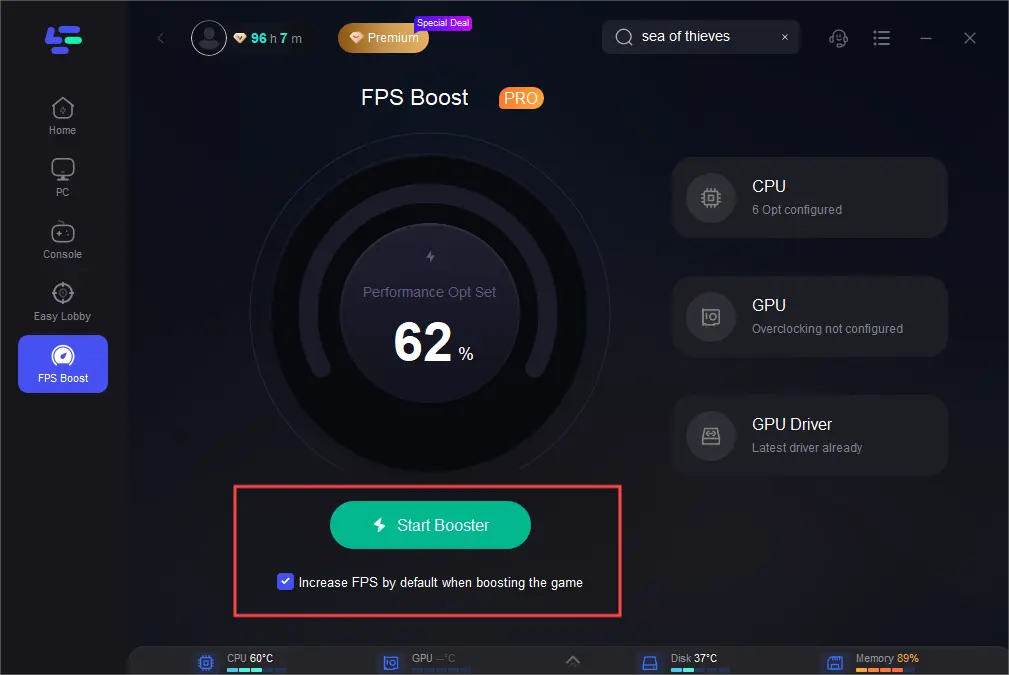
Step 4. Finally, click start booster.
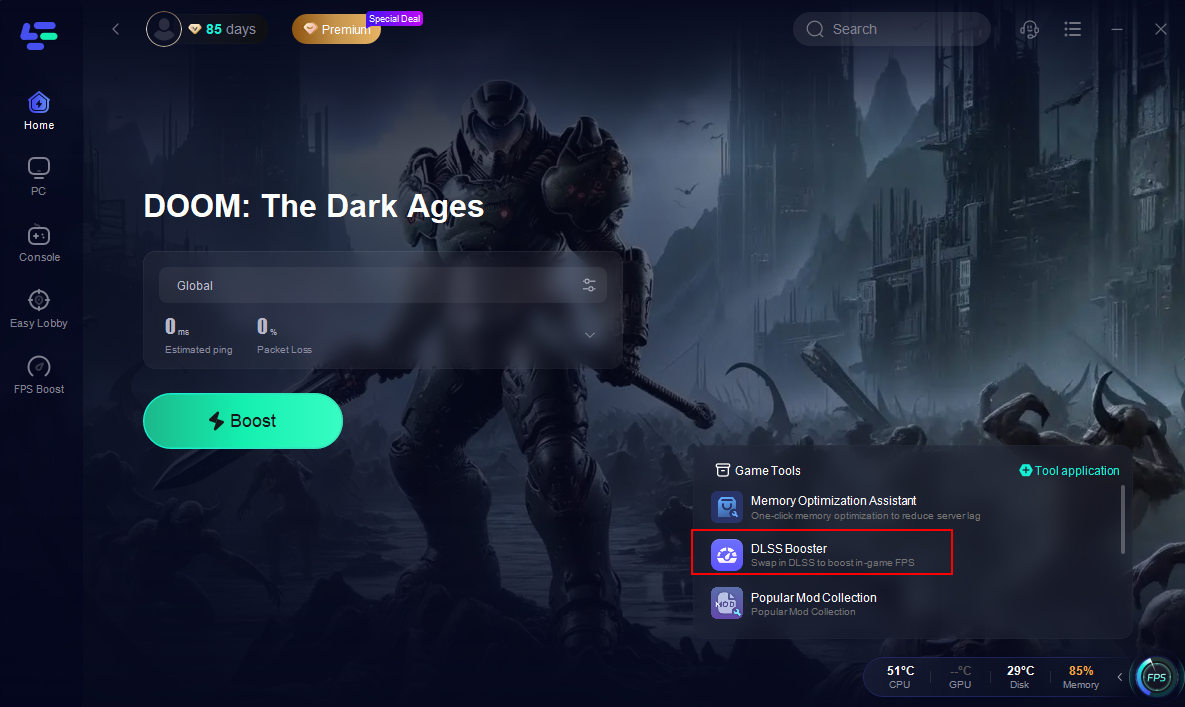
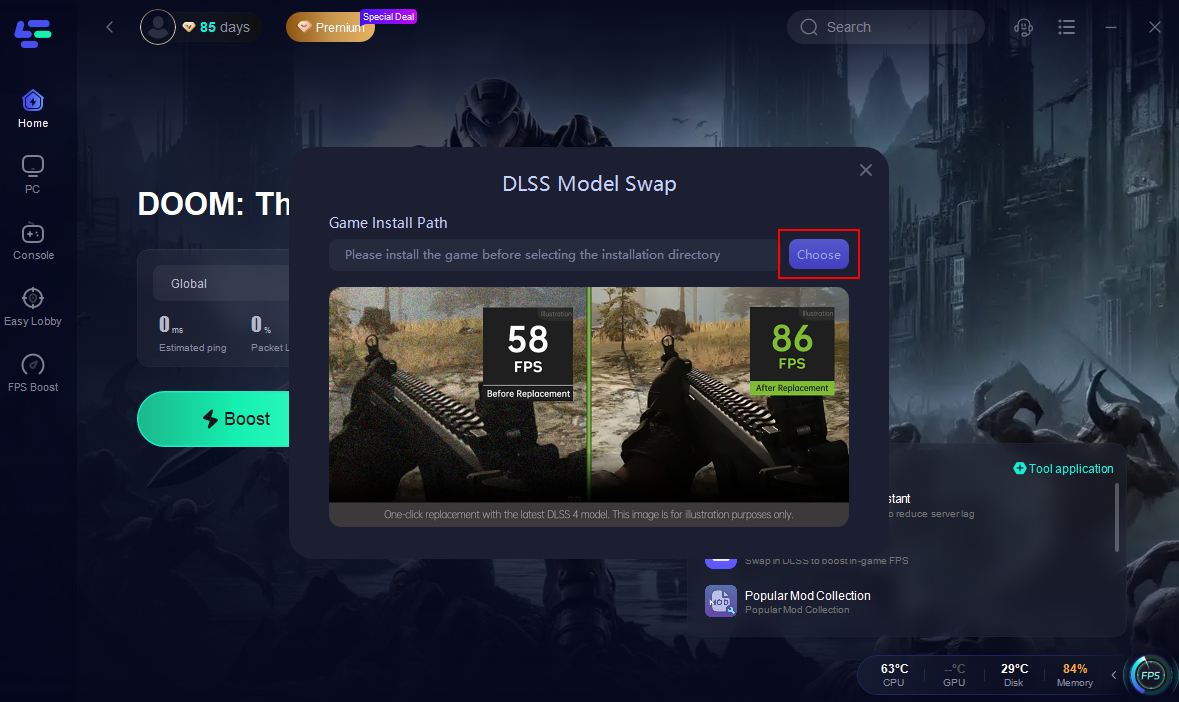
If you want to experience DLSS4.0 with a higher frame rate, LagoFast can also help you do that. Using LagoFast's DLSS Booster tool, you can replace the DLSS file with one click, bringing your game frame rate to 70 or even 80.
How to Unlock DLSS4 in Doom: The Dark Ages with LagoFast:
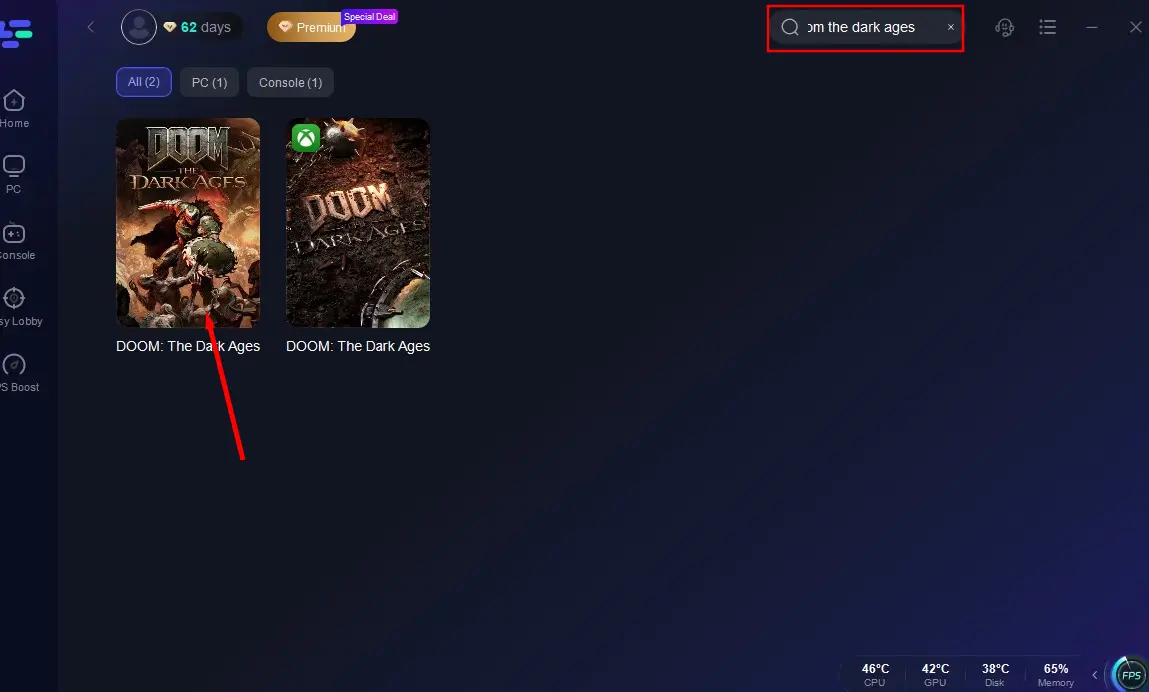
Step 1: Open LagoFast, then click the PC button on the left and search for Doom: The Dark Ages in the search bar, click it after it appears.
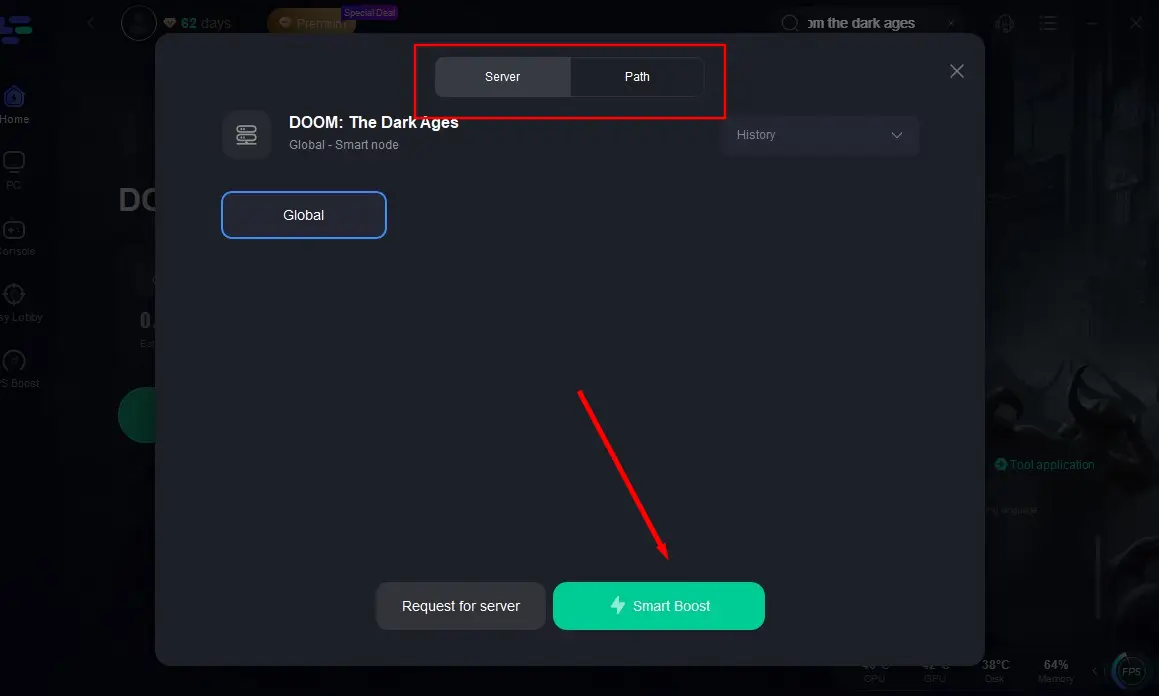
Step 2: Click on “Server” to change to a stable server that can ensure a smooth gaming experience, then click on “Smart Boost”.
Step 3. After boosting the game, click the DLSS Booster on the right.
Step 5. Select the game installation path, use the recommended configuration, and then you can replace it with one click.
Part 3. Other Solutions to Fix Low FPS in Doom: The Dark Ages
Update Graphics Drivers
NVIDIA’s latest 576.40 driver (released May 13, 2025) includes specific optimizations for Doom: The Dark Ages, fixing color saturation issues and enhancing DLSS 4 performance. Installing this driver is essential for unlocking the game’s full potential.
Adjust In-Game Settings
Resolution Scaling: Lowering the resolution to 1600x900 or enabling DLSS can significantly improve FPS. For example, a RTX 5060 Ti at 4K with DLSS 4 4X can achieve 143 FPS in ray-traced scenes, compared to 58 FPS without DLSS.
- Shadow Quality: Shadows are highly resource-intensive. Setting shadows to medium or low can provide a noticeable FPS boost without sacrificing too much visual fidelity.
- Vertical Sync (V-Sync): Disable V-Sync to reduce input lag, but use G-Sync/Freesync if your monitor supports it to prevent screen tearing.
Hardware Upgrades
- GPU: For 4K gaming, consider upgrading to a RTX 5090 D or AMD RX 9090 XT. These GPUs handle ray tracing and DLSS 4 efficiently, delivering 100+ FPS at max settings.
- CPU: The game benefits from multi-core performance. A Ryzen 9 9900X or Intel Core i9-14900K ensures smooth physics and AI processing during combat.
- RAM: Ensure you have at least 32GB of DDR5-6000 RAM to avoid bottlenecks in memory-intensive scenes.
Network Optimization
- 5G-A or Wired Connection: Use a wired Ethernet connection or 5G-A network (where available) to reduce latency. 5G-A offers speeds up to 10Gbps, minimizing packet loss during online gameplay.
- Router Settings: Configure your router for gaming by prioritizing Doom: The Dark Ages traffic. Tools like Merlin firmware’s "GameFast" feature can reduce ping by 20-30%.
Conclusion
Doom: The Dark Ages combines brutal gameplay with cutting-edge graphics, but achieving smooth FPS requires a combination of software optimization, hardware upgrades, and network tuning. LagoFast’s FPS booster and DLSS 4 tools are essential for unlocking the game’s full potential, while driver updates and in-game settings adjustments provide additional gains. By following this guide, you can enjoy Doom: The Dark Ages at its best.

Boost Your Game with LagoFast for Epic Speed
Play harder, faster. LagoFast game booster eliminates stutter and lags on PC, mobile, or Mac—win every match!
Quickly Reduce Game Lag and Ping!
Boost FPS for Smoother Gameplay!