
The highly anticipated release of "Doom: The Dark Ages" in Early Access opened on May 12 has stirred excitement among gamers worldwide. As fans eagerly await the opportunity to delve into this new iteration of the iconic Doom franchise, some may encounter technical issues that hinder their gaming experience. This comprehensive article aims to address common problems associated with "Doom: The Dark Ages Early Access not working" and provide actionable solutions to ensure a smooth gameplay experience.

- ✅ Reduce Lag and High Ping.
- ✅ Boost FPS at the Same Time.
- ✅ Support 2000+ Popular Online Games.
- ✅ Enhance Gaming Experience.
- ✅ Provide Game Tools.
- ✅ Support Cross-Platform Gameplay.
Part 1: Doom: The Dark Ages Early Access Release Date
Part 2: Causes of Doom: The Dark Ages Early Access Not Working
Part 3: How to Fix Doom: The Dark Ages Early Access Not Working
Part 4: How to Get Doom: The Dark Ages Twitch Drops Rewards
Part 5: How to Enhance Gaming Experience in Doom: The Dark Ages
Part 1: Doom: The Dark Ages Early Access Release Date
Confirmed by Bethesda, the global release date for Doom: The Dark Ages has been set for May 14, 2025. This highly anticipated shooter game, developed by id Software and eagerly awaited by gamers worldwide, will launch simultaneously on PC, PlayStation 5, and Xbox Series X|S platforms. To allow players eager to get an early taste of Doom: The Dark Ages and its new, robust, and powerful gameplay, Bethesda is also offering Early Access opportunities. Below is the timeline for the regional rollout of Doom: The Dark Ages Early Access:
Monday, May 12, 2025
- PDT (Los Angeles): 5 PM
- CDT (Mexico City): 6 PM
- CDT (Dallas): 7 PM
- EDT (New York): 8 PM
- BRT (São Paulo): 9 PM
Tuesday, May 13, 2025
- BST (London): 1 AM
- CEST (Paris): 2 AM
- AST (Dubai): 3 AM
- IST (New Delhi): 5:30 AM
- CST (Beijing): 8 AM
- HKT (Hong Kong): 8 AM
- KST (Seoul): 9 AM
- JST (Tokyo): 9 AM
- AEST (Sydney): 10 AM
- NZST (Auckland): 12 PM (noon)
Players in different regions can refer to the above times for the start of Doom: The Dark Ages Early Access in their area and secure their chance to experience the game ahead of its official launch.
Part 2: Causes of Doom: The Dark Ages Early Access Not Working
Just as players were gearing up to showcase their skills in the Doom: The Dark Ages Early Access, they found themselves facing an unexpected hurdle: the Doom: The Dark Ages Early Access they downloaded wasn't working.
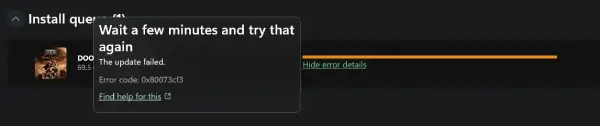
This undoubtedly dampened the enthusiastic gaming spirit that had been building up. So, what could be the reasons behind this issue? Let's take a look!
1. Congested Download Channels
Due to Doom: The Dark Ages having a vast global player base, the simultaneous rush to download the Early Access version can lead to congested download channels. This congestion may prevent some players from downloading the game installer or result in incomplete downloads that fail to install or launch properly.
2. Duplicate Activation Using a Steam Key
Currently, players are only allowed to activate Doom: The Dark Ages with a single activation key. If you've already used a key to activate the game on Steam, even if it's an official key, you might encounter issues where the game doesn't work as expected.
3. Insufficient Device Configuration
As a large-scale multiplayer online shooter, Doom: The Dark Ages demands relatively high device specifications to ensure an immersive gaming experience. The system requirements for the Early Access version are the same as those for the full release. If your device doesn't meet the official configuration requirements, it could lead to the Doom: The Dark Ages Early Access not functioning properly.
4. Network Connection Issues
Similarly, if the network quality is poor or experiences problems during the download of Doom: The Dark Ages Early Access, it can result in an incomplete game installer. This, in turn, may cause installation failures or prevent the game from working after installation.
5. Interference from Antivirus Software or Firewalls
If third-party software, such as antivirus programs or firewalls, interferes with the acquisition of Doom: The Dark Ages Early Access, it can also prevent the game from working correctly.
6. Background Applications Consuming Resources
Running memory-intensive applications in the background can cause your device's memory to be overly occupied, leading to the Doom: The Dark Ages Early Access not functioning properly.
Part 3: How to Fix Doom: The Dark Ages Early Access Not Working
After understanding the potential issues that could cause Doom: The Dark Ages Early Access to malfunction, players can employ corresponding solutions to overcome these challenges and smoothly dive into the thrilling and adrenaline-pumping gameplay. Here are some troubleshooting methods:
1. Avoid Peak Download Times
If the problem stems from congested download channels, players can temporarily exit the download queue, wait patiently for a while, and then attempt to redownload the game during off-peak hours.
2. Verify Steam Account and Activation Key Match
Players should check whether their Steam account has already been used to activate Doom: The Dark Ages with an activation key. If it has, they need to ensure they are using the same account and Steam profile to access the game. Otherwise, they may need to obtain a new activation key or switch to a different Steam account.
3. Check System Requirements
By referring to the system requirements listed below, players can verify whether their system meets the specifications for Doom: The Dark Ages Early Access. Addressing any configuration discrepancies can help resolve issues preventing the game from working.
- OS: Windows 10 / 11.
- CPU: AMD Ryzen 7 3700X / Intel Core i7-10700K.
- GPU: 8GB VRAM; Nvidia GeForce RTX 2060 Super / AMD Radeon RX 6600.
- RAM: 16GB.
- Storage: 512GB or higher NVMe SSD (100GB available)
4. Inspect Network Connection
If network connectivity issues are causing the Doom: The Dark Ages Early Access to malfunction, players can try switching networks or reconnecting to their current network to resolve the problem.
5. Temporarily Disable Antivirus Software or Firewalls
Temporarily disabling antivirus software or firewalls can facilitate the smooth installation of the Doom: The Dark Ages Early Access installer, preventing any corruption and thus resolving issues that prevent the game from functioning.
6. Close Background Programs
Closing memory-intensive applications running in the background can free up device resources and disk space, helping to resolve issues that prevent Doom: The Dark Ages Early Access from working properly.
Part 4: How to Get Doom: The Dark Ages Twitch Drops Rewards
As a token of appreciation for both new and returning players, Doom: The Dark Ages will be offering Twitch Drops Rewards-the exclusive DOOM Slayer Guardian Skin. To participate, players need to log in to their Bethesda.net account (or create a new one if they don't already have it) and watch at least one hour of any live stream featuring Doom: The Dark Ages. If you're looking to save time on watching live streams, you can utilize LagoFast's Twitch Drops Tool to help you quickly and effortlessly claim your rewards. Here are the steps to follow:
Download and install LagoFast at no cost.
Launch LagoFast, search for Doom: The Dark Ages, and click on the relevant result.
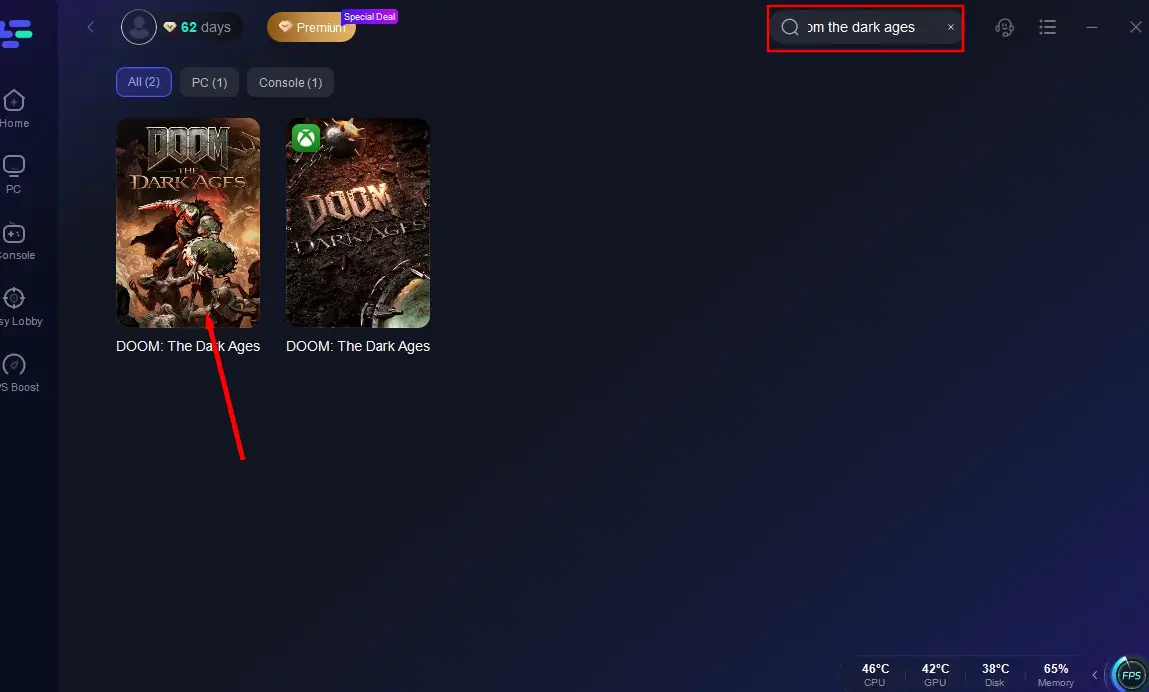
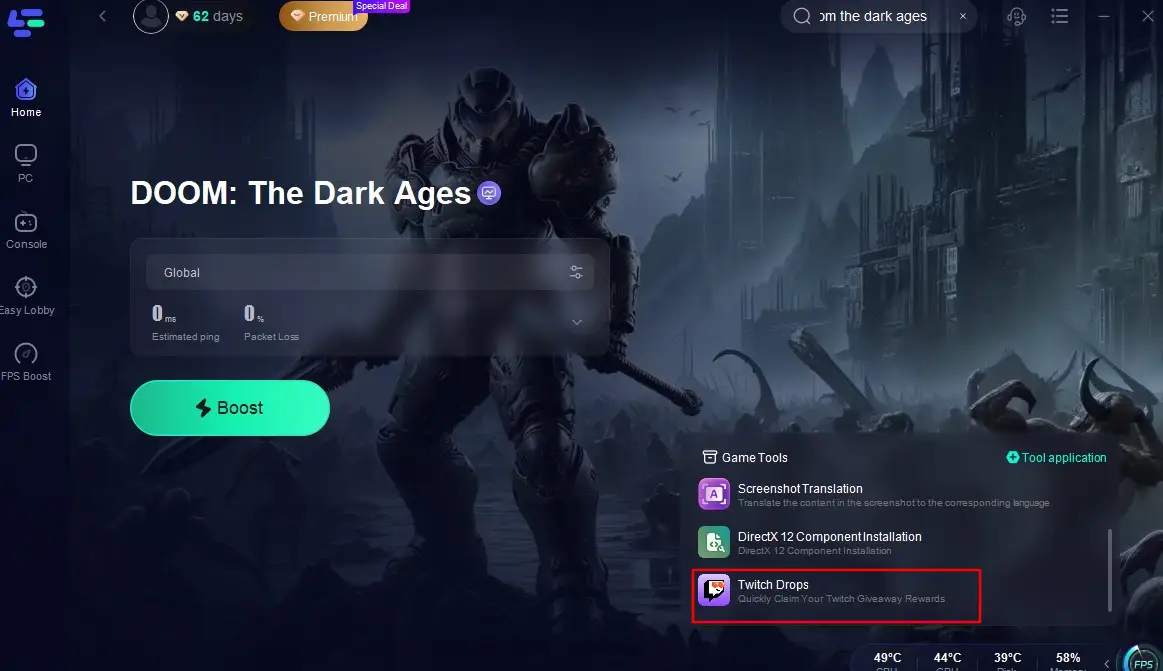
Locate and click on the "Twitch Drops" tool in the bottom right corner of the interface.
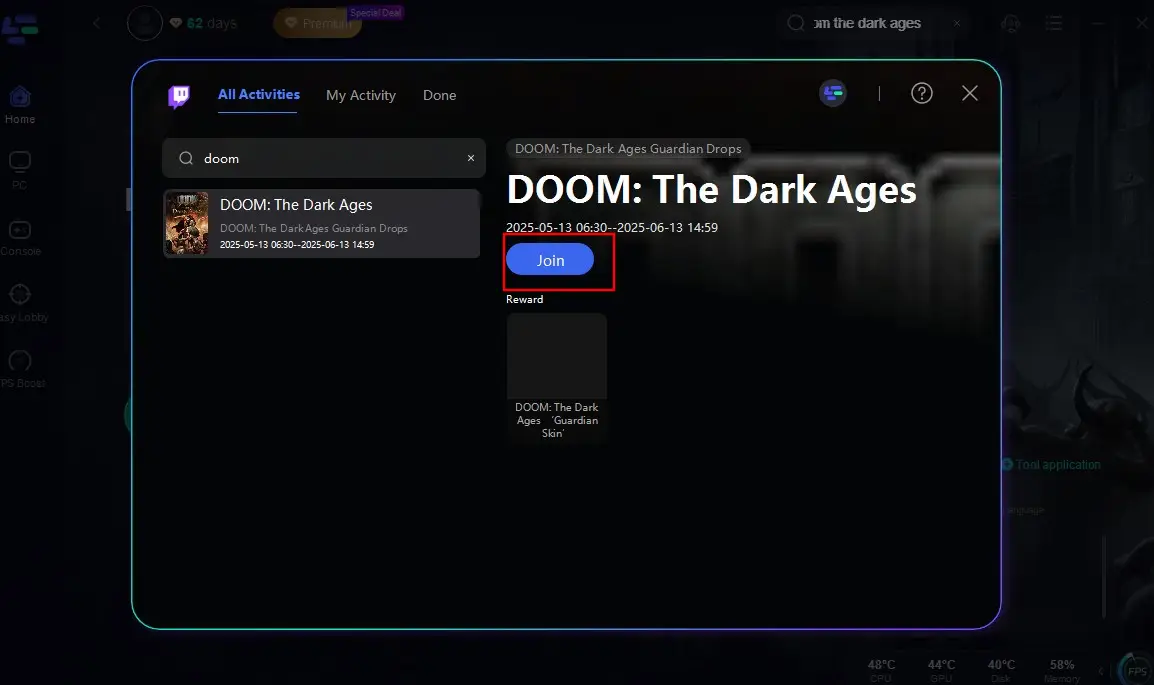
Search for "Doom: The Dark Ages" once more in the search box and click "Join." This will enable you to quickly and conveniently obtain the Twitch Drops for Doom: The Dark Ages Early Access, saving you time and effort!
Part 5: How to Enhance Gaming Experience in Doom: The Dark Ages
After solving the issue of "Doom: The Dark Ages Early Access not working," you can finally enter smoothly in the game world. If you are seeking an extra edge in Doom: The Dark Ages or want to avoid the issue of the game not working caused by an Internet connection or lag, consider using LagoFast Game Booster. This tool is designed to optimize gaming performance by reducing lag and improving connection stability.
Key Features of LagoFast
- Global Server Network: Access low-latency nodes worldwide for stable connections.
- Packet Loss Prevention: Advanced algorithms minimize data loss for smooth gameplay.
- Smart Routing Optimization: Dynamically selects the fastest path to game servers.
- FPS Enhancement: Optimizes system resources to reduce frame drops.
- User-Friendly Interface: One-click solutions for gamers of all skill levels.
Here's how to use it on PC:
Download and Install LagoFast: Click "Free Trial" button to install LagoFast on your PC
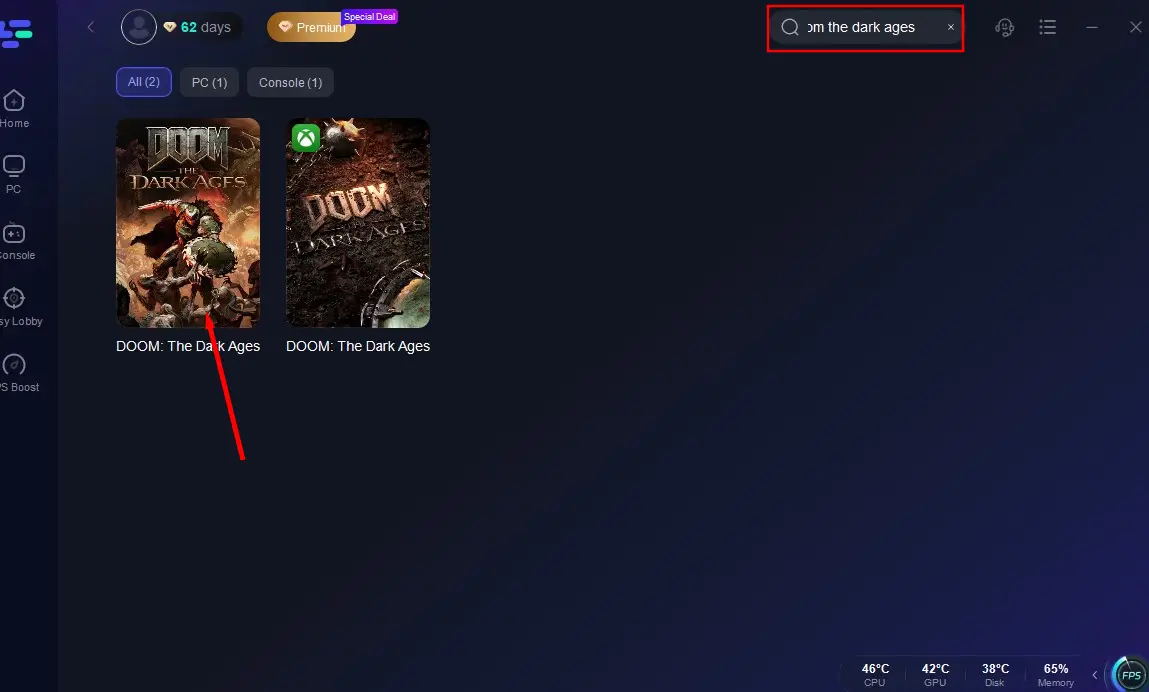
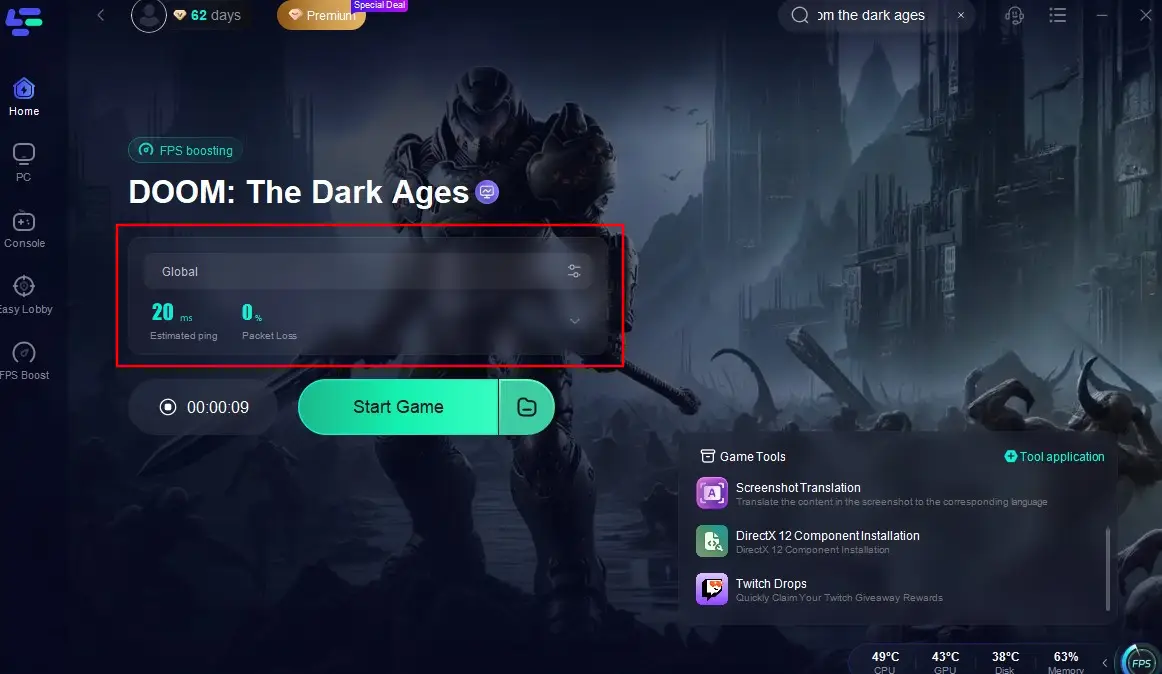
Search the Game: Open LagoFast, search Doom: The Dark Ages in the search bar, then click the search result.
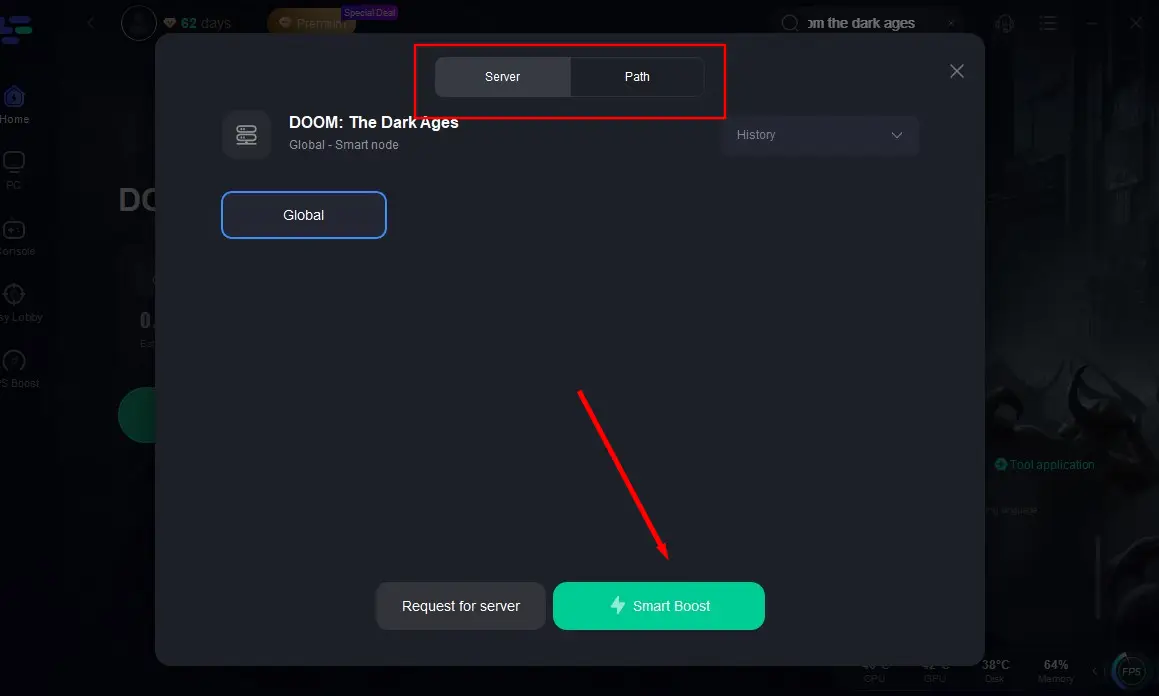
Choose Server and Start Boost: Click "Select Server" to choose a server with better periformance, then click "Smart Boost" to start optimization.
Enjoy the Game without Latency: Check the real-time packet loss and ping before jumping into the game.
Conclusion
Doom: The Dark Ages in Early Access promises an exhilarating gaming experience, but unexpected issues can sometimes get in the way. By understanding common causes and solutions of the game not woking, players can troubleshoot effectively and enjoy the game to its fullest. Being proactive or using LagoFast can significantly enhance your gaming experience. Happy gaming!
Boost Your Game with LagoFast for Epic Speed
Play harder, faster. LagoFast game booster eliminates stutter and lags on PC, mobile, or Mac—win every match!
Quickly Reduce Game Lag and Ping!
Boost FPS for Smoother Gameplay!